
መግቢያ
This manual provides essential information for the safe and efficient use of your Google Pixel 9 Pro 5G smartphone. Please read these instructions carefully before operating your device.
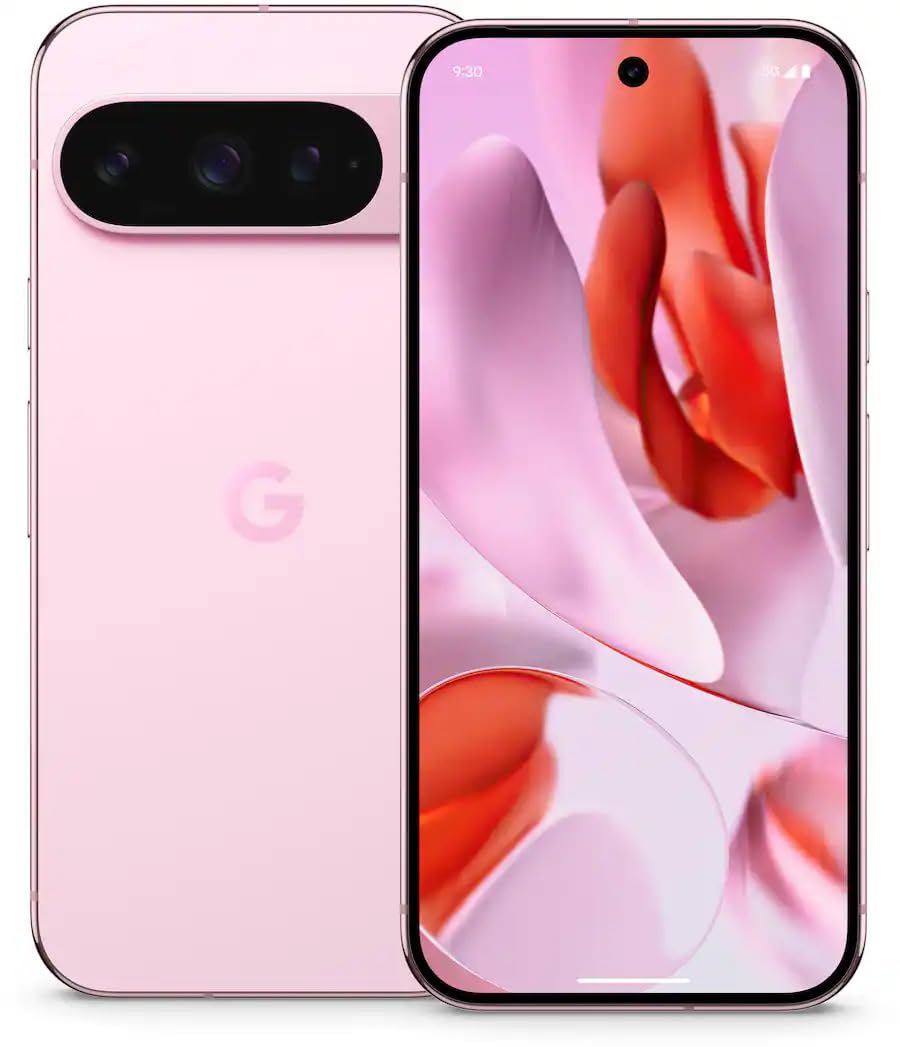
ምስል 1: የፊት view of the Google Pixel 9 Pro 5G.
በሣጥኑ ውስጥ ያለው
ሁሉም እቃዎች በማሸጊያው ውስጥ መኖራቸውን ያረጋግጡ፡-
- የጉግል ፒክስል 9 ፕሮ ስማርትፎን
- USB-C to USB-C Cable (1m, USB 2.0)
- የሲም ትሪ ኤጀክተር መሣሪያ
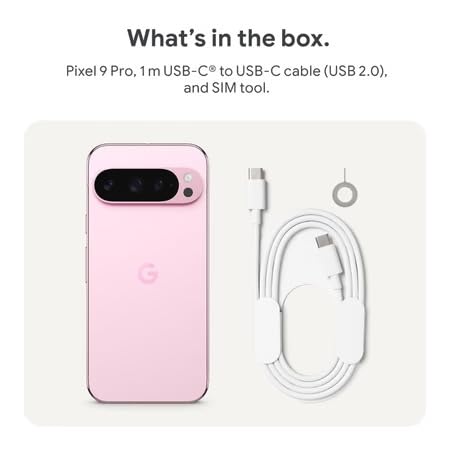
Figure 2: Included items in the Pixel 9 Pro packaging.
ማዋቀር
1. የሲም ካርድ ማስገቢያ
- Locate the SIM tray on the side of your Pixel 9 Pro.
- የቀረበውን የሲም ማስወጫ መሳሪያ በሲም ትሪ ላይ ባለው ትንሽ ቀዳዳ ውስጥ ያስገቡ እና ትሪው እስኪወጣ ድረስ በቀስታ ይጫኑ።
- የናኖ-ሲም ካርድዎን ወርቃማ እውቂያዎች ወደ ታች እያዩ ወደ ትሪው ውስጥ ያስገቡ። በትክክል መቀመጡን ያረጋግጡ።
- Carefully push the SIM tray back into the device until it is flush.
2. የመነሻ ኃይል መሙላት
ከመጠቀምዎ በፊት መሳሪያዎን ሙሉ በሙሉ መሙላት ይመከራል.
- የዩኤስቢ-ሲ ገመዱን ከስልክዎ ግርጌ ላይ ካለው የኃይል መሙያ ወደብ ጋር ያገናኙ።
- Connect the other end of the cable to a compatible USB power adapter (sold separately) and plug it into a power outlet.
- በስክሪኑ ላይ ያለው የባትሪ ምልክት የኃይል መሙያ ሁኔታን ያሳያል።
3. ማብራት / ማጥፋት
- ለማብራት፡- Press and hold the Power button (located on the right side) until the Google logo appears on the screen.
- ለማጥፋት፡- የኃይል ቁልፉን ተጭነው ተጭነው ከዚያ በማያ ገጹ ላይ 'Power off' የሚለውን ይንኩ።
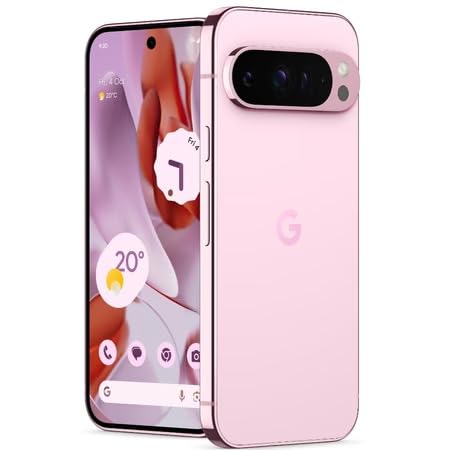
Figure 3: Power and volume buttons on the side of the device.
4. የመጀመሪያ ጊዜ ማዋቀር አዋቂ
Upon powering on for the first time, follow the on-screen instructions to:
- ቋንቋዎን እና ክልልዎን ይምረጡ።
- ከWi-Fi አውታረ መረብ ጋር ይገናኙ።
- በጉግል መለያዎ ይግቡ ወይም አዲስ ይፍጠሩ።
- Set up security features such as fingerprint unlock, face unlock, PIN, pattern, or password.
- ውሂብን ከድሮው መሣሪያ ያስተላልፉ (አማራጭ)።
የአሠራር መመሪያዎች
መሰረታዊ ዳሰሳ
- የማያ ንክኪ ምልክቶች፡- Interact with the device using taps, swipes, pinches (for zoom), and long presses.
- መነሻ ስክሪን፡ Access your applications, widgets, and customize your layout.
- ማሳወቂያዎች፡- ከማያ ገጹ አናት ወደ ታች ያንሸራትቱ view ማሳወቂያዎች.
- ፈጣን ቅንብሮች: Swipe down twice from the top of the screen to access quick settings toggles (Wi-Fi, Bluetooth, etc.).
የካሜራ አሠራር
The Pixel 9 Pro features a powerful triple rear camera system.
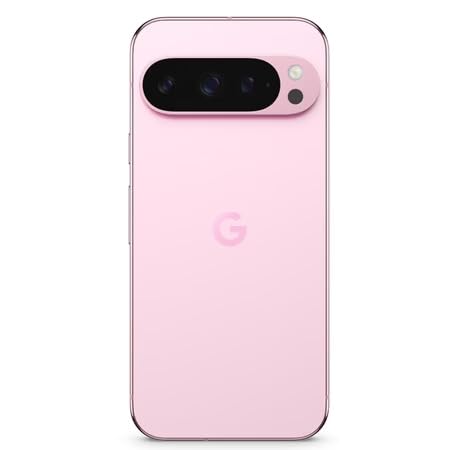
Figure 4: Rear camera system of the Pixel 9 Pro.
- ካሜራውን መክፈት; በመነሻ ስክሪን ወይም በመቆለፊያ ማያዎ ላይ የካሜራ መተግበሪያ አዶን ይንኩ።
- የመቀየሪያ ሌንሶች፡ Tap the icons on the viewfinder to switch between wide, ultrawide, and 5x telephoto lenses.
- የተኩስ ሁነታዎች፡ Select from various modes such as Night Sight for low-light conditions, አስትሮፖቶግራፊ for capturing stars, ማክሮ for close-up shots, ረጅም ተጋላጭነት for creative effects, and የቁም ሥዕል for depth-of-field effects.
- Super Res Zoom: Pinch the screen to digitally zoom up to 30x. For video, Super Res Zoom supports up to 20x.
- Pro Controls: Access advanced camera settings like shutter speed and manual focus for greater creative control.
የባትሪ አስተዳደር
- የባትሪ ደረጃን መፈተሽ፡ View የባትሪው መቶኛtage in the status bar or in Settings > Battery.
- Extreme Battery Saver: Enable this mode in Settings > Battery > Extreme Battery Saver to significantly extend battery life.
- በመሙላት ላይ፡ Use the provided USB-C cable and a compatible power adapter for optimal charging speed.
የደህንነት ባህሪያት
Your Pixel 9 Pro incorporates multiple hardware security layers to protect your data.
- የጣት አሻራ መክፈቻ Register your fingerprints in Settings > Security & privacy > Device unlock.
- በመልክ መክፈት፡- ለሚመች መክፈቻ የፊት ለይቶ ማወቂያን ያዘጋጁ።
- ፒን/ስርዓተ-ጥለት/ይለፍ ቃል፡ Always set a strong screen lock method.
- የሶፍትዌር ማሻሻያ Regularly install system updates to ensure your device has the latest security patches.
የሙቀት ዳሳሽ
The Pixel 9 Pro includes a thermometer for measuring temperature.
- Open the dedicated Thermometer app.
- Follow the on-screen instructions to measure body temperature or the temperature of objects.
- Temperature data can be saved and tracked within the Fitbit application.
ጥገና
መሣሪያዎን ማጽዳት
- የስልክዎን ስክሪን እና አካል ለማጽዳት ለስላሳ፣ ከንጣፍ ነፃ የሆነ ጨርቅ ይጠቀሙ።
- ሻካራ ቁሳቁሶችን፣ ጠጣር ኬሚካሎችን ወይም ኤሮሶል የሚረጩ ነገሮችን ከመጠቀም ይቆጠቡ።
- Do not submerge the device in water, despite its water-resistant rating.
የሶፍትዌር ዝማኔዎች
Google regularly releases software updates to improve performance, add features, and enhance security.
- To check for updates, go to Settings > System > System update.
- Ensure your device is connected to Wi-Fi and has sufficient battery charge before installing updates.
አካላዊ እንክብካቤ
The Pixel 9 Pro is built with Corning Gorilla Glass Victus 2 and is water-resistant, offering durability against everyday drops and spills.
- While durable, avoid excessive impacts or drops to prevent damage.
- Consider using a screen protector and a protective case for additional safeguarding.
መላ መፈለግ
መሣሪያ ምላሽ አይሰጥም
If your phone becomes unresponsive, perform a force restart:
- መሣሪያው እንደገና እስኪጀምር ድረስ የኃይል አዝራሩን ተጭነው ከ10-15 ሰከንድ ያህል ይያዙ።
መተግበሪያዎች እየተበላሹ ወይም እየቀዘቀዙ
- ችግር ያለበትን መተግበሪያ ዝጋ እና እንደገና ይክፈቱት።
- Clear the app's cache: Go to Settings > Apps > See all apps > [App Name] > Storage & cache > Clear cache.
- መተግበሪያው ከGoogle ፕሌይ ስቶር ወደ አዲሱ ስሪት መዘመኑን ያረጋግጡ።
- ስልክዎን እንደገና ያስጀምሩት።
የአውታረ መረብ ግንኙነት ችግሮች (ዋይፋይ/ሴሉላር)
- Toggle Wi-Fi or cellular data off and then back on.
- ስልክዎን እንደገና ያስጀምሩት።
- ሲም ካርድዎ በትክክል መጫኑን ያረጋግጡ።
- የአውታረ መረብ ቅንብሮችን ዳግም ያስጀምሩ፡ ወደ ቅንብሮች > ስርዓት > አማራጮችን ዳግም ያስጀምሩ > Wi-Fiን፣ ሞባይልን እና ብሉቱዝን ዳግም ያስጀምሩ።
ባትሪ በፍጥነት ማፍሰስ
- Check battery usage in Settings > Battery to identify power-consuming apps.
- የማያ ገጹን ብሩህነት እና የማያ ገጹን የማብቂያ ጊዜ ቀንስ።
- Disable unnecessary features like GPS, Bluetooth, and Wi-Fi when not in use.
- Enable Extreme Battery Saver mode.
የፋብሪካ ዳግም ማስጀመር (የመጨረሻው ሪዞርት)
Warning: A factory reset will erase all data from your phone. Back up all important data before proceeding.
- ወደ ቅንብሮች> ስርዓት> አማራጮች ዳግም ማስጀመር> ሁሉንም ውሂብ ደምስስ (የፋብሪካ ዳግም ማስጀመር) ይሂዱ።
- Confirm your decision when prompted.
ዝርዝሮች
| ባህሪ | ዝርዝር |
|---|---|
| የምርት ስም | በጉግል መፈለግ |
| ሞዴል | Pixel 9 Pro |
| ስርዓተ ክወና | አንድሮይድ 15 |
| ፕሮሰሰር | Google Tensor G4 (3.1 GHz) |
| ራም | 16 ጊባ |
| የውስጥ ማከማቻ | 256 ጊባ |
| ማሳያ | 6.3 Inches LTPO OLED (Actua), 1280 x 2856 Pixels, 120 Hz Refresh Rate |
| የኋላ ካሜራ | 50 MP wide + 48 MP ultrawide (Macro) + 48 MP 5x telephoto |
| የፊት ካሜራ | 42 ሜፒ |
| የባትሪ አቅም | 4700 ሚሊamp Hours (up to 24 hours average life) |
| ግንኙነት | 5G, Wi-Fi 7, Bluetooth 5.3, NFC, UWB, USB-C |
| ሲም ካርድ | Single Nano SIM |
| የውሃ መቋቋም | የውሃ መቋቋም |
| መጠኖች | 8 x 72 x 153 ሚሊሜትር |
| ክብደት | 198 ግራም |
ዋስትና እና ድጋፍ
የዋስትና መረጃ
Your Google Pixel 9 Pro 5G comes with a የ 1 ዓመት የአምራች ዋስትና ከተገዛበት ቀን ጀምሮ. ይህ ዋስትና በመደበኛ አጠቃቀም ላይ የምርት ጉድለቶችን ይሸፍናል. ለዋስትና ጥያቄዎች እባክዎ የግዢ ማረጋገጫዎን ያቆዩ።
የደንበኛ ድጋፍ
For technical assistance, warranty claims, or other support inquiries, please contact Google customer service:
- አምራች፡ ጎግል LLC፣ 1600 Amphitheatre Parkway ፣ ተራራ View፣ CA 94043 ፣ አሜሪካ
- Phone Support (India): +91 7718892303
- Importer Contact (India): Nexora Axis Private Limited (+91 7718892303)
For the most up-to-date support information, please visit the official Google Pixel support webጣቢያ.