
1. መግቢያ
Thank you for choosing the New Bee Bluetooth Headset M54. This single-ear headset is designed for clear communication and comfortable wear, featuring advanced ENC environmental noise cancellation and CVC8.0 technology for superior call quality. With its long battery life and multi-device connectivity, it is an ideal companion for commuting, driving, office work, and business chats. Please read this manual carefully before use to ensure proper operation and to maximize your experience.
2. የጥቅል ይዘቶች
ሁሉም እቃዎች መኖራቸውን ለማረጋገጥ እባክዎ የጥቅል ይዘቱን ያረጋግጡ፡-
- Bluetooth Headset x1
- ዓይነት-ሲ ኃይል መሙያ ገመድ x1
- Eartips (S/M/L sizes) x3 pairs
- የኃይል መሙያ መያዣ x1
- መመሪያ መመሪያ x1
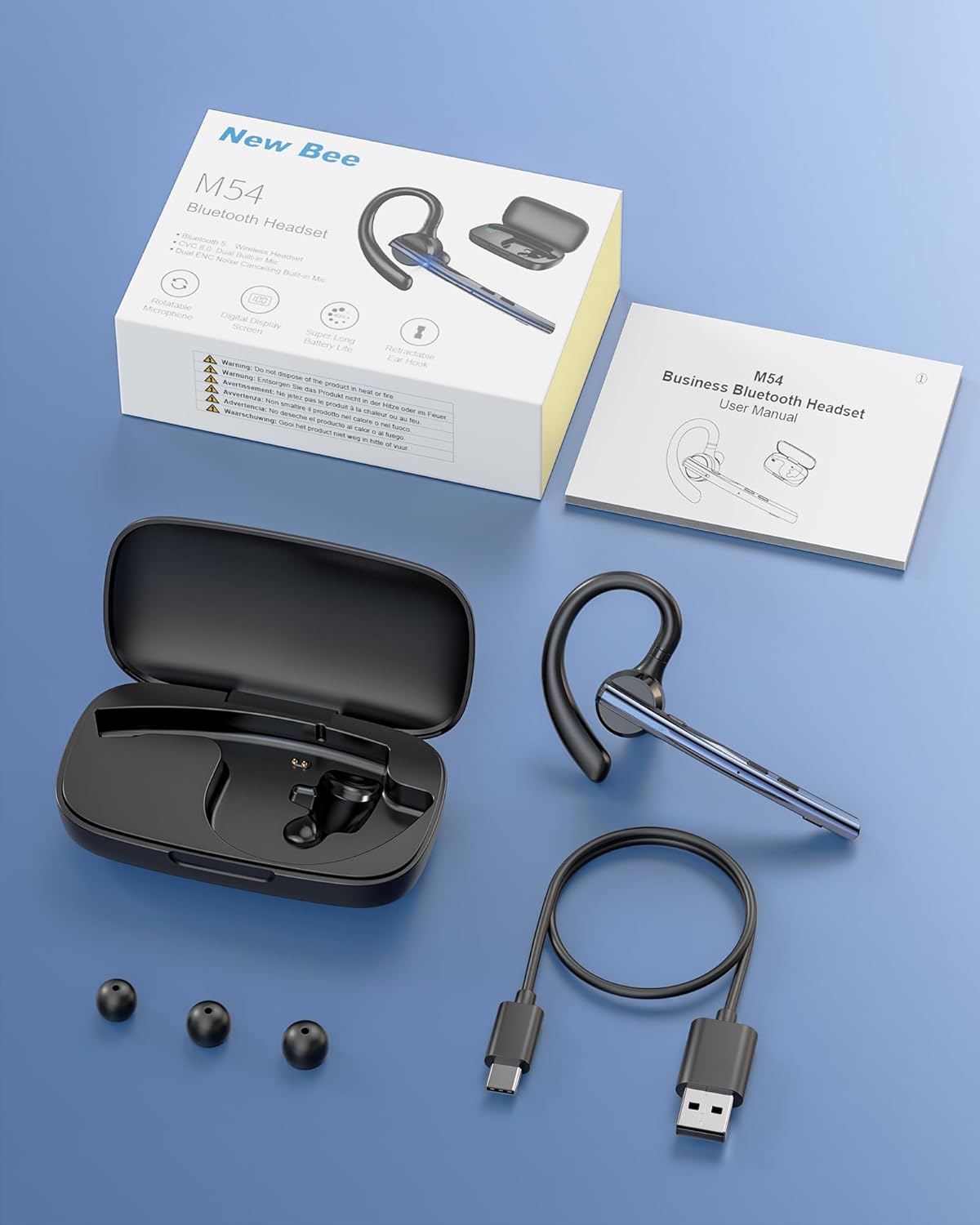
ምስል፡ የኒው ቢ ኤም54 ብሉቱዝ የጆሮ ማዳመጫ ጥቅል ይዘቶች።
3. የምርት ባህሪዎች
ENC Dual Microphone for Clear Calls
The headset features a dual microphone array with ENC (Environmental Noise Cancellation) and CVC8.0 technology. The main microphone accurately captures your voice, while the sub-microphone collects ambient noise. The main control chip processes this information to enhance call effects by effectively canceling environmental noise and echoes. Enjoy HIFI sound quality and 360° surround sound for an immersive audio experience.

Image: Man using the headset in a car, highlighting ENC noise cancellation for clear calls.
Flexible Rotation & Comfortable Fit
An innovative balanced ear hook design prevents the headset from falling off and evenly distributes its weight for comfortable wear. The pivot points use elastic soft rubber material, combined with an in-ear design, ensuring comfort even during prolonged use. The microphone arm can rotate 270°, the ear hook rotates 180°, and the earcup front can move 30° left/right. Three sizes of eartips (S/M/L) are included for a customized fit.

Image: Woman wearing the headset, showcasing its lightweight and adjustable features.
እጅግ በጣም ረጅም የባትሪ ህይወት
Equipped with a large-capacity charging case and a low-power consumption chip, the headset offers extended usage times. Enjoy up to 15 hours of music playback, 12 hours of talk time, and an impressive 6 months of standby time. The charging case provides 2-3 full charges for the headset, extending the total operating time to approximately 60 hours.

Image: Headset charging in its case, illustrating battery life and charging options.
Bluetooth 5.1 & Strong Compatibility
Featuring the latest QCC3020/Bluetooth 5.1 chip, the headset ensures low power consumption, fast transmission speed, and a stable, smooth signal. It offers a reliable connection distance of up to 15 meters, making it compatible with a wide range of devices including smartphones, tablets, laptops, and PCs.

Image: Man using the headset outdoors, showing the 15m Bluetooth range.
Multi-functional & Easy Operation
The headset includes a multi-function button and an independent mute button for convenient control. One-touch mic off protects your privacy. Double-click the mute button to activate your voice assistant. It supports simultaneous connection to two devices, allowing seamless switching between music and call functions. The unique ear hook design is freely extendable to fit various ear shapes, accommodating more users. It is suitable for diverse environments such as office work, driving, phone conferences, and delivery services.

Image: Headset connected to multiple devices, demonstrating dual device connectivity.
4. ማዋቀር
4.1 Charging the Headset and Charging Case
Before first use, fully charge the headset and charging case.
- የጆሮ ማዳመጫውን መሙላት; Place the headset into the charging case. Ensure the charging contacts align. The indicator light on the headset will show charging status.
- ጉዳዩን መሙላት፡- Connect the provided Type-C USB cable to the charging port on the case and plug the other end into a USB power adapter (not included). The digital display on the case will show the battery percentage.
- A full charge for the headset takes approximately 1.5 hours. The charging case can fully charge the headset 2-3 times.
4.2 ማብራት / ማጥፋት
- አብራ፡ Press and hold the Multi-function Button for 3 seconds until the indicator light flashes blue.
- ኃይል ዝጋ: Press and hold the Multi-function Button for 5 seconds until the indicator light flashes red and then turns off.
4.3 የብሉቱዝ ማጣመር
- የጆሮ ማዳመጫ መብራቱን ያረጋግጡ ፡፡
- Press and hold the Multi-function Button for approximately 5-7 seconds until the indicator light flashes red and blue alternately, indicating pairing mode.
- በመሳሪያዎ (ስማርትፎን፣ ታብሌት፣ ፒሲ) ላይ ብሉቱዝን አንቃ እና የሚገኙ መሳሪያዎችን ፈልግ።
- ከተገኙት መሳሪያዎች ዝርዝር ውስጥ "M54" ን ይምረጡ።
- Once connected, the headset indicator light will flash blue slowly.
4.4 የጆሮ ማዳመጫውን መልበስ
The M54 headset is designed for comfortable and secure wear on either ear.
- Choose the Right Eartip: Select the S, M, or L eartip that best fits your ear canal for optimal sound and comfort.
- Adjust the Ear Hook: Place the ear hook over your ear. The ear hook can rotate 180° to fit both left and right ears.
- ማይክሮፎኑን ያስቀምጡ; Rotate the microphone arm up to 270° to position it towards your mouth for clear voice pickup. The earcup front can also be adjusted 30° left or right for fine-tuning.
- Ensure a snug fit without discomfort. An improper fit may affect call quality.

Image: Instructions for selecting eartips and wearing the headset.
5. የአሠራር መመሪያዎች
5.1 የአዝራር ተግባራት በላይview

Image: Detailed diagram of headset buttons and their functions.
5.2 የጥሪ አስተዳደር
- መልስ/ጥሪ ጨርስ፡ Single click the Multi-function Button.
- ጥሪን ውድቅ አድርግ፡ ባለብዙ ተግባር ቁልፍን ለ 2 ሰከንዶች ተጭነው ይያዙ።
- የመጨረሻ ቁጥር Double click the Multi-function Button.
- የማይክሮፎን ድምጸ-ከል አድርግ/ አንሳ፡ Single click the Mute Button.
5.3 የሙዚቃ መልሶ ማጫወት
- አጫውት/ ለአፍታ አቁም፡ Single click the Multi-function Button.
- ቀጣይ ትራክ፡ የድምጽ መጨመሪያ አዝራሩን ለ 3 ሰከንዶች ተጭነው ይያዙት።
- ቀዳሚ ትራክ የድምጽ መጠን ወደ ታች ቁልፍን ለ 3 ሰከንዶች ተጭነው ይያዙ።
5.4 የድምጽ መቆጣጠሪያ
- ድምጽ ጨምር Single click the Volume Up button.
- ጥራዝ ታች Single click the Volume Down button.
5.5 Voice Assistant (SIRI)
- የድምፅ ረዳት አግብር Double click the Mute Button.
5.6 ባለብዙ ነጥብ ግንኙነት
The M54 headset can connect to two Bluetooth devices simultaneously.
- በክፍል 4.3 እንደተገለጸው የጆሮ ማዳመጫውን ከመጀመሪያው መሣሪያ ጋር ያጣምሩ።
- በመጀመሪያው መሣሪያ ላይ ብሉቱዝን ያሰናክሉ። የጆሮ ማዳመጫው እንደገና ወደ ማጣመር ሁነታ ይገባል።
- የጆሮ ማዳመጫውን ከሁለተኛው መሳሪያ ጋር ያጣምሩ.
- Enable Bluetooth on the first device. The headset should automatically connect to both devices.
- You can now seamlessly switch between audio and calls from either connected device.
6. ጥገና
ትክክለኛ ጥገና የጆሮ ማዳመጫዎን ረጅም ዕድሜ እና ጥሩ አፈፃፀም ያረጋግጣል።
- ማጽዳት፡ Use a soft, dry cloth to clean the headset and charging case. Do not use harsh chemicals or abrasive materials. Regularly clean the eartips and charging contacts to prevent debris buildup.
- ማከማቻ፡ Store the headset in its charging case when not in use to protect it from dust and damage. Avoid storing in extreme temperatures or high humidity.
- የባትሪ እንክብካቤ To preserve battery life, avoid fully discharging the battery frequently. Charge the headset regularly, even if not used for extended periods.
- የውሃ መጋለጥ; የጆሮ ማዳመጫው ውሃ የማያስተላልፍ ነው። ለውሃ፣ ለዝናብ ወይም ከመጠን በላይ እርጥበት ከመጋለጥ ይቆጠቡ።
7. መላ መፈለግ
ማንኛቸውም ችግሮች ካጋጠሙዎት እባክዎ የሚከተሉትን የተለመዱ ችግሮች እና መፍትሄዎች ይመልከቱ።
| ችግር | ሊሆን የሚችል ምክንያት | መፍትሄ |
|---|---|---|
| ማብራት አይቻልም | ዝቅተኛ ባትሪ | Charge the headset and charging case fully. |
| ከመሳሪያ ጋር ማጣመር አይቻልም | የጆሮ ማዳመጫ በማጣመር ሁነታ ላይ አይደለም፤ ብሉቱዝ በመሳሪያው ላይ ጠፍቷል፤ መሳሪያው በጣም ሩቅ ነው። | Ensure headset is in pairing mode (flashing red/blue). Turn on Bluetooth on your device. Move device closer to headset (within 15m). Try restarting both devices. |
| ድምጽ ወይም ዝቅተኛ ድምጽ የለም | Volume too low; Headset not connected; Incorrect audio output selected. | በጆሮ ማዳመጫው እና በተገናኘው መሣሪያ ላይ የድምጽ መጠን ይጨምሩ። የጆሮ ማዳመጫውን እንደገና ያገናኙ። በመሳሪያዎ ላይ የድምጽ ውፅዓት ቅንብሮችን ያረጋግጡ። |
| ደካማ የጥሪ ጥራት | Weak signal; Microphone obstructed; Improper fit. | Move closer to the connected device. Ensure microphone is clear and positioned correctly. Adjust headset fit and eartip size. |
| የጆሮ ማዳመጫው በተደጋጋሚ ይቋረጣል | ከክልል ውጪ፤ ጣልቃ ገብነት፤ ዝቅተኛ ባትሪ። | Stay within 15m of the connected device. Avoid strong electromagnetic interference. Charge the headset. |
እነዚህን መፍትሄዎች ከሞከሩ በኋላ ችግሩ ከቀጠለ፣ እባክዎ የደንበኛ ድጋፍን ያግኙ።
8. ዝርዝሮች
| የምርት ስም | አዲስ ንብ |
| ሞዴል | M54 |
| ቀለም | ሰማያዊ |
| የብሉቱዝ ስሪት | 5.1 (QCC3020 Chip) |
| የድምጽ መቆጣጠሪያ | ENC Environmental Noise Cancellation, CVC8.0 Echo Cancellation |
| የማስተላለፊያ ርቀት | እስከ 15 ሜትር |
| የሙዚቃ ማጫዎቻ ጊዜ | በግምት. 15 ሰዓታት |
| የንግግር ጊዜ | በግምት. 12 ሰዓታት |
| የመጠባበቂያ ጊዜ | በግምት. 6 ወራት |
| Total Operating Time (with case) | በግምት. 60 ሰዓታት |
| የኃይል መሙያ ጊዜ | Approx. 1.5 hours (headset) |
| ክብደት | በግምት. 14.2 ግ |
| መነሻ | ቻይና |
9. ዋስትና እና ድጋፍ
9.1 የዋስትና መረጃ
The New Bee Bluetooth Headset M54 comes with a የ 1 ዓመት የአምራች ዋስትና ከተገዛበት ቀን ጀምሮ። ይህ ዋስትና በመደበኛ አጠቃቀም ወቅት የማምረቻ ጉድለቶችን እና ብልሽቶችን ይሸፍናል። አላግባብ መጠቀም፣ አደጋዎች፣ ያልተፈቀዱ ማሻሻያዎች ወይም መደበኛ ብልሽት እና መቀደድ የሚያስከትሉ ጉዳቶችን አይሸፍንም።
9.2 የደንበኛ ድጋፍ
If you have any questions, require technical assistance, or need to claim warranty service, please contact New Bee customer support through the retailer where you purchased the product or visit the official New Bee website for contact information. Please have your purchase receipt and product model number (M54) ready when contacting support.


