
1. መግቢያ
Thank you for choosing the Harman-Kardon Enchant-1100 Dolby Atmos Soundbar with Enchant Subwoofer. This system is designed to deliver an immersive audio experience with 3D surround sound, enhanced dialogue clarity, and powerful bass. This manual provides essential information for setting up, operating, and maintaining your new audio system. Please read it thoroughly before use to ensure proper installation and optimal performance.
2. የደህንነት መረጃ
የኤሌክትሪክ ንዝረትን፣ እሳትን ወይም በመሳሪያው ላይ ጉዳት እንዳይደርስ ለመከላከል የሚከተሉትን የደህንነት ጥንቃቄዎች ይከተሉ፡
- የኃይል ምንጭ፡- በክፍሉ ላይ እንደተመለከተው ክፍሉን ከኤሲ የኃይል ምንጭ ጋር ብቻ ያገናኙት።
- የአየር ማናፈሻ; የአየር ማናፈሻ ክፍተቶችን አይዝጉ። በመሳሪያው ዙሪያ በቂ የአየር ዝውውር እንዲኖር ያድርጉ።
- ውሃ እና እርጥበት; መሳሪያውን ለዝናብ፣ ለእርጥበት፣ ለጠብታ ወይም ለረጨራ አያጋልጡት። እንደ የአበባ ማስቀመጫዎች ባሉ ፈሳሾች የተሞሉ ነገሮችን በመሳሪያው ላይ አያስቀምጡ።
- ሙቀት፡ ክፍሉን እንደ ራዲያተሮች፣ ሙቀት መመዝገቢያዎች፣ ምድጃዎች ወይም ሌሎች መሳሪያዎች (እንደ በራዲያተሮች) ባሉ የሙቀት ምንጮች አጠገብ አታስቀምጥ ampማሞቂያዎች) ሙቀትን ያመነጫሉ.
- ማጽዳት፡ በደረቅ ጨርቅ ብቻ አጽዳ.
- አገልግሎት መስጠት፡ ይህንን ምርት እራስዎ ለማገልገል አይሞክሩ። ሁሉንም አገልግሎት ወደ ብቃት ላለው የአገልግሎት ሠራተኛ ያማክሩ።
3. በሳጥኑ ውስጥ ያለው
ሁሉንም ክፍሎች በጥንቃቄ ይክፈቱ እና የሚከተሉትን ንጥረ ነገሮች እንዳሉዎት ያረጋግጡ:
- Harman-Kardon Enchant-1100 Soundbar
- Harman-Kardon Enchant Subwoofer
- የርቀት መቆጣጠሪያ ከባትሪዎች ጋር
- HDMI ገመድ
- የኃይል ገመዶች (ለSoundbar እና Subwoofer)
- Wall-Mount Brackets (with screws)
- ፈጣን ጅምር መመሪያ
4. ምርት አብቅቷልview
4.1 Soundbar Front and Top Controls
The soundbar features a sleek design with integrated controls and indicators for easy access.

ምስል፡ ፊት ለፊት view of the Harman-Kardon Enchant-1100 Soundbar, showcasing its minimalist design and fabric grille.
- የኃይል ቁልፍ፡- የድምጽ አሞሌውን ያበራል ወይም ያጠፋል.
- ድምጽ ወደ ላይ/ወደታች፡ ዋናውን የድምፅ ደረጃ ያስተካክላል.
- ምንጭ ቁልፍ Cycles through available input sources (HDMI, Optical, Bluetooth, Wi-Fi).
- የ LED አመልካቾች Display current status, input source, and volume level.
4.2 Soundbar Rear Connections
The rear panel provides all necessary ports for connecting to your television and other devices.

ምስል: የኋላ view of the Harman-Kardon Enchant-1100 Soundbar, showing the various input and output ports.
- HDMI eARC/ARC፡ Connects to your TV's HDMI ARC/eARC port for high-quality audio and control.
- ኦፕቲካል ኢን: Digital audio input for devices without HDMI ARC.
- ዩኤስቢ (አይነት A)፦ ለአገልግሎት ወይም ለጽኑዌር ማሻሻያ።
- ኢተርኔት፡ ለገመድ አውታረ መረብ ግንኙነት።
- የኤሲ ኃይል ከኃይል ገመድ ጋር ይገናኛል።
4.3 Enchant Subwoofer
The wireless subwoofer provides deep, impactful bass to complement the soundbar.
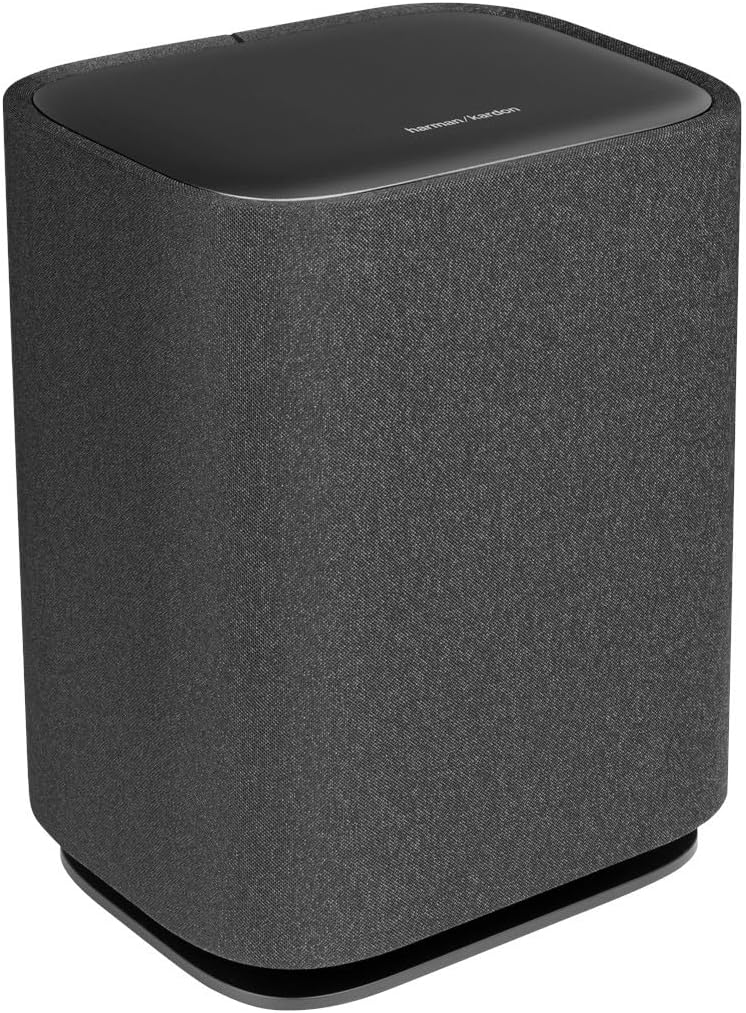
ምስል: የፊት እና ጎን view of the Harman-Kardon Enchant Subwoofer, featuring its fabric-covered cylindrical design.

ምስል: የኋላ view of the Harman-Kardon Enchant Subwoofer, showing the power input and pairing controls.
- የኃይል ግቤት፡ Connects to the subwoofer's power cord.
- የማጣመጃ ቁልፍ Used to manually pair the subwoofer with the soundbar if automatic pairing fails.
- የአገልግሎት ወደብ፡ For technical servicing.
5. ማዋቀር
5.1 አቀማመጥ
ምርጥ የድምጽ ተሞክሮ ለማግኘት ጥሩ አቀማመጥ ወሳኝ ነው።

Image: A Harman-Kardon soundbar positioned below a television in a living room setting, demonstrating typical placement.
- የድምጽ አሞሌ፡ Place the soundbar centrally below your TV, ensuring it is not obstructed. For wall mounting, use the provided brackets and follow the wall-mounting guide.
- ንዑስwoofer Position the subwoofer anywhere in the room. Wireless connectivity allows flexibility. For best bass response, experiment with different locations, typically near a wall or in a corner.
5.2 ግንኙነቶች
- HDMI eARC/ARC Connection (Recommended):
Connect one end of the HDMI cable to the HDMI eARC/ARC port on the soundbar and the other end to the HDMI ARC/eARC port on your TV. This connection supports the highest quality audio formats, including Dolby Atmos, and allows your TV remote to control the soundbar's volume. - የኦፕቲካል ግንኙነት (አማራጭ):
If your TV does not have an HDMI ARC/eARC port, connect an optical cable from the TV's optical digital output to the OPTICAL IN port on the soundbar. Note that this connection does not support Dolby Atmos. - የኃይል ግንኙነት;
የኤሌክትሪክ ገመዶችን ከድምጽ አሞሌው እና ከንዑስ ድምጽ ማጉያ ጋር ያገናኙ እና ከዚያ ወደ ግድግዳ መውጫ ይሰኩት።
5.3 ገመድ አልባ የሱብዎፈር ማጣመር
The subwoofer should automatically pair with the soundbar upon powering on. If pairing fails:
- ሁለቱም የድምጽ አሞሌ እና ንዑስ ድምጽ ማጉያ መብራታቸውን ያረጋግጡ።
- Press and hold the Pairing button on the rear of the subwoofer until the LED indicator flashes rapidly.
- On the soundbar, press and hold the Source button for 5 seconds. The soundbar display will show "PAIRING".
- Once connected, the LED on the subwoofer will turn solid, and the soundbar will indicate successful pairing.
5.4 Sound Calibration
The Enchant-1100 features easy sound calibration to optimize audio for your room. Follow the on-screen instructions on your TV (if connected via HDMI eARC) or refer to the Harman Kardon One App for detailed calibration steps.
6. የአሠራር መመሪያዎች
6.1 መሠረታዊ አሠራር
- ማብራት/ማጥፋት፡ በድምጽ አሞሌው ወይም በርቀት መቆጣጠሪያው ላይ የኃይል አዝራሩን ይጫኑ።
- የድምጽ መቆጣጠሪያ፡- Use the Volume Up/Down buttons on the soundbar or remote.
- የምንጭ ምርጫ፡- Press the Source button on the soundbar or remote to cycle through HDMI, Optical, Bluetooth, and Wi-Fi inputs.
- ድምጸ-ከል አድርግ፡ ኦዲዮውን ለጊዜው ዝም ለማሰኘት በርቀት መቆጣጠሪያው ላይ ያለውን ድምጸ-ከል የሚለውን ቁልፍ ተጫን።
6.2 የብሉቱዝ ማጣመር
የብሉቱዝ መሣሪያን ለማገናኘት፡-
- Press the Bluetooth button on the remote or cycle to the Bluetooth source on the soundbar. The soundbar will enter pairing mode, indicated by a flashing LED.
- On your device (smartphone, tablet), enable Bluetooth and select "Harman-Kardon Enchant-1100" from the list of available devices.
- Once connected, the LED on the soundbar will become solid.
6.3 Wi-Fi and Streaming Features
The Enchant-1100 supports various streaming technologies:
- Google Cast Stream audio from Cast-enabled apps directly to your soundbar.
- ኤርፕሌይ፡ ከአፕል መሳሪያዎች ድምጽ ይልቀቁ።
- Spotify ግንኙነት፡- የሙዚቃ መልሶ ማጫወትን በቀጥታ ከSpotify መተግበሪያ ይቆጣጠሩ።
- Harman Kardon One App: Download the app for advanced control, setup, and access to additional features.
6.4 Immersive Audio Technologies
The soundbar utilizes advanced technologies for a superior listening experience:
- Dolby Atmos እና DTS:X: Experience multi-dimensional sound that moves around you. Ensure your content source and TV support these formats for optimal effect.
- MultiBeam™: Creates a wide soundstage by reflecting sound off walls, providing a surround sound experience without additional rear speakers.
- Harman PureVoice™: Enhances dialogue clarity, making sure voices are distinct even during intense action scenes.
6.5 የምርት ቪዲዮዎች
Watch these videos for visual guidance on setup and features:
ቪዲዮ፡ አጠቃላይ አልፏልview of the Harman-Kardon Enchant series, highlighting key features and design elements. (Duration: 0:53)
Video: A short demonstration of the soundbar's audio capabilities and immersive sound. (Duration: 0:31)
7. ጥገና
- ማጽዳት፡ የድምፅ አሞሌውን እና የሱፍ ሰሪውን ገጽታዎች ለማጽዳት ለስላሳ እና ደረቅ ጨርቅ ይጠቀሙ። ፈሳሽ ማጽጃዎችን ወይም የማጽጃ ቁሳቁሶችን አይጠቀሙ።
- የሶፍትዌር ማሻሻያ Periodically check for firmware updates via the Harman Kardon One App or the Harman Kardon support webምርጥ አፈጻጸምን ለማረጋገጥ እና የአዳዲስ ባህሪያትን መዳረሻ ለማረጋገጥ ጣቢያ።
- የአየር ማናፈሻ; Ensure that the ventilation openings on the soundbar and subwoofer are not blocked to prevent overheating.
8. መላ መፈለግ
ችግሮች ካጋጠሙዎት የሚከተሉትን የተለመዱ ችግሮች እና መፍትሄዎች ይመልከቱ።
| ችግር | ሊሆን የሚችል መፍትሄ |
|---|---|
| ኃይል የለም | Ensure power cords are securely connected to both the unit and a working power outlet. Try a different outlet. |
| ድምጽ የለም። | Check input source selection. Verify volume levels on both the soundbar and TV. Ensure cables (HDMI, Optical) are correctly connected. |
| Subwoofer አልተገናኘም። | Perform manual pairing as described in Section 5.3. Ensure the subwoofer is powered on and within range of the soundbar. |
| ደካማ የድምፅ ጥራት | Check audio settings on your TV and source device. Ensure the soundbar is not obstructed. Run sound calibration. |
| የርቀት መቆጣጠሪያ አይሰራም | Replace batteries. Ensure there are no obstructions between the remote and the soundbar. |
| No Dolby Atmos/DTS:X | Ensure your TV and content source support Dolby Atmos/DTS:X and are connected via HDMI eARC. Check TV audio output settings. |
9. ዝርዝሮች
| ባህሪ | ዝርዝር |
|---|---|
| የሞዴል ስም | HKENCH1100BLKAM |
| የድምጽ ማጉያ አይነት | የድምጽ አሞሌ |
| ልዩ ባህሪያት | 3D Surround Sound, DTS:X, MultiBeam, Bluetooth, Wi-Fi, Airplay, Google Cast, Spotify Connect, Smart Dialogue Enhancement with Harman PureVoice Tech, Easy Sound Calibration, UltraHD 4K Pass-Through with Dolby Vision, HDMI eARC, Harman Kardon One App, Multi-Channel Surround Sound |
| የሚመከር አጠቃቀሞች | ለዙሪያ ድምጽ ሲስተምስ |
| ተስማሚ መሣሪያዎች | Television, Home Theater |
| የዙሪያ ድምጽ ቻናል ውቅር | 5.1 |
| ቀለም | ጥቁር |
| የምርት ልኬቶች (የድምጽ አሞሌ) | 5.1" ዲ x 45.2" ዋ x 2.6" ኤች |
| የእቃው ክብደት | 10.1 ፓውንድ (የድምፅ አሞሌ) |
| የእቃዎች ብዛት | 2 (Soundbar and Subwoofer) |
| የመቆጣጠሪያ ዘዴ | የርቀት፣ ይንኩ። |
| ገመድ አልባ የመገናኛ ቴክኖሎጂ | ብሉቱዝ ፣ Wi-Fi |
| Woofer ዲያሜትር | 6.5 ኢንች (ሰብዋፈር) |
| የኃይል ምንጭ | AC |
| የድግግሞሽ ምላሽ | 52 Hz - 20 kHz (-6dB) |
| የመጫኛ አይነት | የጠረጴዛ ተራራ |
| ዩፒሲ | 840377559134 |
10. የዋስትና መረጃ
This Harman-Kardon product is covered by a limited warranty. The terms and conditions of the warranty may vary by region. Please refer to the warranty card included in your product packaging or visit the official Harman Kardon webዝርዝር የዋስትና መረጃ እና ምዝገባ ለማግኘት ድህረ ገጽ።
11. ድጋፍ
For further assistance, technical support, or customer service, please visit the official Harman Kardon support webጣቢያ ወይም የደንበኛ አገልግሎት ቡድናቸውን ያነጋግሩ፡-
- Webጣቢያ፡ www.harmankardon.com/support
- የመስመር ላይ መርጃዎች፡- FAQs, troubleshooting guides, and software downloads are available on the support webጣቢያ.