
OHAYO X10 Max
OHAYO X10 Max Bluetooth Speaker Instruction Manual
Welcome to your new OHAYO X10 Max Portable Bluetooth Speaker.
1. ጠቃሚ የደህንነት መረጃ
- ተናጋሪውን ለረጅም ጊዜ ለከፍተኛ ሙቀት ወይም ቀጥተኛ የፀሐይ ብርሃን አታጋልጥ።
- ድምጽ ማጉያውን ከሙቀት ምንጮች፣ ስለታም ነገሮች እና ከቆሻሻ ቁሳቁሶች ያርቁ።
- ድምጽ ማጉያውን እራስዎ አይበታተኑ፣ አይጠግኑ ወይም አይቀይሩ። አስፈላጊ ከሆነ ብቃት ያላቸውን የአገልግሎት ባለሙያዎችን ያነጋግሩ።
- IPX7 የውሃ መከላከያ ደረጃውን ለመጠበቅ ድምጽ ማጉያውን በውሃ አቅራቢያ ሲጠቀሙ የኃይል መሙያ ወደብ ሽፋኑ ደህንነቱ በተጠበቀ ሁኔታ መዘጋቱን ያረጋግጡ።
- ለኃይል መሙያ የቀረበውን የኃይል መሙያ ገመድ ወይም የተረጋገጠ የዩኤስቢ-ሲ ገመድ ብቻ ይጠቀሙ።
2. የጥቅል ይዘቶች
- 1 x OHAYO X10 Max Bluetooth Speaker (White)
- 1 x USB-C Charging Cable (charging plug not contained)
- 1 x 3.5mm AUX ገመድ
- 1 x የተጠቃሚ መመሪያ
- 1 x Lanyard
3. ምርት አብቅቷልview
The OHAYO X10 Max is a versatile portable Bluetooth speaker designed for high-quality audio and durability. It features a powerful 25W sound output with active bass, IPX7 waterproofing, and a long-lasting 24-hour battery. Enjoy dynamic sound with colorful RGB lighting effects, dual pairing for stereo sound, and multiple input modes.
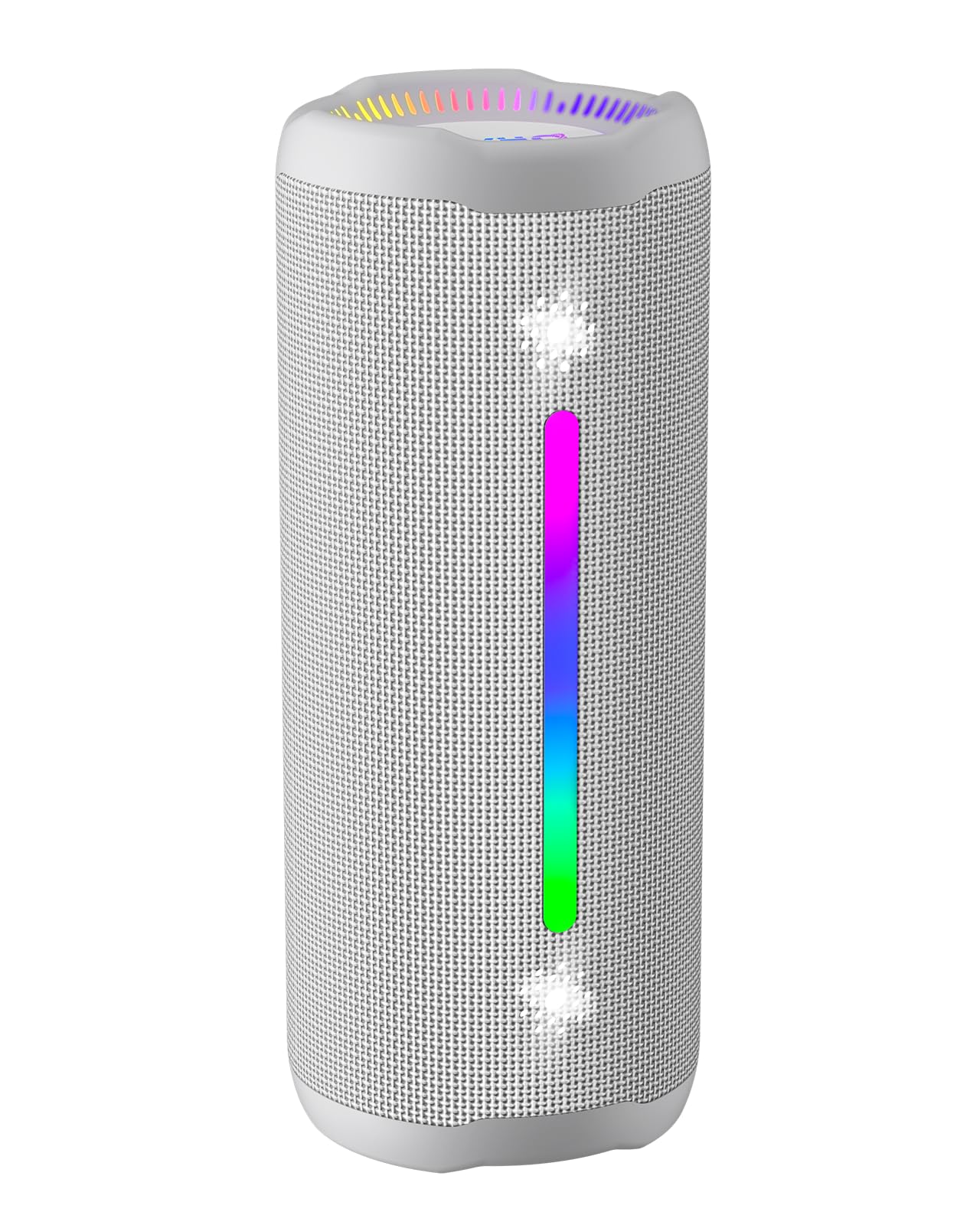
Figure 3.1: OHAYO X10 Max Bluetooth Speaker (White)

Figure 3.2: OHAYO X10 Max Bluetooth Speaker - Fully upgraded from appearance to performance.

Figure 3.3: 25W Deep Bass Sound - Independent channel design for accurate audio performance.

Figure 3.4: 6 Dazzling RGB Light Effects - Syncs with music for an immersive experience.

Figure 3.5: IPX7 Waterproof - Highly sealed design for use in various environments.

Figure 3.6: 24H Ultra-Long Battery Life - 6600mAh battery for extended playback.
4. መቆጣጠሪያዎች እና ጠቋሚዎች
The OHAYO X10 Max features intuitive controls for easy operation.

ምስል 4.1፡ የመቆጣጠሪያ ፓነል እና ወደቦች
- የኃይል ቁልፍ፡- Press and hold to power on/off. Short press to switch between input modes (Bluetooth, AUX, TF Card, USB-Audio).
- የድምጽ መጠን መጨመር (>): ድምጽን ለመጨመር አጭር ተጫን። ለቀጣይ ትራክ በረጅሙ ተጫን።
- የድምጽ መጠን መቀነስ (<): ድምጽን ለመቀነስ አጭር ተጫን። ለቀደመው ትራክ በረጅሙ ይጫኑ።
- ባስ አዝራር፡- Press to activate/deactivate Bass Boost mode.
- የማጫወት/ለአፍታ አቁም/ጥሪ አዝራር፦ Short press to play/pause music. Short press to answer/end calls. Long press to reject calls. Double press to activate voice assistant.
- የባትሪ አመልካች መብራቶች፡- Four LED lights indicate battery level.
- የRGB ብርሃን ስትሪፕ፡ Displays various colorful lighting effects.
- የኃይል መሙያ ወደብ (USB-C)፦ ድምጽ ማጉያውን ለመሙላት.
- AUX ወደብ ባለገመድ የድምጽ ግንኙነት.
- የ TF ካርድ ማስገቢያ ሙዚቃን በቀጥታ ከማይክሮ ኤስዲ ካርድ ለማጫወት።
5. ማዋቀር
5.1 ድምጽ ማጉያውን መሙላት
Before first use, fully charge the speaker. Connect the provided USB-C charging cable to the speaker's charging port and the other end to a 5V/2A USB power adapter (not included). The battery indicator lights will blink during charging and remain steady when fully charged.
5.2 ማብራት / ማጥፋት
Press and hold the Power button for approximately 3 seconds to turn the speaker on or off. A voice prompt will confirm the action.
5.3 የብሉቱዝ ማጣመር
- Turn on the speaker. It will automatically enter Bluetooth pairing mode, indicated by a blinking blue LED.
- በመሳሪያዎ ላይ ብሉቱዝን ያንቁ (ስማርትፎን፣ ታብሌት፣ ወዘተ)።
- ፈልግ "X10 Max" in your device's Bluetooth list and select it to connect.
- አንዴ ከተገናኘ፣ የድምጽ መጠየቂያው የተሳካ ማጣመርን ያረጋግጣል።
5.4 እውነተኛ ገመድ አልባ ስቴሪዮ (TWS) ማጣመር
To achieve a true wireless stereo experience, you can pair two OHAYO X10 Max speakers together.

ምስል 5.1፡ እውነተኛ ገመድ አልባ ስቴሪዮ ማጣመር
- Ensure both X10 Max speakers are powered on and not connected to any other Bluetooth device.
- በአንድ ድምጽ ማጉያ ላይ (ይህ ዋናው ድምጽ ማጉያ ይሆናል)፣ የኃይል አዝራሩን ሁለቴ ይጫኑ። ወደ TWS የማጣመሪያ ሁነታ ይገባል።
- ሁለቱ ድምጽ ማጉያዎች በራስ-ሰር እርስ በእርስ ይገናኛሉ። የድምጽ ጥያቄ የተሳካ የTWS ማጣመርን ያረጋግጣል።
- አሁን በክፍል 5.3 እንደተገለጸው መሳሪያዎን ከዋናው ድምጽ ማጉያ ጋር በብሉቱዝ ያገናኙት።
5.5 በAUX በኩል መገናኘት
Use the provided 3.5mm AUX cable to connect the speaker to devices without Bluetooth capability.
Figure 5.2: 4 Input Modes - Including AUX, TF, and USB-Audio.
- የAUX ኬብሉን አንድ ጫፍ ከድምጽ ማጉያው AUX-in ወደብ ጋር ያገናኙ።
- ሌላውን ጫፍ ከመሣሪያዎ የድምጽ ውፅዓት ጋር ያገናኙ።
- The speaker will automatically switch to AUX mode. If not, short press the Power button to cycle through modes until AUX mode is activated.
5.6 የቲኤፍ ካርድን መጠቀም
Insert a MicroSD (TF) card with MP3/WAV/FLAC/WMA audio files into the TF card slot. The speaker will automatically switch to TF card mode and begin playback. Short press the Power button to cycle through modes if needed.
5.7 Using USB-Audio
Connect the speaker to a computer using the USB-C cable. The speaker can function as an external audio output device for your computer. Short press the Power button to cycle through modes if needed.
6. የአሠራር መመሪያዎች
6.1 ሙዚቃን መጫወት
- አጫውት/ ለአፍታ አቁም፡ የ Play/Pause/Call አዝራሩን በአጭሩ ይጫኑ።
- የድምጽ መቆጣጠሪያ፡- Short press the Volume Up (>) or Volume Down (<) buttons.
- ቀጣይ ትራክ፡ Long press the Volume Up (>) button.
- ቀዳሚ ትራክ Long press the Volume Down (<) button.
6.2 ባስ ማበልጸጊያ ተግባር
Press the 'BASS' button to activate or deactivate the enhanced bass mode. This feature provides deeper and richer low frequencies for a more impactful audio experience.
6.3 RGB ብርሃን ሁነታዎች
The speaker features dynamic RGB lighting. The lights will automatically sync with the music beat. To turn the lights on/off, refer to the specific control instructions in your quick start guide or experiment with the mode button if available.
6.4 ከእጅ-ነጻ ጥሪ
በብሉቱዝ በኩል ከስማርት ስልክዎ ጋር ሲገናኙ፣ ድምጽ ማጉያው ለእጅ ነፃ ጥሪዎች ሊያገለግል ይችላል።

ምስል 6.1፡ ከእጅ ነፃ የሆነ የመደወያ ባህሪ
- መልስ/ጥሪ ጨርስ፡ የ Play/Pause/Call አዝራሩን በአጭሩ ይጫኑ።
- ጥሪን ውድቅ አድርግ፡ የPlay/Pause/Call አዝራሩን ለረጅም ጊዜ ይጫኑ።
- የድምፅ ረዳት አግብር Double press the Play/Pause/Call button.
7. ጥገና
- ማጽዳት፡ ድምጽ ማጉያውን ለስላሳ ፣ መamp ጨርቅ. ኃይለኛ ኬሚካሎችን ወይም ሻካራ ማጽጃዎችን አይጠቀሙ.
- ማከማቻ፡ የድምጽ ማጉያውን በቀጥታ ከፀሀይ ብርሀን እና ከከፍተኛ ሙቀት ርቆ ለረጅም ጊዜ በማይሰራበት ቀዝቃዛና ደረቅ ቦታ ያከማቹ።
- የባትሪ እንክብካቤ To prolong battery life, charge the speaker at least once every three months if not used regularly.
8. መላ መፈለግ
| ችግር | ሊሆን የሚችል ምክንያት | መፍትሄ |
|---|---|---|
| ተናጋሪው አይበራም። | ዝቅተኛ ባትሪ. | ድምጽ ማጉያውን ሙሉ በሙሉ ይሙሉ። |
| በብሉቱዝ በኩል ማጣመር አይቻልም። | ድምጽ ማጉያ በማጣመር ሁነታ ላይ አይደለም; መሳሪያ ብሉቱዝ ጠፍቷል; ከመሳሪያው በጣም የራቀ. | Ensure speaker is in pairing mode (blinking blue LED). Turn on device Bluetooth. Move device closer to speaker (within 10 meters). |
| ምንም ድምጽ ወይም ዝቅተኛ ድምጽ የለም. | ድምጽ ማጉያው ወይም መሳሪያው ላይ በጣም ዝቅተኛ ነው፤ የተሳሳተ የግቤት ሁነታ። | Increase volume on both speaker and device. Check if the correct input mode (Bluetooth, AUX, TF) is selected. |
| TWS ማጣመር አልተሳካም። | Speakers too far apart; one speaker already connected to another device. | Ensure speakers are close to each other. Disconnect any existing Bluetooth connections before TWS pairing. |
| የድምፅ ማዛባት. | የድምጽ መጠኑ በጣም ከፍተኛ ነው፤ ባትሪው ዝቅተኛ ነው። | የድምጽ መጠን ይቀንሱ። ድምጽ ማጉያውን ይሙሉት። |
9. ዝርዝሮች
| ባህሪ | ዝርዝር መግለጫ |
|---|---|
| የሞዴል ስም | X10 ማክስ |
| የብሉቱዝ ስሪት | 5.3 |
| ገመድ አልባ የመገናኛ ቴክኖሎጂ | ብሉቱዝ |
| የድምጽ ማጉያ ከፍተኛ የውጤት ኃይል | 35 Watts (25W effective) |
| የባትሪ አቅም | 6600 ሚአሰ |
| የጨዋታ ጊዜ | Up to 24 hours (varies with volume and light use) |
| የውሃ መቋቋም ደረጃ | IPX7 (ውሃ መከላከያ) |
| ግብዓት Voltage | 5 ቮልት (ዲሲ) |
| የድግግሞሽ ምላሽ | 20 kHz |
| የምልክት-ወደ-ጫጫታ ሬሾ | 80 ዲቢቢ |
| የድምጽ ሾፌር ዓይነት | ተለዋዋጭ ሾፌር |
| Woofer ዲያሜትር | 75 ሚሊሜትር |
| Tweeter ዲያሜትር | 26 ሚሊሜትር |
| የምርት ልኬቶች | 2.95" ዲ x 2.95" ዋ x 7.28" ኤች |
| የእቃው ክብደት | 450 ግራም (15.9 አውንስ) |
| ቁሳቁስ | Acrylonitrile Butadiene Styrene (ABS), አሉሚኒየም |
| የመቆጣጠሪያ ዘዴ | የግፊት ቁልፍ |
| ልዩ ባህሪያት | Bass Boost, AUX, Hi-Res Audio, 24-Hour Playtime, IPX7 Waterproof, TF Card Port, Dual Passive Radiators, Hands-free, True Wireless Stereo Pairing, Shockproof |
10. ዋስትና እና ድጋፍ
The OHAYO X10 Max Bluetooth Speaker comes with an extended warranty. For specific warranty details and to register your product, please refer to the information provided in your quick start guide or contact OHAYO customer support.
For technical support or customer service inquiries, please contact OHAYO Direct. Contact information may be found in your product packaging or on the official OHAYO webጣቢያ.
11. ይፋዊ የምርት ቪዲዮ
Video 11.1: Official OHAYO Portable Bluetooth Speaker overview by OHAYO Direct. This video highlights key features and design elements of the speaker.
Ask a question about this manual
Ask about setup, troubleshooting, compatibility, parts, safety, or missing instructions. Manuals+ will review the question and use this page’s manual context to help answer it.