1. መግቢያ
Thank you for choosing the Baseus E20 True Wireless Earbuds. These earbuds are designed to provide a high-quality audio experience with powerful bass, clear calls, and reliable connectivity. This manual will guide you through the setup, operation, and maintenance of your new earbuds.
2. በሳጥኑ ውስጥ ያለው
- Baseus E20 True Wireless Earbuds (Left and Right)
- የመሙያ መያዣ
- የዩኤስቢ-ሲ ኃይል መሙያ ገመድ
- የተጠቃሚ መመሪያ

Image: Baseus E20 True Wireless Earbuds shown inside their charging case, highlighting key features like powerful bass, IPX5 water resistance, 33 hours listening time, and environmental noise cancellation.
3. ምርት አብቅቷልview
3.1 የጆሮ ማዳመጫ ክፍሎች
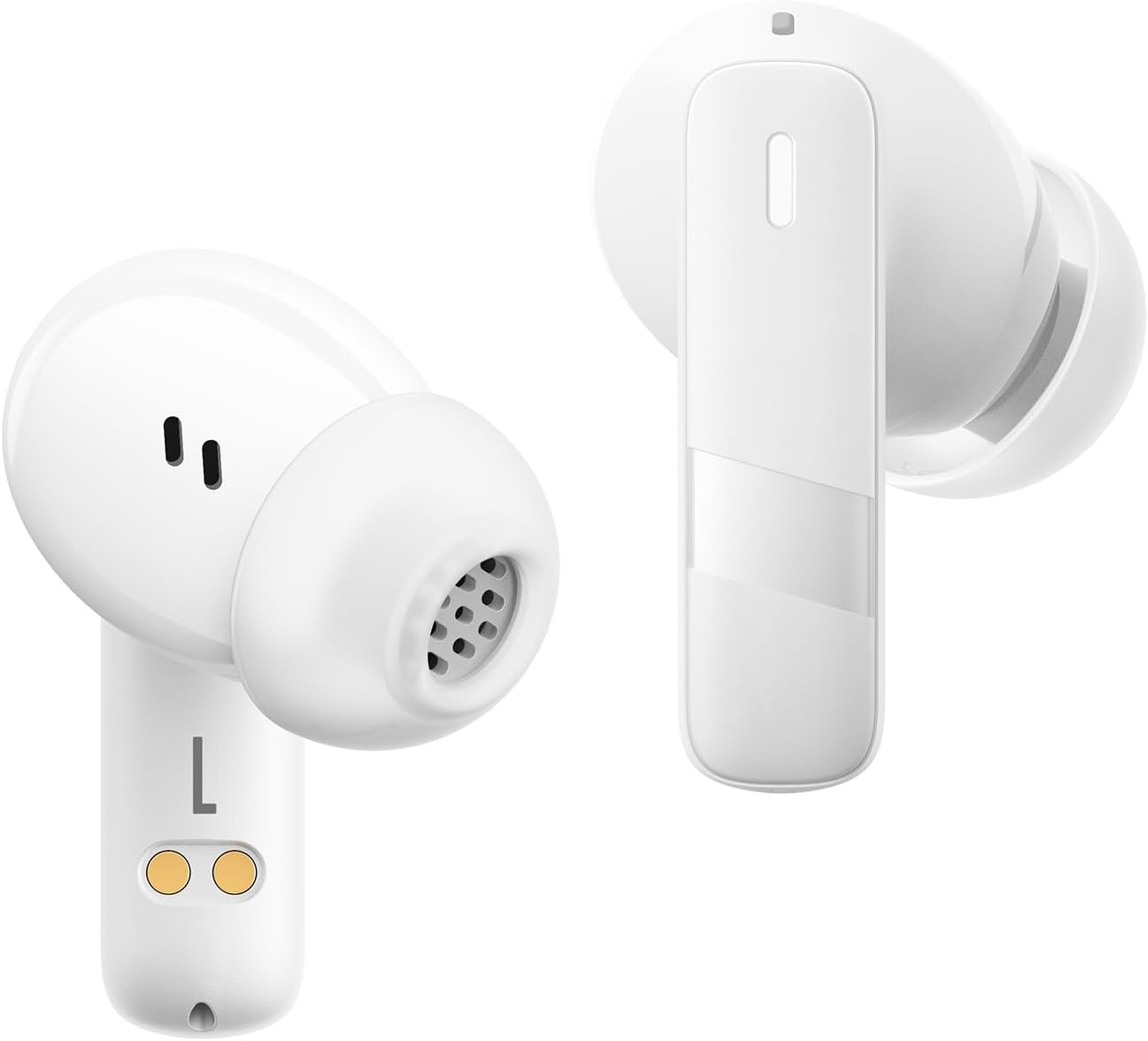
ምስል፡ መቀራረብ view of the Baseus E20 True Wireless Earbuds, showing the ergonomic design, speaker grille, and charging contacts.
- የንክኪ መቆጣጠሪያ ቦታ፡ መልሶ ማጫወትን፣ ጥሪዎችን እና ሁነታዎችን ለማስተዳደር።
- ማይክሮፎን For calls and voice commands (2 ENC Mics).
- ተናጋሪ፡- Delivers audio (12mm drivers).
- እውቂያዎችን በመሙላት ላይ፡ For charging the earbuds in the case.
3.2 የኃይል መሙያ ጉዳይ
- የኃይል መሙያ ወደብ; መያዣውን ለመሙላት የዩኤስቢ-ሲ ወደብ።
- አመልካች ብርሃን፡- የኃይል መሙያ ሁኔታን እና የባትሪ ደረጃን ያሳያል።
4. ማዋቀር
4.1 የጆሮ ማዳመጫውን እና መያዣውን መሙላት
ከመጠቀምዎ በፊት የጆሮ ማዳመጫውን እና የኃይል መሙያውን ሙሉ በሙሉ ይሙሉ።
- የጆሮ ማዳመጫዎቹን በቻርጅ መሙያ መያዣው ውስጥ ያስቀምጡ። የኃይል መሙያ እውቂያዎቹ እርስ በእርስ መጣጣማቸውን ያረጋግጡ።
- የዩኤስቢ-ሲ ባትሪ መሙያ ገመዱን በሻንጣው ላይ ካለው የኃይል መሙያ ወደብ እና ከኃይል ምንጭ ጋር ያገናኙ።
- The indicator light on the case will show the charging status. Once fully charged, the light will indicate completion or turn off.

Image: The Baseus E20 charging case is shown connected to a USB-C charging cable, illustrating the charging process and highlighting the 33-hour total listening time.
4.2 የብሉቱዝ ማጣመር
Pair your Baseus E20 earbuds with your device for the first time.
- የኃይል መሙያ መያዣውን ይክፈቱ። የጆሮ ማዳመጫዎቹ በራስ-ሰር ወደ ማጣመሪያ ሁነታ ይገባሉ፣ እና የአመላካች መብራቶቻቸው ብልጭ ድርግም ይላሉ።
- በመሳሪያዎ ላይ (ስማርትፎን፣ ታብሌት፣ ላፕቶፕ) ብሉቱዝን አንቃ።
- ፈልግ "Baseus E20" in the list of available Bluetooth devices and select it to connect.
- አንዴ ከተገናኘ በኋላ የጆሮ ማዳመጫ አመልካች መብራቶቹ ይጠፋሉ ወይም ቋሚ ብርሃን ያሳያሉ፣ እና የማረጋገጫ ድምጽ ይሰማሉ።
ማስታወሻ፡- ከመጀመሪያው ማጣመር በኋላ፣ የጆሮ ማዳመጫዎቹ ከመሳሪያው ሲወጡ ከመጨረሻው የተጣመረ መሣሪያ ጋር በራስ-ሰር ይገናኛሉ፣ ብሉቱዝ በመሳሪያው ላይ ከነቃ።

Image: A detailed diagram illustrating the Bluetooth 5.3 chip, emphasizing a more stable and efficient connection for the Baseus E20 earbuds.
5. የአሠራር መመሪያዎች
The Baseus E20 earbuds feature intuitive touch controls. The following table outlines the common functions:

Image: A visual guide to the touch control areas on the Baseus E20 earbuds, detailing single, double, and triple tap functions for various operations.
| ድርጊት | ተግባር |
|---|---|
| ሁለቴ መታ ያድርጉ (ግራ ወይም ቀኝ) | Answer/Hang up Call, Play/Pause Music |
| ሶስት ጊዜ መታ ማድረግ (ሊትር ወይም ቀኝ) | የድምጽ ረዳትን አግብር |
| Long Press (L or R) | Cycle Noise Cancellation Modes (Default > Normal > Transparency) |
| Long Press (L or R) | Cycle Spatial Audio Modes (Music Mode > Theater Mode > Normal) |
ማስታወሻ፡- Specific functions may vary slightly depending on your connected device and operating system.
5.1 የጥሪ አስተዳደር
- መልስ/ጥሪ ጨርስ፡ ሁለቱንም የጆሮ ማዳመጫውን ሁለቴ መታ ያድርጉ።
- ጥሪን ውድቅ አድርግ፡ የትኛውንም የጆሮ ማዳመጫ ለ2 ሰከንድ ተጭነው ይያዙ።

Image: An internal diagram of the Baseus E20 earbud highlighting the dual-mic Environmental Noise Cancellation (ENC) system for clear calls.
5.2 የሙዚቃ መልሶ ማጫወት
- አጫውት/ ለአፍታ አቁም፡ ሁለቱንም የጆሮ ማዳመጫውን ሁለቴ መታ ያድርጉ።
5.3 የድምፅ ረዳት
- የድምፅ ረዳት አግብር የጆሮ ማዳመጫውን ሶስት ጊዜ መታ ያድርጉ።
5.4 የጩኸት መቆጣጠሪያ ሁነታዎች
The Baseus E20 earbuds offer different noise control modes:
- Noise Cancellation (Default): ለተሳሳተ የማዳመጥ ልምድ የድባብ ድምጽን ይቀንሳል።
- መደበኛ ሁነታ፡ Standard audio playback without active noise control.
- ግልጽነት ሁነታ: ኦዲዮን በሚያዳምጡበት ጊዜ አካባቢዎን እንዲሰሙ ይፈቅድልዎታል።
ሁነታዎችን ለማዞር፦ የጆሮ ማዳመጫውን ለረጅም ጊዜ ይጫኑ።
6. ጥገና
6.1 ጽዳት
- Regularly clean the earbuds, especially the ear tips and speaker grilles, with a soft, dry, lint-free cloth.
- የኃይል መሙያ ችግሮችን ለመከላከል በሁለቱም የጆሮ ማዳመጫዎች እና መያዣዎች ላይ ያሉት የኃይል መሙያ እውቂያዎች ንጹህ እና ደረቅ መሆናቸውን ያረጋግጡ።
- Do not use abrasive materials, solvents, or harsh chemicals.
6.2 ማከማቻ
- የጆሮ ማዳመጫዎቹን ለመጠበቅ እና እንዲከፍሉ ለማድረግ ጥቅም ላይ በማይውሉበት ጊዜ በሚሞሉበት መያዣቸው ውስጥ ያከማቹ።
- በከፍተኛ ሙቀት ወይም ከፍተኛ እርጥበት ውስጥ ማከማቸት ያስወግዱ.
6.3 የውሃ መቋቋም (IPX5)
The Baseus E20 earbuds are IPX5 water-resistant, meaning they can withstand splashes and sweat. They are not designed for submersion in water or exposure to pressurized water jets. Ensure earbuds are dry before placing them back in the charging case to prevent damage.

Image: The Baseus E20 earbuds and charging case are depicted with water splashing around them, illustrating their IPX5 water-resistant capability for reliable performance in various conditions.
7. መላ መፈለግ
| ችግር | ሊሆን የሚችል መፍትሄ |
|---|---|
| የጆሮ ማዳመጫዎች አይጣመሩም። |
|
| ከአንድ የጆሮ ማዳመጫ ድምጽ የለም። |
|
| የመሙያ መያዣው እየሞላ አይደለም። |
|
| ደካማ የጥሪ ጥራት |
|
8. ዝርዝሮች
| ባህሪ | ዝርዝር |
|---|---|
| የሞዴል ስም | E20 |
| የብሉቱዝ ስሪት | 5.3 |
| የአሽከርካሪ መጠን | 12 ሚሜ |
| ጠቅላላ የጨዋታ ጊዜ | እስከ 33 ሰዓታት (ከኃይል መሙያ መያዣ ጋር) |
| Earbuds Playback Time | እስከ 6 ሰአታት (ነጠላ ክፍያ) |
| የውሃ መቋቋም | IPX5 |
| ማይክሮፎኖች | 2 ENC Mics for Clear Calls |
| የመቆጣጠሪያ ዓይነት | የንክኪ መቆጣጠሪያ |
| የኃይል መሙያ ወደብ | ዩኤስቢ-ሲ |
| የእቃው ክብደት | 3.2 አውንስ |
| ተስማሚ መሣሪያዎች | Cellphones, Laptops, Tablets, Devices with Bluetooth Audio Capability (iOS, Android, Windows, Mac OS, Switch) |

Image: A cutaway diagram illustrating the 12mm PU diaphragm driver, emphasizing its role in producing strong and accurate ultra-low frequencies for powerful bass.
9. ምርት አብቅቷልview ቪዲዮ
ቪዲዮ፡ አንድ ባለሥልጣን አብቅቷል።view of the Baseus E20 True Wireless Earbuds, demonstrating features such as touch controls, powerful bass, IPX5 water resistance, 33-hour battery life, ENC for clear calls, and Bluetooth 5.3 connectivity. The video shows the earbuds in various usage scenarios, including listening to music, making calls, and being used in different weather conditions.
10. ዋስትና እና ድጋፍ
Baseus products come with a standard manufacturer's warranty. For detailed warranty information, product support, or service inquiries, please refer to the warranty card included in your product packaging or visit the official Baseus webጣቢያ. ለዋስትና ጥያቄዎች የግዢ ደረሰኝዎን እንደ ግዢ ማረጋገጫ ያቆዩት።
የመስመር ላይ ድጋፍ ለተጨማሪ እርዳታ፣ እባክዎን ይጎብኙ የቤዝየስ ኦፊሴላዊ መደብር በአማዞን ላይ ወይም ባለሥልጣናቸው webጣቢያ.