
1. መግቢያ
This manual provides essential information for the safe and efficient operation of your DOOGEE Anywise W1 Smartwatch. Please read this manual thoroughly before using the device and retain it for future reference.
The DOOGEE Anywise W1 is a robust smartwatch designed for active lifestyles, featuring dual-band GPS, 5ATM water resistance, a 1.43-inch AMOLED display, and comprehensive health monitoring capabilities. It supports over 170 sport modes and offers Bluetooth calling functionality.
2. የጥቅል ይዘቶች
ሁሉም እቃዎች በጥቅልዎ ውስጥ መኖራቸውን ያረጋግጡ፡-
- 1 x DOOGEE Anywise W1 Smartwatch
- 1 x መግነጢሳዊ ኃይል መሙያ ገመድ
- 3 x Watch Bands (various styles/colors)
- 1 x የተጠቃሚ መመሪያ (ይህ ሰነድ)
- 1 x የአገልግሎት ካርድ።
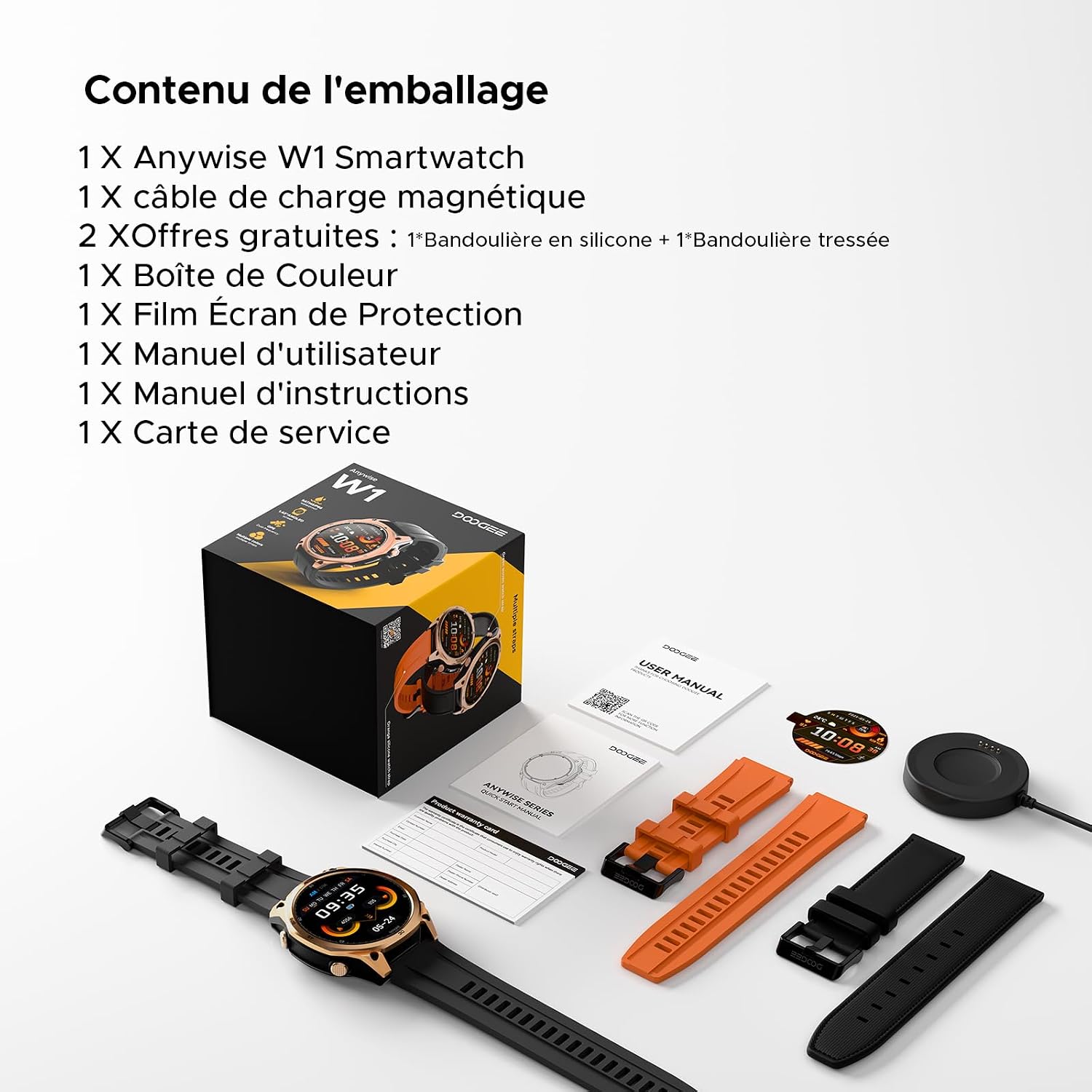
Image: The DOOGEE Anywise W1 Smartwatch, magnetic charging cable, and three watch bands are shown laid out, representing the package contents.
3. ምርት አብቅቷልview
3.1 ክፍሎች ይመልከቱ
- 1.43-ኢንች AMOLED ማሳያ: High-definition touchscreen for clear visibility.
- አካላዊ ቁልፎች፡- For navigation and function access.
- Heart Rate/Blood Oxygen Sensor: Located on the back of the watch.
- እውቂያዎችን በመሙላት ላይ፡ For magnetic charging cable.
- ማይክሮፎን እና ድምጽ ማጉያ፡ For Bluetooth calls and voice assistant.
- የ LED የእጅ ባትሪ; የተዋሃደ የብርሃን ምንጭ።

Image: The DOOGEE Anywise W1 Smartwatch with its main display showing various information such as time, date, temperature, heart rate, and step count.

Image: A close-up of the back of the DOOGEE Anywise W1 Smartwatch, highlighting the advanced health sensors for heart rate and blood oxygen monitoring.
4. ማዋቀር
4.1 Smartwatchን በመሙላት ላይ
መጀመሪያ ከመጠቀምዎ በፊት የእርስዎን ስማርት ሰዓት ሙሉ በሙሉ ኃይል ይሙሉ። የመግነጢሳዊ ቻርጅ ገመዱን በሰዓቱ ጀርባ ላይ ካሉት እውቂያዎች ጋር ያገናኙ እና የዩኤስቢውን ጫፍ በሃይል አስማሚ (ያልተካተተ) ወይም የኮምፒዩተር ዩኤስቢ ወደብ ይሰኩት።
- የኃይል መሙያ እውቂያዎች ንጹህ እና ደረቅ መሆናቸውን ያረጋግጡ።
- የሰዓት ማሳያው የኃይል መሙያ ሁኔታን ያሳያል።
- ሙሉ ክፍያ በተለምዶ 2 ሰአታት ይወስዳል።
4.2 ማብራት / ማጥፋት
- አብራ፡ Press and hold the top physical button for a few seconds until the DOOGEE logo appears.
- ኃይል ዝጋ: From the watch face, swipe down to access quick settings, then tap the power icon, or go to Settings > System > Power Off. Alternatively, press and hold the top physical button, then select 'Power Off' on the screen.
4.3 መተግበሪያ መጫን እና ማጣመር
To unlock the full potential of your Anywise W1, download and install the companion app on your smartphone.
- Scan the QR code in the manual or on the watch screen, or search for 'Doogee Fit' in your smartphone's app store (Google Play Store for Android, Apple App Store for iOS).
- Install the 'Doogee Fit' app.
- መለያ ለመፍጠር ወይም ለመግባት መተግበሪያውን ይክፈቱ እና በስክሪኑ ላይ ያሉትን መመሪያዎች ይከተሉ።
- በእርስዎ ዘመናዊ ስልክ ላይ ብሉቱዝን ያንቁ።
- In the app, navigate to 'Device' or 'Add Device' and select 'DOOGEE Anywise W1' from the list of available devices.
- በሁለቱም በስማርትፎንዎ እና በስማርት ሰዓቱ ላይ የማጣመሪያ ጥያቄውን ያረጋግጡ።
The watch is compatible with iOS 13 and above, and Android 5.0 and above.

Image: The DOOGEE Anywise W1 Smartwatch paired with a smartphone running the 'Doogee Fit' application, demonstrating its broad compatibility with mobile devices.
4.4 ማሰሪያ መትከል
The DOOGEE Anywise W1 comes with interchangeable straps. To attach or detach a strap, locate the quick-release pins on the underside of the strap. Slide the pin to release or secure the strap into the watch lugs.
5. የአሠራር መመሪያዎች
5.1 መሰረታዊ ዳሰሳ
- የንክኪ ማያ ገጽ፡ Swipe left/right to cycle through widgets, swipe up for notifications, swipe down for quick settings. Tap to select.
- ከፍተኛ አዝራር፡- Press to return to the watch face, long press for power options.
- የታችኛው አዝራር፡- Customizable shortcut for quick access to a specific function (e.g., sport modes).
5.2 የስፖርት ሁነታዎች
The watch supports over 170 sport modes. To access:
- From the watch face, press the bottom button (if configured) or navigate through the app list to find 'Workout' or 'Sport'.
- Select your desired activity (e.g., Walking, Running, Cycling).
- The watch will begin tracking your activity, including duration, distance, heart rate, and calories burned.
- To end a workout, swipe right or press a physical button, then select 'End'.

Image: A person cycling, wearing the DOOGEE Anywise W1 Smartwatch, which is actively tracking their workout.

Image: Visual representation of the 170+ sport modes available on the DOOGEE Anywise W1, including icons for walking, running, cycling, rowing, and elliptical training.
5.3 የጤና ክትትል
The Anywise W1 continuously monitors various health metrics:
- የልብ ምት: Access the Heart Rate app on the watch to view real-time data and historical trends in the Doogee Fit app.
- የደም ኦክስጅን (ስፒኦ2)፡- Use the SpO2 app on the watch for on-demand measurements.
- የእንቅልፍ ክትትል; Wear the watch to bed for automatic sleep stage analysis (Awake, REM, Light, Deep sleep). View በመተግበሪያው ውስጥ ዝርዝር ዘገባዎች።
- የጭንቀት ክትትል; The watch can track stress levels throughout the day.
- የመተንፈስ ስልጠና; Guided breathing exercises are available to help manage stress.

Image: A person sleeping, with an overlay showing the DOOGEE Anywise W1 Smartwatch displaying detailed sleep stage analysis, including awake, REM, light, and deep sleep durations.
5.4 የብሉቱዝ ጥሪ
አንዴ ከስማርትፎንዎ ጋር ከተጣመሩ በቀጥታ ከእጅ ሰዓትዎ ጥሪዎችን ማድረግ እና መቀበል ይችላሉ።
- ጥሪዎችን በመመለስ ላይ፡- ጥሪ ሲገባ፣ በሰዓት ማያ ገጹ ላይ ያለውን አረንጓዴ የመልስ አዶ ይንኩ።
- ጥሪዎችን ማድረግ; Use the dial pad or access your contacts through the watch's phone app.
5.5 AI ድምጽ ረዳት
The watch integrates an AI voice assistant for hands-free control.
- Activate the voice assistant by tapping its icon or using a pre-set gesture/button.
- Speak commands for tasks like checking weather, setting alarms, or initiating calls.

Image: A user interacting with the DOOGEE Anywise W1 Smartwatch and their smartphone, showcasing the AI voice assistant's ability to control the phone hands-free for tasks like checking weather or sending messages.
5.6 GPS Usage
The integrated dual-band GPS (L1+L5) provides accurate location tracking for outdoor activities.
- GPS is automatically activated during outdoor sport modes.
- View your route and statistics in the Doogee Fit app after your workout.

Image: A person running on a bridge, wearing the DOOGEE Anywise W1 Smartwatch, which shows GPS navigation and activity data on its screen.
5.7 Flashlight and Compass
- የእጅ ባትሪ፡ Access the flashlight function from quick settings or the app list. The watch's LED will illuminate.
- ኮምፓስ፡ Open the Compass app on the watch to view directional information. Ensure you are away from strong magnetic fields for accurate readings.

Image: The DOOGEE Anywise W1 Smartwatch showcasing its flashlight and compass features, with a person using the flashlight in a dark outdoor setting.
5.8 ሌሎች ባህሪዎች
The Anywise W1 includes additional functionalities:
- የሙዚቃ ቁጥጥር፡- በተጣመረው ስማርት ስልክዎ ላይ የሙዚቃ መልሶ ማጫወትን ይቆጣጠሩ።
- የአየር ሁኔታ ዝመናዎች View የአሁኑ የአየር ሁኔታ እና ትንበያዎች።
- የሩጫ ሰዓት እና ሰዓት ቆጣሪ፡ For various timing needs.
- ማንቂያ፡- ማንቂያዎችን በቀጥታ ከሰዓቱ ያዘጋጁ።
- የካሜራ ርቀት: ሰዓቱን ለስልክዎ ካሜራ እንደ የርቀት መዝጊያ ይጠቀሙ።
- የሶስ ተግባር ለአደጋ ጊዜ ሁኔታዎች።
- የድምፅ ቀረፃ; Record short voice memos.
- ስልክ አግኝ፡ የተጣመረ ስማርትፎንዎን ያግኙ።

Image: Multiple screens of the DOOGEE Anywise W1 Smartwatch illustrating its connectivity features, including Bluetooth calls, remote photo capture, music control, and the 'find phone' function.
6. ጥገና
6.1 ጽዳት
- ሰዓቱን እና ማሰሪያዎቹን በለስላሳ ጨርቅ አዘውትረው ይጥረጉ፣amp ጨርቅ.
- ኃይለኛ ኬሚካሎችን ወይም ሻካራ ቁሳቁሶችን ከመጠቀም ይቆጠቡ.
- ከመሙላቱ በፊት የኃይል መሙያ እውቂያዎቹ ንጹህ እና ደረቅ መሆናቸውን ያረጋግጡ።
6.2 የውሃ መቋቋም (5ATM)
The DOOGEE Anywise W1 is 5ATM water-resistant, meaning it can withstand pressures equivalent to a depth of 50 meters. This makes it suitable for swimming and showering. However, it is not recommended for diving or high-pressure water activities.
- የውሃ ውስጥ ቁልፎችን አይጠቀሙ.
- Avoid exposure to hot water, steam, or detergents, which can compromise water resistance.
- ለጨው ውሃ ከተጋለጡ በኋላ ሰዓቱን በንጹህ ውሃ ያጠቡ እና በደንብ ያድርቁ.

Image: The DOOGEE Anywise W1 Smartwatch being splashed with water, demonstrating its 5ATM water resistance, suitable for rainy days and swimming.
6.3 የባትሪ እንክብካቤ
- የባትሪውን ዕድሜ ሊያሳጣው ከሚችለው ከፍተኛ የሙቀት መጠን ያስወግዱ።
- ለረጅም ጊዜ ማከማቻ፣ ሰዓቱን እስከ 50% ድረስ ይሙሉት እና ቀዝቃዛና ደረቅ ቦታ ላይ ያስቀምጡት።
- The battery is non-removable. Do not attempt to replace it yourself.
7. መላ መፈለግ
| ችግር | ሊሆን የሚችል መፍትሄ |
|---|---|
| ሰዓቱ አይበራም | Ensure the watch is fully charged. Press and hold the top button for 10-15 seconds to force a restart. |
| ከስማርትፎን ጋር ማጣመር አይቻልም | Ensure Bluetooth is enabled on your phone. Make sure the watch is discoverable. Restart both the watch and phone. Check app permissions. |
| ትክክለኛ ያልሆነ የጤና መረጃ | Ensure the watch is worn snugly on your wrist, not too tight or too loose. Clean the sensor area. Avoid excessive movement during measurements. |
| አጭር የባትሪ ህይወት | Reduce screen brightness, disable always-on display, limit notifications, and close unused apps. Frequent GPS use will consume more battery. |
| GPS not locking quickly | ከቤት ውጭ ክፍት በሆነ ቦታ ላይ መሆንዎን ያረጋግጡ view of the sky. Sync GPS data via the app regularly. |
8. ዝርዝሮች
| ባህሪ | ዝርዝር |
|---|---|
| የሞዴል ስም | AnywiseW1 |
| ማሳያ | ባለ 1.43-ኢንች AMOLED፣ 240 x 135 ጥራት |
| የውሃ መቋቋም | 5ATM (እስከ 50 ሜትር) |
| ጂፒኤስ | Dual-Band GPS (L1+L5), supports GPS, GLONASS, Beidou, Galileo, QZSS, AGPS |
| የባትሪ አቅም | 550 ሚአሰ ሊቲየም-ፖሊመር |
| የተለመደው የባትሪ ህይወት | Up to 18 days (daily use), 50 days (standby), 40 hours (continuous GPS) |
| ግንኙነት | ብሉቱዝ |
| ስርዓተ ክወና | ባለቤትነት ያለው |
| ተኳኋኝነት | አንድሮይድ 5.0+ / iOS 13+ |
| ቁሳቁስ | Titanium case |
| ዳሳሾች | Heart Rate, Blood Oxygen, Stress, Sleep Tracker, Compass |
| ልዩ ባህሪያት | 170+ Sport Modes, Bluetooth Calling, AI Voice Assistant, LED Flashlight |
9. ዋስትና እና ድጋፍ
9.1 የዋስትና መረጃ
The DOOGEE Anywise W1 Smartwatch comes with a 2-year manufacturer's limited warranty from the date of purchase. This warranty covers manufacturing defects and workmanship under normal use. It does not cover damage caused by misuse, accidents, unauthorized modifications, or normal wear and tear.
ለዋስትና ጥያቄዎች እባክዎ የግዢ ማረጋገጫዎን ያቆዩ።
9.2 የደንበኛ ድጋፍ
For technical assistance, troubleshooting, or warranty inquiries, please refer to the contact information provided on the included Service Card or visit the official DOOGEE webጣቢያ.
Online resources, including FAQs and software updates, may also be available on the DOOGEE support page.


