
መግቢያ
The Fender Mustang LTX50 is a versatile 50-watt modeling combo amplifier designed for guitarists seeking a wide range of authentic Fender tones and modern features. Equipped with a 12-inch Celestion G12P-80 speaker, it delivers dynamic sound suitable for practice, rehearsal, and performance. This amplifier offers 25 amp models and 25 effects, covering various musical styles from clean to high-gain. Its intuitive color display, onboard tuner, and 100 user preset slots provide easy customization and quick access to your preferred sounds. The Mustang LTX50 also features Bluetooth audio streaming for playing along with tracks and USB-C connectivity for direct recording and monitoring.
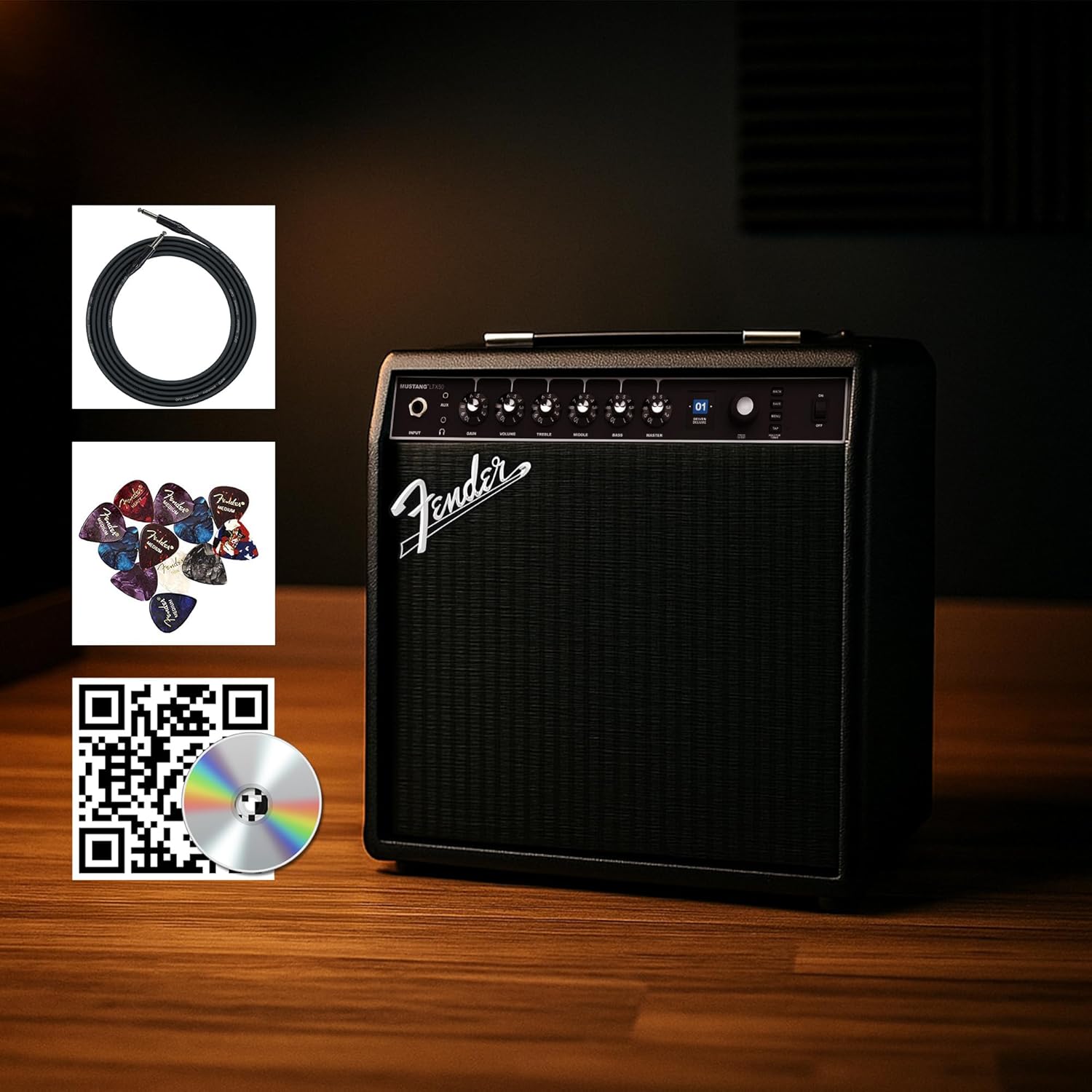
Figure 1: Fender Mustang LTX50 Guitar Combo Ampሊፋየር ከተካተቱ መለዋወጫዎች ጋር።
ማዋቀር
1. Unboxing እና የመጀመሪያ ምርመራ
- በጥንቃቄ ያስወግዱ ampሊፋየር እና ከማሸጊያው የተገኙ ሁሉም መለዋወጫዎች።
- የሚለውን መርምር amplifier for any signs of damage that may have occurred during shipping.
- Confirm all included items are present: Mustang LTX50 amplifier, power cord, instrument cable, 12-pack guitar picks, and instructional DVD.
2. የማገናኘት ኃይል
- ያረጋግጡ ampየሊፋየር ሃይል መቀየሪያ በጠፋ ቦታ ላይ ነው።
- Connect the included power cord to the AC input on the rear panel of the ampማብሰያ
- የኤሌትሪክ ገመዱን ሌላኛውን ጫፍ ወደ ኤሌክትሪክ ሶኬት ይሰኩት።
3. ጊታርዎን ማገናኘት
- Use the included instrument cable to connect your guitar to the ግቤት jack on the front panel of the ampማብሰያ
4. መሰረታዊ መቆጣጠሪያዎች ተጠናቀቁview
Familiarize yourself with the front panel controls before powering on the ampማብሰያ
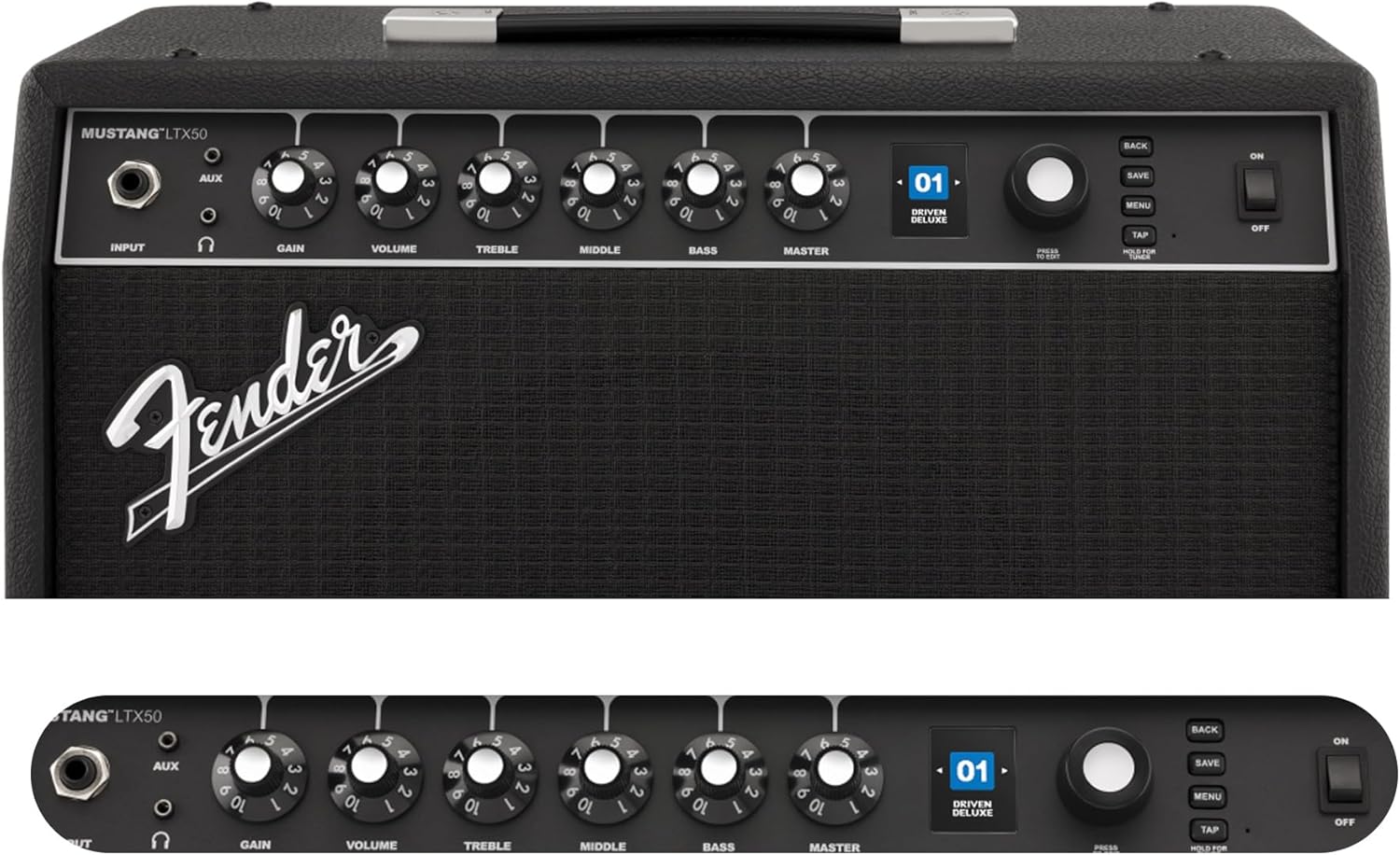
Figure 2: Front Panel Controls of the Mustang LTX50.
የአሠራር መመሪያዎች
1. ማብራት / ማጥፋት
- To power on, ensure all volume controls are set to minimum, then flip the ኃይል ወደ ማብሪያ ቦታ ይቀይሩ።
- To power off, flip the ኃይል ወደ OFF ቦታ ይቀይሩ.
2. Navigating Presets
- የሚለውን ተጠቀም ማበረታቻ knob (large rotary knob) to scroll through the 100 available presets (70 factory, 30 user).
- የሚለውን ይጫኑ ማበረታቻ knob to select a preset.
- The color LCD displays the current preset number and name.
3. ማስተካከል Amp ሞዴሎች እና ውጤቶች
- የሚለውን ይጫኑ MENU ለመድረስ አዝራር amplifier's settings.
- Navigate through options like AMP, STOMP, MOD, DELAY, REVERB using the ማበረታቻ.
- Select an option and use the ማበረታቻ to choose different amp ሞዴሎች ወይም ተፅዕኖዎች።
- Adjust parameters for each effect using the smaller control knobs (GAIN, VOLUME, TREBLE, MIDDLE, BASS, MASTER) or by selecting parameters on the display.
- ተጫን አስቀምጥ to store your customized preset.
4. አብሮ የተሰራውን መቃኛ መጠቀም
- ተጭነው ይያዙት። ታፕ button to activate the chromatic tuner.
- Play a single note on your guitar; the display will show the note and indicate if it is sharp, flat, or in tune.
- Press any button or play for a few seconds to exit tuner mode.
5. Fender Tone 3.0 App Control
- Download the Fender Tone 3.0 app from your device's app store (iOS/Android).
- በተንቀሳቃሽ መሣሪያዎ ላይ ብሉቱዝን ያንቁ።
- በላዩ ላይ ampሊፋየር፣ ይጫኑ MENU button, navigate to "Bluetooth," and select "Pair."
- Select "Mustang LTX50" from your device's Bluetooth settings to connect.
- Use the app to wirelessly create, edit, save, and share presets, and to manage your ampየሊፊየር ቅንብሮች.
6. Playing Along with Audio (Bluetooth)
- Once paired via Bluetooth, you can stream audio from your mobile device directly to the ampማብሰያ
- Adjust the volume of the streamed audio from your mobile device.
- Alternatively, connect an external audio source to the ኤክስኤክስ IN jack on the front panel using a 3.5mm stereo cable.
7. Recording via USB-C
- Connect a USB-C cable from the amplifier's USB-C port to your computer (Mac or PC).
- የ amplifier functions as a bidirectional audio interface, allowing direct recording and monitoring.
- Refer to your Digital Audio Workstation (DAW) software's manual for specific setup instructions.
ጥገና
1. ማጽዳት
- ግንኙነቱን ያላቅቁ ampከማጽዳት በፊት ከኃይል የሚወጣ ማጽጃ።
- ውጫዊውን ገጽታ ለማጽዳት ለስላሳ እና ደረቅ ጨርቅ ይጠቀሙ።
- ለግትር ቆሻሻ, ትንሽ መamp ለስላሳ ሳሙና ያለው ጨርቅ፣ ከዚያም ደረቅ ጨርቅ መጠቀም ይቻላል።
- ሻካራ ማጽጃዎችን፣ ሟሟቶችን ወይም ሰሞችን ከመጠቀም ይቆጠቡ፤ ምክንያቱም እነዚህ ጨርቁን ሊጎዱ ይችላሉ።
2. ማከማቻ
- ያከማቹ ampበቀጥታ ከፀሀይ ብርሀን እና ከከባድ የሙቀት መጠን ርቆ በሚገኝ ቀዝቃዛና ደረቅ ቦታ ላይ ማጣሪያ።
- ከፍተኛ እርጥበት ባለባቸው ቦታዎች ውስጥ ከማከማቸት ይቆጠቡ።
- If storing for extended periods, cover the ampከአቧራ ለመከላከል ሊፋየር።
3. Safety Warnings (Proposition 65)
ይህ ምርት በካሊፎርኒያ ግዛት ካንሰር፣ የልደት ጉድለቶች ወይም ሌላ የመራቢያ ጉዳት እንደሚያስከትሉ የሚታወቁ ኬሚካሎችን ሊይዝ ይችላል። ለተጨማሪ መረጃ፣ ይጎብኙ www.p65warnings.ca.gov.
መላ መፈለግ
ድምጽ የለም
- ያረጋግጡ ampሊፋየር በርቷል እና የኃይል ገመዱ ደህንነቱ በተጠበቀ ሁኔታ ተገናኝቷል።
- Check that your guitar is properly connected to the ግቤት ጃክ
- መሆኑን ያረጋግጡ መምህር volume and individual preset volume controls are not set to zero.
- Test with a different instrument cable and guitar to rule out faulty equipment.
- If using headphones, ensure they are fully plugged into the headphone jack and that the main speaker is not muted.
የተዛባ ወይም ያልተፈለገ ድምፅ
- የጊታርዎን የድምጽ መጠን እና የቃና መቆጣጠሪያዎች ይፈትሹ።
- ቀንስ ማግኘት በ ላይ ማቀናበር ampማብሰያ
- Ensure your instrument cable is not damaged or poorly shielded.
- Try a different power outlet to rule out electrical interference.
- If using high-gain amp models, some distortion is inherent. Adjust settings accordingly.
የብሉቱዝ ግንኙነት ጉዳዮች
- Ensure Bluetooth is enabled on both your mobile device and the ampማብሰያ
- መሆኑን ያረጋግጡ amplifier is in pairing mode (refer to "Fender Tone 3.0 App Control" section).
- ተንቀሳቃሽ መሣሪያዎን ወደ አገልግሎቱ ያቅርቡ ampማብሰያ
- መሣሪያዎቹን ለማጣመር እና እንደገና ለማጣመር ይሞክሩ።
- ሁለቱንም እንደገና ያስጀምሩ amplifier and your mobile device.
Amplifier Not Responding
- የኃይል ዑደት ኤ amplifier by turning it off, waiting 10 seconds, and turning it back on.
- If the issue persists, a factory reset may be necessary. Consult the Fender support website for instructions on performing a factory reset for the Mustang LTX50.
ዝርዝሮች
| የሞዴል ስም | MUSTANG LTX50 |
| የሞዴል ቁጥር | 2311700000 |
| የምርት ስም | ፋንደር |
| Ampየሚያነቃቃ ዓይነት | ዲጂታል ሞዴሊንግ |
| የኃይል ውፅዓት | 50 ዋት |
| ተናጋሪ | 1 x 12" Celestion G12P-80 |
| Amp ሞዴሎች | 25 |
| ተፅዕኖዎች | 25 (distortion, overdrive, compression, modulation, reverb, delay, octave, etc.) |
| ቅድመ-ቅምጦች | 70 factory + 100 user slots |
| ማሳያ | Color LCD with onboard chromatic tuner |
| ግንኙነት | Bluetooth audio, USB-C bidirectional audio |
| ውጤቶች | XLR line out, Headphone out |
| የመተግበሪያ ድጋፍ | Fender Tone 3.0 app (iOS/Android) |
| የማቀፊያ ቁሳቁስ | ብረት |
| የንጥል መጠኖች (D x W x H) | 22.3" ዲ x 19.9" ዋ x 12.3" ኤች |
| የእቃው ክብደት | 26.4 ፓውንድ £ |
| ዩፒሲ | 840262259088 |

Figure 3: Rear Panel Connections of the Mustang LTX50.
የዋስትና መረጃ
The Fender Mustang LTX50 Guitar Combo Ampሊፋየር በ የ2-አመት የተወሰነ ዋስትና. This warranty covers defects in materials and workmanship under normal use. For full terms and conditions, please refer to the warranty documentation included with your product or visit the official Fender webጣቢያ.
ድጋፍ
For further assistance, technical support, or service inquiries regarding your Fender Mustang LTX50 amplifier, please visit the official Fender support webጣቢያ፡
You may also find additional resources, FAQs, and software updates on the Fender webጣቢያ.