1. መግቢያ
This manual provides essential information for the safe and efficient operation of your Thomson 43FT2S15 FHD LED Smart TV. Please read this manual thoroughly before using the television and retain it for future reference.
2. የደህንነት መረጃ
ይህንን ምርት ሲጠቀሙ ሁልጊዜ የእሳት፣ የኤሌክትሪክ ንዝረት እና የአካል ጉዳት ስጋትን ለመቀነስ መሰረታዊ የደህንነት ጥንቃቄዎችን ይከተሉ።
- ቴሌቪዥኑን ለዝናብ እና ለእርጥበት አያጋልጡት።
- የአየር ማናፈሻ ክፍተቶችን አያግዱ ፡፡
- የኃይል ገመዱ ትክክለኛ መሠረት መኖሩን ያረጋግጡ።
- ቴሌቪዥኑን በማይረጋጋ ጋሪ፣ ቁም፣ ትሪፕድ፣ ቅንፍ ወይም ጠረጴዛ ላይ አታስቀምጡ።
- በመብረቅ አውሎ ንፋስ ጊዜ ወይም ለረጅም ጊዜ ጥቅም ላይ በማይውልበት ጊዜ ቴሌቪዥኑን ይንቀሉ.
- ሁሉንም አገልግሎቶች ብቁ ለሆኑ የአገልግሎት ሰራተኞች ያመልክቱ።
3. የጥቅል ይዘቶች
ከዚህ በታች የተዘረዘሩት ሁሉም እቃዎች በጥቅልዎ ውስጥ መካተታቸውን ያረጋግጡ፡-
- Thomson 43FT2S15 FHD LED Smart TV
- የኃይል አስማሚ
- የርቀት መቆጣጠሪያ
- የተጠቃሚ መመሪያ (ይህ ሰነድ)
- የዋስትና ካርድ

ምስል፡ ፊት ለፊት view of the Thomson 43FT2S15 Smart TV.
4. ማዋቀር
4.1 አካላዊ ጭነት
The Thomson 43FT2S15 TV is designed for table mounting. Ensure the TV is placed on a stable, flat surface.

Image: Diagram showing the dimensions of the Thomson 43FT2S15 Smart TV. The screen size is 109 cm (43 inches) diagonally, with a width of 95 cm and height of 60 cm (including stand). The depth is 6 cm.
ልኬቶች (W x H x D) 95 cm x 60 cm x 6 cm (without stand, depth is 6 cm). The screen diagonal is 109 cm (43 inches).
4.2 ማገናኛ መሳሪያዎች
ውጫዊ መሳሪያዎችዎን በቴሌቪዥኑ ላይ ካሉ ተገቢ ወደቦች ጋር ያገናኙ። የወደብ ቦታዎችን ለማየት ከታች ያለውን ንድፍ ይመልከቱ።
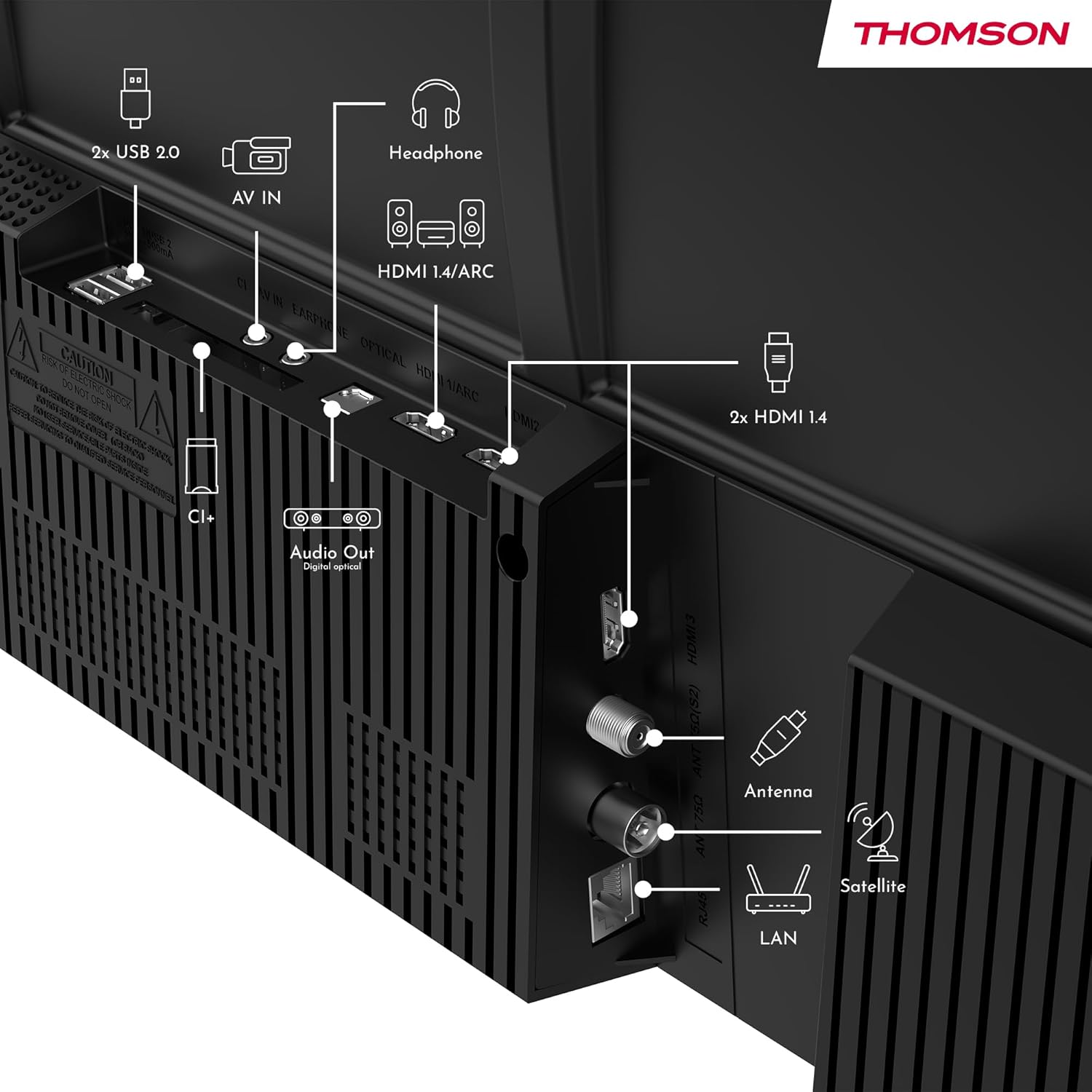
ምስል: የኋላ view of the Thomson 43FT2S15 Smart TV showing various connection ports. These include 2x USB 2.0, AV IN, Headphone out, HDMI 1.4/ARC, Optical Audio Out, CI+, Antenna (DVB-T2/C), Satellite (DVB-S2), and LAN (Ethernet).
- ኤችዲኤምአይ: Connect external devices like Blu-ray players, game consoles, or set-top boxes. The TV has 2 HDMI 1.4 ports, one with ARC support.
- ዩኤስቢ፡ For connecting USB storage devices. The TV has 2 USB 2.0 ports.
- አንቴና/ሳተላይት፡ Connect your terrestrial or satellite antenna for live TV.
- LAN (ኢተርኔት)፡- ለገመድ የበይነመረብ ግንኙነት።
- ዋይ ፋይ፡ ለገመድ አልባ የበይነመረብ ግንኙነት።
- ብሉቱዝ፡ For connecting compatible wireless accessories.
- የድምጽ ውጪ (ኦፕቲካል): For connecting to an external sound system.
- የጆሮ ማዳመጫ: የጆሮ ማዳመጫዎችን ለማገናኘት ፡፡
- CI+ ማስገቢያ፡ For inserting a Conditional Access Module (CAM) for encrypted channels.
5. የአሠራር መመሪያዎች
5.1 ማብራት / ማጥፋት
Connect the power adapter to the TV and a power outlet. Press the power button on the remote control to turn the TV on or off.
5.2 TiVo OS and Smart Features
Your Thomson Smart TV is powered by TiVo OS, which integrates live TV, streaming applications, and on-demand services into a single, intuitive interface. Personalized recommendations help you discover new content.

Image: The Thomson Smart TV displaying the TiVo OS interface with various streaming apps like Netflix, Canal+, Prime Video, YouTube, and Disney+.
5.3 የድምጽ መቆጣጠሪያ
Use the TiVo Voice Control feature to navigate channels, open applications, or search for content across different platforms using voice commands. The remote control includes a microphone for this function.

Image: The Thomson Smart TV remote control highlighting the voice control microphone, backlit buttons, and direct access buttons for streaming services.
5.4 Wireless Display
Mirror content from your smartphone, tablet, or laptop to the TV screen using the Wireless Display function. This allows for easy sharing of videos, photos, and applications.
5.5 Audio and Video Enhancements
- ዶልቢ ኦዲዮ፡ Experience enhanced sound quality with Dolby Audio, providing clear dialogue and immersive, multi-dimensional effects.

Image: A Thomson Smart TV displaying content with visual representations of sound waves, indicating the Dolby Audio feature.
- HDR10፡ Enjoy sharper contrast and lifelike colors with HDR10 technology, revealing details in both bright highlights and deep shadows.

Image: A split-screen comparison showing the difference between SDR (Standard Dynamic Range) and HDR10 (High Dynamic Range) image quality on a Thomson Smart TV, demonstrating improved contrast and color.
5.6 የርቀት መቆጣጠሪያ
The ergonomic remote control features backlit buttons for easy navigation in low light conditions. It also includes direct access buttons for popular streaming services such as Netflix, YouTube, Prime Video, Disney+, and Canal+.
6. ጥገና
የቲቪዎን ረጅም ዕድሜ እና ጥሩ አፈጻጸም ለማረጋገጥ እነዚህን የጥገና መመሪያዎች ይከተሉ፡
- ማያ ገጹን ማጽዳት; ስክሪኑን በቀስታ ለስላሳ እና ከተሸፈነ ጨርቅ ይጥረጉ። ለጠንካራ ምልክቶች፣ ለቲቪዎች ተብሎ የተነደፈ የስክሪን ማጽጃ በቀጥታ በስክሪኑ ላይ ሳይሆን በጨርቁ ላይ ይተገበራል።
- ካቢኔን ማጽዳት; የቴሌቪዥን ካቢኔቱን ለማጽዳት ለስላሳና ደረቅ ጨርቅ ይጠቀሙ። ሻካራ ማጽጃዎችን ወይም ሟሟቶችን አይጠቀሙ።
- የአየር ማናፈሻ; ከመጠን በላይ ሙቀትን ለመከላከል በቴሌቪዥኑ ጀርባ ላይ የአየር ማናፈሻ ክፍተቶች አለመዘጋታቸውን ያረጋግጡ።
- የኃይል ገመድ; የኃይል ገመዱን ጉዳት በየጊዜው ያረጋግጡ። ከተበላሸ፣ ለመተካት ብቃት ያላቸውን የአገልግሎት ባለሙያዎችን ያነጋግሩ።
7. መላ መፈለግ
በቲቪዎ ላይ ችግሮች ካጋጠሙዎት የሚከተሉትን የተለመዱ የመላ ፍለጋ ደረጃዎች ይመልከቱ፡
- ኃይል የለም፡
- የኃይል ገመዱ ከቴሌቪዥኑ እና ከኃይል መውጫው ጋር ደህንነቱ በተጠበቀ ሁኔታ የተገናኘ መሆኑን ያረጋግጡ።
- Ensure the power outlet is functioning by plugging in another device.
- የርቀት መቆጣጠሪያውን ብቻ ሳይሆን የኃይል አዝራሩን በራሱ ቴሌቪዥኑ ላይ ለመጫን ይሞክሩ።
- ምንም ምስል/ድምጽ የለም፡
- Verify that the correct input source is selected (e.g., HDMI 1, Antenna).
- በቴሌቪዥኑ እና በውጫዊ መሳሪያዎች መካከል ያሉትን ሁሉንም የኬብል ግንኙነቶች ይፈትሹ.
- ድምጹን ያስተካክሉ እና ቴሌቪዥኑ ድምጸ-ከል እንዳይደረግበት ያረጋግጡ።
- የርቀት መቆጣጠሪያ አይሰራም;
- በርቀት መቆጣጠሪያው ውስጥ ያሉትን ባትሪዎች ይተኩ.
- በርቀት መቆጣጠሪያው እና በቴሌቪዥኑ IR ዳሳሽ መካከል ምንም እንቅፋቶች አለመኖራቸውን ያረጋግጡ።
- Smart TV Features Not Working (Wi-Fi/Apps):
- የበይነመረብ ግንኙነትዎን ያረጋግጡ። አስፈላጊ ከሆነ ራውተርዎን እንደገና ያስጀምሩ.
- Go to the TV's network settings to ensure it's connected to Wi-Fi or Ethernet.
- ቴሌቪዥኑን እንደገና ለማስጀመር ይሞክሩ።
For more complex issues, please contact customer support or refer to the manufacturer's webጣቢያ.
8. ዝርዝሮች
Key technical specifications for the Thomson 43FT2S15 FHD LED Smart TV:
| ባህሪ | ዝርዝር መግለጫ |
|---|---|
| የምርት ስም | ቶምሰን |
| ሞዴል | 43FT2S15 |
| የስክሪን መጠን | 43 ኢንች (109 ሴ.ሜ) |
| የማሳያ ቴክኖሎጂ | LED |
| ጥራት | 1920 x 1080 (ኤፍኤችዲ) |
| የማደስ ደረጃ | 60 Hz |
| ምጥጥነ ገጽታ | 16፡9 |
| ስርዓተ ክወና | ቲቮ ኦኤስ |
| የድምጽ ቴክኖሎጂ | Dolby Audio (Dolby Atmos encoding) |
| የኤችዲአር ድጋፍ | HDR10 |
| ግንኙነት | Wi-Fi, Ethernet, Bluetooth, 2x HDMI 1.4 (1x ARC), 2x USB 2.0, Optical Audio Out, AV In, Headphone, CI+ |
| መቃኛዎች | DVB-T2/C/S2 (Triple Tuner) |
| የሚደገፉ የበይነመረብ አገልግሎቶች | Netflix, YouTube, Prime Video, Disney+, Canal+, Browser |
| ልኬቶች (ምርት) | 6 x 95 x 60 ሴሜ; 6.5 ኪ.ግ |
| የኢነርጂ ውጤታማነት ክፍል | E |

Image: Energy efficiency label for the Thomson 43FT2S15 Smart TV, showing an energy class of E and energy consumption of 42 kWh/1000h (SDR) and 46 kWh/1000h (HDR).
ለዝርዝር የምርት መረጃ፣ የEPREL የውሂብ ጎታውን ይመልከቱ፡- https://eprel.ec.europa.eu/qr/1969521
9. ዋስትና እና ድጋፍ
Your Thomson 43FT2S15 TV comes with a warranty. Please refer to the included Warranty Card for specific terms and conditions.
ለቴክኒክ ድጋፍ ወይም የአገልግሎት ጥያቄዎች፣ እባክዎ አምራቹን ያነጋግሩ፦
- አምራች፡ ዥረትview GmbH
- Webጣቢያ፡ www.ዥረትview.com
- ኢሜይል፡- contact@streamview.com
- ስልክ፡ +4318900066
Please have your model number (43FT2S15) and purchase information ready when contacting support.