
1. መግቢያ
Thank you for choosing the Hama Usedom Weather Station. This device provides digital display of indoor and outdoor temperature, humidity, time, date, and a weather forecast. It features a DCF radio-controlled clock for automatic time adjustment and a frost alarm. Please read this instruction manual carefully before initial use to ensure proper operation and safety.
2. የደህንነት መመሪያዎች
- ምርቱን ከቆሻሻ, እርጥበት እና ከመጠን በላይ ሙቀት ይጠብቁ.
- ምርቱን አይጣሉት ወይም ለከባድ ድንጋጤ አያጋልጡት።
- መሣሪያውን አይክፈቱ ወይም ከተበላሸ ወደ ሥራው አይቀጥሉ.
- ይህንን ምርት ልክ እንደ ሁሉም የኤሌክትሪክ ምርቶች, ህጻናት በማይደርሱበት ቦታ ያስቀምጡት.
- በአካባቢው በሚተገበሩ ደንቦች መሰረት የማሸጊያ እቃዎችን ወዲያውኑ ያስወግዱ.
- ምርቱን በምንም መንገድ አይቀይሩት. ይህን ማድረግ ዋስትናውን ባዶ ያደርገዋል።
- ምርቱን ለታለመለት ዓላማ ብቻ ይጠቀሙ.
- ምርቱን በማሞቂያዎች ወይም በሌሎች የሙቀት ምንጮች አቅራቢያ ወይም በቀጥታ የፀሐይ ብርሃን ውስጥ አይጠቀሙ.
3. የጥቅል ይዘቶች
እባክህ ጥቅሉ የሚከተሉትን ነገሮች እንደያዘ አረጋግጥ።
- 1x Hama Usedom Weather Station (Main Unit)
- 1 x የውጪ ዳሳሽ
- 1 x የኃይል አቅርቦት ክፍል
- 2x AA Mignon Batteries (for sensor)
- 1 x መመሪያ መመሪያ

Image: The main weather station unit, the outdoor sensor, and the power adapter included in the package.
4. ምርት አብቅቷልview
4.1 ዋና ክፍል

Image: Front display of the weather station, showing various readings and icons.
- የጊዜ ማሳያ
- Date and Day display
- የአየር ሁኔታ ትንበያ አዶዎች
- የቤት ውስጥ ሙቀት እና እርጥበት ማሳያ
- የውጪ ሙቀት እና እርጥበት ማሳያ
- Frost alarm indicator
- DCF radio signal indicator
4.2 Back Panel Controls
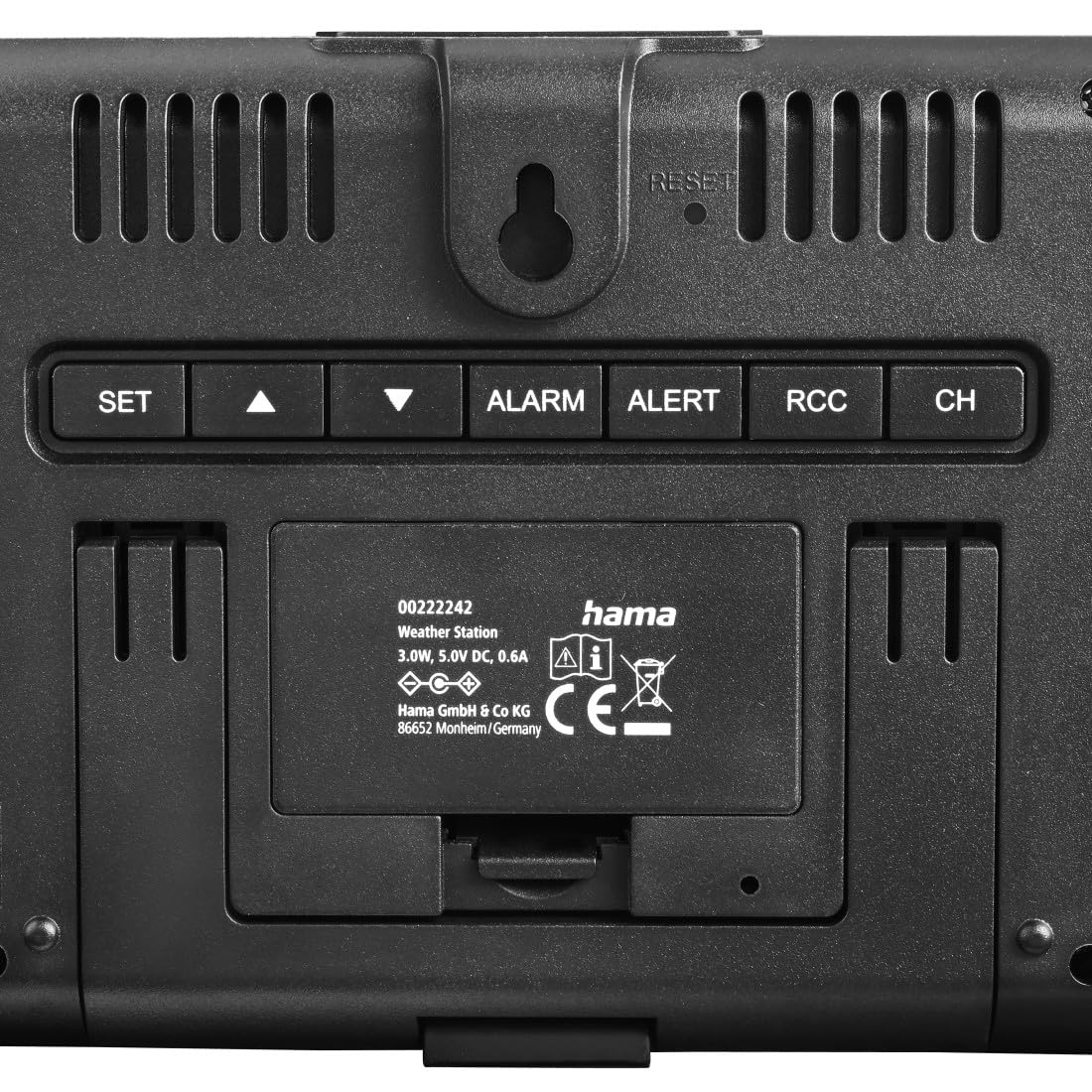
ምስል: የኋላ view of the main unit, highlighting the control buttons and power input.
- አዘጋጅ button: Enters setting mode.
- ▲ (UP) button: Increases values, navigates menus.
- ▼ (DOWN) button: Decreases values, navigates menus.
- ማንቂያ button: Sets or activates/deactivates alarm.
- ማንቂያ button: Sets temperature alerts.
- አርሲሲ button: Manually initiates DCF signal reception.
- CH button: Switches between outdoor sensor channels.
- ዳግም አስጀምር button: Resets the device to factory settings (use a thin object to press).
- SNOOZE / LIGHT button (top): Activates backlight, snoozes alarm.

Image: Close-up of the SNOOZE/LIGHT button on top of the main unit.
4.3 የውጪ ዳሳሽ
The outdoor sensor measures external temperature and humidity and transmits data wirelessly to the main unit.

Image: The outdoor sensor positioned on a window sill.
5. ማዋቀር
5.1 Battery Installation (Outdoor Sensor)
- ከቤት ውጭ ባለው ዳሳሽ ጀርባ ላይ ያለውን የባትሪ ክፍል ይክፈቱ።
- ሁለቱን የ AA Mignon ባትሪዎች ያስገቡ፣ ትክክለኛውን የፖላራይቲ (+/-) ያረጋግጡ።
- የባትሪውን ክፍል ደህንነቱ በተጠበቀ ሁኔታ ይዝጉ።
5.2 ዋናውን ክፍል ማብቃት
The main unit can be powered via the included power supply unit.
- Connect the power supply unit to the main unit's power input.
- የኃይል አቅርቦት አሃዱን ወደ ተስማሚ የኃይል ምንጭ ይሰኩት.
- The display will light up, and the unit will begin searching for the DCF signal and outdoor sensor.
ማስታወሻ፡- The main unit can also use 2x AA batteries (not included) for backup power, but it is primarily designed to be powered by the adapter for continuous display illumination.
5.3 የመጀመሪያ ማመሳሰል
After powering on, the weather station will automatically attempt to synchronize with the DCF radio signal and connect to the outdoor sensor.
- Place the main unit and outdoor sensor close to each other during initial setup.
- The DCF signal icon will flash during reception. Once successful, the icon will appear solid, and the correct time will be displayed. This process may take several minutes.
- The outdoor temperature and humidity will appear on the display once the sensor connects.
5.4 የውጪ ዳሳሽ አቀማመጥ
For accurate outdoor readings, consider the following:
- Mount the outdoor sensor in a shaded, dry location, protected from direct sunlight and rain.
- Avoid placing it near heat sources (e.g., vents, windows that get direct sun) or large metal objects that could interfere with the signal.
- Ensure the sensor is within the effective transmission range (typically up to 30 meters in open areas) of the main unit.
6. የአየር ሁኔታ ጣቢያን መስራት
6.1 የማሳያ መረጃ
The main display shows:
- ሰዓት እና ቀን፡- Automatically set by the DCF signal.
- የቤት ውስጥ ሙቀት/እርጥበት፡ በዋናው ክፍል የሚለካ።
- የውጪ ሙቀት/እርጥበት፡ Received from the outdoor sensor.
- የአየር ሁኔታ ትንበያ: Based on atmospheric pressure changes, displayed with icons (sunny, partly cloudy, cloudy, rainy).
- Frost Alarm: An icon will appear when the outdoor temperature is between -1°C and +1°C.
6.2 በእጅ የሚሰራ ሰዓት እና ቀን
If the DCF signal is not available or you wish to set the time manually:
- ተጭነው ይያዙት። አዘጋጅ button for approximately 3 seconds to enter setting mode.
- The setting value will flash. Use the ▲ or ▼ እሴቱን ለማስተካከል አዝራሮች.
- ተጫን አዘጋጅ again to confirm the setting and move to the next parameter (e.g., 12/24 hour format, hour, minute, year, month, day, temperature unit °C/°F).
- After setting all parameters, press አዘጋጅ ከማቀናበር ሁነታ ለመውጣት.
6.3 ማንቂያ ቅንብር
- የሚለውን ይጫኑ ማንቂያ የማንቂያ ሰዓቱን ለማሳየት አንድ ጊዜ አዝራር።
- ተጭነው ይያዙት። ማንቂያ button for approximately 3 seconds to enter alarm setting mode.
- የሚለውን ተጠቀም ▲ or ▼ ሰዓቱን እና ደቂቃውን ለማስተካከል ቁልፎች.
- ተጫን ማንቂያ እያንዳንዱን ቅንብር ለማረጋገጥ።
- ማንቂያውን ለማንቃት/ለማጥፋት፣ የሚለውን ይጫኑ ማንቂያ የማንቂያ አዶው እስኪታይ/እስኪጠፋ ድረስ ደጋግመው ይጫኑ።
6.4 Snooze and Backlight
የሚለውን ይጫኑ SNOOZE / LIGHT button on the top of the unit:
- When an alarm sounds, press this button to activate the snooze function (alarm will sound again after a few minutes).
- At any other time, press this button to temporarily illuminate the display backlight.
6.5 የሙቀት ማንቂያ ቅንብር
The device allows setting alerts for specific outdoor temperatures.
- የሚለውን ይጫኑ ማንቂያ button to cycle through alert settings (e.g., high temperature alert, low temperature alert).
- ተጭነው ይያዙት። ማንቂያ የማንቂያ ቅንብር ሁነታን ለማስገባት አዝራር።
- ተጠቀም ▲ or ▼ to adjust the desired temperature threshold.
- ተጫን ማንቂያ ለማረጋገጥ እና ወደ ቀጣዩ ቅንብር ይሂዱ።
- To activate/deactivate an alert, press ማንቂያ repeatedly until the alert icon appears/disappears.
7. ጥገና
- ይህንን ምርት በጥቂቱ ብቻ ያጽዱamp፣ ከጥጥ ነፃ የሆነ ጨርቅ እና ኃይለኛ የጽዳት ወኪሎችን አይጠቀሙ።
- ምንም ውሃ ወደ ምርቱ ውስጥ እንደማይገባ እርግጠኛ ይሁኑ.
- Replace batteries in the outdoor sensor when the low battery indicator appears on the main unit.
- ምርቱ ለረጅም ጊዜ ጥቅም ላይ የማይውል ከሆነ ባትሪዎቹን ያስወግዱ።
8. መላ መፈለግ
| ችግር | ሊሆን የሚችል ምክንያት | መፍትሄ |
|---|---|---|
| በዋናው ክፍል ላይ ምንም ማሳያ የለም። | ምንም ኃይል ወይም ጠፍጣፋ ባትሪዎች የሉም። | Ensure power adapter is connected or replace backup batteries. |
| Outdoor readings not displayed or incorrect. | ከክልል ውጪ የሆነ ዳሳሽ፣ ዝቅተኛ የዳሳሽ ባትሪዎች ወይም ጣልቃገብነት። | Move sensor closer, replace sensor batteries, or reposition to avoid interference. Press CH button to re-sync. |
| DCF time not synchronizing. | ደካማ ምልክት፣ ጣልቃ ገብነት ወይም የተሳሳተ የሰዓት ሰቅ ቅንብር። | Move unit to a window, away from electronics. Manually initiate DCF search with አርሲሲ button. Set time manually if necessary. |
| የአየር ሁኔታ ትንበያ የተሳሳተ ይመስላል። | Weather forecasts are based on atmospheric pressure changes and are estimates. | This is normal. The forecast is a prediction based on local pressure trends, not a satellite forecast. |
9. ዝርዝሮች
| የሞዴል ቁጥር | 00222242 |
| የማሳያ ዓይነት | LED (VA Display) |
| የኃይል ምንጭ (ዋና ክፍል) | Power Adapter (5.0V DC, 0.6A), 2x AA Mignon Batteries (backup) |
| የኃይል ምንጭ (ዳሳሽ) | 2x AA Mignon Batteries (included) |
| የግንኙነት ቴክኖሎጂ | የሬዲዮ ድግግሞሽ (433 ሜኸ) |
| የሙቀት ትክክለኛነት | ± 0.5 ° ሴ |
| ልዩ ባህሪያት | DCF Radio Controlled Clock, Frost Alarm, Adjustable Brightness, Large Display |
| ልኬቶች (ዋና ክፍል) | Approx. 15.6 cm (W) x 11.4 cm (H) x 3.1 cm (D) |
| ልኬቶች (ዳሳሽ) | Approx. 4.4 cm (W) x 10.2 cm (H) x 3 cm (D) |

Image: Dimensional drawing of the main unit and outdoor sensor.
10. ዋስትና እና ድጋፍ
Hama GmbH & Co KG provides a manufacturer's warranty for this product. For detailed warranty conditions, please refer to the warranty card included with your product or visit the official Hama webጣቢያ.
For technical support or service inquiries, please contact your local Hama customer service or visit www.hama.com ለበለጠ መረጃ።