
1. መግቢያ
This manual provides essential information for the safe and efficient use of your Haier H55C95EUX 55-inch OLED 4K HDR Smart TV. Please read these instructions thoroughly before operating your television and retain them for future reference.
The Haier H55C95EUX features a 55-inch OLED display for deep blacks and vibrant colors, 4K HDR resolution, a 144Hz refresh rate for smooth motion, integrated Harman Kardon sound, and the Google TV operating system for smart functionality and voice control.

ምስል 1.1፡ አልቋልview of Haier C95 Series OLED TV features, highlighting Harman Kardon audio, 144Hz gaming, Dolby Vision IQ, Dolby Atmos, HDR10+, Google TV, and 3GB RAM with 32GB storage.
2. የደህንነት መረጃ
ይህንን ቴሌቪዥን ሲጠቀሙ የእሳት፣ የኤሌትሪክ ንዝረት እና የመቁሰል አደጋን ለመቀነስ ሁል ጊዜ መሰረታዊ የደህንነት ጥንቃቄዎችን ይከተሉ።
- የኃይል ምንጭ፡- ቴሌቪዥኑን ከኤሲ 220-240V፣ 50/60Hz የኃይል አቅርቦት ጋር ብቻ ያገናኙ።
- የአየር ማናፈሻ; በቴሌቪዥኑ ዙሪያ በቂ የአየር ዝውውርን ያረጋግጡ። የአየር ማናፈሻ ክፍተቶችን አያግዱ.
- ውሃ እና እርጥበት; ቴሌቪዥኑን ለዝናብ እና ለእርጥበት አያጋልጡት። በፈሳሽ የተሞሉ ዕቃዎችን ለምሳሌ የአበባ ማስቀመጫዎች በቴሌቪዥኑ ላይ አታስቀምጡ።
- ማጽዳት፡ ከማጽዳትዎ በፊት ቴሌቪዥኑን ከግድግዳ ሶኬት ያላቅቁት። ለስላሳና ደረቅ ጨርቅ ይጠቀሙ። ፈሳሽ ማጽጃዎችን ወይም ኤሮሶል ማጽጃዎችን አይጠቀሙ።
- መጫን፡ If wall-mounting, ensure the wall mount is compatible with the VESA standard (100 x 100 mm) and can support the TV's weight.
- ልጆች፡- Supervise children to ensure they do not play with the television.
3. በሳጥኑ ውስጥ ያለው
ሳጥኑን በጥንቃቄ ይክፈቱ እና ሁሉም እቃዎች መኖራቸውን እና ምንም ጉዳት እንዳልደረሰባቸው ያረጋግጡ።
- Haier H55C95EUX 55-inch OLED 4K HDR Smart TV
- የርቀት መቆጣጠሪያ
- የተጠቃሚ መመሪያ (ይህ ሰነድ)
- የኃይል ገመድ
- የቲቪ መቆሚያ ክፍሎች (የሚመለከተው ከሆነ)
4. ማዋቀር
4.1 አካላዊ ጭነት
Before installation, consider the TV's dimensions to ensure proper placement.

ምስል 4.1፡ ፊት view dimensions of the 55-inch Haier TV, indicating a width of 1225mm and a height of 749mm.

Image 4.2: Detailed dimensions of the Haier 55-inch TV, showing measurements with and without the stand.
የቁም መጫኛ
- የስክሪኑ ጉዳት እንዳይደርስ ለመከላከል የቴሌቪዥኑን ፊት ለስላሳ እና ጠፍጣፋ መሬት ላይ ያድርጉት።
- Attach the stand components to the designated slots on the bottom of the TV using the provided screws.
- ቴሌቪዥኑን ቀጥ አድርገው ከማስቀመጥዎ በፊት ማቆሚያው ደህንነቱ በተጠበቀ ሁኔታ መያያዙን ያረጋግጡ።
የግድግዳ መጫኛ
If wall-mounting, use a VESA-compatible mount (100 x 100 mm) and follow the mount manufacturer's instructions. Ensure the wall can support the TV's weight.
4.2 ማገናኛ መሳሪያዎች
ቴሌቪዥንዎ ውጫዊ መሳሪያዎችን ለማገናኘት በርካታ ወደቦች አሉት።
- ኤችዲኤምአይ: Connect Blu-ray players, game consoles, or set-top boxes to the HDMI 2.1 ports for high-quality audio and video.
- ዩኤስቢ፡ የሚዲያ መልሶ ማጫወት የዩኤስቢ ማከማቻ መሳሪያዎችን ያገናኙ።
- ኢተርኔት፡ ለተረጋጋ የበይነመረብ ግንኙነት።
- ብሉቱዝ፡ ገመድ አልባ የጆሮ ማዳመጫዎችን ወይም ሌሎች የብሉቱዝ መሳሪያዎችን ያገናኙ።
4.3 የመነሻ ኃይል-ማብራት እና ማዋቀር
- የኃይል ገመዱን ከቴሌቪዥኑ እና ከግድግዳ መውጫ ጋር ያገናኙ.
- በርቀት መቆጣጠሪያው ወይም በቴሌቪዥኑ ላይ የኃይል አዝራሩን ይጫኑ።
- Follow the on-screen instructions to complete the initial setup, including language selection, network connection (Wi-Fi or Ethernet), and Google TV account login.
5. ቴሌቪዥንዎን ሥራ ላይ ማዋል
5.1 የርቀት መቆጣጠሪያ
The included remote control allows you to navigate the TV's features. It may feature a solar cell for eco-friendly charging and USB-C for backup charging.

Image 5.1: The Haier TV remote control, featuring navigation, volume, and app access buttons.
5.2 ጎግል ቲቪ በይነገጽ
Your TV runs on Google TV, providing access to a wide range of streaming services, apps, and personalized content.

Image 5.2: The Google TV home screen, showcasinየተለያዩ የዥረት መተግበሪያዎች እና የይዘት ምክሮች።
የድምጽ ቁጥጥር
Use the built-in voice control feature to search for content, launch apps, and control your TV hands-free. Simply say "Hey Google" or press the voice assistant button on your remote.

Image 5.3: Demonstrating voice control functionality with the Haier TV and Google TV.
5.3 የምስል እና የድምጽ ቅንብሮች
OLED ቴክኖሎጂ
The OLED display provides absolute blacks and infinite contrast for a lifelike viewልምድ.

Image 5.4: Visual representation of OLED technology, showcasing deep blacks and vibrant colors.
Harman Kardon Sound
Experience immersive audio with clear dialogues and cinematic depth, delivered by the integrated Harman Kardon sound system.

Image 5.5: Depiction of the Harman Kardon sound system, emphasizing clear and powerful audio.
Dolby Atmos
Enjoy three-dimensional, immersive sound that moves around you, enhancing your audio experience.
144Hz አድስ ተመን
The 144Hz refresh rate ensures smooth and fluid motion, ideal for fast-paced content like gaming and sports.

Image 5.6: Visual comparison illustrating the fluidity of 144Hz motion compared to 60Hz, particularly beneficial for gaming.
6. ጥገና
6.1 የእርስዎን ቲቪ ማጽዳት
- ከማጽዳትዎ በፊት ሁልጊዜ ቴሌቪዥኑን ይንቀሉ.
- ስክሪኑን እና ካቢኔቱን ለማጽዳት ለስላሳ፣ ደረቅ፣ ከንጣፍ ነፃ የሆነ ጨርቅ ይጠቀሙ።
- ለግትር ምልክቶች፣ በትንሹ መampጨርቁን በውሃ ወይም በልዩ ማያ ገጽ ማጽጃ። ማጽጃውን በቀጥታ ወደ ማያ ገጹ ላይ በጭራሽ አይረጩ።
- ሻካራ ማጽጃዎችን፣ ሰምዎችን ወይም ፈሳሾችን ከመጠቀም ይቆጠቡ።
6.2 የሶፍትዌር ዝመናዎች
Your Haier TV may receive software updates to improve performance and add new features. Ensure your TV is connected to the internet to receive these updates automatically or check for them manually through the settings menu.
7. መላ መፈለግ
በቲቪዎ ላይ ችግሮች ካጋጠሙዎት የሚከተሉትን የተለመዱ መፍትሄዎች ይመልከቱ፡
| ችግር | ሊሆን የሚችል መፍትሄ |
|---|---|
| ኃይል የለም | Check if the power cable is securely connected to the TV and the wall outlet. Ensure the outlet is functioning. Try pressing the power button on the TV itself. |
| ምንም ስዕል የለም፣ ግን ድምጽ አሁን አለ። | የግቤት ምንጩን ያረጋግጡ። የተገናኘው መሣሪያ መብራቱን እና በትክክል እየሰራ መሆኑን ያረጋግጡ። የተለየ የኤችዲኤምአይ ገመድ ወይም ወደብ ይሞክሩ። |
| ምንም ድምፅ የለም፣ ግን ሥዕል አሁን አለ። | Check the volume level. Ensure the TV is not muted. Verify audio output settings (e.g., internal speakers, external sound system). Check audio cables if using external speakers. |
| የርቀት መቆጣጠሪያ አይሰራም | Check the remote control's battery level. Ensure there are no obstructions between the remote and the TV's IR sensor. If it's a solar remote, ensure it has sufficient light exposure. |
| የአውታረ መረብ ግንኙነት ጉዳዮች | ራውተርዎን እና ሞደምዎን እንደገና ያስጀምሩ። የWi-Fi ይለፍ ቃል ያረጋግጡ። ኢተርኔት የሚጠቀሙ ከሆነ ገመዱ በትክክል መገናኘቱን ያረጋግጡ። ካለ ከሌላ አውታረ መረብ ጋር ለመገናኘት ይሞክሩ። |
8. ዝርዝሮች
| ባህሪ | ዝርዝር |
|---|---|
| የሞዴል ስም | H55C95EUX |
| የስክሪን መጠን | 55 ኢንች |
| የማሳያ ቴክኖሎጂ | OLED |
| ጥራት | 4ኬ (3840 x 2160) |
| የማደስ ደረጃ | 120 Hz (Motion Enhancement: 144Hz) |
| የኤችዲአር ቅርጸት ይደገፋል | ዶልቢ ቪዥን |
| ስርዓተ ክወና | ጎግል ቲቪ |
| የውስጥ ማከማቻ | 32 ጊባ |
| የድምጽ ስርዓት | Harman Kardon 2.1 Sound System |
| Surround Sound Format | Dolby Atmos |
| ግንኙነት | Bluetooth, Ethernet, HDMI (x4), USB (x1) |
| ገመድ አልባ ቴክኖሎጂ | ብሉቱዝ ፣ Wi-Fi |
| የመቆጣጠሪያ ዘዴ | Remote Control, Voice |
| የምርት ልኬቶች (DxWxH) | 29.5P x 122.5l x 76.8H cm (with stand) |
| VESA ማፈናጠጥ መደበኛ | 100 x 100 ሚ.ሜ |
| የኢነርጂ ውጤታማነት ክፍል (ኤስዲአር) | ፋ (77 ኪ.ወ.ሰ/1000ሰ) |
| የኢነርጂ ውጤታማነት ክፍል (ኤችዲአር) | ጂ (70 ኪ.ወ/1000 ሰ) |
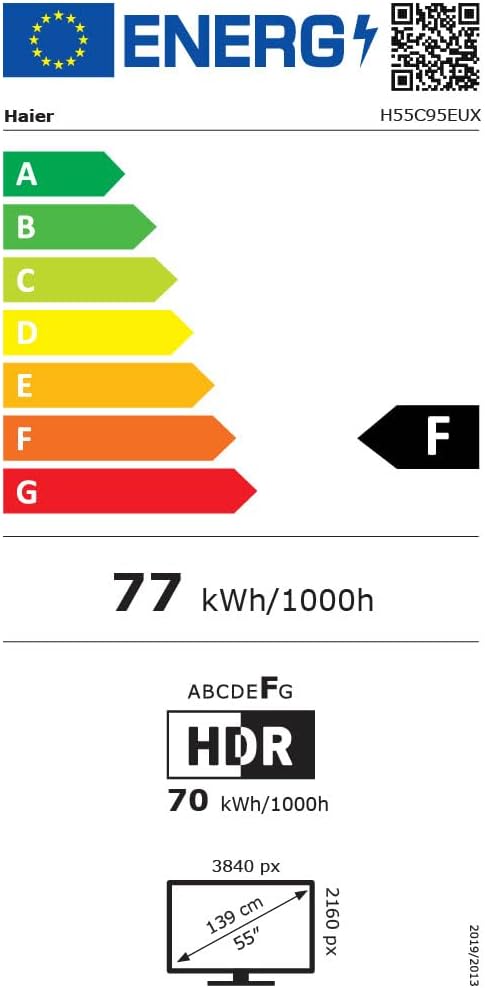
Image 8.1: EU Energy Label for the Haier H55C95EUX TV. For more details, visit the EPREL ዳታቤዝ.
9. ዋስትና እና ድጋፍ
Your Haier H55C95EUX television comes with a የ 2 ዓመት የአምራች ዋስትና. ለዋስትና ጥያቄዎች እባክዎ የግዢ ማረጋገጫዎን ያቆዩ።
For technical support, service, or further inquiries, please refer to the contact information provided on the official Haier webጣቢያ ወይም በአካባቢዎ የተፈቀደ የአገልግሎት ማዕከል።