
1. መግቢያ
This manual provides essential information for the safe and efficient use of your DJI Avata 360 Charging Hub. Please read this manual thoroughly before using the product to ensure proper operation and to prevent damage or injury. Keep this manual for future reference.
The DJI Avata 360 Charging Hub is designed to charge up to three DJI Avata 360 Intelligent Flight Batteries simultaneously or sequentially, depending on the power input.
2. የደህንነት መረጃ
- Use only compatible DJI Avata 360 Intelligent Flight Batteries with this charging hub.
- Ensure the charging hub is connected to a compatible power adapter (DJI 65W Portable Charger or DJI 100W USB-C Power Adapter recommended) with an input of 65W or higher for parallel charging.
- Do not expose the charging hub to water or moisture.
- Do not disassemble, modify, or attempt to repair the charging hub yourself. Contact DJI support for service.
- Keep the charging hub away from heat sources and direct sunlight.
- Always supervise the charging process.
- ልጆች በማይደርሱበት ቦታ ያስቀምጡ.
3. የጥቅል ይዘቶች
ሁሉም እቃዎች በጥቅልዎ ውስጥ መካተታቸውን ያረጋግጡ፡-
- DJI Avata 360 Charging Hub × 1
Note: The power adapter/charger is not included and must be purchased separately.
4. ምርት አብቅቷልview
The DJI Avata 360 Charging Hub features multiple battery slots and a power input port for efficient charging.
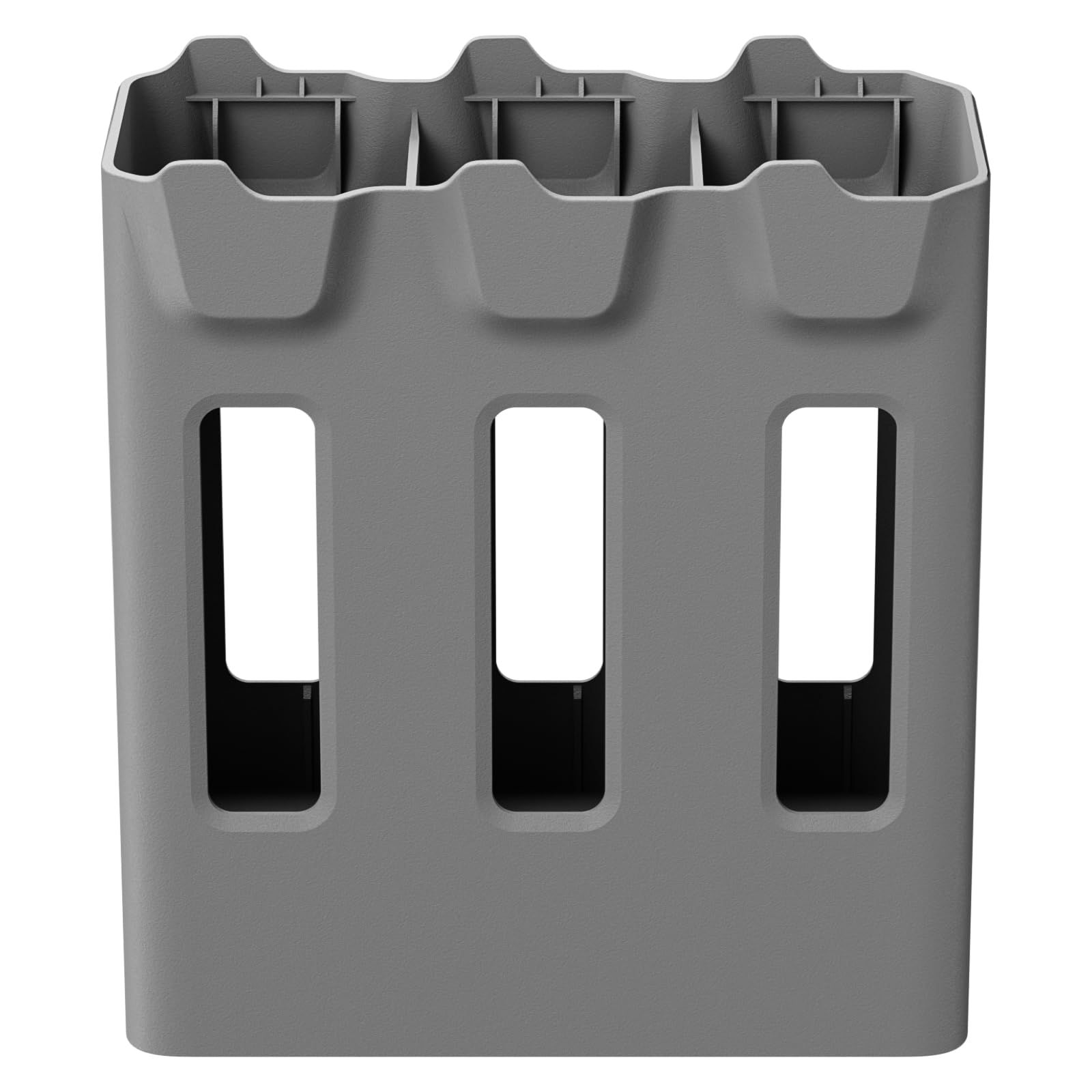
ምስል 1: ማዕዘን view of the DJI Avata 360 Charging Hub. This image displays the hub's overall design, including the three distinct slots for batteries and the USB-C power input port located at the base.

ምስል 2: ጎን view of the charging hub. This perspective clearly shows the USB-C input port and the power button, which are essential for connecting the power source and initiating charging.

ምስል 3፡ ከላይ ወደ ታች view of the charging hub. This image illustrates the three empty slots where DJI Avata 360 Intelligent Flight Batteries are inserted for charging.

Figure 4: Charging hub with batteries inserted. This image demonstrates the charging hub in use, with three DJI Avata 360 Intelligent Flight Batteries securely placed in their slots and the charging cable connected to the hub's input port.
5. ማዋቀር
- የኃይል አስማሚን ያገናኙ፡ Connect a compatible USB-C power adapter (e.g., DJI 65W Portable Charger or DJI 100W USB-C Power Adapter) to the USB-C input port on the charging hub.
- ወደ ኃይል መውጫ ይሰኩት፡ የኃይል አስማሚውን ወደ ግድግዳ መውጫ ይሰኩት.
- ባትሪዎችን አስገባ: Insert up to three DJI Avata 360 Intelligent Flight Batteries into the designated slots on the charging hub. Ensure they are securely seated.
6. የአሠራር መመሪያዎች
6.1 የመሙላት ሂደት
Once batteries are inserted and the hub is connected to a power source, the charging process will begin automatically. The LED indicators on the batteries will show their charging status.
6.2 Parallel vs. Sequential Charging
- Parallel Charging: If the charging hub is connected to a power adapter with an input of 65W or higher (e.g., DJI 65W Portable Charger or DJI 100W USB-C Power Adapter), the hub will support parallel charging. This means all inserted batteries will charge simultaneously.
- Sequential Charging: If the power input is less than 65W, the hub will charge batteries sequentially. In this mode, the hub prioritizes charging the battery with the highest remaining power level first, then proceeds to the next highest, and so on, until all batteries are fully charged.
6.3 የባትሪ ሁኔታን መፈተሽ
Refer to the LED indicators on each DJI Avata 360 Intelligent Flight Battery to check its current charge level and charging status.
7. ጥገና
- ማጽዳት፡ Use a soft, dry cloth to clean the surface of the charging hub. Do not use liquid cleaners or solvents.
- ማከማቻ፡ Store the charging hub in a cool, dry place away from direct sunlight and extreme temperatures when not in use.
- ምርመራ፡- Regularly inspect the charging hub and its ports for any signs of damage or wear.
8. መላ መፈለግ
| ችግር | ሊሆን የሚችል ምክንያት | መፍትሄ |
|---|---|---|
| ባትሪዎች እየሞሉ አይደለም። |
|
|
| Charging is slow or sequential despite multiple batteries. |
|
|
| Hub feels warm during charging. |
|
|
9. ዝርዝሮች
| ባህሪ | ዝርዝር |
|---|---|
| የምርት ስም | ዲጂ |
| የሞዴል ቁጥር | 6937224137479 |
| ቀለም | ግራጫ |
| የምርት ልኬቶች (D x W x H) | 4.13" x 4.57" x 1.97" |
| የእቃው ክብደት | 151 ግ |
| ግብዓት Voltage | 20 ቮ |
| የውጤት ቁtage | 17.2 ቪ ዲ.ሲ |
| የአሁኑ ደረጃ አሰጣጥ | 3 አ |
| Ampንዴት | 5 አ |
| ተስማሚ መሣሪያዎች | DJI Avata 360 ኢንተለጀንት የበረራ ባትሪ |
| የማገናኛ አይነት | DJI Proprietary Connector (USB-C for input) |
| የወደብ ብዛት | 3 (for batteries) |
| የምስክር ወረቀቶች | UL፣ FCC |
| ዩፒሲ | 190021162952 |
10. የዋስትና መረጃ
The DJI Avata 360 Charging Hub comes with a የ 2 ዓመት የአምራች ዋስትና. For detailed warranty terms and conditions, please refer to the official DJI website or contact DJI customer support.
11. ድጋፍ
For technical support, troubleshooting assistance, or service inquiries, please visit the official DJI webጣቢያ ወይም የደንበኞች አገልግሎት ክፍልን ያነጋግሩ።
DJI ኦፊሴላዊ Webጣቢያ፡ www.dji.com።
You can also refer to the product page on Amazon for additional information: የአማዞን ምርት ገጽ


