
መግቢያ
Welcome to the HP OmniDesk M03 AI Desktop PC. This manual provides essential information for setting up, operating, maintaining, and troubleshooting your new computer. The HP OmniDesk M03 is designed for performance and efficiency, featuring an Intel Core Ultra 7 265 processor with dedicated AI cores, 16GB DDR5 RAM, and a 2TB NVMe SSD, running on Windows 11 Home.
በሣጥኑ ውስጥ ያለው
ሁሉም ክፍሎች በማሸጊያው ውስጥ መኖራቸውን ያረጋግጡ፡-
- የ HP OmniDesk ዴስክቶፕ ፒሲ
- ገመድ አልባ ቁልፍ ሰሌዳ
- አይጥ
- ፈጣን ማዋቀር መመሪያ
- የኃይል ገመድ

Image: The HP OmniDesk M03 desktop PC, wireless keyboard, mouse, and power cable, illustrating the contents of the product box.
ማዋቀር
1. ተያያዥ መሳሪያዎች
Before powering on your PC, connect your monitor, keyboard, and mouse.
- ተቆጣጠር፥ Connect your monitor to the PC using an HDMI or DisplayPort cable. The ports are located on the rear of the PC.
- የቁልፍ ሰሌዳ እና መዳፊት; The included keyboard and mouse are wireless. Insert batteries (if not pre-installed) and connect their USB receiver to an available USB port on the PC.
- ኃይል፡- Connect the power cable to the PC's power input on the rear and then to a wall outlet.
- አውታረ መረብ (አማራጭ) For a wired internet connection, connect an Ethernet cable from your router to the RJ45 port on the rear of the PC.

Image: Rear panel of the HP OmniDesk M03, highlighting the DisplayPort, HDMI, USB, and Ethernet ports for connecting external devices.

ምስል: ጎን view of the HP OmniDesk M03 AI Desktop PC, showing its compact tower design.
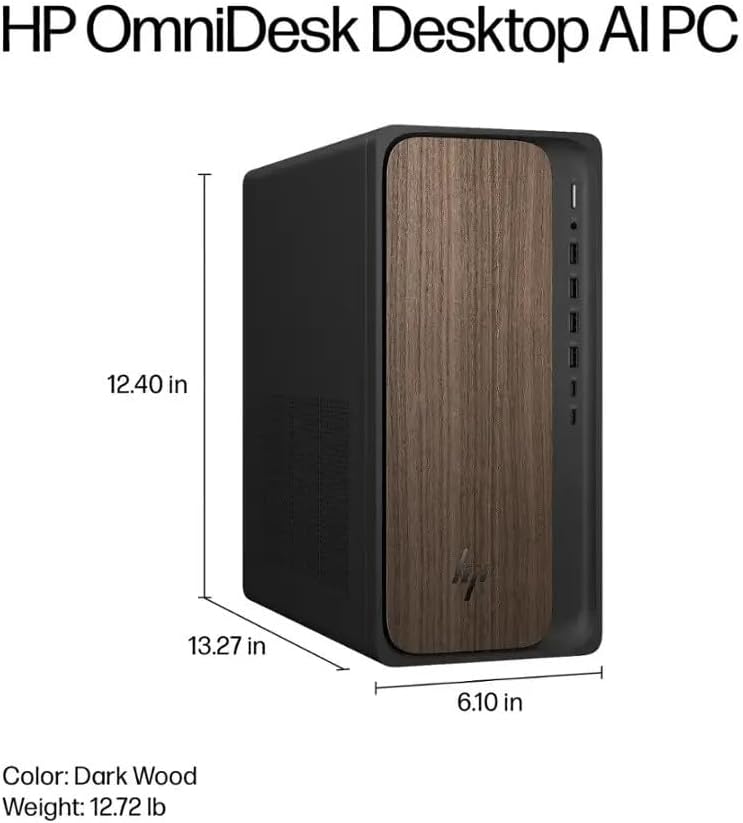
Image: Diagram illustrating the location and type of front and rear ports on the HP OmniDesk M03, including USB-A, USB-C, HDMI, DisplayPort, and audio jacks.
2. ማብራት እና የመጀመሪያ ማዋቀር
Once all peripherals are connected:
- በፒሲው ፊት ላይ የሚገኘውን የኃይል ቁልፍ ይጫኑ።
- Follow the on-screen instructions to complete the Windows 11 Home initial setup, including language selection, network connection (if not wired), account creation, and privacy settings.

ምስል፡ ፊት ለፊት view of the HP OmniDesk M03, showing the power button at the top right and various USB ports below it.
ፒሲዎን በማስኬድ ላይ
ዊንዶውስ 11 መነሻ
Your HP OmniDesk M03 comes pre-installed with Windows 11 Home. Familiarize yourself with the operating system's interface, Start menu, and settings. Microsoft provides extensive online resources for Windows 11 usage.
AI ባህሪያት
The Intel Core Ultra 7 265 processor includes dedicated AI cores and Intel AI Boost, enhancing performance for AI-driven applications and features within Windows 11, such as AI Copilot. These features can assist with tasks, content creation, and system optimization.
ግንኙነት
- ዋይፋይ 6 (802.11ax): ለኢንተርኔት መዳረሻ ከገመድ አልባ አውታረ መረቦች ጋር ይገናኙ። በዊንዶውስ 11 የአውታረ መረብ ቅንብሮች በኩል የWi-Fi ቅንብሮችን ያቀናብሩ።
- ብሉቱዝ 5.4: Pair wireless devices such as headphones, speakers, or additional input devices. Access Bluetooth settings via the Windows 11 settings menu.
- ኢተርኔት፡ For a stable, high-speed wired connection, ensure an Ethernet cable is connected to the RJ45 port.
ጥገና
ፒሲዎን ማጽዳት
- ውጫዊ፡ ለስላሳ፣ ከቆሸሸ ነፃ የሆነ ጨርቅ በትንሹ ተጠቀምampened with water or a mild cleaning solution to wipe down the exterior. Avoid harsh chemicals.
- ትዕይንቶች ትክክለኛውን የአየር ፍሰት ለማረጋገጥ እና ከመጠን በላይ ሙቀትን ለመከላከል የተጨመቀ አየርን በመጠቀም ከአየር ማናፈሻ ግሪልስ አቧራ በየጊዜው ያጽዱ።
- ወደቦች፡ ወደቦች ከአቧራ እና ከቆሻሻ ነፃ ያድርጓቸው።
የሶፍትዌር ዝማኔዎች
Regularly update Windows 11 and device drivers to ensure optimal performance, security, and compatibility. Access Windows Update through the Settings menu.
የውሂብ ምትኬ
የውሂብ መጥፋትን ለመከላከል አስፈላጊ ውሂብዎን በመደበኛነት ወደ ውጫዊ አንጻፊ ወይም የደመና ማከማቻ እንዲያስቀምጡ ይመከራል።
መላ መፈለግ
ይህ ክፍል ሊያጋጥሙዎት የሚችሉ የተለመዱ ጉዳዮችን ይመለከታል።
- ኃይል የለም፡
- የኃይል ገመዱ ከፒሲው እና ከግድግዳው መውጫ ጋር ደህንነቱ በተጠበቀ ሁኔታ መገናኘቱን ያረጋግጡ።
- ሌላ መሳሪያ በመጫን የግድግዳው መውጫው የሚሰራ መሆኑን ያረጋግጡ።
- ማሳያ የለም፡
- Check that the monitor is powered on and correctly connected to the PC via HDMI or DisplayPort.
- ትክክለኛው የግቤት ምንጭ በእርስዎ ማሳያ ላይ መመረጡን ያረጋግጡ።
- የበይነመረብ ግንኙነት የለም፡
- For Wi-Fi, check if the Wi-Fi adapter is enabled and if you are connected to the correct network with the right password.
- For wired connection, ensure the Ethernet cable is properly connected and your router is working.
- የቁልፍ ሰሌዳ/አይጥ ምላሽ የማይሰጥ፡
- Check battery levels for wireless devices.
- Ensure the USB receiver is plugged into a functional USB port.
- ፒሲውን እንደገና ለማስጀመር ይሞክሩ።
ለተጨማሪ ውስብስብ ጉዳዮች፣ የ HP ድጋፍን ይመልከቱ webጣቢያ ወይም የደንበኛ አገልግሎትን ያነጋግሩ።
ዝርዝሮች
Detailed technical specifications for the HP OmniDesk M03 AI Desktop PC:
| አካል | ዝርዝር መግለጫ |
| ፕሮሰሰር | Intel Core Ultra 7 265 (20-Core, up to 5.3 GHz, Intel AI Boost) |
| ስርዓተ ክወና | ዊንዶውስ 11 መነሻ (64-ቢት) |
| ማህደረ ትውስታ (ራም) | 16 ጊባ DDR5 5600 ሜኸ |
| ማከማቻ | 2ቲቢ PCIe NVMe M.2 SSD |
| ግራፊክስ | የተዋሃዱ ኢንቴል ግራፊክስ |
| የቪዲዮ ውፅዓት | 1x HDMI 2.1፣ 1x DisplayPort 1.4a |
| የዩኤስቢ ወደቦች (ፊት) | 2x USB-A 5Gbps, 2x USB-A 10Gbps, 1x USB-C 5Gbps, 1x USB-C 10Gbps |
| የዩኤስቢ ወደቦች (የኋላ) | 4 x ዩኤስቢ 2.0 ዓይነት-ኤ |
| የድምጽ ወደቦች | 1x Headphone/Microphone Combo, 1x Line Input, 1x Line Output |
| አውታረ መረብ | Wi-Fi 6 (802.11ax), Bluetooth 5.4, Gigabit Ethernet (RJ45) |
| ልኬቶች (H x W x D) | 13.3" x 6.1" x 12.4" (33.8 ሴሜ x 15.5 ሴሜ x 31.5 ሴሜ) |
| ክብደት | 11.77 ፓውንድ (5.34 ኪግ) |

Image: Diagram showing the height (13.27 inches), width (6.10 inches), and depth (12.40 inches) of the HP OmniDesk M03 desktop PC.
ዋስትና እና ድጋፍ
የዋስትና መረጃ
Your HP OmniDesk M03 AI Desktop PC comes with a 90-ቀን የተወሰነ ዋስትና. This warranty covers defects in materials and workmanship under normal use. For detailed terms and conditions, please refer to the warranty documentation included with your product or visit the official HP support webጣቢያ.
የደንበኛ ድጋፍ
For technical assistance, troubleshooting, or warranty claims, please contact HP Customer Support:
- የመስመር ላይ ድጋፍ ኦፊሴላዊውን ይጎብኙ የ HP ድጋፍ Webጣቢያ ለአሽከርካሪዎች፣ ለመመሪያዎች እና ለመላ ፍለጋ መመሪያዎች።
- የስልክ ድጋፍ፡ Refer to the Quick Setup Guide or HP's webለክልላዊ አድራሻ ቁጥሮች ጣቢያ.
When contacting support, please have your product model (M03) and serial number ready.