መግቢያ
This manual provides instructions for the Generic replacement remote control designed for the Excelvan RD-802 LED Mini Portable Pocket Projector. This remote control offers a convenient way to operate your projector. Please note that as a replacement unit, some functions may differ from your original remote control.
ምርት አልቋልview
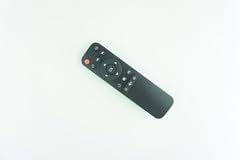
Image: Generic replacement remote control. This image displays the black remote control with various buttons for power, navigation, and other functions, designed for ease of use.
The remote control is designed for simple operation and features a compact size. It is constructed from durable ABS material for comfortable handling and longevity.
ማዋቀር
- የባትሪ ጭነት; Open the battery compartment cover on the back of the remote control. Insert two AAA batteries (not included), ensuring correct polarity (+/-). Close the battery compartment cover securely.
- ምንም ፕሮግራም አያስፈልግም፡- This replacement remote control does not require any programming or setup. Once batteries are installed, it is ready for use with your Excelvan RD-802 LED Mini Projector.
- የተኳኋኝነት ማስታወሻ፡- As a replacement remote, some advanced or specific functions of your original projector remote may not be supported. This is not indicative of a defective product.
የአሠራር መመሪያዎች
Point the remote control directly at the infrared receiver on your Excelvan RD-802 LED Mini Projector. Ensure there are no obstructions between the remote and the projector. The remote offers stable performance and a farther transmitting distance compared to some standard remotes.
- የኃይል ቁልፍ፡- Press the power button (usually red) to turn the projector on or off.
- የማውጫ ቁልፎች: Use the directional arrow buttons (Up, Down, Left, Right) to navigate through menus and options.
- እሺ/አዝራር አስገባ፡ Press the 'OK' or 'Enter' button in the center of the navigation pad to confirm selections.
- የድምጽ መቆጣጠሪያ፡- If available, use the volume buttons to adjust the audio output of the projector.
- Menu/Source Buttons: Use dedicated buttons to access the projector's menu or switch input sources.
Refer to your projector's user manual for specific functions and menu navigation details.
ጥገና
- የባትሪ መተካት፡ Replace batteries when the remote's performance degrades or it stops responding. Always use new batteries of the specified type (AAA).
- ማጽዳት፡ የርቀት መቆጣጠሪያውን ለስላሳና ደረቅ ጨርቅ ያጽዱ። ፈሳሽ ማጽጃዎችን ወይም የማጽጃ ቁሳቁሶችን አይጠቀሙ።
- ማከማቻ፡ የርቀት መቆጣጠሪያውን በቀጥታ ከፀሀይ ብርሀን እና ከከፍተኛ ሙቀት ርቆ በቀዝቃዛና ደረቅ ቦታ ያከማቹ። ረዘም ላለ ጊዜ ጥቅም ላይ ካልዋሉ, የውሃ ማፍሰስን ለመከላከል ባትሪዎቹን ያስወግዱ.
መላ መፈለግ
- የርቀት ምላሽ የማይሰጥ፡
- ባትሪዎቹ በትክክል ከትክክለኛው ፖላሪቲ ጋር በትክክል መጨመሩን ያረጋግጡ.
- የድሮ ባትሪዎችን በአዲስ ይተኩ።
- Ensure there is a clear line of sight between the remote control and the projector's infrared receiver.
- Confirm the remote is pointed directly at the projector.
- አንዳንድ የማይሰሩ ተግባራት፡- This remote is a replacement unit. It may not support all functions of the original projector remote. This is expected behavior and not a defect.
- ተጨማሪ እርዳታ፡ If you encounter persistent issues, it is helpful to provide your original remote's part number or your projector's exact model number when seeking support.
ዝርዝሮች
| የምርት ስም | አጠቃላይ |
| ተስማሚ መሣሪያዎች | Excelvan RD-802 LED Mini Projector |
| ቁሳቁስ | ኤቢኤስ/ፕላስቲክ |
| ቀለም | ጥቁር ወይም ነጭ (ቀለም ሊለያይ ይችላል) |
| ልዩ ባህሪ | Digital Display (if applicable to specific variants) |
| የሚደገፉ መሳሪያዎች ከፍተኛ ቁጥር | 2 |
| ASIN | B0FYHT81K2 |
| አምራች | ሆአንጋህ542543 |
ዋስትና እና ድጋፍ
Specific warranty information for this Generic replacement remote control is not provided in the product details. For any warranty claims or technical support, please contact the seller or retailer from whom you purchased the product directly. Providing your original remote part number or projector model may assist in resolving inquiries more efficiently.


