
መግቢያ
Welcome to the Thunderobot Zero 16 Pro user manual. This document provides essential information for setting up, operating, maintaining, and troubleshooting your new gaming laptop. The Thunderobot Zero 16 Pro is engineered for high-performance gaming and demanding applications, featuring an Intel Core Ultra 9 275HX processor, NVIDIA GeForce RTX 5080 graphics, a 16-inch QHD+ 360Hz display, 32GB DDR5 RAM, and a 1TB PCIe M.2 SSD.
ለተሻለ አፈጻጸም እና ረጅም ዕድሜ፣ መሳሪያዎን ከመጠቀምዎ በፊት ይህንን መመሪያ በደንብ ያንብቡ።
የጥቅል ይዘቶች
ሁሉም እቃዎች በጥቅልዎ ውስጥ መኖራቸውን ያረጋግጡ፡-
- Thunderobot Zero 16 Pro Gaming Laptop
- የኃይል አስማሚ እና ገመድ
- የተጠቃሚ መመሪያ (ይህ ሰነድ)
- የዋስትና ካርድ
ማዋቀር
1. የመጀመሪያ ኃይል-በ
- የግንኙነት ኃይል; የኃይል አስማሚውን ከላፕቶፑ የኃይል ወደብ ጋር ይሰኩት እና ከዚያም ወደ ግድግዳ መውጫ ይሰኩት።
- ላፕቶፕ ክፈት፡ የሊፕቶፑን ክዳን በጥንቃቄ ይክፈቱ.
- አብራ፡ የኃይል አዝራሩን ይጫኑ፣ በተለምዶ ከቁልፍ ሰሌዳው በላይ ወይም በጎን በኩል ይገኛል።
- የመጀመሪያ ማዋቀር፡- ቋንቋ፣ ክልል፣ የአውታረ መረብ ግንኙነት እና የተጠቃሚ መለያ መፍጠርን ጨምሮ የዊንዶውስ 11 የቤት ማዋቀርን ለማጠናቀቅ የማያ ገጽ ላይ መመሪያዎችን ይከተሉ።
2. ተያያዥ መሳሪያዎች
The Thunderobot Zero 16 Pro offers various ports for connecting external devices:
- የዩኤስቢ-ኤ ወደቦች፡ Connect mice, keyboards, external hard drives, and other USB accessories.
- USB-C Port (Thunderbolt 5): For high-speed data transfer, external displays, and power delivery.
- HDMI 2.1 ወደብ፡ ለተጨማሪ ማሳያ ከውጫዊ ማሳያዎች ወይም ቲቪዎች ጋር ይገናኙ።
- RJ-45 የኤተርኔት ወደብ፡ ለተረጋጋ የገመድ አውታረ መረብ ግንኙነት።
- 3.5ሚሜ ኦዲዮ ጃክ፡ የጆሮ ማዳመጫዎችን ወይም የውጭ ድምጽ ማጉያዎችን ያገናኙ ፡፡
ምስል: ጎን view of the Thunderobot Zero 16 Pro, highlighting the RJ-45, USB3.2 Gen2 Type-A, HDMI 2.1, Thunderbolt 5 Type-C, Power, USB3.2 Gen1 Type-A, and 3.5mm audio jack ports.

Image: Detailed diagram illustrating the location and type of ports available on the Thunderobot Zero 16 Pro, including USB, HDMI, Ethernet, and audio connections.
የአሠራር መመሪያዎች
1. Keyboard and Lighting
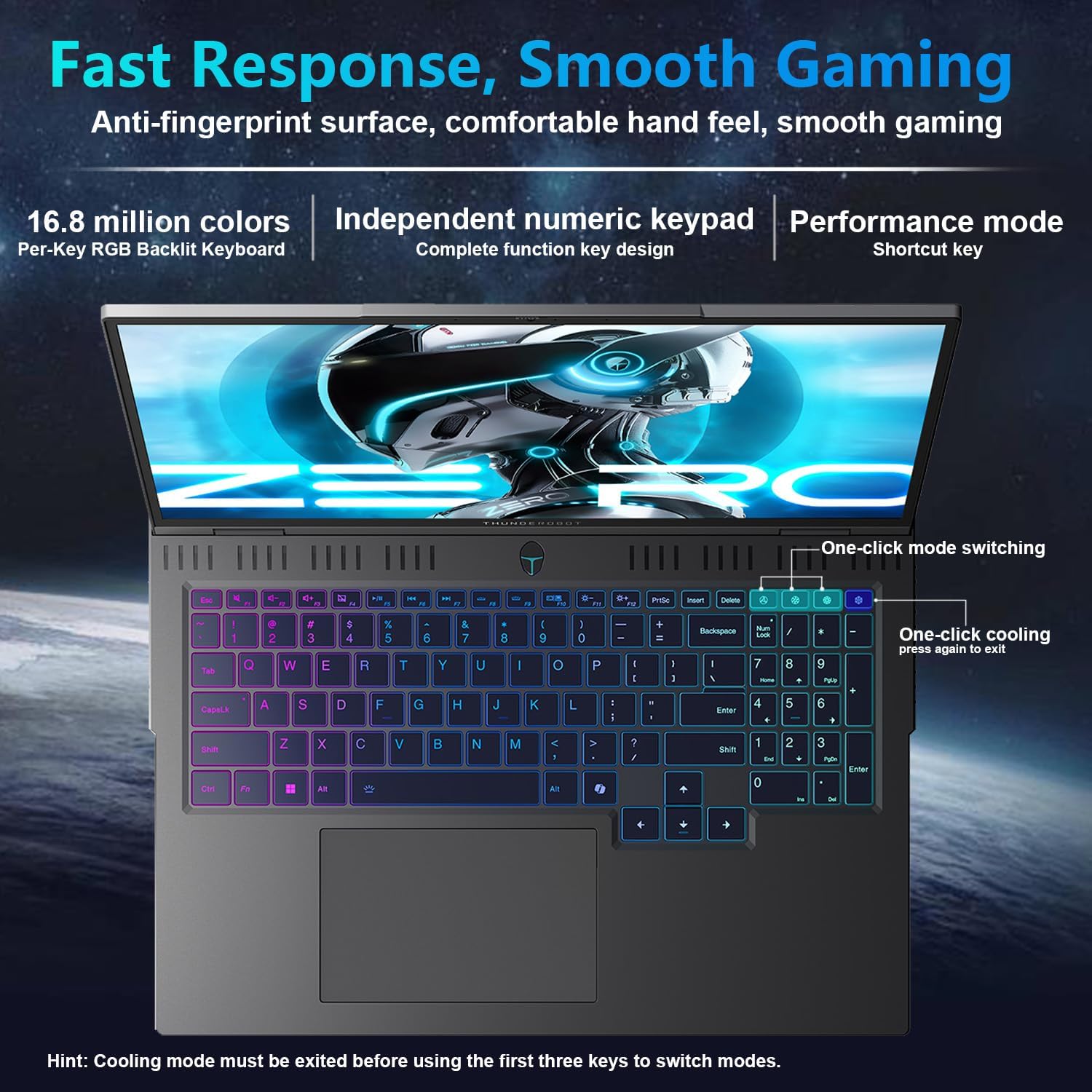
The laptop features a full-size, per-key RGB backlit keyboard with a numeric keypad. You can customize the RGB lighting effects through the Thunderobot Control Center software.
- Performance Mode Switching: Use dedicated shortcut keys to switch between performance profiles (e.g., Quiet, Balance, Turbo).
- One-Click Cooling: A dedicated key allows for instant activation of maximum cooling.
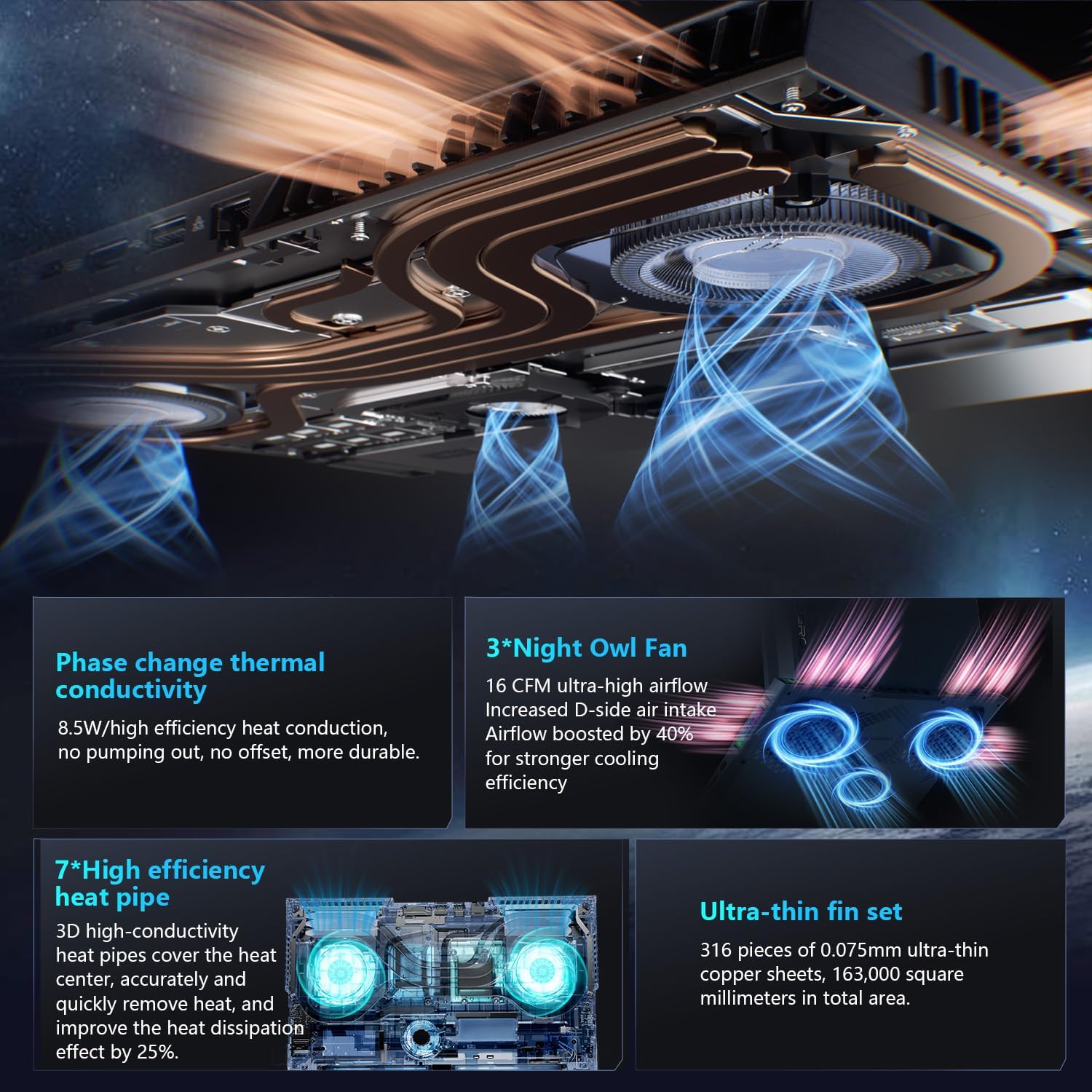
Image: The RGB backlit keyboard of the Thunderobot Zero 16 Pro, showing the full layout and numeric keypad.

Image: Visual guide to the keyboard's one-click mode switching and cooling activation keys.
Video: This video demonstrates the RGB lighting system and keyboard features of the Thunderobot Zero 16 Pro, including performance mode switching and one-click cooling.
2. የማሳያ ባህሪያት
The 16-inch QHD+ (2560x1600) display offers a 360Hz refresh rate and eye-care technology. To utilize the highest refresh rate, ensure the dedicated graphics direct connection mode is enabled in the Control Center.
- Anti-Glare & Anti-Reflection: Reduces distractions from ambient light.
- ፀረ-ሰማያዊ ብርሃን፦ Helps reduce eye strain during prolonged use.
- የዲሲ መደብዘዝ፡ Provides flicker-free eye protection.
- ሙያዊ የቀለም ማስተካከያ፡ ትክክለኛ የቀለም ማባዛትን ያረጋግጣል።

Image: The 16-inch QHD+ display of the Thunderobot Zero 16 Pro, showcasing its high refresh rate and eye-care features.

Image: Infographic detailing the display's features such as 2.5K resolution, 360Hz refresh rate, 500 nits brightness, and various eye protection technologies.
3. Thunderobot Control Center
The AI Intelligent Control Center software allows for comprehensive management of your laptop's performance, lighting, and system settings. It is recommended to connect the device to a power source for full functionality of system mode switching.
- የአፈጻጸም ማስተካከያ፡ Adjust CPU and GPU settings for optimal performance or power saving.
- Intelligent Light Adjustment: Customize keyboard, strip, and logo RGB lighting.
- Comprehensive Adjustment: Monitor system status, fan speeds, and manage other personalized settings.
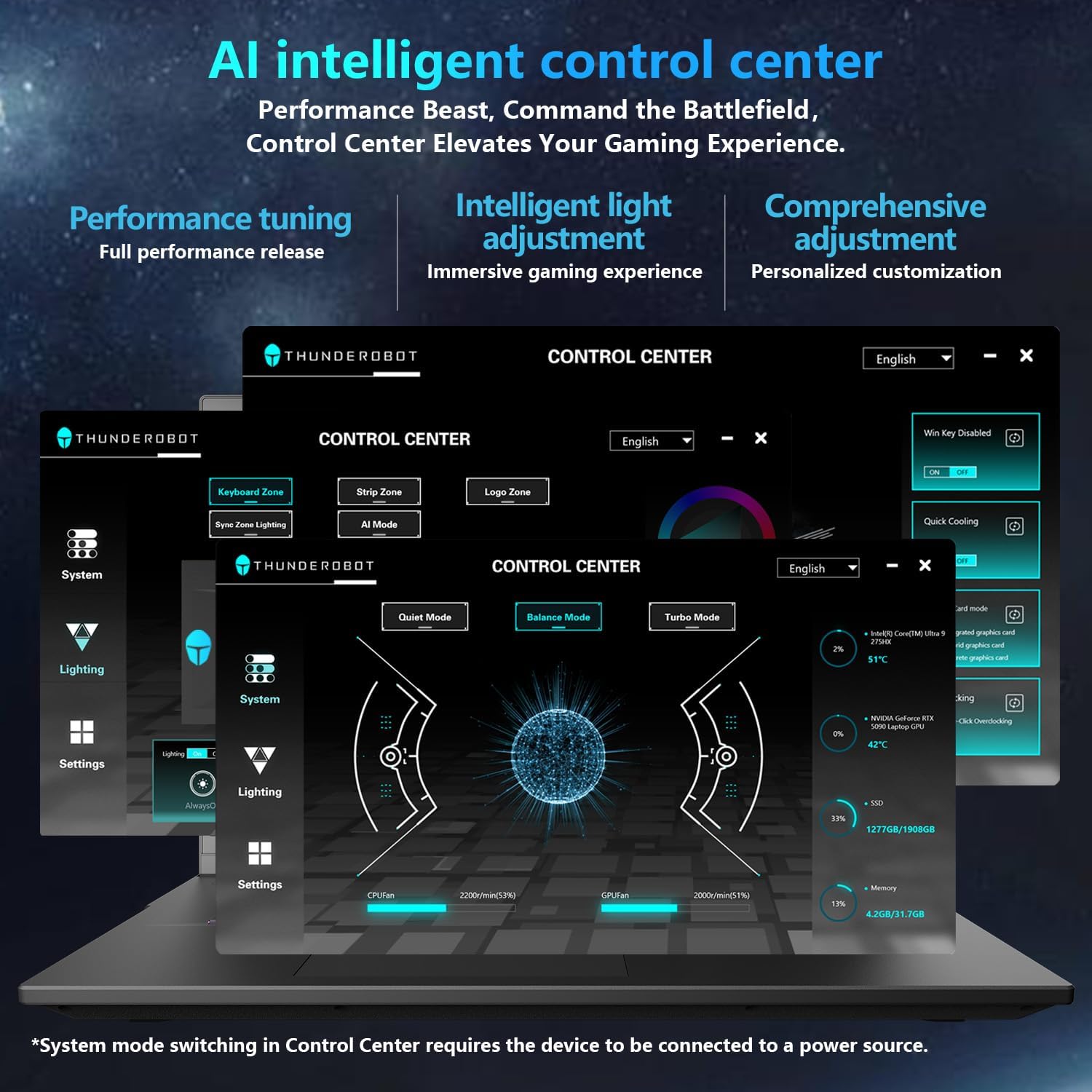
Image: A visual representation of the Thunderobot Control Center interface, showing options for system monitoring, lighting control, and performance settings.
Image: Infographic explaining the capabilities of the AI Intelligent Control Center, including performance tuning, intelligent light adjustment, and comprehensive system management.
4. የድምጽ ስርዓት
The laptop is equipped with a Soundstage Full audio system, featuring 4 speakers and Nahimic high-quality sound effects for an immersive audio experience.

Image: A graphic illustrating the Soundstage Full audio system with sound waves, emphasizing the immersive experience.
Video: This video showcases the display quality and overall design of the Thunderobot Zero series, including the Zero 16 Pro.
ጥገና
1. የማቀዝቀዣ ዘዴ
The Thunderobot Zero 16 Pro features a robust cooling system designed to maintain performance under heavy loads. This includes dual Night Owl fans, 7 enlarged heat pipes, and 316 ultra-thin copper fins.
- የአየር ማናፈሻዎችን አጽዳ; Ensure that the air intake and exhaust vents are not obstructed to allow for proper airflow.
- መደበኛ ጽዳት; የተጨመቀ አየርን በመጠቀም በየጊዜው አቧራውን ከአየር ማስወጫ ቱቦዎች ያጽዱ.

ምስል፡ የፈነዳ view of the laptop's internal cooling components, showing the dual fans, heat pipes, and fin set.

Image: Infographic explaining the Night Hawk fans, high-efficiency heat pipes, phase-change thermal conduction, and ultra-thin fin array.
2. አጠቃላይ እንክብካቤ
- ማጽዳት፡ ስክሪኑንና ቻሲስን ለማጽዳት ለስላሳ፣ ከንጣፍ ነፃ የሆነ ጨርቅ ይጠቀሙ። ጠንከር ያሉ ኬሚካሎችን ያስወግዱ።
- የአካባቢ ሁኔታዎች; Operate the laptop within recommended temperature ranges (-20°C to 60°C) and humidity (up to 90%).
- የባትሪ ዕድሜ; To prolong battery life, avoid frequently discharging the battery completely and store the laptop with a partial charge if not used for extended periods.
Video: This video highlights the robust build quality and testing of Thunderobot gaming products, demonstrating their durability.
መላ መፈለግ
የተለመዱ ጉዳዮች እና መፍትሄዎች
| ጉዳይ | ሊሆን የሚችል ምክንያት | መፍትሄ |
|---|---|---|
| Display not reaching 360Hz refresh rate. | Dedicated graphics direct connection mode is not enabled. | Enable the dedicated graphics direct connection mode in the Thunderobot Control Center. |
| Laptop performance is lower than expected. | Laptop is not connected to power, or is in a power-saving mode. | Connect the laptop to its power adapter. Adjust performance settings to "Turbo Mode" or "Performance Mode" in the Thunderobot Control Center. Ensure cooling vents are clear. |
| Keyboard RGB lighting is not working or customizable. | Lighting settings are disabled or not configured in the Control Center. | Open the Thunderobot Control Center and navigate to the "Lighting" section to enable and customize RGB effects. |
| No sound from speakers or headphones. | Audio drivers are outdated, volume is muted, or incorrect output device selected. | Check volume levels and audio output settings in Windows. Update audio drivers if necessary. Ensure headphones are fully plugged into the 3.5mm jack. |
ዝርዝሮች
| ባህሪ | ዝርዝር |
|---|---|
| የምርት ስም | ተንደርሮቦት |
| የሞዴል ስም | ZERO 16 Pro |
| የስክሪን መጠን | 16 ኢንች |
| ጥራት | 2560x1600 pixels (QHD+) |
| የማደስ ደረጃ | 360Hz |
| የሲፒዩ ሞዴል | Intel Core Ultra 9 275HX (24 Cores, up to 5.4 GHz) |
| ግራፊክስ ኮፕሮሰሰር | NVIDIA GeForce RTX 5080 (12 ጊባ GDDR7) |
| RAM ማህደረ ትውስታ የተጫነ መጠን | 32 ጊባ DDR5 (4800 ሜኸ) |
| የሃርድ ዲስክ መጠን | 1 TB SSD (PCIe x4) |
| ስርዓተ ክወና | ዊንዶውስ 11 መነሻ |
| የግንኙነት ቴክኖሎጂ | Wi-Fi 6E, Bluetooth, USB-A, USB-C (Thunderbolt 5), HDMI, Ethernet, Audio Jack |
| ጠቅላላ የዩኤስቢ ወደቦች | 4 |
| HDMI ወደቦች | 1 |
| የቁልፍ ሰሌዳ | የኋላ ብርሃን፣ በቁጥር ቁልፍ ሰሌዳ ሙሉ መጠን |
| Webየካም አቅም | አዎ |
| የንጥል መጠኖች (L x W x ውፍረት) | 14.09"ኤል x 10.52" ዋ x 1.03"ሰ |
| ለምርት ልዩ አጠቃቀሞች | ጨዋታ |
ዋስትና እና ድጋፍ
የዋስትና መረጃ
Every Thunderobot laptop includes a የ 12-ወር ዋስትና, offering expert support, thorough diagnostics, and genuine parts if a repair is needed. Additionally, a የ 90 ቀን ዋስትና is provided on all warranty replacement parts, ensuring hassle-free repairs. Your complete satisfaction is our commitment.
የደንበኛ ድጋፍ
For technical assistance, warranty claims, or product inquiries, please visit the official Thunderobot website or contact their customer support. Refer to the warranty card included in your package for specific contact details and terms.
እንዲሁም መጎብኘት ይችላሉ Thunderobot Store on Amazon ለተጨማሪ የምርት መረጃ እና የድጋፍ ምንጮች.


