
መግቢያ
This manual provides detailed instructions for the Saitake Wireless Arcade Fight Stick Joystick. It covers product features, setup, operation, connection methods, and troubleshooting to ensure optimal performance across various platforms including PC, Android, iOS, Nintendo Switch, PS3, and PS4.
ምርት አልቋልview
ቪዲዮ: አልቋልview of the Saitake Arcade Fight Stick, showcasing its design, joystick, buttons, and key features.
ቁልፍ ባህሪያት
- የብዝሃ-ፕላትፎርም ተኳኋኝነት፡- Compatible with Windows PC, Android, iOS, Nintendo Switch 1/2, PS3, and PS4.
- Three Connection Methods: Supports Bluetooth, 2.4GHz wireless (with included receiver), and wired (Type-C) connections.
- የተቀናጀ የማሳያ ማያ ገጽ፦ A 1.9-inch functional display screen shows function options, volume, lighting effects, brightness, and language settings.
- 3.5 ሚሜ የጆሮ ማዳመጫ ጃክ; For audio output and communication.
- የቱርቦ ተግባር Equipped with standard turbo and upgraded auto turbo modes for rapid input execution.
- የማክሮ ተግባር Customize button mappings and create macro commands with up to 18 keystrokes, including trigger timestamps.
- ከፍተኛ ትክክለኛነት ጆይስቲክ; Features an adjustable RGB light ring with 4 modes and 7 colors.
- ዝቅተኛ-ፕሮfile Red Switches: Buttons utilize low-profile red switches for light pressure and quick response.
- Ergonomic ንድፍ; Designed for comfortable and extended gaming sessions.
Product Layout and Button Functions
Familiarize yourself with the layout and functions of the arcade fight stick's buttons and controls.

Image: Detailed diagram of the Saitake Arcade Fight Stick showing the location and labels of all buttons and features.
- A: የምናሌ አማራጭ
- B: Joystick Function Option
- C: ጆይስቲክ
- D: የስክሪን ማሳያ
- E: የቱርቦ ቁልፍ
- F: አዝራር ይምረጡ
- G: የጀምር አዝራር
- H: መነሻ አዝራር
- I: የግንኙነት አማራጭ
- J: Touch Panel (for PS4 platform)
- K: Earphone & Microphone Option
- L: LSB አዝራር
- M: የRSB ቁልፍ
- N: LB አዝራር
- O: LT አዝራር
- P: የጆሮ ማዳመጫ መሰኪያ
- Q: MACRO Button
- R: አንድ ቁልፍ
- S: X አዝራር
- T: ቢ ቁልፍ
- U: ኢ አዝራር
- V: RT አዝራር
- W: አርቢ አዝራር
ማዋቀር እና ግንኙነት
መሣሪያውን በመሙላት ላይ
The arcade stick has a built-in 1000mAh rechargeable lithium battery. Connect the included USB Type-C cable to the device and a power source (e.g., computer USB port, USB wall adapter) to charge. The display screen will indicate charging status.
የግንኙነት ዘዴዎች
The Saitake Arcade Fight Stick supports three primary connection methods:

Image: Visual representation of the Bluetooth switch, 2.4G receiver, and Type-C wired connection port.
- የብሉቱዝ ግንኙነት
- Ensure the arcade stick is powered on and in Bluetooth pairing mode (refer to the display screen for status).
- On your device (Android, iOS, Switch, PS3, PS4, PC with Bluetooth), search for available Bluetooth devices.
- Select "Saitake Arcade Stick" to pair.
- 2.4GHz ገመድ አልባ ግንኙነት፡-
- Locate the 2.4GHz receiver in the hidden compartment on the back of the arcade stick.
- Plug the 2.4GHz receiver into a USB port on your PC, Switch dock, or PS3/PS4 console.
- The arcade stick should automatically connect to the receiver.
- ባለገመድ ግንኙነት፡
- Connect the USB Type-C cable from the arcade stick to a USB port on your PC, Switch dock, or PS3/PS4 console.
- The device will automatically detect the wired connection.
የብዝሃ-ፕላትፎርም ተኳኋኝነት
The Saitake Arcade Fight Stick is designed for broad compatibility. The image below illustrates the supported systems.

Image: Icons representing Android, iOS, PC, Nintendo Switch, PS3, and PS4, indicating multi-system support.
የአሠራር መመሪያዎች
አጠቃላይ አጠቃቀም
Once connected, the arcade stick functions as a standard controller for compatible games. Use the joystick for directional input and the action buttons for in-game commands. The 1.9-inch display screen provides real-time information and allows for various adjustments.
የ TURBO ተግባር
The TURBO function allows for rapid, repeated input of a button press. This can be useful in games requiring fast button mashing.
- Standard Turbo: የሚለውን ይጫኑ ቱርቦ button and the desired action button simultaneously to activate. The button will now rapidly repeat its input when held down.
- አውቶ ቱርቦ Some modes may offer an auto-turbo feature where the button repeats without needing to be held. Refer to the on-screen display for specific settings.
- ፍጥነት ማስተካከል; The display screen and encoder allow for adjusting the turbo speed settings.
- ቱርቦን በማጥፋት ላይ የሚለውን ይጫኑ ቱርቦ button and the action button again to deactivate.
ማክሮ ተግባር
The MACRO function allows you to record a sequence of up to 18 keystrokes and assign them to a single button for complex command execution.
- ማክሮን መቅዳት፡
- የሚለውን ይጫኑ ማክሮ button to enter recording mode. The display screen will indicate recording status.
- Perform the desired sequence of button presses and joystick movements.
- የሚለውን ይጫኑ ማክሮ ቀረጻውን ለማቆም እንደገና ይጫኑ።
- Assign the recorded macro to a specific button by pressing that button.
- ማክሮን ማስኬድ፡ Press the assigned button to execute the recorded sequence.
- ማክሮን ማጽዳት; Refer to the display screen options or the full manual for instructions on clearing recorded macros.

Image: Visual explanation of the Turbo and Macro functions, highlighting their benefits for efficient gaming.
Display Screen and Audio Jack
- 1.9-inch Functional Display Screen: Use the encoder and buttons near the screen to navigate menus and adjust settings such as volume, lighting effects, brightness, and language. The screen also provides status updates.
- 3.5 ሚሜ የጆሮ ማዳመጫ ጃክ; Located on the side of the unit, this jack allows you to connect headphones or a headset for in-game audio and voice chat (if supported by the connected platform).
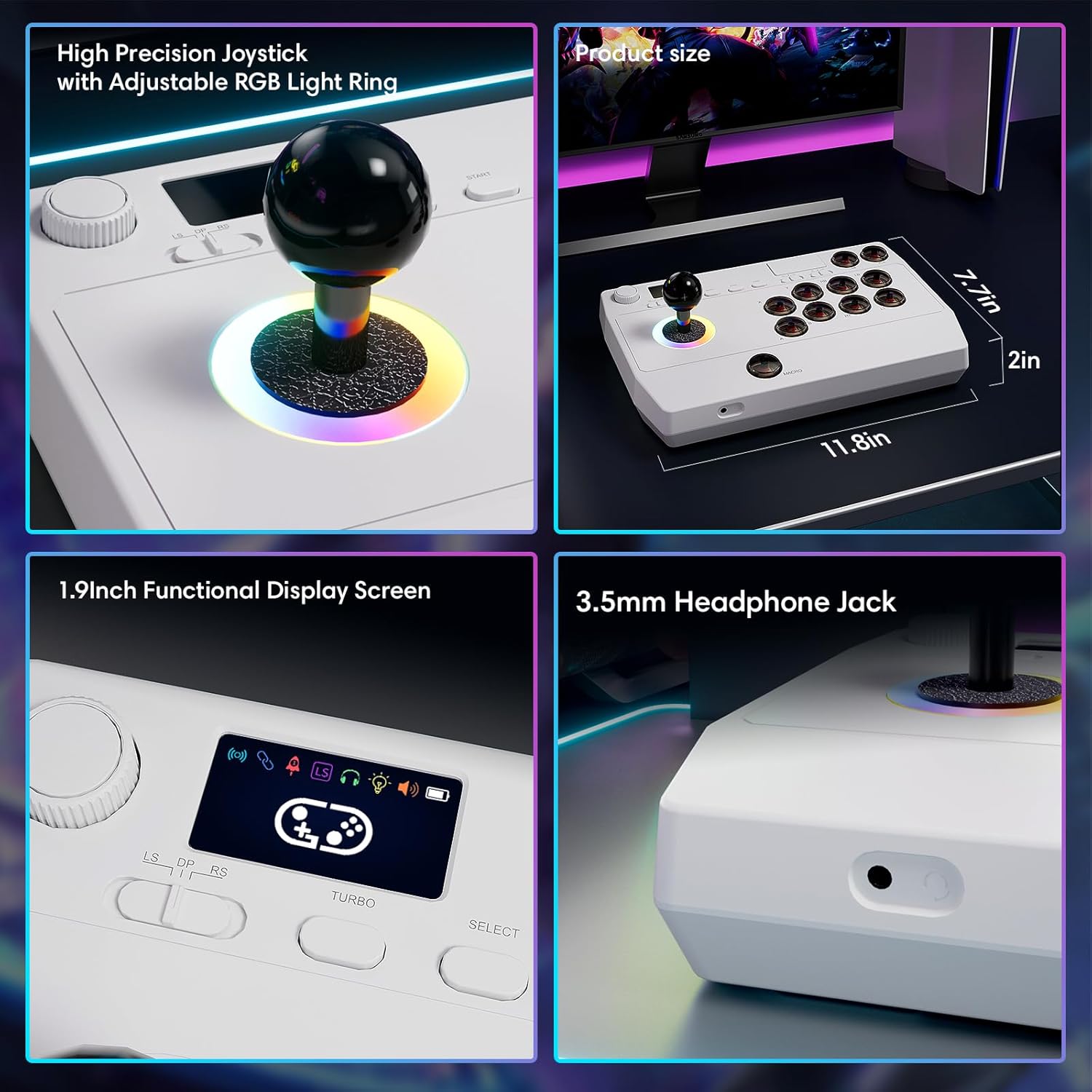
ምስል፡ መቀራረብ views of the high-precision joystick with RGB lighting, the 1.9-inch functional display screen, and the 3.5mm headphone jack.
ጥገና
- ለስላሳ እና ደረቅ ጨርቅ በማጽዳት መሳሪያውን በንጽህና ይያዙት.
- መሳሪያውን ለከፍተኛ ሙቀት፣ እርጥበት ወይም ቀጥተኛ የፀሐይ ብርሃን ከማጋለጥ ይቆጠቡ።
- መሣሪያውን ለመበተን አይሞክሩ፣ ምክንያቱም ይህ ዋስትናውን ሊያሳጣው ይችላል።
- Store the 2.4GHz receiver in its designated compartment when not in use to prevent loss.
መላ መፈለግ
- መሣሪያው አይበራም፦
- Ensure the device is fully charged. Connect it to a power source using the USB Type-C cable.
- Cannot connect wirelessly:
- For Bluetooth, ensure the device is in pairing mode and your host device's Bluetooth is enabled.
- For 2.4GHz, ensure the receiver is securely plugged into a USB port and the arcade stick is in 2.4GHz mode.
- Try restarting both the arcade stick and the host device.
- Buttons or joystick are unresponsive:
- Ensure the device is properly connected (wired or wireless).
- Test the device on a different game or platform to rule out software issues.
- በአዝራሮቹ ወይም በጆይስቲክ ላይ የሚደርስ ማንኛውም አካላዊ እንቅፋት ወይም ጉዳት ካለ ያረጋግጡ።
- Audio issues with 3.5mm jack:
- የጆሮ ማዳመጫዎቹ ሙሉ በሙሉ መሰካታቸውን ያረጋግጡ።
- Check the volume settings on both the arcade stick's display and the host device.
- Test with a different pair of headphones.
ዝርዝሮች
| የሞዴል ስም | የመጫወቻ ማዕከል |
| የምርት ስም | ሳይታኬ |
| ተስማሚ መሣሪያዎች | Android, iOS, Nintendo Switch 1/2, PC, PlayStation 3/4 |
| የመቆጣጠሪያ አይነት | ጆይስቲክ |
| የግንኙነት ቴክኖሎጂ | Bluetooth, USB (2.4GHz wireless, Wired Type-C) |
| ተጨማሪ ባህሪያት | Ergonomic, Headphone Jack, Portable, Wireless, 1.9-inch Display Screen, TURBO Function, Macro Function, RGB Lighting |
| የሃርድዌር መድረክ | Desktop, Gaming Console, Laptop, Smartphone, Tablet, Television |
| የኃይል ምንጭ | Battery Powered (Built-in 1000mAh Lithium Battery) |
| የንጥል መጠኖች | 11.61 x 0.71 x 7.68 ኢንች |
| ቀለም | ነጭ |
ዋስትና እና ድጋፍ
The Saitake Wireless Arcade Fight Stick Joystick comes with a የ 1 ዓመት ዋስትና ከተገዛበት ቀን ጀምሮ.
For technical support, troubleshooting assistance, or warranty claims, please contact Saitake customer service through their official website or the retailer where the product was purchased. Please have your purchase receipt and product model information ready.