
1. መግቢያ
ስለገዙ እናመሰግናለንasing the DEPSTECH DS620-TL Triple Lens Endoscope Camera. This device is designed for visual inspection in hard-to-reach areas, featuring a 1080P triple-lens camera, a 5-inch IPS monitor, and an IP67 waterproof semi-rigid cable. This manual provides essential information for safe and effective use of your endoscope camera.
2. ምርት አብቅቷልview
2.1 ቁልፍ ባህሪያት
- 1080P Triple Lens Camera: Equipped with three cameras (front, side B, side C) for multi-angle inspection.
- 5-inch IPS Monitor: Provides clear, real-time images with excellent color reproduction.
- IP67 የውሃ መከላከያ ምርመራ፡ The 7.9mm diameter semi-rigid cable is waterproof, suitable for wet environments.
- የሚስተካከሉ የ LED መብራቶች; Features 8+1+1 high-brightness LED chips with adjustable intensity for optimal illumination.
- 5M Semi-Rigid Cable: Offers flexibility and durability for navigating various spaces.
- ዳግም ሊሞላ የሚችል ባትሪ፡ Built-in battery provides approximately 2-3 hours of continuous operation.
2.2 የጥቅል ይዘቶች
ሁሉም እቃዎች በጥቅሉ ውስጥ መኖራቸውን ያረጋግጡ፡-
- DEPSTECH DS620-TL Endoscope Camera
- ዓይነት-ሲ ባትሪ መሙያ ገመድ
- መንጠቆ እና ማግኔት አባሪዎች
- የማከማቻ መሳቢያ ቦርሳ
- የተጠቃሚ መመሪያ

ምስል 2.2: የተካተቱ መለዋወጫዎች እና ዋና ክፍል.
3. የደህንነት መረጃ
- መሳሪያውን ተቀጣጣይ ወይም ፈንጂ ጋዞች ባሉበት አካባቢ አይጠቀሙ።
- መሳሪያውን ከጠንካራ የኤሌክትሮማግኔቲክ መስኮች ያርቁ.
- Avoid direct exposure of the camera lens to strong light sources.
- መሳሪያውን ለመበተን ወይም ለማሻሻል አይሞክሩ። ጥገናዎች መከናወን ያለባቸው በተፈቀደላቸው ሰራተኞች ብቻ ነው።
- Ensure the device is fully charged before use to avoid interruptions during inspection.
- Clean the probe and lens after each use, especially after contact with liquids or corrosive substances.
4. ማዋቀር
4.1 መሳሪያውን መሙላት
Connect the provided Type-C charging cable to the device's charging port and a suitable USB power adapter (not included). The charging indicator will show the charging status. A full charge typically takes 2-3 hours.
4.2 የማይክሮ ኤስዲ ካርድ ማስገባት
To save photos and videos, a Micro SD card (Class 10/Class 10 or higher, 8-32GB) is required (not included). Locate the Micro SD card slot on the side of the monitor unit and insert the card until it clicks into place.
4.3 መለዋወጫዎችን ማያያዝ
The endoscope comes with hook and magnet attachments. These can be screwed onto the tip of the camera probe for retrieving small objects or maneuvering in tight spaces.

Figure 4.3: Magnet and hook attachments for the probe.
5. የአሠራር መመሪያዎች
5.1 ማብራት / ማጥፋት
Press and hold the power button (usually located on the side or front panel) for a few seconds to turn the device on. The screen will display the DEPSTECH logo. To power off, press and hold the power button again.

ምስል 5.1፡ የመቆጣጠሪያ አዝራር አቀማመጥ እና ተግባራት።
5.2 Switching Lenses
The DS620-TL features a triple-lens system. Press the lens switch button (often labeled with a camera icon or 'M') to cycle between Front Camera A, Side Camera B, and Side Camera C. This allows for comprehensive viewing without repositioning the probe.

Figure 5.2: Triple lens camera detail.
5.3 የ LED ብሩህነት ማስተካከል
Use the up/down arrow buttons on the monitor to adjust the brightness of the LED lights on the camera probe. There are multiple levels of brightness to suit different inspection environments.
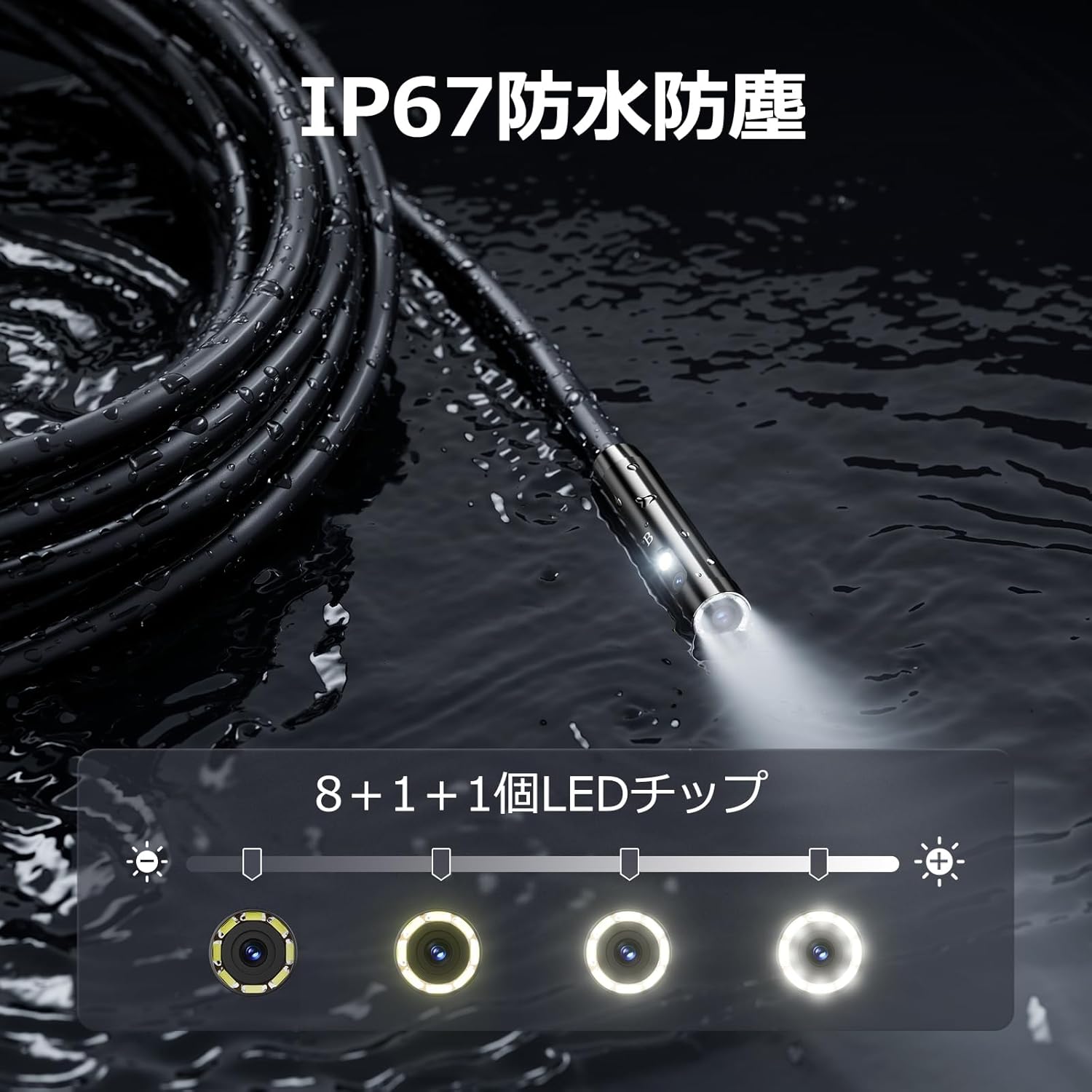
Figure 5.3: IP67 waterproof probe with adjustable LED illumination.
5.4 ፎቶዎችን ማንሳት እና ቪዲዮዎችን መቅዳት
Press the photo/video button (usually a camera icon) to capture a still image. To record video, press and hold the photo/video button; press again to stop recording. Ensure a Micro SD card is inserted to save your media.

Figure 5.4: Monitor interface for photo and video capture.
5.5 ስክሪን ማሽከርከር
Press the screen rotation button (often a circular arrow icon) to rotate the image on the monitor by 180 degrees. This is useful when the probe is in an inverted position.
5.6 ተግባራዊ አፕሊኬሽኖች
The DS620-TL is suitable for various tasks including home appliance maintenance, pipe inspection, wall wiring checks, and automotive repairs.

Figure 5.6: Various inspection scenarios for the endoscope.
5.7 የምርት ማሳያ ቪዲዮ
Video 5.7: A demonstration of the DEPSTECH DS620-TL endoscope camera in use, showcasing ባህሪያቱ እና አፕሊኬሽኑ።
6. ጥገና
6.1 የመመርመሪያውን እና የሌንስን ማጽዳት
After each use, especially in dirty or wet conditions, gently wipe the camera probe and lens with a soft, dry cloth. For stubborn dirt, a slightly damp ጨርቅ መጠቀም ይቻላል፣ ከዚያም ማድረቅ ይቻላል። ሻካራ ማጽጃዎችን ወይም ሟሟቶችን አይጠቀሙ።
6.2 ማከማቻ
Store the endoscope camera in a cool, dry place, away from direct sunlight and extreme temperatures. Use the provided drawstring bag for protection. Ensure the cable is coiled neatly without sharp bends.
6.3 የባትሪ እንክብካቤ
To prolong battery life, avoid fully discharging the device frequently. If storing for an extended period, charge the battery to approximately 50% every three months.
7. መላ መፈለግ
7.1 በስክሪኑ ላይ ምንም ምስል የለም
- መሣሪያው መብራቱን እና ሙሉ በሙሉ መሙላቱን ያረጋግጡ።
- Check if the camera cable is securely connected to the monitor unit.
- Adjust the LED brightness to ensure adequate lighting in the inspection area.
7.2 Cannot Record Photos/Videos
- Verify that a compatible Micro SD card (Class 10/Class 10 or higher, 8-32GB) is inserted correctly.
- የማይክሮ ኤስዲ ካርድ በቂ ነፃ ቦታ እንዳለው ያረጋግጡ።
- Ensure the Micro SD card is not locked (read-only).
- Try formatting the Micro SD card (this will erase all data).
7.3 መሳሪያው እየሞላ አይደለም
- Ensure the Type-C charging cable is properly connected to both the device and the power source.
- Try using a different USB power adapter or charging cable.
- ለማንኛውም ፍርስራሾች ወይም ብልሽቶች የኃይል መሙያ ወደቡን ያረጋግጡ።
If you encounter issues not listed here or if the problem persists, please contact DEPSTECH customer support.
8. ዝርዝሮች
| ባህሪ | ዝርዝር መግለጫ |
|---|---|
| የምርት ስም | DEPSTECH |
| የሞዴል ስም | DS620TL-JP |
| ቀለም | ጥቁር |
| የውሃ መከላከያ ደረጃ | IP67 |
| የሚዲያ ዓይነት | SD Memory Card (8-32GB, Class 10/Class 10 or higher recommended) |
| File ቅርጸት | MP4, MOV, AVI, JPEG, RAW |
| የቪዲዮ ቀረጻ ቅርጸት | MP4 |
| Viewየፈላጊ ዓይነት | አይፒኤስ |
| ዳሳሽ ዓይነት | CMOS |
| የፎቶ ዳሳሽ ጥራት | 2.1 ሜፒ |
| የትኩረት ተግባር | ቋሚ ትኩረት |
| ራስ-ሰር ትኩረት | አይ |
| የባትሪ አማካይ ሕይወት | 2 ሰዓታት |
| የተካተቱ አካላት | Type-C Cable, Attachments, Storage Drawstring Bag |
| የአምራች ዋስትና | 2 ዓመታት |
| የትውልድ ሀገር | ቻይና |
9. ዋስትና እና ድጋፍ
9.1 የአምራች ዋስትና
The DEPSTECH DS620-TL comes with a 24-month manufacturer warranty. Your order number serves as proof of purchase for warranty claims.
9.2 የደንበኛ ድጋፍ
For any inquiries, technical assistance, or warranty claims, please contact our dedicated support team:
- ኢሜይል፡- support@depstech.com
- የምላሽ ጊዜ፡- We aim to respond to all inquiries within 24 hours. For requests submitted on weekends or holidays, a response will be provided on the next business day.

Figure 9.2: DEPSTECH support details.