
1. መግቢያ
ስለገዙ እናመሰግናለንasing the Sharp PS-916 Bluetooth Party Speaker System. This system includes two identical portable Bluetooth speakers designed to deliver powerful audio with versatile connectivity options. Please read this manual carefully before using the product to ensure proper operation and to maximize your listening experience.
የጥቅል ይዘቶች፡-
- 2 x Sharp PS-916 Party Speakers
- 1 x የኃይል መሙያ ገመድ
- 1 x የርቀት መቆጣጠሪያ
- 1 x የተጠቃሚ መመሪያ

Image: The Sharp PS-916 system includes two speakers for a complete stereo experience.
2. ማዋቀር
2.1 ድምጽ ማጉያዎችን መሙላት
The PS-916 speakers are equipped with rechargeable batteries, providing up to 12 hours of playback. Before initial use, fully charge both speakers.
- Connect the charging cable to the DC IN port on the rear of each speaker.
- Plug the other end of the charging cable into a suitable power adapter (not included) or USB power source.
- The charging indicator light will illuminate. It will change color or turn off once charging is complete.
2.2 ማብራት / ማጥፋት
To power on or off each speaker, press and hold the ON/STAND BY INPUT በመቆጣጠሪያ ፓኔል ላይ የሚገኘው አዝራር.
2.3 የብሉቱዝ ማጣመር (ነጠላ ድምጽ ማጉያ)
- Ensure the speaker is powered on and in Bluetooth mode. The Bluetooth indicator will flash, indicating it is ready for pairing.
- በተንቀሳቃሽ መሣሪያዎ ላይ ብሉቱዝን ያንቁ እና የሚገኙ መሳሪያዎችን ይፈልጉ።
- Select "Sharp PS-916" from the list of devices.
- አንዴ ከተገናኘ በኋላ የብሉቱዝ አመልካች ብልጭ ድርግም ብሎ ይቆማል እና ጠንካራ ሆኖ ይቆያል።
2.4 True Wireless Stereo (TWS) Pairing (Two Speakers)
TWS allows you to connect two PS-916 speakers wirelessly for a stereo sound experience.
- Power on both PS-916 speakers.
- Ensure neither speaker is currently connected to a Bluetooth device.
- በአንደኛው ድምጽ ማጉያ ላይ (ይህ ዋና ድምጽ ማጉያ ይሆናል)፣ ይጫኑ TWS button. The speaker will enter TWS pairing mode.
- The primary speaker will automatically search for the secondary speaker. Once connected, you will hear an audible confirmation, and the TWS indicator lights on both speakers will illuminate.
- አሁን በክፍል 2.3 እንደተገለጸው ተንቀሳቃሽ መሳሪያዎን ከዋናው ድምጽ ማጉያ ጋር በብሉቱዝ ያገናኙት። ኦዲዮ በሁለቱም ድምጽ ማጉያዎች በስቲሪዮ ውስጥ ይጫወታል።
3. አሠራር
3.1 የቁጥጥር ፓነል በላይview

Image: Main control panel for the Sharp PS-916 speaker.
- ON/STAND BY INPUT: Power on/off, switch input modes (Bluetooth, USB, TF, AUX, FM).
- PLAY/PAUSE (►/∕∕): የድምጽ መልሶ ማጫወትን ያጫውቱ ወይም ለአፍታ ያቁሙ።
- ቀዳሚ (◀◀): ወደ ቀዳሚው ትራክ ይዝለሉ።
- NEXT (▶▶): ወደሚቀጥለው ትራክ ይዝለሉ።
- የድምጽ እውቀት ፦ ዋናውን ድምጽ ለማስተካከል ያሽከርክሩ።
- TWS Initiate or disconnect True Wireless Stereo pairing.
- አመጣጣኝ፡ Cycle through preset equalizer modes.
- ቤዝ Activate or deactivate bass boost.
- ብርሃን፡ Change or turn off the LED light effects.
- MIC CONTROL: Adjust microphone volume or echo (if applicable).
3.2 የግቤት ወደቦች
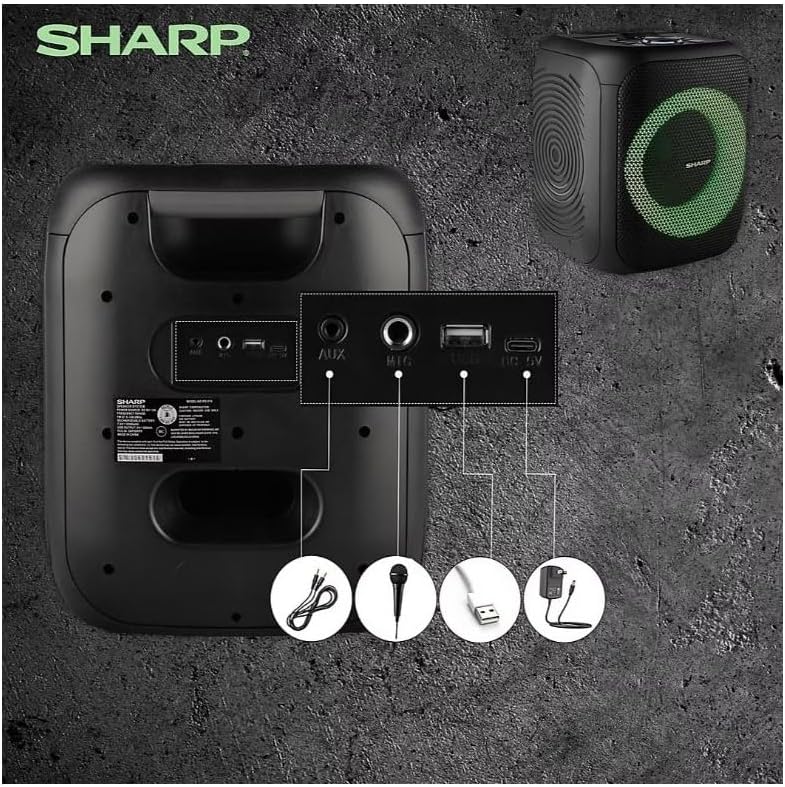
Image: Rear panel with various input and charging ports.
- ዐውደ ውስጥ: ውጫዊ የድምጽ መሳሪያዎችን በ3.5ሚሜ የድምጽ ገመድ ያገናኙ።
- MIC ውስጥ፡ Connect a microphone (sold separately) for karaoke or announcements.
- ዩኤስቢ፡ ለድምጽ መልሶ ማጫወት የዩኤስቢ ፍላሽ አንፃፊ ያስገቡ።
- TF ካርድ ፦ Insert a TF (microSD) card for audio playback.
- ዲሲ IN Connect the charging cable to power and charge the speaker.
3.3 Playing Audio from USB/TF Card
- Insert a USB flash drive or TF card into the corresponding port.
- የሚለውን ይጫኑ ON/STAND BY INPUT button repeatedly until the display shows the USB or TF mode.
- መልሶ ማጫወት በራስ-ሰር ይጀምራል። ይጠቀሙ አጫውት/አፍታ አቁም, የቀድሞ, እና ቀጣይ መልሶ ማጫወትን ለመቆጣጠር አዝራሮች።
3.4 AUX ግብዓትን በመጠቀም
- Connect one end of a 3.5mm audio cable to the AUX IN port on the speaker.
- ሌላውን ጫፍ ከጆሮ ማዳመጫ መሰኪያ ወይም ከውጫዊ መሳሪያዎ የድምጽ ውፅዓት ጋር ያገናኙ።
- የሚለውን ይጫኑ ON/STAND BY INPUT button repeatedly until the display shows AUX mode.
- ከውጫዊ መሣሪያዎ መልሶ ማጫወትን እና ድምጽን ይቆጣጠሩ።
3.5 ኤፍኤም ሬዲዮ ኦፕሬሽን

Image: The PS-916 features an integrated FM Tuner.
- የሚለውን ይጫኑ ON/STAND BY INPUT button repeatedly until the display shows FM mode.
- ተጭነው ይያዙት። አጫውት/አፍታ አቁም የሚገኙ የኤፍኤም ጣቢያዎችን በራስ ሰር ለመቃኘት እና ለማስቀመጥ አዝራር።
- የሚለውን ተጠቀም የቀድሞ እና ቀጣይ በተቀመጡ ጣቢያዎች ውስጥ ለማሰስ አዝራሮች።
3.6 LED Light Effects
የሚለውን ይጫኑ ብርሃን button to cycle through different LED light modes or to turn the lights off.
4. ጥገና
4.1 ጽዳት
- ከማጽዳትዎ በፊት ድምጽ ማጉያውን ሁልጊዜ ያጥፉት እና ከኃይል ምንጭ ያላቅቁት።
- ውጫዊ ገጽታዎችን ለማጽዳት ለስላሳ እና ደረቅ ጨርቅ ይጠቀሙ.
- ፈሳሽ ማጽጃዎችን፣ ኤሮሶሎችን ወይም መሟሟቶችን አይጠቀሙ፣ ምክንያቱም እነዚህ ማጠናቀቂያውን ወይም ውስጣዊ ክፍሎችን ሊጎዱ ይችላሉ።
4.2 ማከማቻ
- ድምጽ ማጉያዎቹን በቀጥታ ከፀሀይ ብርሀን እና ከከፍተኛ ሙቀት ርቆ በቀዝቃዛና ደረቅ ቦታ ያከማቹ።
- ባትሪውን ለረጅም ጊዜ ካከማቹ፣ የባትሪውን ጤና ለመጠበቅ በየጥቂት ወሩ ባትሪውን በግምት 50% ይሙሉት።
5. መላ መፈለግ
If you encounter issues with your Sharp PS-916 speakers, please refer to the following common problems and solutions:
| ችግር | ሊሆን የሚችል መፍትሄ |
|---|---|
| ተናጋሪው አይበራም። | ባትሪው መሙላቱን ያረጋግጡ። የኃይል መሙያ ገመዱን ያገናኙና እንደገና ይሞክሩ። |
| ከተናጋሪው ምንም ድምፅ የለም ፡፡ | የድምጽ ደረጃውን በድምጽ ማጉያው እና በተገናኘው መሳሪያዎ ላይ ያረጋግጡ። ትክክለኛው የግቤት ሁነታ መመረጡን ያረጋግጡ። |
| የብሉቱዝ መሳሪያ ማጣመር አይችልም። | Ensure the speaker is in Bluetooth pairing mode (indicator flashing). Move your device closer to the speaker. Disconnect from other Bluetooth devices. |
| TWS ማጣመር አልተሳካም። | Ensure both speakers are powered on and not connected to any other Bluetooth devices. Try initiating TWS pairing again. |
| የተዛባ ድምጽ። | የድምጽ ማጉያውንም ሆነ የተገናኘውን መሳሪያዎን ድምጽ ይቀንሱ። የድምጽ ምንጩ የተዛባ አለመሆኑን ያረጋግጡ። |
6. ዝርዝሮች
| ባህሪ | ዝርዝር |
|---|---|
| የምርት ስም | ስለታም |
| የሞዴል ስም | PS-916 |
| የድምጽ ማጉያ ውቅር | 8" Woofer, 1" Tweeter (per speaker) |
| ከፍተኛ የውጤት ኃይል | 400 ዋትስ (በአንድ ድምጽ ማጉያ) |
| የ RMS የውጤት ኃይል | 40 ዋትስ (በአንድ ድምጽ ማጉያ) |
| የግንኙነት ቴክኖሎጂ | ብሉቱዝ |
| ተጨማሪ ግብዓቶች | USB, TF Card, 3.5mm AUX, Microphone Input |
| የባትሪ ህይወት | እስከ 12 ሰዓታት ድረስ |
| ልዩ ባህሪያት | True Wireless Stereo (TWS) Pairing, Bass Boost, LED Light Effects, FM Tuner |
| ቀለም | ጥቁር |
| የእቃው ክብደት | 6.5 ፓውንድ (በአንድ ተናጋሪ) |
| ዩፒሲ | 728434122111 |
| GTIN | 728434122111 |
7. ዋስትና እና ድጋፍ
7.1 የዋስትና መረጃ
This Sharp PS-916 product comes with a 90-day limited warranty. This warranty covers manufacturing defects under normal use. It does not cover damage caused by misuse, accidents, unauthorized modifications, or normal wear and tear.
7.2 የደንበኛ ድጋፍ
For technical assistance, warranty claims, or further inquiries, please refer to the contact information provided with your purchase documentation or visit the official Sharp support webጣቢያ.