
1. መግቢያ
ስለገዙ እናመሰግናለንasing the OXS Thunder Duo Speaker System. This manual provides essential information for the safe and efficient use of your new speaker system. Please read this manual thoroughly before operating the device and retain it for future reference.
The OXS Thunder Duo is a 3.1.2 channel bookshelf speaker system designed for an immersive audio experience, compatible with various devices including TVs, PCs, gaming consoles, and mobile devices.
2. የደህንነት መረጃ
- የኃይል ምንጭ፡- የቀረበውን የኃይል አስማሚ ብቻ ይጠቀሙ። ጥራዝ ያረጋግጡtagሠ ከአከባቢዎ የኃይል አቅርቦት ጋር ይዛመዳል።
- አቀማመጥ፡- Place the speakers on a stable, flat surface. Avoid placing near heat sources, direct sunlight, or in areas with high humidity or dust.
- የአየር ማናፈሻ; የአየር ማናፈሻ ክፍተቶችን አይዝጉ። ለትክክለኛ የአየር ዝውውር በድምጽ ማጉያዎቹ ዙሪያ በቂ ቦታ ያረጋግጡ።
- ውሃ እና እርጥበት; Do not expose the device to water, rain, or moisture. This product is not waterproof.
- ማጽዳት፡ Disconnect from power before cleaning. Use a soft, dry cloth. Do not use liquid cleaners or aerosols.
- አገልግሎት መስጠት፡ Do not attempt to repair or disassemble the unit yourself. Refer all servicing to qualified personnel.
- ባትሪዎች፡ The remote control uses AAA batteries. Ensure correct polarity when inserting. Do not mix old and new batteries.
3. የጥቅል ይዘቶች
ከዚህ በታች የተዘረዘሩት ሁሉም እቃዎች በጥቅልዎ ውስጥ መካተታቸውን ያረጋግጡ፡-
- OXS Thunder Duo Speakers (2 units)
- የርቀት መቆጣጠሪያ (ከ2 AAA ባትሪዎች ጋር)
- HDMI ገመድ
- የጨረር ገመድ
- የኃይል አስማሚ
- የተጠቃሚ መመሪያ (ይህ ሰነድ)
4. ምርት አብቅቷልview
The OXS Thunder Duo speaker system consists of two bookshelf speakers designed for tabletop placement. Below is a general representation of the product and its typical components.
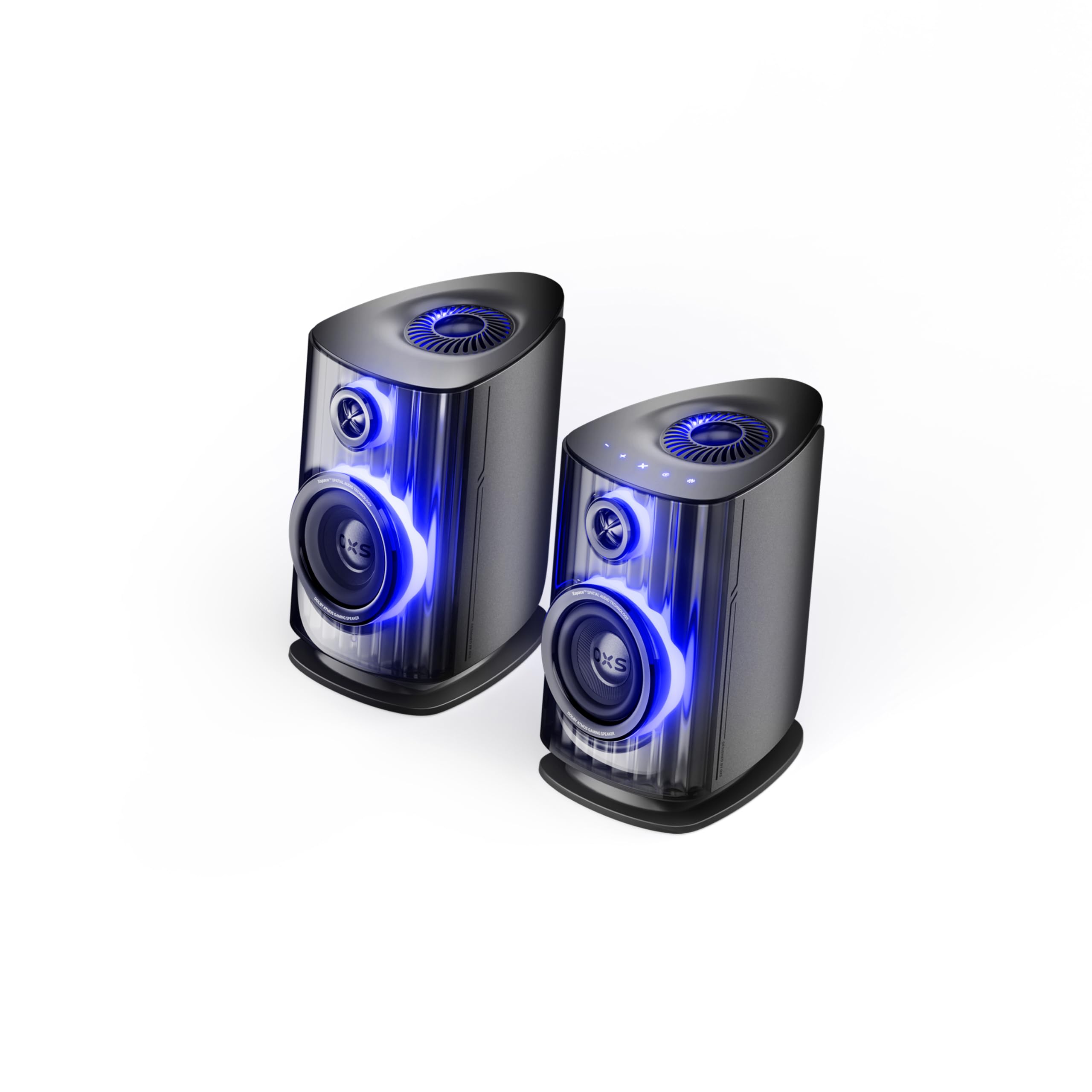
Image: OXS Thunder Duo Speaker System. This image shows the two main speaker units, typically placed on a tabletop. The design features a sleek, modern aesthetic with speaker grilles visible on the front.
4.1. የድምጽ ማጉያ ክፍሎች
- Main Speaker Unit: Houses the primary audio drivers and control circuitry.
- Satellite Speaker Unit: Connects to the main unit to provide a wider soundstage.
- የኃይል ግቤት፡ የኃይል አስማሚውን ለማገናኘት.
- የድምፅ ግብዓቶች HDMI IN, USB-C, eARC, Optical for various source connections.
4.2. የርቀት መቆጣጠሪያ
The included remote control allows for convenient operation of the speaker system from a distance. It typically includes buttons for:
- ኃይል አብራ/ አጥፋ
- ድምጽ ወደ ላይ/ወደታች
- Input Source Selection (HDMI, USB-C, eARC, Optical)
- ድምጸ-ከል አድርግ
- Audio Mode Selection (e.g., Surround)
5. ማዋቀር
5.1. የድምጽ ማጉያ አቀማመጥ
Place the OXS Thunder Duo speakers on a stable, flat tabletop surface. For optimal sound, position them equidistant from your listening position and at ear level. Ensure there are no obstructions between the speakers and your listening area.
5.2. የኃይል ግንኙነት
- Connect the power adapter to the power input port on the main speaker unit.
- የኃይል አስማሚውን ወደ ግድግዳ መውጫ ይሰኩት.
- The power indicator on the speaker will illuminate, indicating it is in standby mode.
5.3. የድምጽ ምንጮችን በማገናኘት ላይ
The OXS Thunder Duo offers multiple connectivity options:
- HDMI (eARC)፡- For connecting to TVs with an HDMI eARC/ARC port. Use the provided HDMI cable. This connection supports high-quality audio and allows TV remote control of speaker volume.
- ኤችዲኤምአይ ውስጥ For connecting other HDMI-enabled devices like gaming consoles or Blu-ray players.
- ኦፕቲካል፡ For connecting to TVs or other devices with an optical audio output. Use the provided optical cable.
- ዩኤስቢ-ሲ For connecting to PCs, laptops, or compatible mobile devices.
Connect your desired audio source to the corresponding input port on the main speaker unit.
6. የአሠራር መመሪያዎች
6.1. ማብራት / ማጥፋት
Press the Power button on the remote control or the main speaker unit to turn the system on or off. The power indicator will change status accordingly.
6.2. የግቤት ምንጭ መምረጥ
Press the 'Input' or dedicated source buttons (e.g., HDMI, Optical, USB-C) on the remote control to switch between connected audio sources. The current input source will typically be indicated by an LED or display on the main speaker unit.
6.3. የድምጽ መቆጣጠሪያ
Use the 'Volume Up' (+) and 'Volume Down' (-) buttons on the remote control to adjust the audio level. Press the 'Mute' button to temporarily silence the audio.
6.4. የድምጽ ሁነታዎች
The OXS Thunder Duo supports surround sound audio output. Use the 'Mode' button on the remote control to cycle through available audio modes, if applicable, to optimize your listening experience for different content types.
7. ግንኙነት
The OXS Thunder Duo offers versatile connectivity for a wide range of devices:
- ኤችዲኤምአይ ውስጥ Connects to various HDMI-enabled devices.
- ዩኤስቢ-ሲ Ideal for direct digital audio connection to computers (PC), laptops, and mobile devices running Windows, Android, or iOS.
- eARC (የተሻሻለ የድምጽ መመለሻ ቻናል)፦ Connects to compatible TVs for high-fidelity audio transmission and simplified control.
- ኦፕቲካል፡ Provides a digital audio connection for TVs, game consoles (PlayStation, XBOX, Switch), and other devices with an optical output.
8. ጥገና
Proper maintenance ensures the longevity and performance of your OXS Thunder Duo speaker system.
- ማጽዳት፡ Regularly wipe the speaker surfaces with a soft, dry, lint-free cloth. Do not use abrasive cleaners, waxes, or solvents.
- አቧራ፡ Keep the speaker grilles free from dust accumulation. Use a soft brush or a vacuum cleaner with a brush attachment on a low setting.
- ማከማቻ፡ ድምጽ ማጉያዎቹን ለረጅም ጊዜ ካከማቹ፣ ከኤሌክትሪክ ያላቅቋቸውና ቀዝቃዛና ደረቅ ቦታ፣ በተለይም በዋናው ማሸጊያቸው ውስጥ ያስቀምጧቸው።
9. መላ መፈለግ
If you encounter issues with your OXS Thunder Duo, refer to the following common problems and solutions:
| ችግር | ሊሆን የሚችል ምክንያት | መፍትሄ |
|---|---|---|
| ኃይል የለም | Power cable not connected; Power outlet not active; Speaker is off. | Ensure power cable is securely connected. Test the outlet with another device. Press the Power button on the remote or speaker. |
| ድምጽ የለም። | Incorrect input source selected; Volume too low or muted; Audio cable not connected properly; Source device not outputting audio. | Select the correct input source. Increase volume and check if muted. Reconnect audio cables. Check audio settings on your source device. |
| የርቀት መቆጣጠሪያ አይሰራም | Batteries are dead or incorrectly inserted; Obstruction between remote and speaker. | Replace batteries, ensuring correct polarity. Remove any obstructions. Ensure remote is pointed at the main speaker unit. |
| የተዛባ ድምጽ | Volume too high; Poor audio source quality; Loose cable connection. | Lower the volume. Check the audio quality from the source. Ensure all cables are securely connected. |
If the problem persists after trying these solutions, please contact OXS customer support.
10. ዝርዝሮች
| ባህሪ | ዝርዝር መግለጫ |
|---|---|
| የምርት ስም | ኦክስኤስ |
| የሞዴል ቁጥር | Thunder DUO |
| Speaker Max Output | 220 ዋት |
| የድግግሞሽ ምላሽ | 20 kHz |
| የግንኙነት ቴክኖሎጂ | HDMI IN, USB-C, eARC, Optical |
| የድምጽ ውፅዓት ሁኔታ | ዙሪያ |
| የመጫኛ አይነት | የጠረጴዛ ተራራ |
| Product Exterior Material | ABS & PVC |
| የድምጽ ማጉያ አይነት | የመጽሐፍ መደርደሪያ |
| የሚመከር አጠቃቀሞች | Computer, TV, Gaming Consoles |
| ቀለም | ታይታን |
| የውሃ መከላከያ | ውሸት |
| የዋስትና ዓይነት | የተወሰነ ዋስትና |
| የድምጽ ማጉያ መጠን | 1.5 ኢንች |
| የተናጋሪ ቻናል ውቅር | 3.1.2 |
| S/N ሬሾ | 96 ዲቢቢ |
| ባትሪዎች | 2 AAA ባትሪዎች (ለርቀት ተካትቷል) |
| የንጥል መጠኖች (D x W x H) | 17.8 x 21.5 x 27.6 ሴ.ሜ |
| የእቃው ክብደት | 11.02 ፓውንድ |
| ተስማሚ መሣሪያዎች | TV, PC, PlayStation, XBOX, Mobile devices (Windows, Android, iOS), Switch |
| ዩፒሲ | 199284067936 |
| ASIN | B0GDFVBVB3 |
11. ዋስትና እና ድጋፍ
The OXS Thunder Duo Speaker System comes with a Limited Warranty. Please refer to the warranty card included in your package for specific terms and conditions, including the duration and coverage details.
For technical support, troubleshooting assistance, or warranty claims, please contact OXS customer service through the contact information provided on the official OXS website or your purchase documentation. Please have your model number (Thunder DUO) and proof of purchase ready when contacting support.


