
SOONBOX S3000
SOONBOX S3000 Wireless Party Box Speaker User Manual
ሞዴል፡ S3000
መግቢያ
The SOONBOX S3000 is a versatile wireless party box speaker designed for powerful audio output and entertainment. It features integrated HD microphones for karaoke, dynamic RGB lighting, and multiple connectivity options including Bluetooth, USB, AUX, TF card, and FM radio. Its portable design with a handling strap and IPX-5 water resistance makes it suitable for various indoor and outdoor environments.
የጥቅል ይዘቶች
እባክዎ ለሚከተሉት ዕቃዎች ሳጥኑ ላይ ምልክት ያድርጉ።
- SOONBOX S3000 Wireless Party Box Speaker
- Built-in HD Microphones
- የኃይል መሙያ ገመድ
- የተጠቃሚ መመሪያ
- Handling Strap
ምርት አልቋልview
ከተናጋሪው አካላት እና መቆጣጠሪያዎች ጋር እራስዎን ይወቁ።

ምስል 1፡ ፊት ለፊት view of the SOONBOX S3000 speaker in green, showcasing the speaker grille, SOONBOX logo, and a detachable shoulder strap for portability.
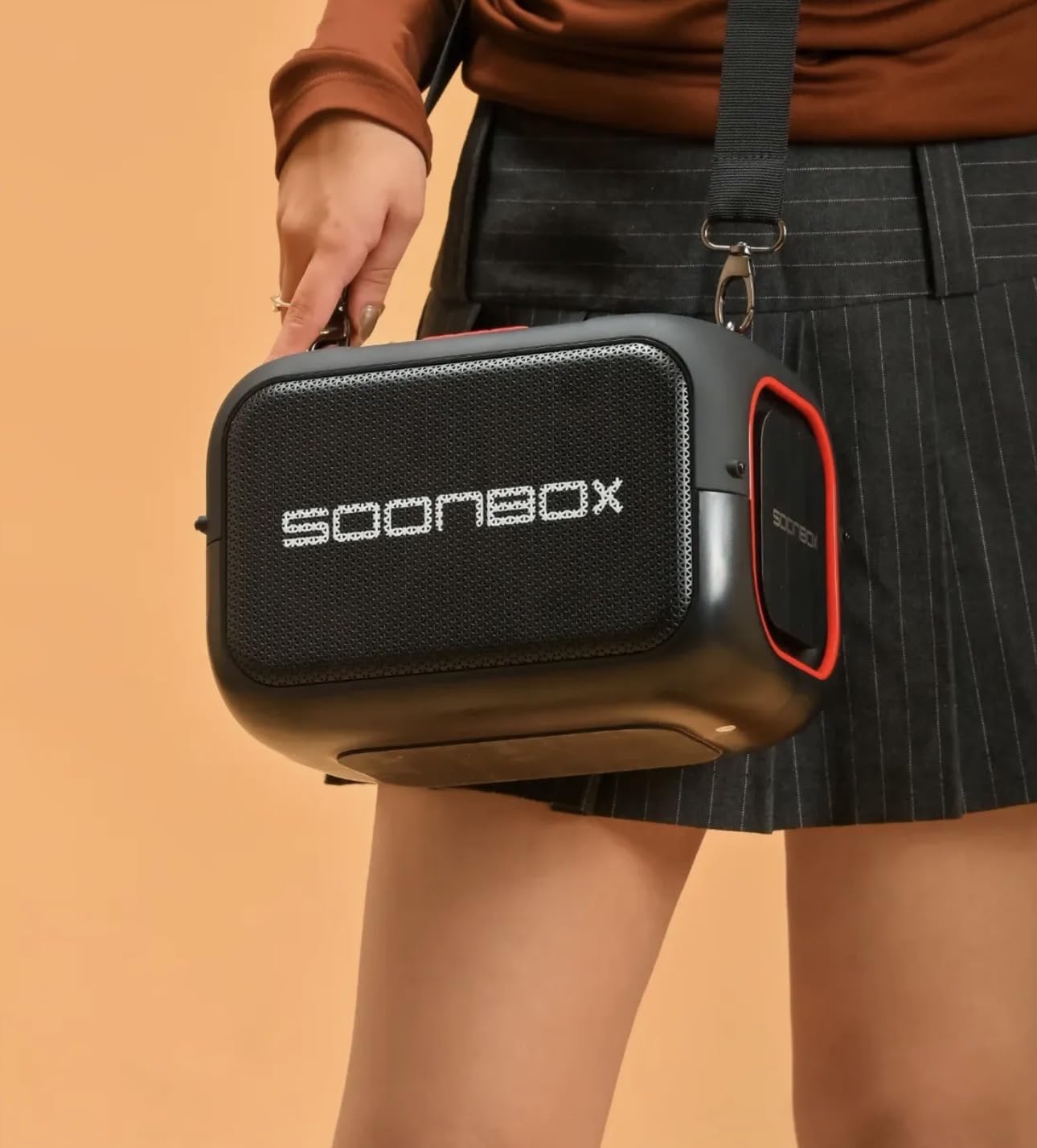
ምስል 2፡ The SOONBOX S3000 speaker in black, demonstrating its portability with a person carrying it using the shoulder strap.
የቁጥጥር ፓነል (መደበኛ አቀማመጥ)
- የኃይል ቁልፍ፡- ድምጽ ማጉያውን ለማብራት/ለማጥፋት ተጭነው ይያዙ።
- ሁነታ አዝራር (ኤም)፦ በብሉቱዝ፣ ኤፍኤም ሬዲዮ፣ ዩኤስቢ፣ TF ካርድ እና AUX ሁነታዎች መካከል ለመቀያየር ይጫኑ።
- አጫውት/አፍታ አቁም አዝራር፡- ኦዲዮን ለማጫወት ወይም ባለበት ለማቆም ይጫኑ።
- የድምጽ መጠን መጨመር (+): ድምጽን ለመጨመር ይጫኑ። ለቀጣዩ ትራክ ተጭነው ይያዙ።
- ድምጽ መቀነስ (-): ድምጽን ለመቀነስ ተጫን። ለቀደመው ትራክ ተጭነው ይያዙ።
- RGB ብርሃን ቁልፍ፡- Press to cycle through light modes or turn lights ON/OFF.
- የማይክሮፎን ግቤት፡ For external microphones (if applicable, in addition to built-in).
- የዩኤስቢ ወደብ፡ ለዩኤስቢ አንጻፊ መልሶ ማጫወት።
- የ TF ካርድ ማስገቢያ ለ TF (ማይክሮ ኤስዲ) ካርድ መልሶ ማጫወት።
- AUX ግቤት፡ ውጫዊ የድምጽ መሳሪያዎችን በ3.5ሚሜ ገመድ ለማገናኘት።
- DC 5V ኃይል መሙያ ወደብ፡- ድምጽ ማጉያውን ለመሙላት.
ማዋቀር
1. የመነሻ ኃይል መሙላት
- Connect the provided charging cable to the DC 5V charging port on the speaker.
- የኬብሉን ሌላኛውን ጫፍ ወደ ተኳሃኝ የዩኤስቢ ኃይል አስማሚ (ያልተካተተ) ወይም የኮምፒተር ዩኤስቢ ወደብ ያገናኙ።
- The charging indicator light will illuminate. Allow the speaker to fully charge before first use (approximately 3-4 hours). The indicator light will change or turn off when fully charged.
2. ማብራት / ማጥፋት
- ለማብራት፡- Press and hold the Power Button for 2-3 seconds until you hear an audible prompt and the RGB lights activate.
- ለማጥፋት፡- Press and hold the Power Button for 2-3 seconds until you hear an audible prompt and the lights turn off.
የአሠራር መመሪያዎች
የብሉቱዝ ሞድ
- ድምጽ ማጉያውን ያብሩ። በሚያብረቀርቅ መብራት ወይም በሚሰማ ጥያቄ የተገለጸውን የብሉቱዝ ማጣመሪያ ሁነታን በራስ-ሰር ያስገባል።
- በተንቀሳቃሽ መሣሪያዎ ላይ ብሉቱዝን ያንቁ (ስማርትፎን ፣ ታብሌት ፣ ወዘተ)።
- ፈልግ "SOONBOX S3000" in the list of available devices and select it to pair.
- አንዴ በተሳካ ሁኔታ ከተጣመሩ የማረጋገጫ ድምጽ ይሰማሉ። አሁን በድምጽ ማጉያው በኩል ከመሳሪያዎ ላይ ድምጽ ማጫወት ይችላሉ።
ኤፍኤም ሬዲዮ ሞድ
- Press the Mode Button (M) repeatedly until you enter FM Radio mode.
- የሚገኙ የኤፍኤም ጣቢያዎችን በራስ-ሰር ለመቃኘት እና ለማስቀመጥ የPlay/Pause አዝራሩን ይጫኑ።
- በተቀመጡ ጣቢያዎች መካከል ለማሰስ የድምጽ መጨመሪያ (+) እና ድምጽ ወደ ታች (-) አዝራሮችን (አጭር ፕሬስ) ይጠቀሙ።
የዩኤስቢ/TF ካርድ ሁነታ
- Insert a USB flash drive or TF (MicroSD) card into the respective port/slot.
- ድምጽ ማጉያው በራስ-ሰር ወደ ዩኤስቢ ወይም TF ካርድ ሁነታ ይቀየራል እና ኦዲዮ ማጫወት ይጀምራል files. If not, press the Mode Button (M) to select the correct mode.
- Use the Play/Pause, Volume Up (+), and Volume Down (-) buttons to control playback.
AUX ሁነታ
- የ3.5ሚሜ የድምጽ ገመድ አንድ ጫፍ (ያልተካተተ) በድምጽ ማጉያው ላይ ካለው የAUX ግብዓት ወደብ ጋር ያገናኙ።
- ሌላኛውን ጫፍ ከውጫዊ መሳሪያዎ የድምጽ ውፅዓት መሰኪያ ጋር ያገናኙ (ለምሳሌ፣ MP3 ማጫወቻ፣ ላፕቶፕ)።
- Press the Mode Button (M) to switch to AUX mode.
- ከተገናኘው መሣሪያዎ መልሶ ማጫወትን እና ድምጽን ይቆጣጠሩ።
Microphone Usage (Built-in HD Microphones)
The SOONBOX S3000 features built-in HD microphones for karaoke or voice amplification. Simply speak into the speaker's designated microphone area. Ensure the speaker's volume is adjusted appropriately to avoid feedback.
TWS (እውነተኛ ገመድ አልባ ስቴሪዮ) ተግባር
To pair two SOONBOX S3000 speakers for a stereo sound experience:
- Ensure both S3000 speakers are powered on and in Bluetooth mode, but not connected to any device.
- On one of the speakers (this will be the primary speaker), press and hold the TWS button (if available, or a specific button designated for TWS pairing, often the Play/Pause button for a few seconds).
- The speakers will attempt to connect to each other. Once successfully paired, you will hear a confirmation sound.
- Now, connect your mobile device to the primary speaker via Bluetooth as described in the "Bluetooth Mode" section. Audio will play in stereo across both speakers.
Note: The exact TWS pairing button may vary. Refer to the speaker's physical markings if a dedicated TWS button is not present.
RGB Lights Control
Press the RGB Light Button (if available) to cycle through different lighting effects or to turn the lights on/off. If no dedicated button, the lights may activate automatically with music or be controlled via the Mode button with a long press.
ጥገና
- ማጽዳት፡ የድምጽ ማጉያውን ውጫዊ ክፍል ለማጽዳት ለስላሳ እና ደረቅ ጨርቅ ይጠቀሙ. ገላጭ ማጽጃዎችን ወይም ፈሳሾችን አይጠቀሙ.
- የውሃ መቋቋም; The speaker has an IPX-5 water resistance rating, meaning it can withstand low-pressure water jets. Do not submerge the speaker in water or expose it to high-pressure water. Ensure all port covers are securely closed before exposure to water.
- ማከማቻ፡ ድምጽ ማጉያውን በቀጥታ ከፀሀይ ብርሀን እና ከከፍተኛ ሙቀት ርቆ በቀዝቃዛና ደረቅ ቦታ ያከማቹ።
- የባትሪ እንክብካቤ To prolong battery life, fully charge the speaker before long periods of inactivity and recharge it at least once every three months.
መላ መፈለግ
| ችግር | ሊሆን የሚችል ምክንያት | መፍትሄ |
|---|---|---|
| ተናጋሪው አይበራም። | ዝቅተኛ ባትሪ. | ድምጽ ማጉያውን ሙሉ በሙሉ ይሙሉ። |
| ድምጽ የለም። | ድምጽ በጣም ዝቅተኛ፤ የተሳሳተ ሁነታ፤ መሳሪያው አልተገናኘም። | Increase speaker and device volume. Ensure correct mode is selected (Bluetooth, AUX, etc.). Re-pair Bluetooth device. |
| የብሉቱዝ ማጣመር አልተሳካም። | ድምጽ ማጉያ በማጣመር ሁነታ ላይ አይደለም; መሳሪያ በጣም ሩቅ; ጣልቃ መግባት. | Ensure speaker is in Bluetooth pairing mode. Move device closer to speaker. Turn off other Bluetooth devices. Forget "SOONBOX S3000" on your device and try pairing again. |
| የኤፍኤም ሬዲዮ አቀባበል ደካማ ነው። | ደካማ ምልክት; የአካባቢ ጣልቃገብነት. | ተናጋሪውን የተሻለ አቀባበል ወዳለበት አካባቢ ያዛውሩት። |
| የማይክሮፎን አስተያየት። | Microphone too close to speaker or volume too high. | Increase distance between microphone and speaker. Reduce speaker volume. |
ዝርዝሮች
| የሞዴል ስም | S3000 |
| የምርት ስም | SOONBOX |
| የድምጽ ውፅዓት | 40 ዋ |
| ገመድ አልባ ቴክኖሎጂ | ብሉቱዝ |
| የግንኙነት አማራጮች | Bluetooth, USB, AUX, TF Card, FM Radio, TWS |
| ማይክሮፎኖች | Built-in HD Microphones |
| ማብራት | RGB መብራቶች |
| የውሃ መቋቋም | IPX-5 |
| ቁሳቁስ | ፋይበር |
| የምርት ልኬቶች | 24D x 9W x 24H ሴንቲሜትር |
| የእቃው ክብደት | 3 ኪ |
| የኃይል ምንጭ | Battery Powered (DC Charging) |
ዋስትና እና ድጋፍ
The SOONBOX S3000 Wireless Party Box Speaker comes with a standard manufacturer's warranty. Please refer to the warranty card included in your package for specific terms and conditions, including warranty period and coverage details.
For technical support, troubleshooting assistance, or warranty claims, please contact SOONBOX customer service through the contact information provided on the product packaging or the official SOONBOX webጣቢያ.
Ask a question about this manual
Ask about setup, troubleshooting, compatibility, parts, safety, or missing instructions. Manuals+ will review the question and use this page’s manual context to help answer it.