
1. ምርት አብቅቷልview
The Samsung 65-inch Class Q6F Series QLED 4K UHD Smart Tizen TV (Model QN65Q6FDAF) offers an immersive viewing experience with advanced picture and sound technologies. Featuring a Q4 Lite Processor, Quantum HDR, Motion Xcelerator, and Object Tracking Sound Lite, this television is designed to deliver vibrant colors, sharp detail, and dynamic audio. Its Tizen operating system provides a smart and intuitive interface for accessing a wide range of streaming content and smart features.

ምስል፡ ፊት ለፊት view of the Samsung 65-inch QLED TV on its stands, showcasing its slim bezels and a colorful display.
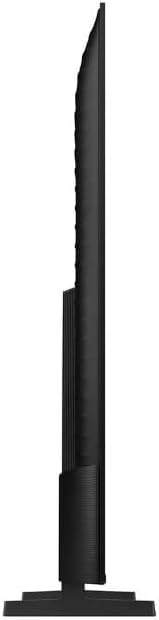
ምስል: የጎን ፕሮfile of the Samsung 65-inch QLED TV, demonstrating its sleek and thin form factor.
2. ማዋቀር
2.1 የቦክስ መክፈቻ
Carefully open the TV packaging. It is recommended to have two people for safe unboxing and installation due to the size and weight of the television. The box is designed to open from the top, allowing you to lift the box upwards to reveal the TV without needing to lift the TV itself out of the box.

Image: A diagram illustrating the dimensions of the 65-inch QLED TV and the contents of its packaging, including the remote control.
2.2 የቆመ መጫኛ
The TV comes with two stand legs. These can be installed in two positions: wide (outer) or narrow (inner), depending on the width of your TV console. Ensure the TV is placed face down on a soft, clean surface before attaching the stands. Securely fasten the stand legs into the designated slots on the back of the TV. The TV will not stand securely without the legs properly attached or if it is not wall-mounted.
2.3 Initial Power-on and Setup
Once the stands are securely attached or the TV is wall-mounted, connect the power cable to the TV and a power outlet. Press the power button on the remote control. Follow the on-screen instructions to complete the initial setup, including connecting to your Wi-Fi network, signing into your Samsung account, and configuring smart features.
3. ቴሌቪዥኑን መስራት
3.1 የስማርት ቲቪ ባህሪያት (Tizen OS)
The Samsung Q6F Series TV runs on the Tizen operating system, providing a user-friendly interface for accessing various applications and services. The home screen allows quick access to your favorite streaming apps, live TV, and connected devices. Navigate using the included Smart Remote.
3.2 የርቀት መቆጣጠሪያ አጠቃቀም
The included Smart Remote is designed for intuitive control. It features dedicated buttons for popular streaming services like Netflix, Disney+, and Prime Video, as well as a button for Samsung TV Plus. Use the directional pad to navigate menus and select options. The remote also includes volume and channel controls.
3.3 የምስል ጥራት ባህሪያት
- ኳንተም HDR፡ Experience a wide range of contrast and brightness, revealing hidden details in both dark and bright scenes.
- 100% የቀለም መጠን ከኳንተም ነጥብ ጋር፡ Enjoy a billion shades of accurate and vibrant colors, even in bright scenes.
- 4 ኪ ማደግ The Q4 Lite Processor optimizes audio and upscales content to near 4K resolution for enhanced clarity.
- Color Booster AI: This technology analyzes each scene to enhance color expression for more vivid and dynamic visuals.
3.4 የድምጽ ባህሪያት
- የነገር መከታተያ ድምፅ ቀላል፡ Sound follows the action on screen, creating a more immersive audio experience.
- ጥ-ሲምፎኒ፡ When paired with a compatible Samsung soundbar, the TV and soundbar speakers work together to create a richer, more nuanced soundstage.
3.5 የጨዋታ ባህሪያት
For gamers, the TV includes Motion Xcelerator for fast motion clarity, reducing blur and enhancing the gaming experience. The HDMI 2.1 ports support advanced gaming features, though specific refresh rates for gaming consoles may vary.
4. ግንኙነት
The Samsung Q6F Series TV offers a variety of connectivity options to integrate with your home entertainment system.

ምስል: ዝርዝር view of the TV's back panel, highlighting the various input and output ports including HDMI, USB, and LAN connections.
4.1 ወደቦች
- HDMI ወደቦች፡ Multiple HDMI ports (including HDMI 2.1) for connecting gaming consoles, Blu-ray players, and other high-definition devices.
- የዩኤስቢ ወደቦች፡ ሚዲያ ለማጫወት የUSB ማከማቻ መሳሪያዎችን ለማገናኘት files.
- LAN ወደብ፡ ለገመድ የበይነመረብ ግንኙነት።
- የአንቴና ግቤት፡ ለአየር ላይ ስርጭቶች አንቴና ለማገናኘት.
4.2 የገመድ አልባ ግንኙነት
- ዋይ ፋይ፡ ለኢንተርኔት ተደራሽነት እና ዥረት ስርጭት አብሮ የተሰራ Wi-Fi።
- ብሉቱዝ፡ For connecting wireless headphones, soundbars, and other Bluetooth-enabled devices.
5. ጥገና
የሳምሰንግ QLED ቲቪዎ ረጅም ዕድሜ እና ጥሩ አፈጻጸም ለማረጋገጥ የሚከተሉትን የጥገና መመሪያዎች ይከተሉ፡
- ማያ ገጹን ማጽዳት; ስክሪኑን በቀስታ ለስላሳ እና ደረቅ ማይክሮፋይበር ጨርቅ ይጥረጉ። ለግትር ማጭበርበሮች፣ በትንሹ መampጨርቁን በውሃ ወይም በስክሪኑ ላይ የተወሰነ የጽዳት መፍትሄ (በፍፁም በቀጥታ ወደ ማያ ገጹ ላይ አይረጩ)።
- ፍሬሙን ማጽዳት; የቲቪ ክፈፉን ለማጽዳት ለስላሳ እና ደረቅ ጨርቅ ይጠቀሙ.
- የአየር ማናፈሻ; ከመጠን በላይ ሙቀትን ለመከላከል በቴሌቪዥኑ ዙሪያ በቂ የአየር ዝውውርን ያረጋግጡ. የአየር ማናፈሻ ክፍተቶችን አያግዱ.
- የኃይል አስተዳደር; በመብረቅ አውሎ ንፋስ ጊዜ ወይም ለረጅም ጊዜ ሳይስተጓጎል በሚቆይበት ጊዜ ቴሌቪዥኑን ከኃይል ማሰራጫው ያላቅቁት።
6. መላ መፈለግ
በቲቪዎ ላይ ችግሮች ካጋጠሙዎት የሚከተሉትን መሰረታዊ የመላ ፍለጋ ደረጃዎች ይሞክሩ።
- ኃይል የለም፡ የኤሌክትሪክ ገመዱ ከቴሌቪዥኑ እና ከኃይል ማመንጫው ጋር ደህንነቱ በተጠበቀ ሁኔታ መገናኘቱን ያረጋግጡ። መውጫው የሚሰራ መሆኑን ያረጋግጡ።
- ምንም ምስል/ድምጽ የለም፡ ትክክለኛው የግቤት ምንጭ መመረጡን ያረጋግጡ። ሁሉንም የኬብል ግንኙነቶች (ኤችዲኤምአይ፣ አንቴና፣ ወዘተ) ልቅነትን ያረጋግጡ።
- የርቀት መቆጣጠሪያ አይሰራም; በርቀት መቆጣጠሪያው ውስጥ ያሉትን ባትሪዎች ይተኩ. በርቀት መቆጣጠሪያው እና በቴሌቪዥኑ መካከል ምንም እንቅፋቶች አለመኖራቸውን ያረጋግጡ።
- የአውታረ መረብ ግንኙነት ጉዳዮች፡- ራውተርዎን እና ሞደምዎን እንደገና ያስጀምሩ። ቴሌቪዥኑን በቴሌቪዥኑ ቅንብሮች ምናሌ በኩል ከዋይፋይ አውታረ መረብዎ ጋር እንደገና ያገናኙት።
- የምስል ጥራት ጉዳዮች፡- በቴሌቪዥኑ ምናሌ ውስጥ የምስል ቅንብሮችን (ብሩህነት፣ ንፅፅር፣ ቀለም) ያስተካክሉ። የይዘቱ ምንጭ ከፍተኛ ጥራት ያለው መሆኑን ያረጋግጡ።
For more detailed troubleshooting, refer to the full user manual or contact Samsung customer support.
7. ዝርዝሮች
| ባህሪ | ዝርዝር |
|---|---|
| የምርት ስም | ሳምሰንግ |
| የሞዴል ስም | QN65Q6FDAF |
| የስክሪን መጠን | 65 ኢንች |
| የማሳያ ቴክኖሎጂ | QLED |
| ጥራት | 4K |
| የማደስ ደረጃ | 60 Hz |
| ልዩ ባህሪያት | 100% Color Volume with Quantum Dot, Color Booster / 4K Upscaling / Object Tracking Sound Lite / Q-Symphony, Motion Xcelerator, Q4 Lite Processor, Quantum HDR |
| የግንኙነት ቴክኖሎጂ | ብሉቱዝ ፣ Wi-Fi |
| ምጥጥነ ገጽታ | 16፡9 |
| ቀለም | ጥቁር |
| የእቃው ክብደት | 33 ፓውንድ £ |
| የምርት ልኬቶች | 3 x 56.9 x 32.7 ኢንች |
| ጥራዝtage | 120 ቮልት (ኤሲ) |
8. በሳጥኑ ውስጥ ያለው
Upon opening your Samsung 65-inch Q6F Series QLED TV package, you should find the following items:
- Samsung 65” Class Q6F Series QLED Smart Tizen TV
- የርቀት መቆጣጠሪያ
- የኃይል ገመድ
- የተጠቃሚ መመሪያ (ይህ ሰነድ)
9. ዋስትና እና ድጋፍ
Your Samsung Q6F Series QLED TV comes with a manufacturer's warranty. Please refer to the warranty card included in your package for specific terms and conditions. For technical support, service, or additional information, please visit the official Samsung support webየደንበኛ አገልግሎት መስመራቸውን ይጎብኙ ወይም ያነጋግሩ። ለማንኛውም የዋስትና ጥያቄ የግዢ ማረጋገጫዎን በእጅዎ ያስቀምጡ።