
1. መግቢያ
Thank you for choosing the Sharp 40HF2265E Full HD Google TV. This manual provides essential information for setting up, operating, and maintaining your television. Featuring integrated Google TV, HDR10 support, Dolby Digital audio, and Bluetooth connectivity, your new TV offers a rich entertainment experience. Please read this manual thoroughly before use to ensure proper operation and to maximize your viewደስታ ።

ምስል 1.1፡ ፊት view of the Sharp 40HF2265E Full HD Google TV.
2. በሳጥኑ ውስጥ ያለው
ቴሌቪዥኑን በጥንቃቄ ይክፈቱ እና የሚከተሉትን ዕቃዎች በሙሉ መያዙን ያረጋግጡ፡
- ሻርፕ 40HF2265E ቴሌቪዥን
- የኃይል ገመድ
- የርቀት መቆጣጠሪያ (2 የ AAA ባትሪዎች ያስፈልጋሉ፣ ሁልጊዜም አልተካተተም)
- የተጠቃሚ መመሪያ (ይህ ሰነድ)
- የዋስትና ካርድ
If any items are missing or damaged, please contact your retailer or Sharp customer support immediately.
3. ማዋቀር
3.1 የቆመ መጫኛ
To install the TV stand, place the TV screen-down on a soft, flat surface to prevent scratches. Align the stand feet with the corresponding slots on the bottom of the TV and secure them with the provided screws. Ensure the stand is firmly attached before placing the TV upright.

ምስል 3.1፡ ፊት view of the TV with stand feet attached.
3.2 ግድግዳ መትከል
If you prefer to wall-mount your TV, you will need a VESA-compatible wall mount (not included). The Sharp 40HF2265E supports a VESA mounting standard of 200 x 200 mm. Refer to the wall mount's instructions for installation. Always ensure the wall can support the weight of the TV and the mount.

ምስል 3.2፡ የኋላ view of the TV, highlighting VESA mounting points and ports.
3.3 ማገናኛ ፔሪፈራል
Connect your external devices to the appropriate ports on the back and side of the TV. The TV features multiple HDMI, USB, and other connectivity options.
- HDMI ወደቦች፡ የብሉ ሬይ ማጫወቻዎችን ለማገናኘት ፣የጨዋታ ኮንሶሎች ፣ set-top ሳጥኖች ፣ወዘተ
- የዩኤስቢ ወደቦች፡ ሚዲያ ለማጫወት የUSB ማከማቻ መሳሪያዎችን ለማገናኘት ወይም ለሶፍትዌር ዝመናዎች።
- የኢተርኔት ወደብ ለገመድ የበይነመረብ ግንኙነት።
- አንቴና/የገመድ ግቤት፡- የአንቴና ወይም የኬብል ቲቪ ምልክት ለማገናኘት.
- የድምጽ ውፅዓት፡- ውጫዊ የድምጽ ስርዓቶችን ለማገናኘት.
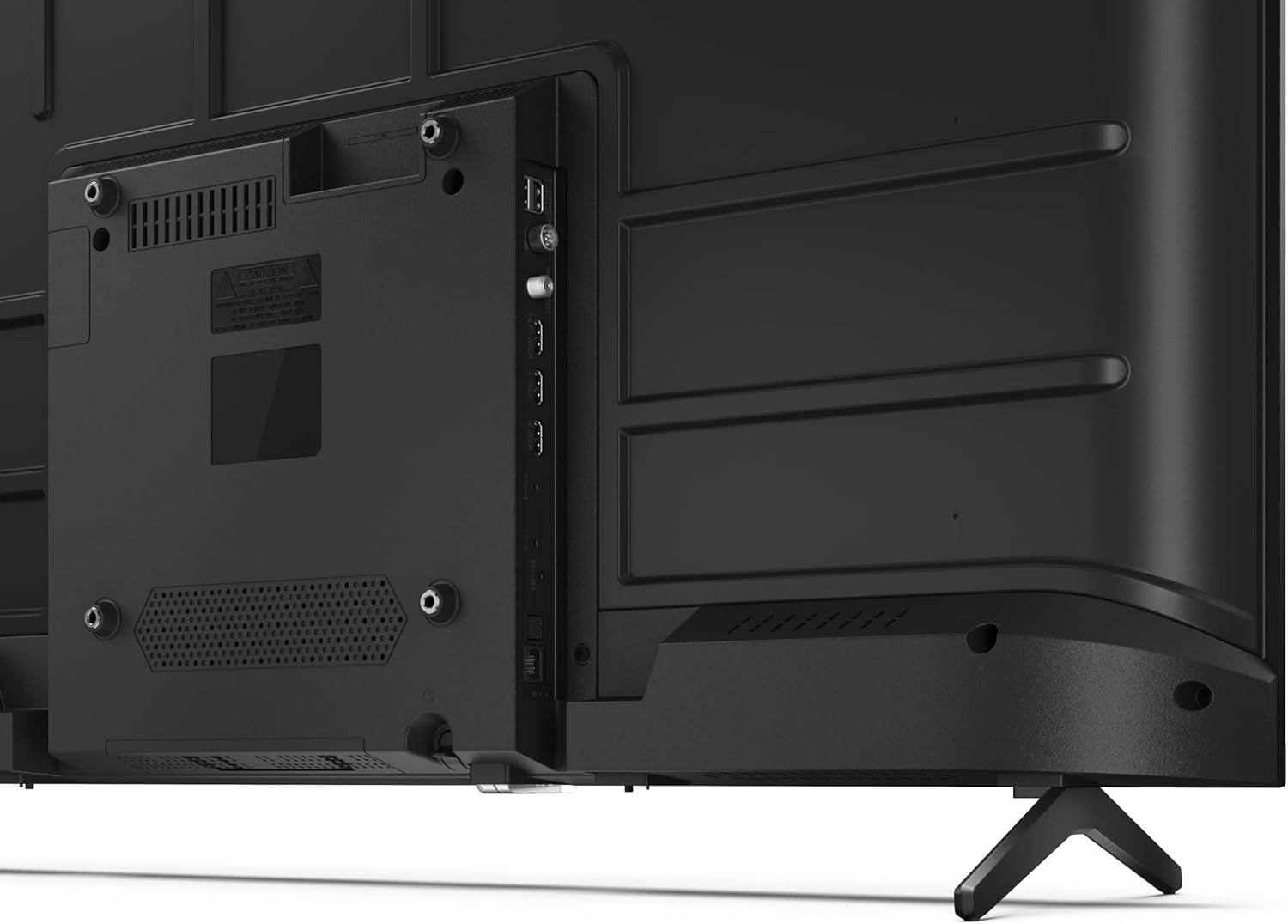
ምስል 3.3፡ ዝርዝር view የቲቪው የግንኙነት ወደቦች.
3.4 የመነሻ ኃይል በ Google ቲቪ ማዋቀር
After connecting all necessary cables, plug the power cable into an electrical outlet. Press the power button on the remote control or on the TV. Follow the on-screen instructions to complete the initial setup, including network connection, Google account login, and channel scanning.
4. አሠራር
4.1 የርቀት መቆጣጠሪያ ተግባራት
The remote control allows you to navigate the TV's features. Common buttons include Power, Volume Up/Down, Channel Up/Down, Input Source, Home (Google TV), Navigation (directional arrows, OK), Back, and Google Assistant.
4.2 ጎግል ቲቪ በይነገጽ
Your Sharp TV runs on Google TV, providing a personalized home screen with content recommendations from your subscriptions. Use the remote's navigation buttons to browse movies, shows, apps, and your library.

Image 4.1: The Google TV home screen on the Sharp 40HF2265E.
4.3 የግቤት ምርጫ
To switch between connected devices (e.g., HDMI 1, HDMI 2, TV tuner), press the 'Input' or 'Source' button on your remote control and select the desired input from the on-screen menu.
4.4 የምስል እና የድምጽ ቅንብሮች
Access the TV's settings menu to adjust picture modes (Standard, Vivid, Cinema, Game), brightness, contrast, color, and sound modes (Standard, Music, Movie, Speech). The TV supports HDR10 for enhanced contrast and color, and Dolby Digital for rich audio.

Image 4.2: Visual representation of HDR (High Dynamic Range) technology.
4.5 የጉግል ረዳት እና Chromecast
Use the built-in Google Assistant for voice control. Press the Google Assistant button on your remote and speak your commands, such as searching for content, controlling smart home devices, or getting information. Chromecast allows you to cast content directly from compatible devices like smartphones or tablets to your TV.

Image 4.3: Google Assistant integration for voice commands.
4.6 የብሉቱዝ ግንኙነት
Pair Bluetooth-enabled devices such as headphones or soundbars with your TV for a wireless audio experience. Navigate to the TV's settings menu, select 'Remotes & Accessories', and then 'Pair new device' to connect.
5. ጥገና
5.1 ቴሌቪዥኑን ማጽዳት
Always unplug the TV before cleaning. Use a soft, dry cloth to wipe the screen and TV body. For stubborn marks, lightly dampጨርቁን በውሃ ወይም በልዩ የስክሪን ማጽጃ ያጽዱ። ሻካራ ማጽጃዎችን፣ ሰሞችን ወይም ሟሟቶችን በፍፁም አይጠቀሙ።
5.2 የሶፍትዌር ዝመናዎች
Your Google TV may receive automatic software updates. Ensure your TV is connected to the internet to receive these updates, which can improve performance and add new features. You can also manually check for updates in the settings menu.
6. መላ መፈለግ
በቲቪዎ ላይ ችግሮች ካጋጠሙዎት የሚከተሉትን የተለመዱ መፍትሄዎች ይመልከቱ፡
- ኃይል የለም፡ የኃይል ገመዱ በቴሌቪዥኑም ሆነ በግድግዳው መውጫ ላይ ደህንነቱ በተጠበቀ ሁኔታ መሰካቱን ያረጋግጡ። መውጫው ተግባራዊ መሆኑን ያረጋግጡ።
- ምንም ምስል/ድምጽ የለም፡ ትክክለኛው የግቤት ምንጭ መመረጡን ያረጋግጡ። ሁሉንም የኬብል ግንኙነቶች (HDMI፣ አንቴና) ያረጋግጡ። ቴሌቪዥኑን እንደገና ለማስጀመር ይሞክሩ።
- የርቀት መቆጣጠሪያ አይሰራም; ባትሪዎቹን (2 AAA) ይተኩ። በርቀት መቆጣጠሪያው እና በቴሌቪዥኑ የ IR ዳሳሽ መካከል ምንም እንቅፋት አለመኖሩን ያረጋግጡ።
- የአውታረ መረብ ግንኙነት ጉዳዮች፡- For Wi-Fi, check your router and ensure the TV is within range. For wired connections, check the Ethernet cable. Try restarting your router and the TV.
- የምስል ጥራት ጉዳዮች፡- የምስል ቅንብሮችን ያስተካክሉ (ብሩህነት ፣ ንፅፅር ፣ ጥርት)። የግቤት ምንጭ ከፍተኛ ጥራት ያለው ምልክት እያቀረበ መሆኑን ያረጋግጡ።
For more complex issues, consult the comprehensive troubleshooting section in the full digital manual or contact Sharp customer support.
7. ዝርዝሮች
Below are the technical specifications for the Sharp 40HF2265E Full HD Google TV:

Image 7.1: Dimensions of the Sharp 40HF2265E TV.
| ባህሪ | ዝርዝር መግለጫ |
|---|---|
| የምርት ስም | ስለታም |
| የሞዴል ቁጥር | 40HF2265E |
| የሞዴል ስም | HF ተከታታይ |
| ሞዴል ዓመት | 2025 |
| የስክሪን መጠን | 40 ኢንች (81 ሴንቲሜትር) |
| የማሳያ ቴክኖሎጂ | LED |
| ጥራት | 1080 ፒ (ሙሉ ኤችዲ) |
| የማደስ ደረጃ | 60 Hz |
| ምጥጥነ ገጽታ | 16፡9 |
| የንፅፅር ሬሾ | 100000፡1 |
| Screen Finish | ማት |
| የምላሽ ጊዜ | 8 ሚሊሰከንዶች |
| የጀርባ ብርሃን ቴክኖሎጂ | LED |
| Supported HDR Format | HDR10፣ HLG |
| የምስል ጥራት ማሻሻል | Dynamic Contrast, HDR10, HLG |
| Motion Enhancement Technology | Motion Interpolation |
| ስርዓተ ክወና | ጎግል ቲቪ |
| Internet Applications | Apple TV, Google TV, Hulu, Prime Video, YouTube |
| ልዩ ባህሪያት | Bluetooth, Chromecast, Dolby Digital, HD Tuner |
| የግንኙነት ቴክኖሎጂ | ኢተርኔት፣ ዩኤስቢ፣ ዋይ ፋይ |
| ገመድ አልባ ቴክኖሎጂ | ብሉቱዝ |
| የብሉቱዝ ስሪት | 5.0 |
| Screen Mirroring Technology | Chromecast, Google Cast |
| ጠቅላላ የኤችዲኤምአይ ወደቦች | 3 |
| Total USB 2.0 Ports | 2 |
| Number of Composite Video Inputs | 1 |
| የድምጽ ግቤት | Mini composite/CVBS + audio input |
| Total Audio Output Ports | 2 |
| የድምጽ ውፅዓት ሁኔታ | ስቴሪዮ |
| የድምጽ ኢንኮዲንግ | DD |
| Integrated Surround Sound Format | Dolby AC-4, Dolby Digital, Dolby Digital Plus |
| ከፍተኛ የድምጽ ማጉያ ውፅዓት ኃይል | 16 ዋት (2x8 ዋት) |
| የድምጽ ቻናሎች ብዛት | 2.0 |
| የስርጭት ስርዓት | DVB-T2/C/S/S2 |
| የቪዲዮ ኢንኮዲንግ | MKV |
| የምርት ልኬቶች (DxWxH) | 8.4P x 89.2lx 50.9H ሴሜ |
| የእቃው ክብደት | 5.4 ኪ |
| ክብደት ያለ ማቆሚያ | 5.4 ኪ |
| የመሠረት ስፋት | 765 ሚሊሜትር |
| VESA ማፈናጠጥ መደበኛ | 200 x 200 ሚ.ሜ |
| የኃይል ፍጆታ | 37 ዋት |
| ጥራዝtage | 230 ቮልት |
| Remote Control Battery Size | አአአ |
| Remote Control Battery Quantity | 2 |
| Parental Control Technology | Kindersicherung Über Google Tv |
| የአውሮፓ ህብረት መለዋወጫ አቅርቦት | 7 ዓመታት |
8. ዋስትና እና ድጋፍ
8.1 የምርት ዋስትና
The Sharp 40HF2265E television comes with a 2-year manufacturer's warranty. Please refer to the included Warranty Card for detailed terms and conditions regarding coverage and service. Keep your proof of purchase for warranty claims.
8.2 የደንበኛ ድጋፍ
If you require further assistance, have questions not covered in this manual, or need technical support, please contact Sharp customer service. Contact information can typically be found on the Warranty Card or the official Sharp webጣቢያ.