
መግቢያ
This manual provides essential information for setting up, operating, maintaining, and troubleshooting your TCL TAB A1 Plus Android Tablet. The tablet features a 12.2-inch 2.4K 120Hz display, a Snapdragon 4 Gen 2 processor, 6GB RAM, and 128GB internal storage, expandable up to 2TB. It is equipped with an 8000mAh battery, quad stereo speakers, and 5MP front and 8MP rear cameras.
For optimal performance and longevity, please read these instructions carefully before using your device.
1. ማዋቀር
1.1 Unboxing እና የመጀመሪያ ምርመራ
Carefully remove all components from the packaging. Verify that all items listed in the "What's in the Box?" section are present and undamaged.

Image: The TCL TAB A1 Plus tablet, a USB-C cable, a Quick Guide & PSI document, and a SIM Pin are shown, illustrating the contents of the box.
- TCL TAB A1 Plus Android Tablet: The main device.
- ዓይነት-C ገመድ፡- ለክፍያ እና የውሂብ ማስተላለፍ.
- QG & PSI: Quick Guide and Product Safety Information.
- SIM Pin: For accessing the SIM/microSD card tray.
1.2 ጡባዊውን መሙላት
Before first use, fully charge the tablet.
- Connect the Type-C cable to the tablet's USB-C port.
- Connect the other end of the cable to a compatible power adapter (not included) and plug it into a wall outlet.
- በማያ ገጹ ላይ ያለው የባትሪ አመልካች የኃይል መሙያ ሁኔታን ያሳያል።

Image: A person is using the TCL TAB A1 Plus tablet while it is charging, with a visual representation of the 8000mAh battery and 20W fast charging capability.
The tablet supports 20W fast charging for quick power restoration.
1.3 ማብራት / ማጥፋት
- ለማብራት፡- የቲሲኤል አርማ እስኪታይ ድረስ የኃይል አዝራሩን ተጭነው ይያዙት።
- ለማጥፋት፡- የኃይል አዝራሩን ተጭነው ይያዙ እና ከዚያ በማያ ገጹ ላይ ካሉት አማራጮች ውስጥ "Power off" የሚለውን ይምረጡ።
1.4 የመጀመሪያ ማዋቀር
Follow the on-screen prompts to complete the initial setup, including:
- ቋንቋዎን መምረጥ።
- ከWi-Fi አውታረ መረብ ጋር በመገናኘት ላይ።
- በGoogle መለያዎ መግባት።
- Setting up security features (PIN, pattern, fingerprint).
2. የአሠራር መመሪያዎች
2.1 የማሳያ ባህሪያት
The TCL TAB A1 Plus features a 12.2-inch 2.4K display with a 120Hz refresh rate and 100% sRGB color. TCL NXTVISION technology enhances visuals for richer colors and sharper clarity.

Image: A user relaxing on a couch, holding the TCL TAB A1 Plus tablet which displays a vibrant image, highlighting its 12.2" 2.4K display, 120Hz refresh rate, 550 nits brightness, and 100% sRGB color.
2.2 አፈጻጸም እና ማከማቻ
Powered by Snapdragon 4 Gen 2 with 6GB RAM (expandable to 16GB total with RAM Expansion) and 128GB storage (expandable to 2TB via microSD), the tablet offers smooth performance for various tasks.

Image: A graphic illustrating the Snapdragon 4 Gen 2 processor, emphasizing its 4nm process and LPDDR5 memory for fast and smooth performance.

Image: The TCL TAB A1 Plus tablet displaying multiple open applications, with icons indicating 16GB RAM, 128GB ROM, and 2TB expandable storage.
2.3 ባለብዙ ተግባር ባህሪዎች
The tablet supports several multitasking modes to enhance productivity:
- የተከፈለ ማያ፡ ሁለት አፕሊኬሽኖችን ጎን ለጎን ያሂዱ።
- ተንሳፋፊ መስኮቶች፡ Keep apps visible in resizable windows while working on other tasks.
- የማራዘም ሁነታ፡ Use the tablet as a second screen for your laptop.
- MirrorMode፡ Mirror your PC screen to the tablet for presentations or document review.

Image: A visual representation of the TCL TAB A1 Plus tablet's multitasking capabilities, including Split Screen, Floating Window, Extend Mode (tablet as second screen), and Mirror Mode (PC screen mirrored to tablet).
2.4 AI Productivity Tools
Leverage built-in AI tools for enhanced productivity:
- ጉግል ጀሚኒ ኤአይ፡ For summarizing, generating ideas, and instant assistance.
- ለመፈለግ ክበብ ይዘትን በማያ ገጽዎ ላይ በማዞር በፍጥነት መረጃ ይፈልጉ።
- Writing Assist: Get AI help for emails, essays, and notes.
- Text Assist: Translate, rewrite, or summarize text instantly.
- Smart Translator: Real-time translation of text, images, or voice.
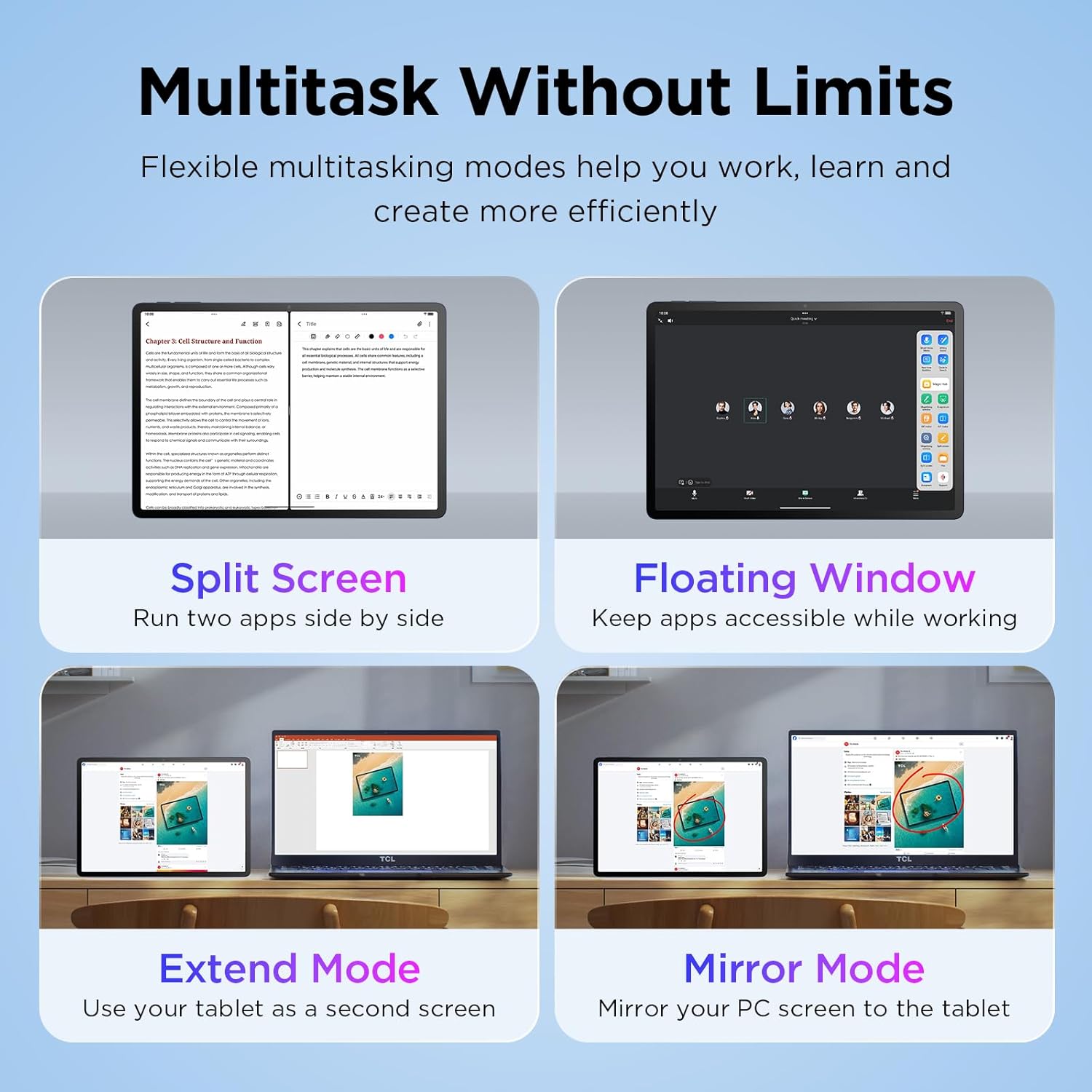
Image: The TCL TAB A1 Plus tablet displaying a search result for a landmark, with icons representing Google Gemini, Circle to Search, Writing Assist, Text Assist, and Smart Translator.
2.5 ኦዲዮ እና ካሜራ
The tablet features quad stereo speakers for rich audio and 5MP front and 8MP rear cameras for clear video calls and photography.

Image: A split image showing the TCL TAB A1 Plus tablet with sound waves emanating from its quad speakers on one side, and the tablet's front and rear cameras (5MP front, 8MP rear) with examples of video calls and photos on the other.
Video: This official video from TCL showcases the smart performance and simple operation of the TCL TAB A1 Plus, demonstrating its key features and user experience.
3. ጥገና
3.1 ጡባዊውን ማጽዳት
- ማያ ገጹን እና ገላውን ለማፅዳት ለስላሳ ፣ ከጥጥ ነፃ የሆነ ጨርቅ ይጠቀሙ።
- Avoid using abrasive cleaners, alcohol, or solvents, as these can damage the screen and finish.
- ለግትር ማጭበርበሮች በትንሹ መampጨርቁን በውሃ.
3.2 የሶፍትዌር ዝመናዎች
ጥሩ አፈጻጸምን፣ ደህንነትን እና የአዳዲስ ባህሪያትን ተደራሽነት ለማረጋገጥ የሶፍትዌር ማሻሻያዎችን በመደበኛነት ያረጋግጡ እና ይጫኑ።
- ወደ ሂድ ቅንብሮች.
- መታ ያድርጉ ስርዓት > የስርዓት ዝመና.
- የሚገኙ ማሻሻያዎችን ለማውረድ እና ለመጫን በማያ ገጽ ላይ ያሉትን መመሪያዎች ይከተሉ።
3.3 የባትሪ እንክብካቤ
- ጡባዊውን ለከፍተኛ ሙቀት ከማጋለጥ ይቆጠቡ።
- ባትሪው በተደጋጋሚ እንዲፈስ አይፍቀዱ.
- ለኃይል መሙላት የቀረበውን ዓይነት-C ገመድ ይጠቀሙ።
4. መላ መፈለግ
4.1 ጡባዊ አልበራም
- Ensure the battery is charged. Connect the tablet to a power source and wait a few minutes before attempting to power on again.
- Try a force restart by holding the Power button for 10-15 seconds.
4.2 ስክሪን ምላሽ የማይሰጥ
- ጡባዊውን እንደገና ያስጀምሩ.
- ማያ ገጹ ንጹህ እና ከእርጥበት ወይም ከቆሻሻ የጸዳ መሆኑን ያረጋግጡ።
4.3 የ Wi-Fi ግንኙነት ጉዳዮች
- በቅንብሮች ውስጥ Wi-Fiን ያጥፉ እና ያብሩ።
- የእርስዎን Wi-Fi ራውተር እንደገና ያስጀምሩ።
- አውታረ መረቡን ይረሱ እና እንደገና ይገናኙ ፣ የይለፍ ቃሉን እንደገና ያስገቡ።
4.4 መተግበሪያዎች እየተበላሹ ወይም እየቀዘቀዙ
- ዝጋ እና መተግበሪያውን እንደገና ይክፈቱ።
- የመተግበሪያውን መሸጎጫ እና ውሂቡን ያጽዱ ቅንብሮች > መተግበሪያዎች > [የመተግበሪያ ስም] > ማከማቻ.
- መተግበሪያው ወደ የቅርብ ጊዜው ስሪት መዘመኑን ያረጋግጡ።
- If issues persist, uninstall and reinstall the app.
5. ዝርዝሮች
| የምርት ስም | TCL |
| የሞዴል ስም | TCL TAB A1 Plus |
| የስክሪን መጠን | 12.2 ኢንች |
| የማሳያ ጥራት | 2400 x 1600 ፒክስል (2.4ኬ) |
| የማደስ ደረጃ | 120Hz |
| ፕሮሰሰር | Snapdragon 4 Gen 2 |
| ራም | 6 ጊባ (ወደ 16 ጊባ ሊሰፋ የሚችል) |
| ማከማቻ | 128 ጊባ (እስከ 2 ቴባ በማይክሮ ኤስዲ ሊሰፋ የሚችል) |
| ስርዓተ ክወና | Android 16 (Upgradable to Android 17), 3 Years Security Updates |
| የባትሪ አቅም | 8000 ሚአሰ |
| የፊት ካሜራ | 5 ሜፒ |
| የኋላ ካሜራ | 8 ሜፒ |
| Dimensions (L x W x Thickness) | 10.85"ኤል x 7.45" ዋ x 0.26"ሰ |
| ክብደት | 1.19 ፓውንድ £ |
| ግንኙነት | Bluetooth, Wi-Fi (802.11ac, 802.11ax), USB Type C |
| ልዩ ባህሪያት | AI-Powered Productivity Tools, Advanced Multitasking Modes, NXTVISION Display |
6. የዋስትና መረጃ
The TCL TAB A1 Plus Android Tablet comes with a የ 1 ዓመት የአምራች ዋስትና. This warranty covers defects in materials and workmanship under normal use. Please refer to the included Product Safety Information (PSI) document for full terms and conditions.
ለዋስትና ጥያቄዎች የግዢ ማረጋገጫዎን ያስቀምጡ።
7. ድጋፍ
ለተጨማሪ እርዳታ፣ የቴክኒክ ድጋፍ ወይም ወደ view frequently asked questions, please visit the official TCL support webጣቢያ ወይም የደንበኛ አገልግሎትን ያነጋግሩ።
- የመስመር ላይ ድጋፍ ን ይጎብኙ የቲሲኤል ኦፊሴላዊ መደብር በአማዞን ላይ ለምርት መረጃ እና የድጋፍ ምንጮች.
- የደንበኛ አገልግሎትን ያነጋግሩ፡- Refer to the contact information provided in your Quick Guide or on the TCL official webጣቢያ.


