
1. መግቢያ
The NYTALK N2 is a Bluetooth motorcycle intercom system designed for clear and reliable communication between riders. It features advanced Bluetooth 5.4 technology, a 1000m intercom range, multi-tasking audio capabilities, music sharing, and voice assistant support. The system is built with a durable, IP67 waterproof design and equipped with DSP/CVC noise reduction for optimal audio quality in various riding conditions.
2. በሳጥኑ ውስጥ ያለው
ሁሉም ክፍሎች በጥቅልዎ ውስጥ መኖራቸውን ያረጋግጡ፡-
- N2 Main Unit (x2 for Duo pack)
- Hi-Fi 40mm Speakers
- ቡም ማይክሮፎን
- ባለ ገመድ ማይክሮፎን
- የዩኤስቢ-ሲ ኃይል መሙያ ገመድ
- Helmet Clip Mount
- የማጣበቅ ተራራ
- የድምጽ ማጉያ ፓድስ
- የተጠቃሚ መመሪያ

Image: All components included in the NYTALK N2 package.
3. ምርት አብቅቷልview
The NYTALK N2 unit features large, tactile buttons designed for easy operation even with gloves. Familiarize yourself with the button layout and functions before use.

Image: NYTALK N2 unit with large, glove-friendly buttons.
ቁልፍ ባህሪዎች
- Bluetooth 5.4 Dual Chip: Ensures stable signal transmission and low latency.
- 1000m Intercom Range: Bidirectional communication for two riders.
- Multi-tasking Audio: Seamless switching between intercom, navigation, and music.
- ሙዚቃ መጋራት፡- Share music with a passenger up to 50m away.
- የድምፅ ረዳት Supports AI voice commands for hands-free operation.
- DSP/CVC Noise Reduction: Effectively reduces wind and road noise.
- IP67 የውሃ መከላከያ; Designed for all-weather use.
- 1000mAh ባትሪ; Up to 20 hours talk time, 25 hours music, 360 hours standby.
4. ማዋቀር እና መጫን
4.1. የራስ ቁር መትከል
- የመጫኛ ዘዴን ይምረጡ፡- Select either the helmet clip mount or the adhesive mount based on your helmet type and preference. The clip mount slides onto the helmet edge, while the adhesive mount sticks directly to the helmet surface.
- የዋናው ክፍል አቀማመጥ: Attach the N2 main unit to the chosen mount on the side of your helmet. Ensure it is securely fastened.
- ድምጽ ማጉያዎችን ይጫኑ፡ Remove the helmet's inner padding. Place the Hi-Fi 40mm speakers into the designated ear pockets within the helmet. Use the provided speaker pads for optimal fit and comfort. Ensure speakers are positioned directly over your ears for best audio quality.
- ማይክሮፎን ይጫኑ፦
- For full-face helmets, use the wired microphone and secure it inside the chin bar.
- For open-face or modular helmets, use the boom microphone and position it close to your mouth.
- የመንገድ ኬብሎች፡ Carefully route all speaker and microphone cables under the helmet's padding to keep them tidy and prevent interference with comfort or safety. Connect them to the N2 main unit.
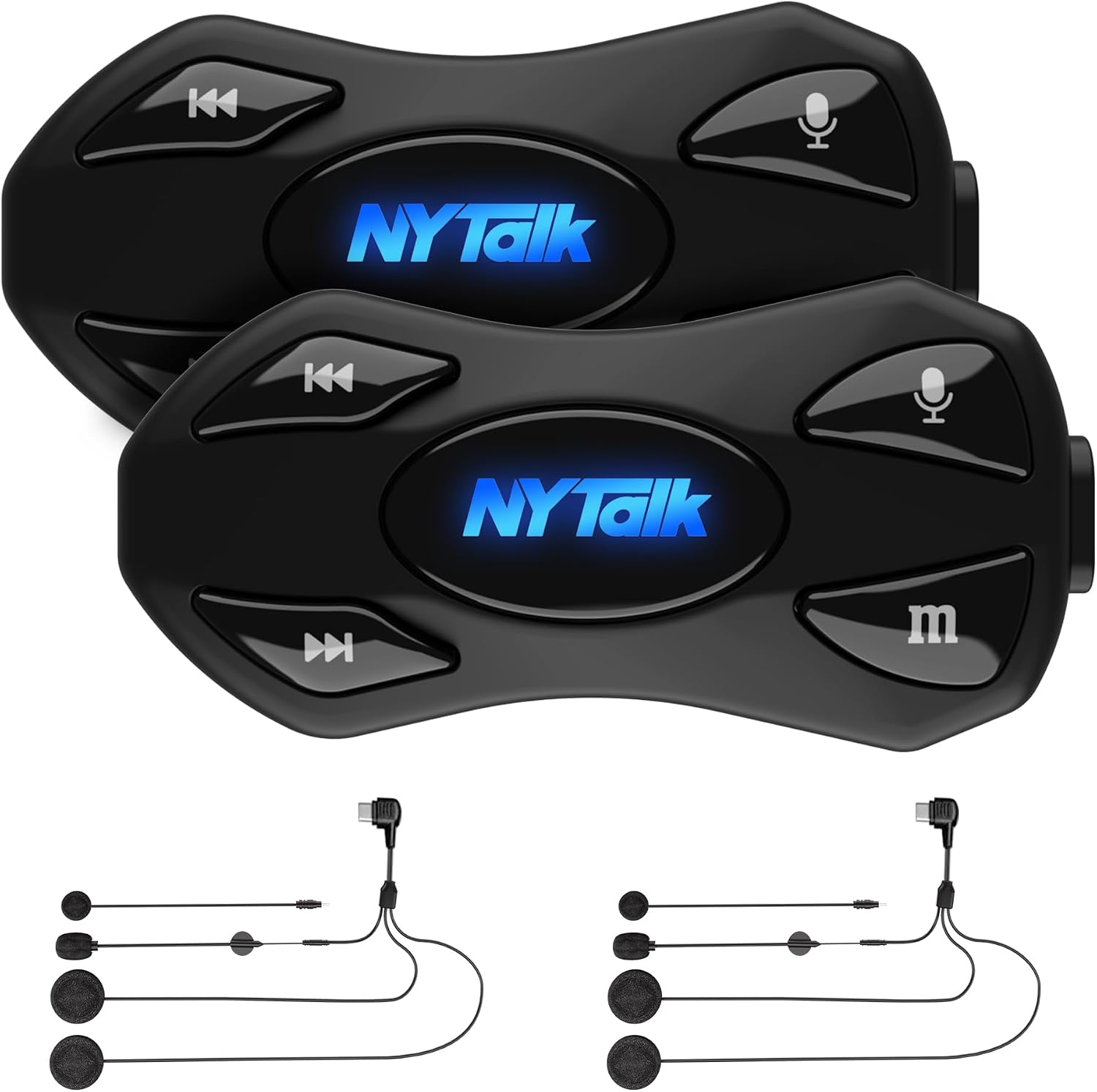
Image: NYTALK N2 unit installed on a helmet.
4.2. የመነሻ ኃይል መሙላት
Before first use, fully charge the N2 unit. Connect the provided USB-C cable to the charging port on the unit and to a USB power source. Charging typically takes approximately 2 hours.

Image: NYTALK N2 charging via USB-C.
5. የአሠራር መመሪያዎች
5.1. ማብራት / ማጥፋት
- አብራ፡ የኃይል አዝራሩን ለ 3 ሰከንዶች ተጭነው ይያዙ።
- ኃይል ዝጋ: ጠቋሚው መብራቱ እስኪጠፋ ድረስ የኃይል አዝራሩን ለ 3 ሰከንዶች ተጭነው ይያዙ.
5.2. ብሉቱዝ ከስልክ ጋር ማጣመር
- With the N2 unit powered off, press and hold the Power button for approximately 5-7 seconds until the LED indicator flashes red and blue alternately, indicating pairing mode.
- On your mobile phone, enable Bluetooth and search for "NYTALK N2".
- Select "NYTALK N2" from the list of available devices to connect. A voice prompt will confirm successful pairing.

Image: Dual Bluetooth 5.4 chips for stable connection and audio multitasking.
5.3. Intercom Communication (Rider-to-Rider)
The N2 supports bidirectional intercom communication up to 1000 meters between two riders.
- Ensure both N2 units are powered on and within range.
- On one unit, press the Intercom button once to initiate pairing with the second unit.
- The units will automatically connect. A voice prompt will confirm the intercom connection.
- If connection is lost, units will automatically reconnect when back in range.

Image: Two riders using the N2 intercom for private communication.
5.4. የሙዚቃ መልሶ ማጫወት እና ማጋራት
- አጫውት/ ለአፍታ አቁም፡ Play/Pause የሚለውን ቁልፍ አንዴ ተጫን።
- ቀጣይ ትራክ፡ ቀጣይ ትራክ ቁልፍን ተጫን።
- ቀዳሚ ትራክ የቀደመውን ትራክ ቁልፍ ተጫን።
- ሙዚቃ መጋራት፡- While music is playing, press the Music Share button (refer to manual for specific button) to share audio with a paired passenger unit.

Image: Music sharing feature between rider and passenger.
5.5. የስልክ ጥሪዎች እና የድምጽ ረዳት
- ጥሪ መልስ፡- የስልክ አዝራሩን አንድ ጊዜ ይጫኑ።
- ጥሪን ጨርስ፡ በጥሪ ወቅት የስልክ አዝራሩን አንድ ጊዜ ይጫኑ።
- ጥሪን ውድቅ አድርግ፡ ለ 2 ሰከንድ የስልክ ቁልፉን ተጭነው ይያዙ።
- ራስ-ሰር መልስ፡- The N2 supports automatic call answering for hands-free convenience.
- የድምጽ ረዳትን (Siri/Google ረዳትን) አግብር፦ Press the Voice Assistant button once. Speak your command after the prompt.

Image: Voice assistant integration for hands-free control.
6. ጥገና
- ማጽዳት፡ ክፍሉን ለስላሳ ፣ መamp ጨርቅ. ኃይለኛ ኬሚካሎችን ወይም ሻካራ ማጽጃዎችን አይጠቀሙ.
- የውሃ መቋቋም; The N2 unit is IP67 waterproof. While it can withstand rain and splashes, avoid submerging it in water for extended periods.
- የባትሪ እንክብካቤ For optimal battery life, charge the unit regularly and avoid fully discharging it frequently. Store in a cool, dry place when not in use for extended periods.

Image: IP67 waterproof design for all-weather reliability.
7. መላ መፈለግ
| ችግር | ሊሆን የሚችል ምክንያት | መፍትሄ |
|---|---|---|
| ኃይል የለም | ዝቅተኛ ባትሪ ወይም ክፍል ጠፍቷል። | Charge the unit fully. Press and hold the Power button to turn on. |
| ከስልክ ጋር ማጣመር አይቻልም | Unit not in pairing mode; phone Bluetooth off; interference. | Ensure N2 is in pairing mode (flashing red/blue). Turn phone Bluetooth off and on. Move away from other Bluetooth devices. |
| Intercom connection unstable or lost | ከክልል ውጪ፤ እንቅፋቶች፤ ጣልቃ ገብነት። | Ensure units are within 1000m and have a clear line of sight. Re-initiate intercom pairing. |
| ደካማ የድምጽ ጥራት / ከመጠን በላይ ድምፅ | Microphone not positioned correctly; speakers misaligned; high wind noise. | Adjust microphone closer to mouth. Ensure speakers are centered over ears. DSP/CVC noise reduction is active, but extreme conditions may affect clarity. |
| አዝራሮች ምላሽ የማይሰጡ | ዩኒቱ ቀዝቅዟል፤ ባትሪው ዝቅተኛ ነው። | Recharge the unit. Try a soft reset (refer to full manual for specific reset procedure if available, otherwise power cycle). |
8. ዝርዝሮች
| ባህሪ | ዝርዝር |
|---|---|
| የሞዴል ስም | N2 |
| የምርት ስም | NYTALK |
| የብሉቱዝ ስሪት | 5.4 |
| የኢንተርኮም ክልል | Up to 1000m (for 2 riders) |
| የባትሪ አቅም | 1000 ሚአሰ |
| የኃይል መሙያ ጊዜ | በግምት. 2 ሰዓታት |
| የንግግር ጊዜ | እስከ 20 ሰዓታት ድረስ |
| የሙዚቃ ማጫዎቻ ጊዜ | እስከ 25 ሰዓታት ድረስ |
| የመጠባበቂያ ጊዜ | እስከ 360 ሰዓታት ድረስ |
| የውሃ መቋቋም | IP67 |
| የድምጽ መቆጣጠሪያ | አክቲቭ ኖዝ ሰርዘሬሽን (DSP/CVC) |
| የድምጽ ማጉያ መጨናነቅ | 32 ኦኤም |
| ክብደት | 50 ግራም |
9. ዋስትና እና ድጋፍ
The NYTALK N2 Intercom System comes with a የ 2 ዓመት የአምራች ዋስትና. ለዋስትና ጥያቄዎች እባክዎ የግዢ ማረጋገጫዎን ያቆዩ።
For technical support, troubleshooting assistance, or warranty inquiries, please visit the official NYTALK brand store or contact customer service through the retailer where you purchased the product.
Official NYTALK Brand Store: NYTALK Store


