1. መግቢያ
This manual provides essential information for the proper setup, operation, and maintenance of your Coby DVD-527 5.1 Channel Progressive Scan DVD Player. Please read this manual thoroughly before using the device to ensure optimal performance and safety. The Coby DVD-527 features a super-slim design, 5.1 channel audio output, and progressive scan video output for enhanced picture quality on compatible televisions.
2. የደህንነት መረጃ
- የኃይል ምንጭ፡- የኃይል አቅርቦቱ ከቮልዩ ጋር መመሳሰሉን ያረጋግጡtagበዩኒቱ ላይ የተገለጹት መስፈርቶች።
- የአየር ማናፈሻ; የአየር ማናፈሻ ክፍተቶችን አይዝጉ። ከመጠን በላይ ሙቀትን ለመከላከል በመሳሪያው ዙሪያ በቂ ቦታ ይስጡ።
- እርጥበት፡- መሳሪያውን ለዝናብ፣ ለእርጥበት ወይም ለከፍተኛ እርጥበት አያጋልጡት።
- ማጽዳት፡ Unplug the unit from the power outlet before cleaning. Use a soft, dry cloth.
- አገልግሎት መስጠት፡ ይህንን ምርት እራስዎ ለማገልገል አይሞክሩ። ሁሉንም አገልግሎት ወደ ብቃት ላለው የአገልግሎት ሠራተኛ ያማክሩ።
3. የጥቅል ይዘቶች
ሁሉም እቃዎች በጥቅሉ ውስጥ መኖራቸውን ያረጋግጡ፡-
- Coby DVD-527 DVD Player
- ሙሉ ተግባር የርቀት መቆጣጠሪያ
- ኤቪ ገመድ
- የተጠቃሚ መመሪያ (ይህ ሰነድ)
- የዋስትና መረጃ
4. ምርት አብቅቷልview
The Coby DVD-527 DVD Player and its accompanying remote control are designed for ease of use and integration into your home entertainment system.
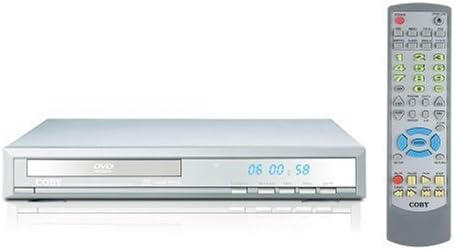
ምስል 1፡ Coby DVD-527 DVD Player (left) and its full-function remote control (right). The DVD player features a slim profile with a disc tray, display screen, and control buttons on the front panel. The remote control includes various buttons for playback, navigation, and special features.
የፊት ፓነል መቆጣጠሪያዎች
The front panel typically includes the disc tray, power button, play/pause, stop, and eject buttons, along with a digital display showing playback time or status.
የኋላ ፓነል ግንኙነቶች
The rear panel houses various audio and video output ports for connecting to your television and audio system.
የርቀት መቆጣጠሪያ
The included remote control provides full functionality for operating the DVD player from a distance, including power, playback controls, menu navigation, volume, and special features.
5. ማዋቀር
5.1 ከቴሌቪዥን ጋር መገናኘት
Choose one of the following video connection methods:
- Component Video Output (Progressive Scan): For the highest quality picture on HD-capable televisions, connect the Y, Pb, and Pr component video outputs from the DVD player to the corresponding inputs on your TV using component video cables.
- RCA Video Output: Connect the yellow RCA video output from the DVD player to the video input on your TV using an RCA video cable.
- የኤስ-ቪዲዮ ውፅዓት፡- Connect the S-Video output from the DVD player to the S-Video input on your TV using an S-Video cable.
5.2 ከድምጽ ስርዓት ጋር መገናኘት
ከሚከተሉት የድምጽ ግንኙነት ዘዴዎች ውስጥ አንዱን ይምረጡ፡
- 5.1 Dolby Digital Output: For surround sound, connect the 5.1 channel audio outputs (Front Left, Front Right, Center, Surround Left, Surround Right, Subwoofer) from the DVD player to the corresponding inputs on your 5.1 channel receiver or ampማብሰያ
- Coaxial Digital Audio ውፅዓት፡- Connect the coaxial digital audio output from the DVD player to the coaxial digital audio input on your receiver or amplifier using a coaxial digital audio cable.
- ኦፕቲካል ዲጂታል ኦዲዮ ውፅዓት፡- Connect the optical digital audio output from the DVD player to the optical digital audio input on your receiver or amplifier using an optical digital audio cable.
- አናሎግ ኦዲዮ ውፅዓት፡- Connect the red and white RCA analog audio outputs from the DVD player to the corresponding audio inputs on your TV or stereo system using an RCA audio cable.
5.3 የኃይል ግንኙነት
After all audio and video connections are made, plug the DVD player's power cord into a standard AC power outlet.
6. የአሠራር መመሪያዎች
6.1 መሰረታዊ የዲስክ መልሶ ማጫወት
- Turn on your television and select the correct input source for the DVD player.
- Press the Power button on the DVD player or remote control to turn on the unit.
- Press the Eject button (▲) on the front panel or remote to open the disc tray.
- Place a compatible disc (DVD, CD, CD-R/RW, MP3) gently into the disc tray with the label side facing up.
- Press the Eject button (▲) again to close the disc tray. The player will begin reading the disc.
- Playback should start automatically. If a disc menu appears, use the navigation buttons on the remote to select your desired option and press Enter.
- Use the Play (▶), Pause (▐▐), Stop (■), Fast Forward (►►), and Rewind (◄◄) buttons on the remote for playback control.
6.2 ልዩ ባህሪያት
- የማያ ገጽ ላይ ማሳያ፡ Press the OSD button on the remote to view playback information on your screen.
- Zoom Operation: Use the Zoom button to magnify a portion of the picture.
- ብዙ Viewአንግል ውስጥ; For discs that support it, press the Angle button to switch between different camera angles.
- የትርጉም ጽሑፎች፡- Press the Subtitle button to select available subtitle languages.
- Parental Lock Control: Access the setup menu to configure parental control settings, restricting playback of certain content based on rating.
6.3 የስርዓት ቅንብሮች
Press the Setup button on the remote to access the system menu. Here you can adjust video settings (e.g., aspect ratio, progressive scan mode), audio settings, language preferences, and parental control options. Refer to the on-screen menu for detailed navigation.
7. ጥገና
7.1 ክፍሉን ማጽዳት
Wipe the exterior of the DVD player with a soft, dry cloth. Do not use liquid cleaners or aerosol sprays, as they may damage the finish or internal components.
7.2 የዲስክ እንክብካቤ
Handle discs by their edges. Keep discs clean and free of scratches. Store discs in their cases when not in use to prevent dust and damage.
8. መላ መፈለግ
በዲቪዲ ማጫወቻዎ ላይ ችግሮች ካጋጠሙዎት የሚከተሉትን የተለመዱ ችግሮች እና መፍትሄዎች ይመልከቱ፡
- ኃይል የለም፡
• Ensure the power cord is securely plugged into both the DVD player and a working electrical outlet.
• Check if the power outlet is functional by plugging in another device. - ስዕል የለም፡
• Verify that the video cables are correctly connected between the DVD player and the TV.
• Ensure your TV is set to the correct input source (e.g., AV1, Component, HDMI).
• Check the TV's picture settings. - ድምጽ የለም፡
• Confirm that audio cables are properly connected to your TV or audio system.
• Check the volume level on both the DVD player and your TV/audio system.
• Ensure your TV/audio system is set to the correct audio input.
• If using digital audio, verify the audio settings in the DVD player's setup menu. - ዲስክ እየተጫወተ አይደለም/ዲስክ ስህተት፡
• Ensure the disc is clean and free of scratches or smudges.
• Make sure the disc is inserted correctly with the label side facing up.
• Verify that the disc format is compatible with the player (DVD, CD, CD-R/RW, MP3). - የርቀት መቆጣጠሪያ አይሰራም;
• Check and replace the batteries in the remote control.
• Ensure there are no obstructions between the remote and the DVD player's sensor.
• Point the remote directly at the DVD player.
9. ዝርዝሮች
| ሞዴል | ዲቪዲ-527 |
| የምርት ስም | ኮቢ |
| መጠኖች (ወ x D x H) | 11 x 10 x 2 ኢንች (በግምት) |
| ክብደት | 7 ፓውንድ (በግምት) |
| Media Type Compatibility | DVD, CD, CD-R/RW, MP3 |
| የቪዲዮ ውፅዓት | Component Video (Y, Pb, Pr), RCA Video, S-Video |
| የድምጽ ውፅዓት | 5.1 Channel Dolby Digital, Coaxial Digital, Optical Digital, Analog RCA (L/R) |
| ልዩ ባህሪያት | Progressive Scan, Multiple Subtitles, Multiple Viewing Angles, On-Screen Display, Zoom Operation, Parental Lock Control |
| የቪዲዮ ተኳኋኝነት | NTSC/PAL ስርዓት |
10. ዋስትና እና ድጋፍ
This product is covered by a limited manufacturer's warranty. Please refer to the warranty information card included in your package for specific terms and conditions, including the warranty period and coverage details. Keep your purchase receipt as proof of purchase.
For technical assistance or customer support, please refer to the contact information provided in your warranty documentation or visit the official Coby webበጣም ወቅታዊ ለሆኑ የድጋፍ ሀብቶች ጣቢያ።


