1. መግቢያ
ስለገዙ እናመሰግናለንasing the Pentax Optio W10 Digital Camera. This manual provides essential information for the safe and effective use of your camera. The Optio W10 is a compact 6.0-megapixel digital camera featuring a 3x optical zoom lens, designed for capturing high-quality still images and video. Its robust design makes it suitable for various environments.
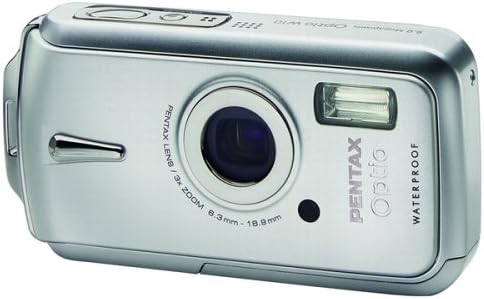
ምስል 1.1: የፊት view of the Pentax Optio W10 Digital Camera, showcasinሌንሱን፣ ፍላሽውን እና የምርት ስም ብራንዲንግን ያካትታል።
2. የደህንነት መረጃ
Please read and understand all safety precautions before using the camera. Failure to do so may result in injury or damage to the product.
- ካሜራውን ለመበተን ወይም ለመቀየር አይሞክሩ።
- ካሜራውን ከከፍተኛ ሙቀት፣ ከቀጥታ የፀሐይ ብርሃን እና ከፍተኛ እርጥበት ያርቁ።
- Ensure all compartment covers (battery, memory card) are securely closed and locked before exposing the camera to water or dust.
- Use only the specified battery type (Lithium-ion DL-I8) and charger.
- ልጆች በማይደርሱበት ቦታ ያስቀምጡ.
3. የጥቅል ይዘቶች
ሁሉም እቃዎች በካሜራዎ ጥቅል ውስጥ መኖራቸውን ያረጋግጡ፡-
- ፔንታክስ ኦፕቲዮ W10 ዲጂታል ካሜራ
- Lithium-ion Battery DL-I8
- ባትሪ መሙያ
- የ AC ኃይል ገመድ
- የዩኤስቢ ገመድ (ለኮምፒዩተር ግንኙነት)
- ማሰሪያ
- ሶፍትዌር ሲዲ-ሮም
- የትምህርት መመሪያ (ይህ ሰነድ)
4. ማዋቀር
4.1. የባትሪ ጭነት
- የባትሪ/የማህደረ ትውስታ ካርድ ክፍል መሸፈኛ በካሜራው ግርጌ ላይ ያግኙ።
- Slide the lock switch to the 'OPEN' position and open the cover.
- Insert the Lithium-ion battery DL-I8 into the compartment, ensuring the correct orientation as indicated inside the compartment.
- Close the cover and slide the lock switch to the 'LOCK' position until it clicks securely.

ምስል 4.1: ታች view of the camera, illustrating the battery and SD card compartment with the lock switch.
4.2. የማህደረ ትውስታ ካርድ ጭነት
The Pentax Optio W10 uses SD memory cards.
- Open the battery/memory card compartment cover as described in Section 4.1.
- Insert the SD memory card into the designated slot with the label facing the correct direction, pushing gently until it clicks into place.
- Close the cover and slide the lock switch to the 'LOCK' position.
4.3. የመጀመሪያ የኃይል ማብሪያ እና ቀን/ሰዓት ቅንብር
- የሚለውን ይጫኑ አብራ/አጥፋ በካሜራው አናት ላይ የሚገኝ አዝራር።
- Upon first power-on, the camera will prompt you to set the date and time. Use the directional buttons on the back of the camera to navigate and the OK ለማረጋገጥ አዝራር.
- የመጀመሪያውን ማዋቀር ለማጠናቀቅ በስክሪኑ ላይ ያሉትን መመሪያዎች ይከተሉ።

ምስል 4.2: ከፍተኛ view of the camera, highlighting the ON/OFF button and 6.0 Megapixels branding.
5. ካሜራውን መስራት
5.1. መሰረታዊ ፎቶግራፍ
To take a still picture:
- ን በመጫን ካሜራውን ያብሩ አብራ/አጥፋ አዝራር።
- ፎቶዎን በ2.5 ኢንች ኤልሲዲ ማሳያ በመጠቀም ይቅረጹ።
- ለማተኮር የመዝጊያውን ቁልፍ በግማሽ ወደ ታች ይጫኑ። ትኩረት ሲደረስ የትኩረት ፍሬሙ አረንጓዴ ይሆናል።
- ምስሉን ለመቅረጽ የመዝጊያ አዝራሩን እስከ ታች ይጫኑ።

ምስል 5.1: የኋላ view የካሜራውን፣ የኤልሲዲ ማያ ገጽ እና የተለያዩ የአሰሳ እና ቅንብሮችን የመቆጣጠሪያ አዝራሮችን ያሳያል።
5.2. የተኩስ ሁነታዎች
The Optio W10 offers various shooting modes accessible via the MODE button. Refer to the on-screen menu for specific options such as Program Auto, Scene Modes, and Movie Mode.
5.3. የቪዲዮ ቀረጻ
ቪዲዮ ለመቅረጽ፡-
- Switch to Movie Mode using the MODE አዝራር።
- Press the shutter button to start recording. The camera can capture QuickTime motion JPEG videos at 640 x 480 resolution at 30 frames per second.
- መቅዳት ለማቆም የመዝጊያ አዝራሩን እንደገና ይጫኑ።
5.4. መልሶ ማጫወት
ለ view የተቀረጹ ምስሎች እና ቪዲዮዎች፤
- የሚለውን ይጫኑ መልሶ ማጫወት አዝራር (ብዙውን ጊዜ በሶስት ማዕዘን አዶ ይገለጻል)።
- Use the directional buttons to scroll through your photos and videos.
- የሚለውን ይጫኑ OK አዝራር ወደ view ቪዲዮ ወይም ፎቶን ማጉላት።
5.5. ከኮምፒዩተር ጋር መገናኘት
To transfer images and videos to a computer:
- ካሜራው መዘጋቱን ያረጋግጡ።
- የቀረበውን የዩኤስቢ ገመድ በመጠቀም ካሜራውን ከኮምፒዩተርዎ ጋር ያገናኙት።
- Turn on the camera. It should be recognized as a removable disk or a PTP device.
- Follow your computer's operating system instructions to access and transfer files.
6. ጥገና
6.1. ማጽዳት
- የካሜራ አካል፡ ለስላሳ እና ደረቅ ጨርቅ ይጥረጉ. ለጠንካራ ቆሻሻ በትንሹ መamp ጨርቅ እና ከዚያም በደንብ ማድረቅ.
- መነፅር Use a lens brush or a soft, clean lens cloth. Avoid touching the lens surface with your fingers.
- LCD ማሳያ፡- ለስላሳና ደረቅ ጨርቅ በቀስታ ይጥረጉ። በማያ ገጹ ላይ ጠንክሮ ከመጫን ይቆጠቡ።
- የውሃ መከላከያ ማህተሞች; Regularly inspect the rubber seals around the battery/memory card compartment for dirt, sand, or damage. Clean gently with a soft cloth. Do not use sharp objects.
6.2. ማከማቻ
When not in use for extended periods, store the camera in a cool, dry, and well-ventilated place. Remove the battery to prevent leakage. Avoid storing in areas with high humidity or extreme temperature fluctuations.
7. መላ መፈለግ
If you encounter issues with your Pentax Optio W10, refer to the following common solutions:
| ችግር | ሊሆን የሚችል ምክንያት / መፍትሄ |
|---|---|
| ካሜራ አይበራም | Battery is depleted or incorrectly inserted. Recharge the battery or reinsert it correctly. |
| ፎቶ ማንሳት አይቻልም | Memory card is full, locked, or not inserted. Delete unnecessary files, unlock the card, or insert it correctly. |
| ምስሎች ደብዛዛ ናቸው። | Lens is dirty, camera shake, or incorrect focus. Clean the lens, hold the camera steady, or ensure proper focus. |
| Water inside compartment | Compartment cover not securely closed or seal is damaged. Ensure cover is locked. If seal is damaged, contact service. |
For further assistance, please refer to the official Pentax support webጣቢያ ወይም የደንበኛ አገልግሎትን ያነጋግሩ።
8. ዝርዝሮች
Key technical specifications for the Pentax Optio W10 Digital Camera:
- ውጤታማ አሁንም ጥራት፡ 6.0 ሜጋፒክስል
- የፎቶ ዳሳሽ ቴክኖሎጂ፡ ሲሲዲ (1/2.5 ኢንች)
- ኦፕቲካል ማጉላት፡ 3x
- ዲጂታል ማጉላት፡ 4x
- ከፍተኛ የትኩረት ርዝመት፡- 114 ሚ.ሜ
- ዝቅተኛ የትኩረት ርዝመት፡- 38 ሚ.ሜ
- LCD ስክሪን መጠን፡- 2.5 ኢንች
- ምስል ማረጋጊያ፡ ዲጂታል ፣ ኦፕቲካል
- የቪዲዮ ጥራት፡ 640 x 480, 30/15 fps (QuickTime Motion JPEG)
- የሚደገፍ File ቅርጸት፡- JPEG (የቁም ምስሎች)፣ MJPEG (ቪዲዮ)
- የማከማቻ ሚዲያ፡ SD/MMC card, Internal Memory
- የባትሪ ዓይነት፡ Lithium-ion (DL-I8)
- ልዩ ባህሪ፡ Waterproof (Note: Ensure all seals are properly closed before water exposure)
- ዝቅተኛ የመዝጊያ ፍጥነት፡- 4 ሰከንድ
- ከፍተኛው የመዝጊያ ፍጥነት፡ 1/2000 ሰከንድ
- አይኤስኦ ክልል መኪና፣ 64፣ 100፣ 200፣ 400፣ 800
- የእቃው ክብደት፡ 5.6 አውንስ
- የሞዴል ቁጥር፡- 19033
9. ዋስትና እና ድጋፍ
For information regarding warranty coverage, service, or technical support for your Pentax Optio W10 camera, please refer to the warranty card included with your product or visit the official Pentax webጣቢያ. ለዋስትና ጥያቄዎች የግዢ ማረጋገጫዎን ያስቀምጡ።
የመስመር ላይ ድጋፍ Ricoh Imaging Global Support (Pentax is a brand of Ricoh Imaging)


