1. መግቢያ
Welcome to the user manual for your new Singing Machine SMVG-620 CD+G Karaoke System. This system is designed to provide hours of entertainment with its CD+G playback capabilities, built-in camera, 5.5-inch monitor, and AM/FM radio. Please read this manual thoroughly before operating your unit to ensure proper use and to maximize your enjoyment.
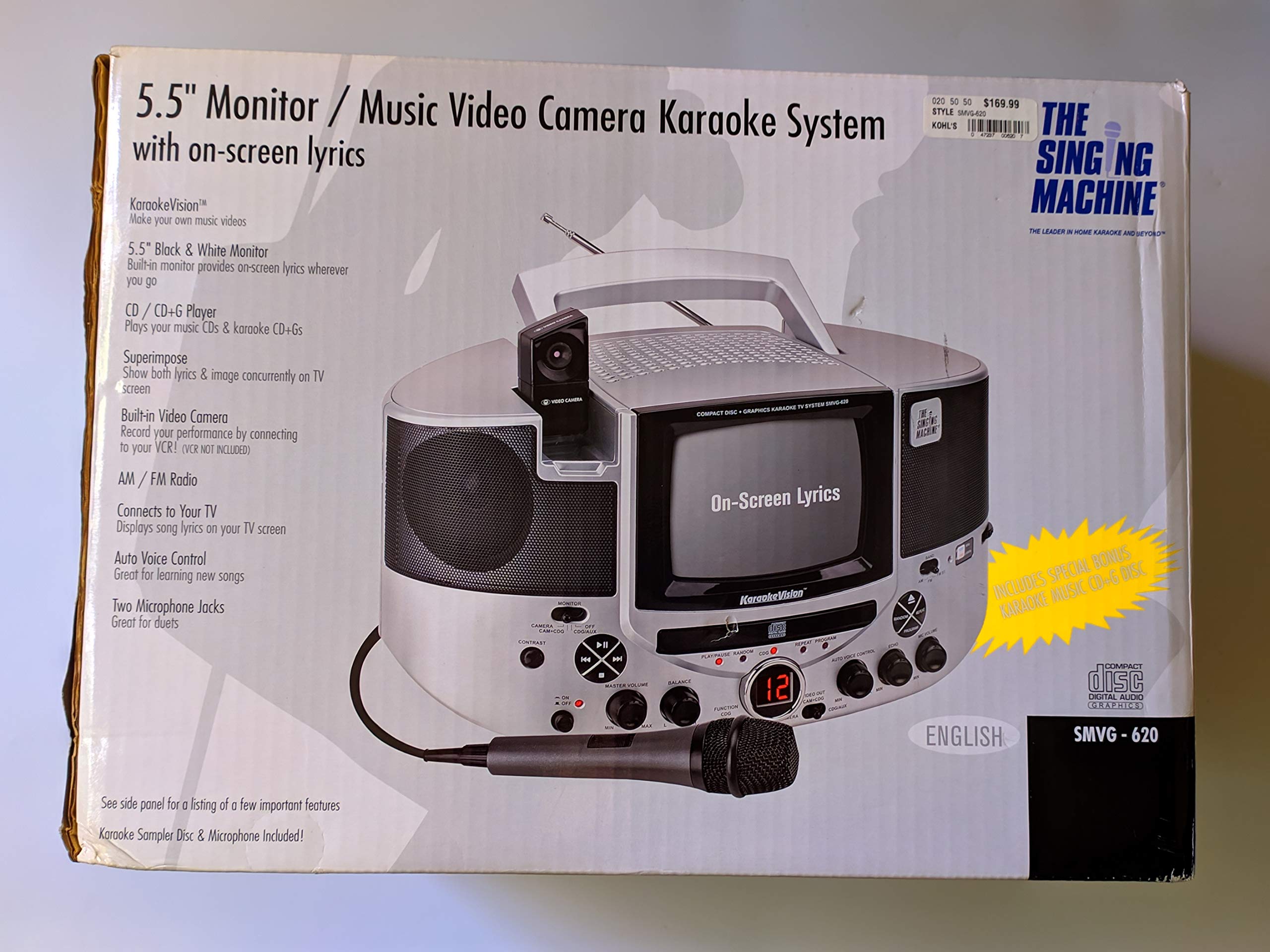
ምስል 1.1፡ The Singing Machine SMVG-620 CD+G Karaoke System.
For optimal performance and safety, always follow the instructions and warnings provided.
2. ጠቃሚ የደህንነት መረጃ
- መመሪያዎችን ያንብቡ፡- መሣሪያው ከመተግበሩ በፊት ሁሉም የደህንነት እና የአሠራር መመሪያዎች ማንበብ አለባቸው.
- መመሪያዎችን ማቆየት; የደህንነት እና የአሠራር መመሪያዎች ለወደፊት ማጣቀሻዎች መቀመጥ አለባቸው.
- ትኩረት ይስጡ ማስጠንቀቂያዎች፡- በመሳሪያው ላይ እና በአሰራር መመሪያው ላይ ሁሉም ማስጠንቀቂያዎች መከበር አለባቸው.
- መመሪያዎችን ተከተል፡- ሁሉም የአሠራር እና የአጠቃቀም መመሪያዎች መከተል አለባቸው.
- ውሃ እና እርጥበት; ይህንን መሳሪያ በውሃ አጠገብ አይጠቀሙ.
- ማጽዳት፡ በደረቅ ጨርቅ ብቻ አጽዳ.
- የአየር ማናፈሻ; የአየር ማናፈሻ ክፍተቶችን አያግዱ። በአምራቹ መመሪያ መሰረት ይጫኑ.
- ሙቀት፡ እንደ ራዲያተሮች፣ ሙቀት መመዝገቢያዎች፣ ምድጃዎች፣ ወይም ሌሎች መሳሪያዎችን (ያጠቃልለው) ካሉ የሙቀት ምንጮች አጠገብ አይጫኑ። ampማሞቂያዎች) ሙቀትን ያመነጫሉ.
- የኃይል ገመድ ጥበቃ የኤሌክትሪክ ገመዱን ከመራመድ ወይም ከመቆንጠጥ ይከላከሉ, በተለይም በፕላጎች, ምቹ መያዣዎች እና ከመሳሪያው የሚወጡበት ቦታ.
- ዓባሪዎች/መለዋወጫ ዕቃዎች፡- በአምራቹ የተገለጹ አባሪዎችን/መለዋወጫዎችን ብቻ ይጠቀሙ።
- መብረቅ፡ ይህንን መሳሪያ በመብረቅ አውሎ ንፋስ ጊዜ ወይም ለረጅም ጊዜ ጥቅም ላይ በማይውልበት ጊዜ ይንቀሉት።
- አገልግሎት መስጠት፡ ሁሉንም አገልግሎት ወደ ብቃት ላለው የአገልግሎት ሠራተኛ ያማክሩ። መሣሪያው በማንኛውም መንገድ ሲጎዳ አገልግሎት መስጠት ያስፈልጋል።
3. የጥቅል ይዘቶች
Carefully unpack your Singing Machine SMVG-620 system and ensure all items listed below are present and in good condition.
- SMVG-620 CD+G Karaoke System
- አንድ (1) ማይክሮፎን
- Sampler CD+G Disc
- Audio/Video RCA Cables
- የኤሲ ኃይል አስማሚ
- መመሪያ መመሪያ

ምስል 3.1፡ Contents of the box, including the microphone, RCA cables, and the instruction manual.
4. ምርት አብቅቷልview
Familiarize yourself with the various parts and controls of your SMVG-620 Karaoke System.

ምስል 4.1፡ የኋላ view of the product packaging highlighting key features and components of the SMVG-620 system.
ቁልፍ ባህሪዎች
- 5.5" Black & White Monitor: For on-screen lyrics from CD+G discs.
- Built-in Color Camera: Allows you to see yourself on the monitor or connected TV.
- Dual Microphone Jacks: Connect two microphones for duets (one microphone included).
- AM/FM ሬዲዮ፡ የሚወዷቸውን የሬዲዮ ጣቢያዎች ይከታተሉ።
- ሲዲ+ጂ ማጫወቻ፡ Plays standard audio CDs and CD+Graphics discs.
- ራስ-ድምጽ መቆጣጠሪያ (AVC)፡- Helps maintain vocal balance by automatically reducing the main vocal track when you sing.
- የኢኮ መቆጣጠሪያ፡- Adds depth and resonance to your voice.
- Professional Style Microphone: For clear vocal pickup.
- የድምጽ/የቪዲዮ ውፅዓት፡- Connects to your TV for larger screen display and enhanced audio.
5. ማዋቀር
5.1 የኃይል ግንኙነት
- ክፍሉ በተረጋጋና ጠፍጣፋ መሬት ላይ መቀመጡን ያረጋግጡ።
- Connect the AC power adapter to the DC IN jack on the back of the SMVG-620 unit.
- Plug the other end of the AC power adapter into a standard wall outlet (AC 120V ~ 60Hz).
5.2 ከቴሌቪዥን ጋር መገናኘት
ለ view lyrics on a larger screen and enhance audio, connect the SMVG-620 to your television using the supplied Audio/Video RCA cables.
- Locate the AUDIO OUT (white and red) and VIDEO OUT (yellow) jacks on the back of the SMVG-620.
- Connect the white plug of the RCA cable to the white AUDIO OUT jack on the karaoke system and to the white AUDIO IN jack on your TV.
- Connect the red plug of the RCA cable to the red AUDIO OUT jack on the karaoke system and to the red AUDIO IN jack on your TV.
- Connect the yellow plug of the RCA cable to the yellow VIDEO OUT jack on the karaoke system and to the yellow VIDEO IN jack on your TV.
- Turn on your TV and select the correct A/V input source (e.g., AV1, Video 1) that corresponds to the jacks you used.
5.3 የማይክሮፎን ግንኙነት
Plug the microphone into either the MIC 1 or MIC 2 jack on the front of the SMVG-620 unit.
6. ኦፕሬሽን
6.1 ማብራት / ማጥፋት
የሚለውን ይጫኑ ኃይል button located on the front panel to turn the unit ON or OFF.
6.2 ሲዲ+ጂ መልሶ ማጫወት
- Open the CD compartment door and carefully place a CD+G disc (or standard audio CD) onto the spindle with the label side facing up. Close the door.
- ይምረጡ ሲዲ+ጂ mode using the FUNCTION selector.
- የሚለውን ይጫኑ አጫውት/አፍታ አቁም መልሶ ማጫወት ለመጀመር አዝራር።
- አስተካክል። ማስተር ቮልዩም ወደሚፈልጉት የማዳመጥ ደረጃ ቁልፉን ይጫኑ።
- የሚለውን ተጠቀም ዝለል አዝራሮች (<< or >>) በትራኮች መካከል ለማሰስ።
- ለአፍታ ለማቆም ተጫን አጫውት/አፍታ አቁም እንደገና። ለመቀጠል እንደገና ይጫኑ።
- መልሶ ማጫዎትን ለማቆም የ ተወ አዝራር።
6.3 የማይክሮፎን አጠቃቀም
- Ensure the microphone is connected to a MIC jack.
- አስተካክል። MIC ጥራዝ የማይክሮፎኑን የውጤት ደረጃ ለመቆጣጠር ቁልፉ።
- አዙሩ ኢኮ በድምጽዎ ላይ የ echo effect ለመጨመር ቁልፉን ይጫኑ።
- የ የራስ-ሰር የድምጽ ቁጥጥር (AVC) switch can be toggled ON/OFF. When ON, the original vocal track on a CD+G disc will be reduced when you sing into the microphone.
6.4 AM/FM ሬዲዮ
- ይምረጡ AM or FM mode using the FUNCTION selector.
- ለተሻለ አቀባበል የኤፍ ኤም አንቴናውን ያራዝሙ።
- አዙሩ ማስተካከል የሚፈልጉትን የሬዲዮ ጣቢያ ለመምረጥ ይንኩ ።
- አስተካክል። ማስተር ቮልዩም እንቡጥ.
6.5 የካሜራ ተግባር
The built-in camera allows you to display your image on the 5.5-inch monitor or a connected TV.
- Ensure the unit is powered on and connected to a TV if you wish to use an external display.
- The camera feed will automatically display when the unit is in CD+G or Video mode, or when no other video source is active.
7. ጥገና
7.1 ክፍሉን ማጽዳት
- ከማጽዳትዎ በፊት ሁልጊዜ ክፍሉን ከኃይል ማከፋፈያው ያላቅቁት.
- ውጫዊ ገጽታዎችን ለማጽዳት ለስላሳ እና ደረቅ ጨርቅ ይጠቀሙ.
- አጨራረስን ሊጎዱ ስለሚችሉ ብስባሽ ማጽጃዎችን፣ ሰምዎችን ወይም ፈሳሾችን አይጠቀሙ።
- ለሲዲ ሌንስ ልዩ የሲዲ ሌንስ ማጽጃ ዲስክ ይጠቀሙ።
7.2 የሲዲ ኬር
- በመጫወቻ ቦታው ላይ የጣት አሻራ እንዳይኖር ሲዲዎችን በጠርዙ ይያዙ።
- ጭረቶችን ለመከላከል ጥቅም ላይ በማይውሉበት ጊዜ ዲስኮችን በቦታቸው ውስጥ ያስቀምጡ።
- ዲስኮችን ለስላሳ እና ከተሸፈነ ጨርቅ ያፅዱ, ከመሃል ወደ ውጭ በማጽዳት.
8. መላ መፈለግ
If you encounter any issues with your SMVG-620, please refer to the following common problems and solutions.
| ችግር | ሊሆን የሚችል ምክንያት | መፍትሄ |
|---|---|---|
| ኃይል የለም | የኤሌክትሪክ ገመድ በትክክል አልተገናኘም. | የኤሲ አስማሚው ከመሳሪያው እና ከሚሰራው የግድግዳ መውጫ ጋር ደህንነቱ በተጠበቀ ሁኔታ መሰካቱን ያረጋግጡ። |
| ከድምጽ ማጉያዎች ድምፅ የለም | Master Volume is too low. Incorrect function mode selected. | Increase the MASTER VOLUME. Select the correct FUNCTION (CD+G, AM, FM). |
| ከማይክሮፎን ምንም ድምፅ የለም። | Microphone not connected. MIC VOLUME is too low. የማይክሮፎን ማብሪያ/ማጥፊያው ጠፍቷል። | Plug microphone into MIC 1 or MIC 2 jack. Increase the MIC VOLUME. Ensure microphone switch is ON. |
| No video on TV / No lyrics | RCA cables not connected correctly. የተሳሳተ የቴሌቪዥን ግብዓት ተመርጧል። Not a CD+G disc. | Check all RCA cable connections (yellow for video). Select the correct A/V input on your TV. Ensure you are playing a CD+G disc for lyrics. |
| ሲዲ መዝለል | ዲስክ የቆሸሸ ወይም የተቧጠጠ ነው ፡፡ ዩኒት ያልተረጋጋ ወለል ላይ ነው። | ዲስኩን አጽዳ ወይም ሌላ ዲስክ ሞክር። Place the unit on a stable, vibration-free surface. |
9. ዝርዝሮች
| የሞዴል ቁጥር | SMVG-620 (SIN SMVG620) |
| የኃይል ምንጭ | AC 120V ~ 60Hz (via AC Adapter) |
| ተቆጣጠር | 5.5-inch Black & White |
| የተናጋሪ ብዛት | 2 |
| ተስማሚ መሣሪያዎች | ቴሌቪዥን |
| የሚዲያ ዓይነት | ሲዲ፣ ሲዲ+ጂ |
| የምርት ልኬቶች (LxWxH) | 35.8 x 20.8 x 19.3 ሴሜ (14.1 x 8.2 x 7.6 ኢንች) |
| የእቃው ክብደት | 3.9 ኪግ (8.6 ፓውንድ) |
10. ዋስትና እና ድጋፍ
For warranty information and customer support, please refer to the warranty card included with your product or contact The Singing Machine directly. You may also consult your retailer for details regarding their return and warranty policies.
አምራች፡ ዘፋኙ ማሽን