መግቢያ
This manual provides essential instructions for the safe and effective operation of your Microlife WS100 Digital Body Fat Analyzer Weight Scale. Please read this manual thoroughly before using the device and retain it for future reference. The Microlife WS100 is designed to measure body weight, body fat percentagሠ, እና የጡንቻዎች ብዛት.
የደህንነት መረጃ
- Do not use this device if you have a pacemaker or other electronic medical implant.
- እርጉዝ ሴቶች ይህንን መሳሪያ ከመጠቀምዎ በፊት ሐኪም ማማከር አለባቸው.
- Ensure the scale is placed on a hard, flat surface for accurate measurements. Avoid carpets or uneven floors.
- መውደቅን ለመከላከል ሚዛኑን በእርጥብ ወይም በሚያንሸራትት መሬት ላይ አይጠቀሙ።
- መሣሪያውን ልጆች በማይደርሱበት ቦታ ያስቀምጡት.
- መሳሪያውን እራስዎ አይበታተኑ ወይም ለመጠገን አይሞክሩ። ችግሮች ከተከሰቱ የደንበኛ ድጋፍን ያነጋግሩ።
ማዋቀር
1. ማሸግ እና የመጀመሪያ ምርመራ
Carefully remove the Microlife WS100 scale from its packaging. Inspect the device for any signs of damage. If any damage is observed, do not use the scale and contact your retailer.
2. የባትሪ ጭነት
The Microlife WS100 scale comes with batteries included. Locate the battery compartment on the underside of the scale. Open the compartment cover and ensure the batteries are correctly inserted according to the polarity indicators (+/-). Close the battery compartment securely.
3. የመጀመሪያ ልኬት
Before first use or after moving the scale, it is recommended to perform an initial calibration. Place the scale on a hard, flat surface. Briefly step onto the scale, then step off. The display will show "0.0" or a similar indication, confirming calibration.
4. የተጠቃሚ ፕሮfile Setup (for Body Fat Analysis)
To utilize the body fat and muscle mass analysis features, you must set up a user profile. Refer to the detailed instructions in the "Operating Instructions" section for setting up user profiles, including age, gender, and height.
የአሠራር መመሪያዎች
1. Basic Weight Measurement
- ደረጃውን በጠንካራና ጠፍጣፋ መሬት ላይ ያስቀምጡት።
- በባዶ እግራቸው ወደ ሚዛኑ ይሂዱ እና ዝም ይበሉ።
- Your weight will be displayed on the screen. The scale will automatically turn off after a few seconds.
2. Body Fat and Muscle Mass Measurement
For body composition analysis, ensure your user profile ተዘጋጅቷል።
- Press the "SET" button to enter user selection mode.
- Use the arrow buttons to select your user number (P1, P2, etc.).
- Step onto the scale barefoot, ensuring your feet are positioned on the metal electrodes.
- Stand still until the measurements (weight, body fat percentagሠ, የጡንቻ ብዛት መቶኛtage) are displayed sequentially.
- The scale will automatically store the data and turn off.
3. Switching Measurement Units
The unit switch button (usually located on the underside of the scale) allows you to toggle between kilograms (kg) and pounds (lb). Press this button to select your preferred unit before taking a measurement.
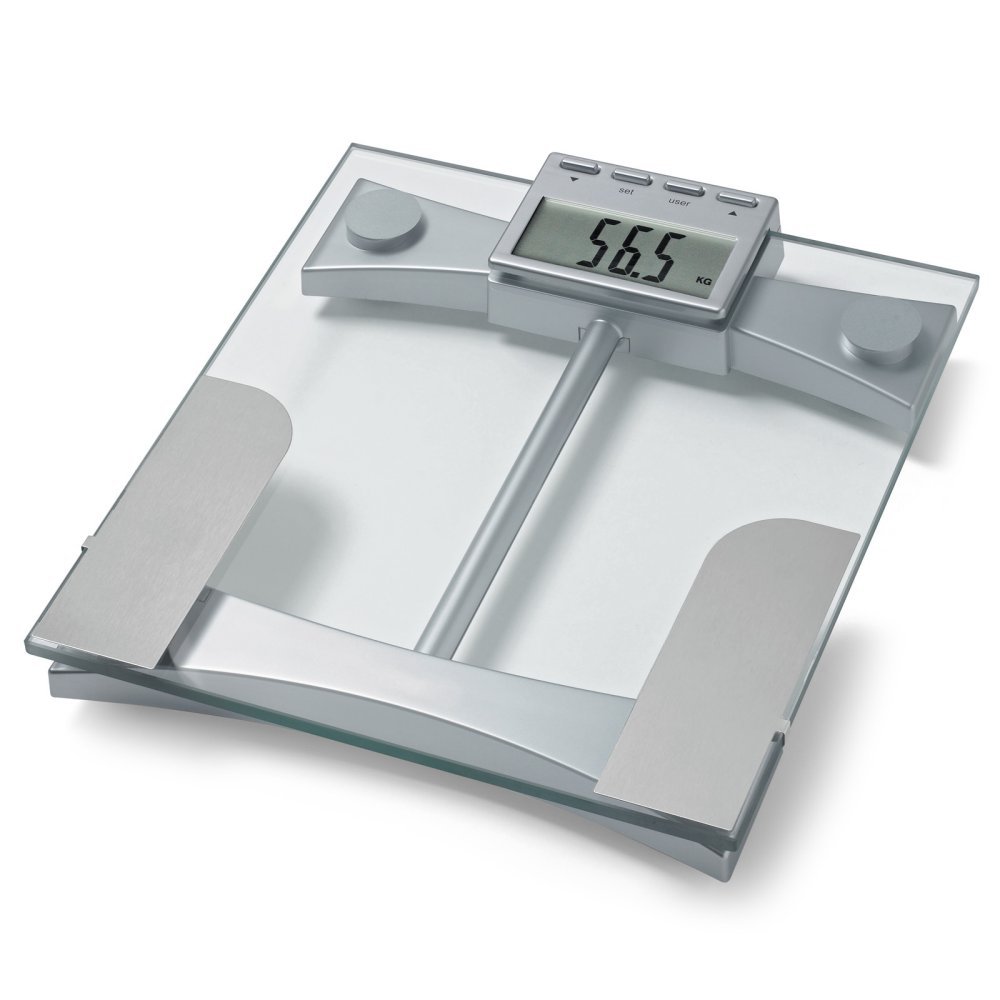
ምስል 1፡ ከፍተኛ view of the Microlife WS100 scale. Note the display area and the metallic electrodes for body composition analysis. Ensure feet are placed correctly on these electrodes for accurate readings.
ጥገና
1. ስኬሉን ማጽዳት
የመለኪያውን ወለል ለስላሳ, መamp ጨርቅ። ሻካራ ማጽጃዎችን አይጠቀሙ ወይም ስኬሉን በውሃ ውስጥ አያጥሉት። መሬቱን ወይም የኤሌክትሮኒክስ ክፍሎችን ሊጎዱ የሚችሉ ኃይለኛ ኬሚካሎችን ያስወግዱ።
2. ማከማቻ
ሚዛኑን ከፀሀይ ብርሀን እና ከከፍተኛ ሙቀት ርቆ በቀዝቃዛና ደረቅ ቦታ ያከማቹ። ጥቅም ላይ በማይውሉበት ጊዜ ከባድ ዕቃዎችን በመለኪያው ላይ ከማስቀመጥ ይቆጠቡ።
3. የባትሪ መተካት
When the display shows a "Lo" indicator, it is time to replace the batteries. Open the battery compartment on the underside of the scale, remove the old batteries, and insert new ones of the same type, observing correct polarity. Dispose of old batteries responsibly.
መላ መፈለግ
| ችግር | ሊሆን የሚችል ምክንያት | መፍትሄ |
|---|---|---|
| "ሎ" ታይቷል | ዝቅተኛ የባትሪ ኃይል. | ባትሪዎቹን በአዲስ ይተኩ. |
| "Err" ታይቷል | ከመጠን በላይ ጭነት ወይም የመለኪያ ስህተት። | Ensure the scale is not overloaded. Step off and then back on the scale. Ensure stable footing. |
| ትክክለኛ ያልሆኑ ንባቦች | Scale on uneven surface, not calibrated, or user profile ትክክል አይደለም | Place scale on a hard, flat surface. Perform initial calibration. Verify user profile settings (age, height, gender). |
| ማሳያ የለም። | Batteries incorrectly installed or completely drained. | የባትሪውን ፖሊነት ያረጋግጡ። አስፈላጊ ከሆነ ባትሪዎችን ይተኩ. |
ዝርዝሮች
- ሞዴል፡ WS100
- የምርት ስም፡ ማይክሮፎን
- የማሳያ አይነት፡ ዲጂታል
- ልዩ ባህሪያት፡ Body Fat, Bodyweight, Muscle Mass
- ቁሳቁስ፡ ፕላስቲክ
- ቀለም፡ ጥቁር
- የኃይል ምንጭ፡- ባትሪዎች (ተጨምሯል)
- የምርት መጠኖች: 31.75 x 7.62 x 37.47 ሴሜ (12.5 x 3 x 14.75 ኢንች)
- የእቃው ክብደት፡ 2.99 ኪግ (6.59 ፓውንድ)
- GTIN/UPC፡ 642632841233
ዋስትና እና ድጋፍ
For warranty information or technical support, please refer to the warranty card included with your product or visit the official Microlife webጣቢያ. መሳሪያውን እራስዎ ለመጠገን አይሞክሩ, ይህ ዋስትናውን ሊያሳጣው ይችላል.


