1. መግቢያ
This manual provides essential information for the safe and efficient use of your Lexmark E260D Monochrome Laser Printer. Please read these instructions carefully before operating the device and retain them for future reference. The Lexmark E260D is designed for fast, high-quality black and white document printing, featuring automatic two-sided printing for efficiency.
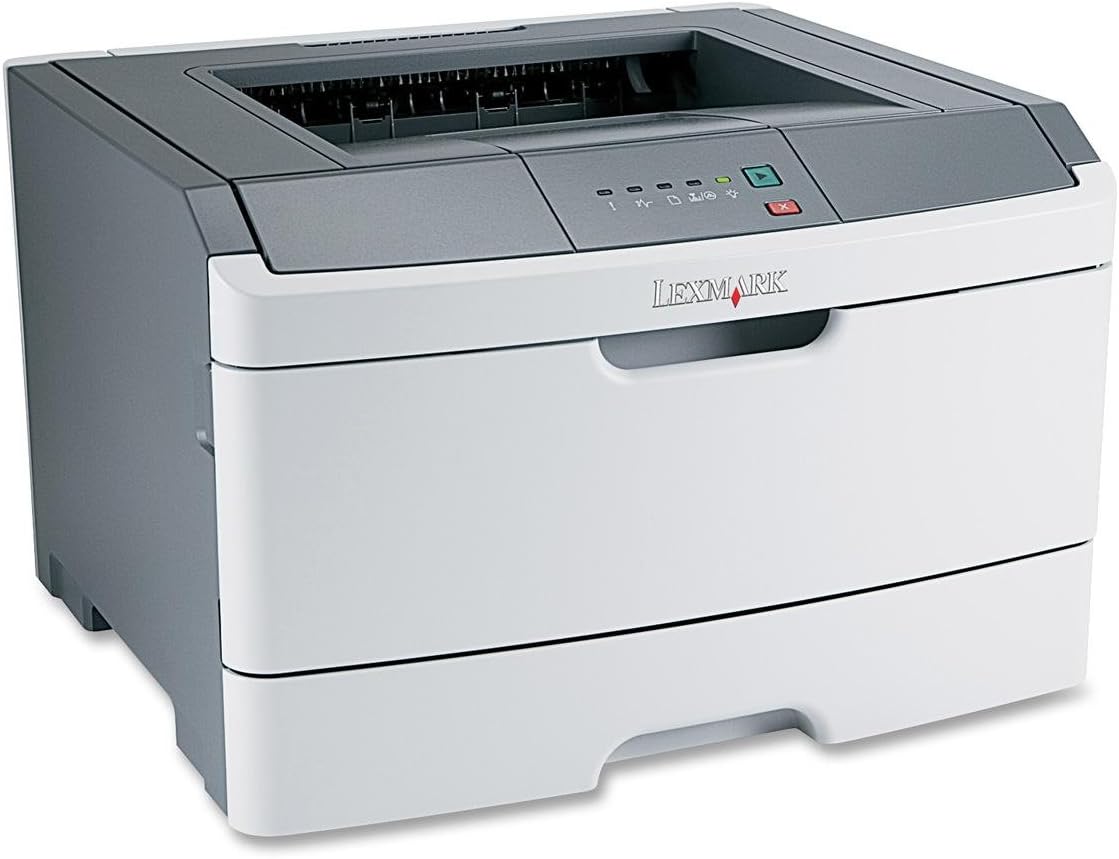
ምስል 1፡ Lexmark E260D Monochrome Laser Printer. This image shows the printer from a front-right angle, highlighting its compact design with a white body and a dark gray top cover. The output tray is visible on top, and the Lexmark logo is displayed on the front panel above the paper input tray.
2. የደህንነት መረጃ
- አታሚውን ሁልጊዜ ከመሬት ላይ ካለው የኃይል መውጫ ጋር ያገናኙ።
- የአየር ማናፈሻ ክፍተቶችን አያግዱ ፡፡
- አታሚውን ከውሃ ወይም ከመጠን በላይ እርጥበት ያርቁ።
- የተወሰኑ የኃይል ገመዶችን እና መለዋወጫዎችን ብቻ ይጠቀሙ።
- የፊውዘር አካባቢን ከመንካት ይቆጠቡ፤ ምክንያቱም ሊሞቅ ይችላል።
3. የጥቅል ይዘቶች
ሁሉም እቃዎች በጥቅሉ ውስጥ መኖራቸውን ያረጋግጡ፡-
- Lexmark E260D Monochrome Laser Printer
- የኃይል ገመድ
- Starter Toner Cartridge (may vary by region)
- Setup Guide or Documentation
- የዩኤስቢ ገመድ (ለብቻው ሊሸጥ ይችላል)
4. ማዋቀር
4.1 ማተሚያውን በማራገፍ ላይ
- ማተሚያውን ከማሸጊያው ያስወግዱት።
- ሁሉንም የማሸጊያ ቁሳቁሶች፣ ቴፖች እና የመከላከያ ፊልሞችን ከአታሚው ውጫዊ እና ውስጣዊ ክፍል ያስወግዱ።
- ማተሚያውን በቂ የአየር ማናፈሻ ባለው የተረጋጋ እና ደረጃ ላይ ያድርጉት።
4.2 ማተሚያውን በማገናኘት ላይ
- የኃይል ገመዱን ከአታሚው ጋር ያገናኙ እና ከዚያ ወደ መሬት ወደ ኤሌክትሪክ ሶኬት ያገናኙ።
- የዩኤስቢ ገመዱን አንድ ጫፍ ከአታሚው የዩኤስቢ ወደብ እና ሌላኛውን ጫፍ ከኮምፒውተርዎ ጋር ያገናኙ።
4.3 የቶነር ካርቶን መትከል
- የአታሚውን የፊት መግቢያ በር ይክፈቱ።
- Carefully remove the toner cartridge from its packaging and shake it gently to distribute the toner.
- ወደ ቦታው ጠቅ እስኪያደርግ ድረስ የቶነር ካርቶን ወደ አታሚው ያስገቡ።
- Close the front access door securely.
4.4 የመጫኛ ወረቀት
- የወረቀት ማስቀመጫውን ያውጡ.
- የወረቀት መመሪያዎችን ከጫኑት ወረቀት መጠን ጋር እንዲመሳሰል ያስተካክሉ.
- ጠፍጣፋ መሆኑን እና ከፍተኛውን የመሙያ መስመር እንዳይበልጥ በማድረግ ወረቀት ወደ ትሪው ውስጥ ጫን።
- የወረቀት ትሪውን እስኪቆለፍ ድረስ ወደ አታሚው መልሰው ይግፉት።
4.5 የአሽከርካሪዎች መጫኛ
After connecting the printer, your operating system may automatically detect and install the necessary drivers. If not, follow these steps:
- Insert the driver CD (if included) into your computer's CD/DVD drive, or download the latest drivers from the official Lexmark support webጣቢያ.
- የአሽከርካሪውን ጭነት ለማጠናቀቅ በስክሪኑ ላይ ያሉትን መመሪያዎች ይከተሉ።
- ከተጠየቁ ኮምፒተርዎን እንደገና ያስጀምሩ.
5. ማተሚያውን መስራት
5.1 መሰረታዊ ማተሚያ
- አታሚው መብራቱን እና ከኮምፒዩተርዎ ጋር መገናኘቱን ያረጋግጡ።
- በኮምፒተርዎ ላይ ለማተም የሚፈልጉትን ሰነድ ይክፈቱ።
- ይምረጡ File > አትም (ወይም በመተግበሪያዎ ውስጥ ያለው ተመጣጣኝ ትዕዛዝ)።
- Choose the Lexmark E260D from the list of available printers.
- Adjust print settings as needed (e.g., number of copies, page range).
- ጠቅ ያድርጉ አትም.
5.2 ባለ ሁለት ጎን ህትመት (ባለሁለት ጎን)
The Lexmark E260D supports automatic two-sided printing.
- የህትመት ስራ ሲልኩ፣ የአታሚውን ባህሪያት ወይም ምርጫዎች ይድረሱ።
- Look for an option related to Duplex ማተሚያ or በሁለቱም በኩል ያትሙ.
- የተፈለገውን የዱፕሌክስ አማራጭ ይምረጡ (ለምሳሌ፣ ረጅም ጠርዝ ማሰሪያ፣ አጭር ጠርዝ ማሰሪያ)።
- ቅንብሮችዎን ያረጋግጡ እና ጠቅ ያድርጉ አትም.
6. ጥገና
6.1 ማተሚያውን ማጽዳት
- ውጫዊ፡ ውጫዊ ገጽታዎችን ለስላሳ, መamp፣ ከጥጥ ነፃ የሆነ ጨርቅ። ገላጭ ማጽጃዎችን ወይም ፈሳሾችን አይጠቀሙ.
- የውስጥ፡ Periodically open the front access door and gently remove any loose toner dust with a dry, lint-free cloth. Avoid touching sensitive components.
6.2 ቶነር ካርትሬጅ መተካት
When the toner level is low, the printer's control panel will indicate it. Replace the toner cartridge as follows:
- አታሚው መብራቱን ያረጋግጡ።
- የፊት መግቢያ በርን ይክፈቱ።
- አሮጌውን የቶነር ካርትሬጅ በቀጥታ በማውጣት በጥንቃቄ ያስወግዱት።
- Unpack the new Lexmark E260D compatible toner cartridge and shake it gently.
- አዲሱን ካርቶጅ ወደ ማተሚያው እስኪዘጋ ድረስ አስገባ።
- የመግቢያ በርን ዝጋ።
7. መላ መፈለግ
7.1 የወረቀት ጃም
If a paper jam occurs, the printer's control panel will display an error. Follow these general steps:
- አታሚውን ያጥፉ እና ከኃይል መውጫው ያላቅቁት።
- Open all accessible covers (front door, rear door, etc.).
- Carefully remove any jammed paper, pulling it in the direction of the paper path to avoid tearing.
- ሁሉንም ሽፋኖች በጥንቃቄ ይዝጉ.
- ይሰኩ እና ማተሚያውን ያብሩት።
7.2 የህትመት ጥራት ጉዳዮች
- የደበዘዙ ወይም ቀላል ህትመቶች፡- The toner cartridge may be low. Try shaking the cartridge gently or replace it.
- ጭረቶች ወይም ማጭበርበሮች; Clean the interior of the printer, especially around the toner cartridge area. Ensure the paper type setting matches the loaded paper.
- ባዶ ገጾች፡ Ensure the toner cartridge is properly installed and has toner. Check printer drivers and print settings.
7.3 የግንኙነት ችግሮች
- አታሚ አልተገኘም፦ Ensure the USB cable is securely connected to both the printer and the computer. Try a different USB port or cable. Reinstall printer drivers if necessary.
- Print Jobs Stuck: Clear the print queue on your computer. Restart both the printer and the computer.
7.4 Envelope Printing on Mac
Users printing envelopes on macOS may encounter issues with incorrect print orientation or partial printing. To resolve this:
- In the print dialogue box, locate the menu that initially reads 'Layout'.
- Select 'Paper Feed' from this menu.
- Change the 'Auto Select' option to 'Manual Envelope'.
- በማተም ይቀጥሉ.
8. ዝርዝሮች
| ባህሪ | ዝርዝር መግለጫ |
|---|---|
| የሞዴል ስም | E260D |
| የህትመት ቴክኖሎጂ | ሌዘር |
| የአታሚ ውፅዓት | ሞኖክሮም |
| ከፍተኛ የህትመት ፍጥነት (ሞኖክሮም) | 35 ፒፒኤም |
| ከፍተኛ የህትመት ጥራት (ጥቁር እና ነጭ) | 1200 ዲፒአይ |
| Duplex ማተሚያ | አውቶማቲክ |
| የግንኙነት ቴክኖሎጂ | ዩኤስቢ 2.0 |
| ከፍተኛው የግቤት ሉህ አቅም | 250 ሉሆች |
| የሚደገፍ የህትመት ሚዲያ | Envelopes, Labels, Paper (plain), Transparencies |
| የማህደረ ትውስታ ማከማቻ አቅም | 32 ሜባ |
| የምርት ልኬቶች | 16.5 x 18.1 x 14 ኢንች |
| የእቃው ክብደት | 29.8 ፓውንድ (13.53 ኪ.ግ) |
| የኃይል ፍጆታ (በሞድ ላይ) | 16 ዋት |
9. የዋስትና መረጃ
The Lexmark E260D Monochrome Laser Printer comes with an Exchange Warranty. For specific terms, conditions, and duration of your warranty, please refer to the warranty documentation included with your product or visit the official Lexmark support webጣቢያ.
10. የደንበኛ ድጋፍ
For further assistance, technical support, or to order replacement parts and supplies, please contact Lexmark Customer Support. You can find contact information and additional resources on the official Lexmark webጣቢያ፡
- የሌክስማርክ ድጋፍ Webጣቢያ፡ www.lexmark.com/support (እባክዎ ያስተውሉ፡ ይህ ቦታ ያዥ ነው። URL. Refer to your product documentation for the exact support link.)


