1. መግቢያ
This manual provides instructions for the SanDisk MobileMate MS+ USB 2.0 Mobile Card Reader/Writer, model SDDR-107-A10M. This device facilitates the transfer of files between various memory cards and your computer. It supports Memory Stick, Memory Stick Duo, Memory Stick PRO, and Memory Stick PRO Duo formats, offering a Hi-Speed USB 2.0 interface for efficient data transfer.
2. የጥቅል ይዘቶች
ሁሉም እቃዎች በጥቅልዎ ውስጥ መኖራቸውን ያረጋግጡ፡-
- SanDisk MobileMate MS+ USB 2.0 Mobile Card Reader/Writer (SDDR-107-A10M)
- 3-inch type Installation CD
- የዩኤስቢ ቅጥያ ገመድ
- Clear protective caps (2)

Figure 2.1: SanDisk MobileMate MS+ Card Reader, USB extension cable, and protective caps.
3. ማዋቀር
3.1 የስርዓት መስፈርቶች
Ensure your computer meets the following minimum requirements:
- ፒሲ፡ Windows 98SE/ME/2000/XP, supported memory cards, USB 2.0 port (for Hi-Speed transfer), CD-ROM drive.
- ማኪንቶሽ፡ Mac OS 9.2.x+, OS X v10.1.2+, supported memory cards, USB 2.0 port (for Hi-Speed transfer), CD-ROM drive.
3.2 የአሽከርካሪዎች መጫኛ
- Insert the provided 3-inch Installation CD into your computer's CD-ROM drive.
- Follow the on-screen instructions to install any necessary drivers or the TransferMate application.
- If prompted, restart your computer after installation.
3.3 Connecting the Card Reader
- በኮምፒተርዎ ላይ የሚገኝ የዩኤስቢ ወደብ ያግኙ።
- Plug the SanDisk MobileMate MS+ directly into the USB port. If the port is difficult to access or crowded, use the provided USB extension cable.
- Your computer should detect the device automatically.
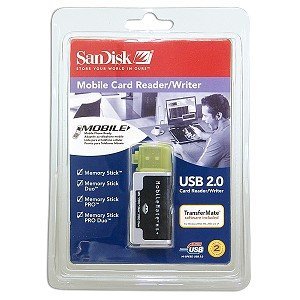
Figure 3.1: SanDisk MobileMate MS+ Card Reader with protective cap.
4. የአሠራር መመሪያዎች
4.1 የማህደረ ትውስታ ካርድ ማስገባት
- Identify the correct slot on the MobileMate MS+ for your memory card type (Memory Stick, Memory Stick Duo, Memory Stick PRO, or Memory Stick PRO Duo).
- Gently insert the memory card into the appropriate slot until it is fully seated. Do not force the card.
4.2 መድረስ Files
- Once the card reader is connected and a memory card is inserted, your computer should recognize it as a removable drive.
- Open "My Computer" (Windows) or "Finder" (Mac) and locate the new removable drive.
- Double-click the drive icon to view the contents of the memory card.
4.3 በማስተላለፍ ላይ Files
- Using Drag-and-Drop: የሚለውን ይምረጡ files or folders you wish to transfer from the memory card and drag them to a desired location on your computer's hard drive. Conversely, drag files from your computer to the memory card drive to transfer them to the card.
- Using TransferMate Application: If installed, launch the TransferMate application for additional features such as easy transfer, printing, emailing, and displaying images. Refer to the TransferMate application's help documentation for detailed instructions.
4.4 መሳሪያውን ደህንነቱ በተጠበቀ ሁኔታ ማስወገድ
Before disconnecting the MobileMate MS+ from your computer, always safely eject the device to prevent data corruption:
- ዊንዶውስ፡ Click the "Safely Remove Hardware" icon in the system tray, then select the MobileMate MS+ device. Wait for the "Safe to Remove Hardware" message.
- ማኪንቶሽ፡ Drag the removable drive icon to the Trash or right-click (Control-click) the drive icon and select "Eject."
Once safely ejected, you can physically disconnect the card reader from the USB port.
5. ጥገና
- ማጽዳት፡ Use a soft, dry, lint-free cloth to clean the exterior of the card reader. Do not use liquid cleaners or solvents.
- ማከማቻ፡ When not in use, store the MobileMate MS+ with its protective caps in a clean, dry environment away from extreme temperatures and direct sunlight.
- አያያዝ፡ መሳሪያውን ከመጣል ወይም ለጠንካራ ተጽእኖዎች ከማድረግ ተቆጠብ።
6. መላ መፈለግ
| ችግር | ሊሆን የሚችል ምክንያት | መፍትሄ |
|---|---|---|
| መሣሪያ በኮምፒዩተር አልታወቀም። |
|
|
| ቀርፋፋ የውሂብ ማስተላለፍ ፍጥነት። |
|
|
| Cannot read or write to memory card. |
|
|
7. ዝርዝሮች
| የሞዴል ቁጥር | SDDR-107-A10M |
| የምርት ልኬቶች | 6.1 x 4.8 x 1.2 ኢንች (ግምታዊ) |
| የእቃው ክብደት | 2.89 አውንስ (ግምታዊ) |
| የግንኙነት ቴክኖሎጂ | የዩኤስቢ አይነት A |
| በይነገጽ | Hi-Speed USB 2.0 (compatible with USB 1.1) |
| የሚደገፉ የሚዲያ ዓይነቶች | Memory Stick, Memory Stick Duo, Memory Stick PRO Duo, Memory Stick Pro |
| ቀለም | ጥቁር |
| የቁጥጥር ማጽደቆች | FCC፣ CE፣ ሲ-ቲክ |
8. ዋስትና እና ድጋፍ
For information regarding product warranty, technical support, or service, please refer to the documentation included with your purchase or visit the official SanDisk webጣቢያ። የደንበኛ ድጋፍ የእውቂያ መረጃ በተለምዶ በአምራቹ ላይ ሊገኝ ይችላል webጣቢያ.
አምራች፡ ሳንዲስክ


