Creative Inspire S2 የብሉቱዝ ገመድ አልባ መልቲሚዲያ ድምጽ ማጉያ ስርዓት የተጠቃሚ መመሪያ
Model: Inspire S2 (51MF0390AA003)
ምርት አልቋልview
The Creative Inspire S2 Bluetooth Wireless Multimedia Speaker System provides high-quality audio through its two satellite speakers and a subwoofer, with the added convenience of Bluetooth wireless connectivity. This system is designed for use with computers and other Bluetooth-enabled devices, offering a versatile audio solution.
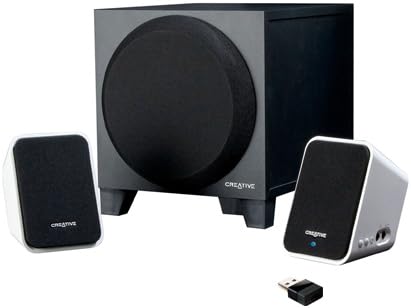
Image: The Creative Inspire S2 system, showing the central subwoofer unit, two compact satellite speakers, and a small USB Bluetooth transmitter. The satellite speakers are white with black grilles, and the subwoofer is black.
የሳጥን ይዘቶች
ሁሉም ክፍሎች በማሸጊያው ውስጥ መኖራቸውን ያረጋግጡ፡-
- ሁለት የሳተላይት ድምጽ ማጉያዎች
- አንድ Subwoofer
- የዩኤስቢ ብሉቱዝ አስተላላፊ
- ሁለንተናዊ የኃይል አስማሚ
- ፈጣን ጅምር መመሪያ (ለዝርዝር መመሪያዎች ይህንን መመሪያ ይመልከቱ)
- Warranty/Technical Support Leaflet
የማዋቀር መመሪያዎች
1. አካላዊ ግንኙነት
- አቀማመጥ፡ Place the subwoofer on the floor or a sturdy surface. Position the two satellite speakers on either side of your computer monitor or listening area for optimal stereo separation.
- የሳተላይት ድምጽ ማጉያዎችን ያገናኙ፡ Connect the cables from the satellite speakers to the corresponding ports on the back of the subwoofer. Ensure a secure connection.
- የግንኙነት ኃይል; Plug the universal power adapter into the subwoofer's power input, then connect the adapter to a wall outlet.
2. Bluetooth Connection (Wireless Audio)
For Computers (using included USB Bluetooth Transmitter):
- Insert Transmitter: Plug the included USB Bluetooth transmitter into an available USB port on your computer. Your computer may automatically install necessary drivers.
- Power On Speakers: Ensure the speaker system is powered on. The power button is typically located on one of the satellite speakers. A green light should indicate power.
- ራስ -ሰር ማጣመር; The speaker system and USB transmitter should automatically pair. A blue light on the satellite speaker will indicate a successful Bluetooth connection.
- የድምጽ ውፅዓት ይምረጡ፡ On your computer, navigate to your sound settings and select the "Creative Inspire S2" or similar Bluetooth audio device as your default playback device.
For Other Bluetooth Devices (e.g., Smartphones, Tablets, Laptops with built-in Bluetooth):
- Power Off Speakers: Ensure the speaker system is turned off.
- የማጣመሪያ ሁነታን ያስገቡ ፦ With the speakers off, press and hold the '+' (volume up) button on the satellite speaker. Continue holding until a blue light begins to flash rapidly. This indicates the speakers are in pairing mode.
- ብሉቱዝን በመሳሪያ ላይ ያንቁ፦ በእርስዎ ዘመናዊ ስልክ፣ ታብሌት ወይም ላፕቶፕ ላይ ወደ ብሉቱዝ ቅንብሮች ይሂዱ እና ብሉቱዝ መንቃቱን ያረጋግጡ።
- Select "Inspire S2": In the list of available devices, select "Inspire S2" (or similar). If prompted for a passcode, enter "0000" (four zeros).
- ግንኙነት አረጋግጥ፡ Once paired, the blue light on the satellite speaker will become solid, indicating a successful connection.
3. Wired Connection (Auxiliary Input)
The Inspire S2 system also supports a wired connection for devices without Bluetooth or for a direct audio link.
- የድምጽ ገመድ ያገናኙ፡ Connect a 3.5mm audio cable (not included) from the audio output of your device (e.g., MP3 player, laptop headphone jack) to the "Audio In" port on the side of the satellite speaker.
- Power On Speakers: የድምጽ ማጉያው ስርዓቱ መብራቱን ያረጋግጡ።
- መልሶ ማጫወት፡ Begin audio playback from your connected device. The system will automatically prioritize the wired input if a cable is connected.
የአሠራር መመሪያዎች
ኃይል አብራ/ አጥፋ
- To power on the system, press the power button located on one of the satellite speakers. A green LED will illuminate.
- To power off, press the power button again. The LED will turn off.
የድምጽ መቆጣጠሪያ
- Use the '+' and '-' buttons on the satellite speaker to adjust the system's volume.
- You can also control the volume from your connected Bluetooth device or computer.
የድምጽ መልሶ ማጫወት
- Once connected via Bluetooth or auxiliary cable, simply start playing audio from your source device.
- Ensure the volume on both the speaker system and your source device is adjusted appropriately.
ጥገና
- ማጽዳት፡ Use a soft, dry cloth to clean the surfaces of the speakers and subwoofer. Avoid using liquid cleaners or abrasive materials.
- አቀማመጥ፡- Ensure the speakers are placed on stable surfaces to prevent accidental falls. Avoid placing them in direct sunlight, near heat sources, or in excessively humid environments.
- የአየር ማናፈሻ; Do not block the ventilation openings on the subwoofer to ensure proper airflow and prevent overheating.
- የኬብል አስተዳደር Keep cables organized and untangled to prevent damage and tripping hazards.
መላ መፈለግ
| ችግር | ሊሆን የሚችል መፍትሄ |
|---|---|
| ከድምጽ ማጉያዎች ምንም ድምፅ የለም። |
|
| Bluetooth device cannot pair or connect. |
|
| ድምፁ የተዛባ ወይም አልፎ አልፎ የሚሰማ ነው። |
|
| Speakers turn off unexpectedly when using auxiliary input. |
|
ዝርዝሮች
| ባህሪ | ዝርዝር |
|---|---|
| የሞዴል ስም | Inspire S2 |
| የሞዴል ቁጥር | 51MF0390AA003 |
| የድምጽ ማጉያ አይነት | Desktop Multimedia Speaker System |
| የግንኙነት ቴክኖሎጂ | Bluetooth Wireless, Wired (3.5mm Auxiliary) |
| የድምጽ ማጉያ ከፍተኛ የውጤት ኃይል | 7 ዋት (አርኤምኤስ) |
| የምልክት-ወደ-ጫጫታ ሬሾ | 75 ዲቢቢ |
| Product Dimensions (Satellite) | 2.9 x 2.9 x 4.05 ኢንች (ግምታዊ) |
| የእቃው ክብደት | 3 ፓውንድ (ጠቅላላ ስርዓት) |
| የኃይል ምንጭ | ባለገመድ ኤሌክትሪክ |
| ልዩ ባህሪያት | USB Bluetooth technology, Creative DIRECT-THROW subwoofer, easy-access controls, Energy Star qualified |
ዋስትና እና ድጋፍ
For warranty information and technical support, please refer to the warranty/technical support leaflet included in your product packaging. You may also visit the official Creative webጣቢያ ለቅርብ ጊዜ የድጋፍ ምንጮች፣ ተደጋጋሚ ጥያቄዎች እና የእውቂያ መረጃ።
የመስመር ላይ ድጋፍ www.creative.com/support


