1. መግቢያ
This manual provides essential information for the safe and efficient operation of your VOLTCRAFT GOS-632 FG Oscilloscope with Frequency Generator. Please read this manual thoroughly before using the device and keep it for future reference. The GOS-632 FG is a 30 MHz dual-channel analog oscilloscope integrated with a frequency generator, designed for various electronic measurement and testing applications.
2. የደህንነት መመሪያዎች
Always observe the following safety precautions to prevent electric shock, injury, or damage to the instrument:
- የኃይል ምንጭ፡- Connect the instrument only to a power source with the specified voltagሠ እና ድግግሞሽ.
- መሬት ላይ የኤሌክትሪክ ንዝረትን ለመከላከል መሳሪያው በትክክል መሬት ላይ መቀመጡን ያረጋግጡ።
- የአየር ማናፈሻ; Do not block ventilation openings. Ensure adequate airflow to prevent overheating.
- አካባቢ፡ Operate the oscilloscope in a dry, clean environment, away from direct sunlight, high temperatures, and excessive dust or humidity.
- ምርመራዎች፡- Use only probes rated for the voltage and frequency being measured. Ensure probes are in good condition.
- አገልግሎት መስጠት፡ ሁሉንም የአገልግሎት አገልግሎት ለሚገባቸው የአገልግሎት ባለሙያዎች ይላኩ። መሳሪያውን እራስዎ ለመክፈት ወይም ለመጠገን አይሞክሩ።
- ፈሳሽ ንክኪ፦ Avoid contact with liquids. If liquid enters the device, disconnect power immediately and have it inspected by a qualified technician.
3. የጥቅል ይዘቶች
Please check the package contents upon receipt. If any items are missing or damaged, contact your dealer immediately.
- VOLTCRAFT GOS-632 FG Oscilloscope with Frequency Generator
- የኃይል ገመድ
- Two (2) Oscilloscope Probes (1x/10x switchable)
- የተጠቃሚ መመሪያ (ይህ ሰነድ)
4. ምርት አብቅቷልview
The VOLTCRAFT GOS-632 FG is a robust analog oscilloscope designed for reliable waveform analysis. Below is a general view የመሳሪያውን.
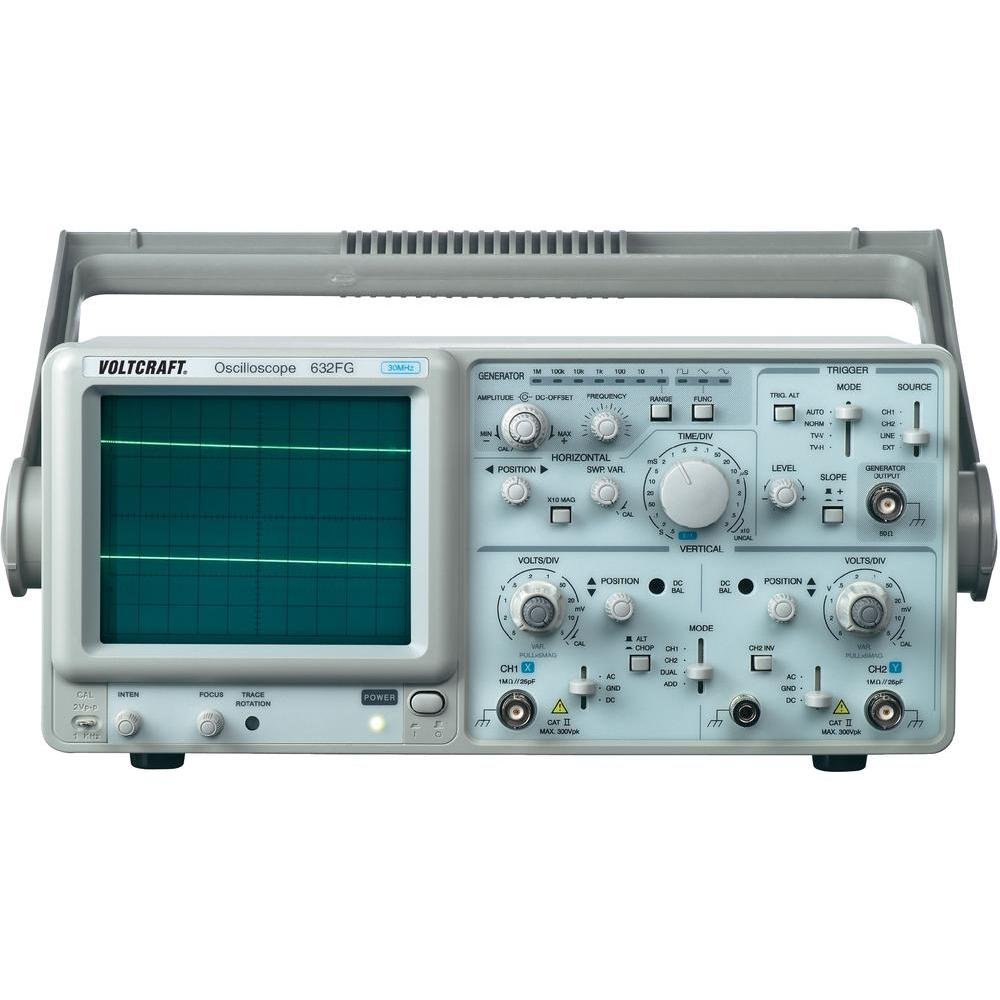
ምስል 4.1፡ ፊት ለፊት view of the VOLTCRAFT GOS-632 FG Oscilloscope. This image shows the main display, control knobs, and input connectors for the two channels and the frequency generator output.
4.1. የፊት ፓነል መቆጣጠሪያዎች
- CRT Display: Shows the waveform.
- CH1/CH2 Input: የኦሲሎስኮፕ መመርመሪያዎችን ለማገናኘት የቢኤንሲ ማያያዣዎች።
- VOLTS/DIV: Adjusts the vertical sensitivity for each channel.
- POSITION Adjusts the vertical position of the waveform.
- TIME/DIV: Adjusts the horizontal sweep speed.
- TRIGGER LEVEL: ጥራዝ ያዘጋጃልtage level at which the sweep starts.
- አቅጣጫዎች: Selects trigger source (CH1, CH2, EXT, LINE).
- FREQUENCY GENERATOR OUTPUT: BNC connector for the integrated signal generator.
- FREQUENCY/AMPትምህርት ፦ Controls for the frequency generator output.
- የኃይል መቀየሪያ; መሣሪያውን ያበራል ወይም ያጠፋል.
4.2. የኋላ ፓነል ግንኙነቶች
- የኤሲ የኃይል ግቤት ለኤሌክትሪክ ገመድ ማገናኛ.
- የከርሰ ምድር ተርሚናል For additional grounding if required.
5. ማዋቀር
- ማሸግ፡ Carefully remove the oscilloscope from its packaging. Retain the packaging for future transport.
- አቀማመጥ፡- ኦሲሎስኮፕን በክፍሉ ዙሪያ በቂ የአየር ዝውውር ባለበት የተረጋጋና ደረጃ ባለው ወለል ላይ ያስቀምጡት።
- የኃይል ግንኙነት; Connect the supplied power cord to the AC power input on the rear panel and then to a grounded electrical outlet.
- የመርማሪ ግንኙነት፡- Connect the oscilloscope probes to the CH1 and/or CH2 BNC input connectors on the front panel. Ensure a secure connection.
- የምርመራ ማካካሻ፡- Before taking measurements, compensate your probes. Connect the probe tip to the probe compensation output (usually a square wave signal on the front panel) and adjust the probe's compensation trimmer until a flat-top square wave is displayed.
6. ኦሲሎስኮፕን በማስኬድ ላይ
6.1. መሰረታዊ መለኪያ
- አብራ፡ Press the POWER switch to turn on the oscilloscope. Allow a few minutes for the display to stabilize.
- የግቤት ምልክት Connect the probe to the circuit point you wish to measure.
- Vertical Adjustment (VOLTS/DIV & POSITION):
- Select the appropriate VOLTS/DIV setting to display the waveform within the screen.
- Use the POSITION knob to center the waveform vertically.
- Horizontal Adjustment (TIME/DIV & POSITION):
- Select the appropriate TIME/DIV setting to display several cycles of the waveform horizontally.
- Use the horizontal POSITION knob to move the waveform left or right.
- የማስነሻ ማዋቀር፡
- Set the TRIGGER MODE (e.g., AUTO, NORM).
- Adjust the TRIGGER LEVEL knob until a stable waveform is displayed.
- Select the TRIGGER SOURCE (e.g., CH1, CH2).
6.2. Using the Frequency Generator
- የውጤት አገናኝ፦ Connect a BNC cable from the FREQUENCY GENERATOR OUTPUT to the circuit or device under test.
- ድግግሞሽ አዘጋጅ፡ Use the FREQUENCY control to select the desired output frequency.
- አዘጋጅ Ampጭልፊት የሚለውን ተጠቀም AMPLITUDE control to adjust the output signal strength.
- የሞገድ ቅርፅ ምርጫ፡ If available, select the desired waveform type (e.g., sine, square, triangle).
7. ጥገና
- ማጽዳት፡ ከማጽዳትዎ በፊት የኃይል ገመዱን ያላቅቁ። ለስላሳ፣ ዲ ይጠቀሙ።amp cloth with a mild detergent to clean the exterior. Do not use abrasive cleaners or solvents.
- ማከማቻ፡ ለረጅም ጊዜ ጥቅም ላይ በማይውልበት ጊዜ ኦሲሎስኮፕን በደረቅና አቧራ በሌለበት አካባቢ ያስቀምጡት።
- ልኬት፡ For accurate measurements, periodic calibration by qualified personnel is recommended.
8. መላ መፈለግ
| ችግር | ሊሆን የሚችል ምክንያት | መፍትሄ |
|---|---|---|
| ከኃይል በኋላ ምንም ማሳያ አይታይም | No power, brightness/focus too low | Check power cord, outlet. Adjust INTENSITY and FOCUS knobs. |
| ያልተረጋጋ የሞገድ ቅርፅ | Incorrect trigger settings, signal too noisy | Adjust TRIGGER LEVEL, TRIGGER MODE, and TRIGGER SOURCE. Check signal integrity. |
| ምንም ምልክት አልታየም። | Probe not connected, incorrect VOLTS/DIV, signal outside range | Ensure probe is connected and making contact. Adjust VOLTS/DIV and POSITION. Check probe compensation. |
| Frequency generator output not working | Output cable not connected, amplitude set to zero | Check output cable connection. Increase AMPLITUDE |
9. ዝርዝሮች
| ባህሪ | ዝርዝር |
|---|---|
| የሞዴል ቁጥር | GOS-632 FG |
| አምራች | ቮልትራፍትት |
| የመተላለፊያ ይዘት | 30 MHz (DC) |
| ቻናሎች | 2 አናሎግ ቻናሎች |
| Integrated Function | ድግግሞሽ ጀነሬተር |
| የምርት ክብደት | 9.07 g (Note: This weight seems unusually low for an oscilloscope and might be a data entry error. Refer to product packaging for accurate weight.) |
| ASIN | B003IDBEYM |
| መጀመሪያ ይገኛል። | መጋቢት 31 ቀን 2015 ዓ.ም |
10. ዋስትና እና ድጋፍ
VOLTCRAFT products are designed for quality and reliability. For information regarding warranty terms, technical support, or service, please refer to the warranty card included with your product or visit the official VOLTCRAFT website. Do not attempt to repair the device yourself, as this may void your warranty.
For further assistance, please contact your local VOLTCRAFT distributor or customer service center.


