መግቢያ
This manual provides comprehensive instructions for the setup, operation, maintenance, and troubleshooting of your Logitech M510 Wireless Mouse. Designed for comfort and efficiency, the M510 offers precise control and convenient features for your computing needs.
The Logitech M510 is a comfortable wireless computer mouse featuring a USB Unifying Receiver, back/forward buttons, and side-to-side scrolling. It operates on 2 AA batteries and is compatible with Personal Computers and Macbooks running operating systems like Windows 10.
የጥቅል ይዘቶች
- Logitech M510 ገመድ አልባ መዳፊት
- የሎጌቴክ ዩኒፊንግ ሪሲቨር
- 2 AA ባትሪዎች (ቀድሞ የተጫኑ ወይም የተካተቱ)
ማዋቀር
1. የባትሪ ጭነት
The Logitech M510 mouse requires two AA batteries for operation. These are typically included with your purchase. If not already installed, follow these steps:
- በመዳፊት ስር ያለውን የባትሪ ክፍል ሽፋን ያግኙ።
- ክፍሉን ለመክፈት ሽፋኑን ያንሸራትቱ ወይም ያንሱ.
- ሁለት የ AA ባትሪዎችን አስገባ, አወንታዊ (+) እና አሉታዊ (-) ተርሚናሎች በክፍሉ ውስጥ ካሉት አመልካቾች ጋር በትክክል እንዲጣጣሙ ያረጋግጡ.
- የባትሪውን ክፍል ደህንነቱ በተጠበቀ ሁኔታ ይዝጉ።
2. የማዋሃድ ተቀባይን ማገናኘት
The Logitech M510 uses a Logitech Unifying Receiver for wireless connectivity. This small USB receiver allows you to connect multiple compatible Logitech devices to your computer using a single USB port.
- Locate the Logitech Unifying Receiver. It is often stored inside the battery compartment of the mouse for safekeeping during transport.
- Plug the Unifying Receiver into an available USB port on your computer (desktop, laptop, or Macbook).
- Your computer should automatically detect the receiver and install the necessary drivers. This may take a few moments.
- Once the drivers are installed, the mouse should be ready for use. If not, ensure the mouse's power switch (if present) is in the 'ON' position.

ምስል፡ ከላይ ወደ ታች view of the Logitech M510 Wireless Mouse alongside its compact USB Unifying Receiver.
አይጤውን በመስራት ላይ
The Logitech M510 Wireless Mouse is designed for intuitive use with several programmable buttons and comfortable ergonomics.
መሰረታዊ ተግባራት
- የግራ-ጠቅታ አዝራር፡ እቃዎችን ለመምረጥ ዋናው ቁልፍ፣ በመክፈት ላይ fileዎች፣ እና ከሶፍትዌር ጋር መስተጋብር።
- በቀኝ ጠቅታ አዝራር፦ የአውድ ምናሌዎችን እና ተጨማሪ አማራጮችን ለመድረስ ሁለተኛ አዝራር።
- የማሽከርከር ጎማ፡ በሰነዶች በኩል ወደ ላይ ወይም ወደ ታች ያሸብልሉ እና web pages. The scroll wheel also functions as a middle-click button.
- Side-to-Side Scrolling: Tilt the scroll wheel left or right to scroll horizontally in applications that support this feature.
Advanced Features (Programmable Buttons)
The M510 features two thumb buttons (back/forward) on the left side, which can be customized using Logitech Options software (available for download from the Logitech website). By default, these buttons perform browser navigation functions.
- ተመለስ አዝራር፡- ወደ ውስጥ ይመለሳል web አሳሾች ወይም file አሳሾች.
- አስተላልፍ አዝራር፡- ወደ ውስጥ ወደፊት ይሄዳል web አሳሾች ወይም file አሳሾች.
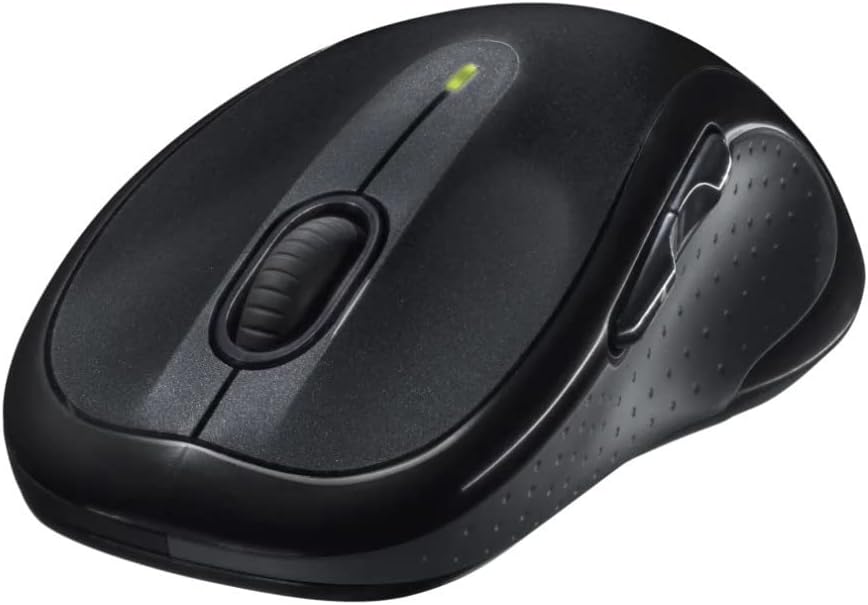
ምስል: አንግል view of the Logitech M510 Wireless Mouse, highlighting its ergonomic shape and side buttons.
ጥገና
አይጥዎን በማጽዳት ላይ
To ensure optimal performance and hygiene, regularly clean your Logitech M510 mouse:
- Disconnect the mouse from your computer by removing the Unifying Receiver.
- ለስላሳ፣ ከቆሸሸ ነፃ የሆነ ጨርቅ በትንሹ ተጠቀም መampened with water or a mild cleaning solution (e.g., isopropyl alcohol) to wipe down the surface of the mouse.
- For crevices and around buttons, use a cotton swab or a soft brush.
- Avoid getting liquid into the internal components or the optical sensor.
- Allow the mouse to dry completely before re-connecting.
የባትሪ መተካት
The Logitech M510 has an average battery life of 18 months. When the battery indicator light (if present) flashes or mouse performance degrades, it's time to replace the batteries.
- Turn off the mouse using the power switch on the underside.
- የባትሪውን ክፍል ክዳን ይክፈቱ.
- የድሮውን የ AA ባትሪዎች ያስወግዱ.
- Insert two new AA batteries, observing the correct polarity (+/-).
- የባትሪውን ክፍል ሽፋን ይዝጉ.
- አይጤውን መልሰው ያብሩት።
መላ መፈለግ
| ችግር | ሊሆን የሚችል ምክንያት | መፍትሄ |
|---|---|---|
| አይጥ ምላሽ እየሰጠ አይደለም። | Low or dead batteries; Unifying Receiver not connected; Mouse power off; Driver issue. | Replace batteries; Ensure Unifying Receiver is securely plugged into a USB port; Turn mouse power switch to 'ON'; Reinstall Logitech Options software or check device manager for driver issues. |
| የዘገየ ወይም የተሳሳተ የጠቋሚ እንቅስቃሴ | Interference; Dirty optical sensor; Mouse used on unsuitable surface; Low battery. | Move mouse closer to receiver; Clear obstructions; Clean optical sensor; Use a mouse pad or suitable surface; Replace batteries. |
| የጎን አዝራሮች አይሰሩም | Software not installed or configured; Application does not support custom buttons. | Download and install Logitech Options software from the official Logitech website to customize button functions. Ensure the application you are using supports these functions. |
| Unifying Receiver not recognized | Faulty USB port; Driver issue. | Try a different USB port; Restart your computer; Download and install the Logitech Unifying Software to re-pair the mouse with the receiver. |
ዝርዝሮች
| ባህሪ | ዝርዝር |
|---|---|
| የምርት ስም | ሎጊቴክ |
| የሞዴል ቁጥር | 910-001822 |
| ተከታታይ | M510 |
| የግንኙነት ቴክኖሎጂ | Radio Frequency, USB (via Unifying Receiver) |
| የእንቅስቃሴ ማወቂያ ቴክኖሎጂ | ሌዘር |
| ቀለም | ጥቁር ግራጫ |
| የእቃው ክብደት | 4.6 አውንስ (130 ግራም ገደማ) |
| የምርት ልኬቶች (LxWxH) | 4.38 x 2.5 x 1.75 ኢንች (በግምት. 11.13 x 6.35 x 4.45 ሴሜ) |
| የኃይል ምንጭ | በባትሪ የተጎላበተ |
| ባትሪዎች ያስፈልጋሉ። | 2 AA ባትሪዎች (ተጨምሯል) |
| አማካይ የባትሪ ህይወት | 18 ወራት |
| የሃርድዌር መድረክ | Personal Computer, Macbook |
| የስርዓተ ክወና ተኳኋኝነት | Windows 10 (and likely earlier versions, macOS) |
| ልዩ ባህሪያት | Battery Life Indicator, Power Saving Mode, Programmable Buttons, Wireless |
| የመጀመሪያ ቀን ይገኛል። | ሰኔ 7፣ 2010 |

ምስል፡ ከላይ ወደ ታች view of the Logitech M510 Wireless Mouse showing its approximate dimensions (4.4" length, 2.5" width).
ዋስትና እና ድጋፍ
የዋስትና መረጃ
Logitech products typically come with a limited hardware warranty. For specific warranty terms and conditions applicable to your Logitech M510 Wireless Mouse, please refer to the warranty card included with your product or visit the official Logitech webጣቢያ.
የደንበኛ ድጋፍ
For further assistance, technical support, or to download the latest software (such as Logitech Options or Unifying Software), please visit the official Logitech support webጣቢያ፡
እንዲሁም አጋዥ ግብዓቶችን፣ ተደጋጋሚ ጥያቄዎችን እና የማህበረሰብ መድረኮችን በእነሱ ላይ ማግኘት ይችላሉ። webጣቢያ.


