መግቢያ
The Sharper Image Portable Travel Sound Soother 20 (Model SI601) is designed to provide a relaxing audio environment, assist with sleep, and function as a portable alarm clock. It features 20 digitally-recorded sound environments, an LCD display with time, date, year, and temperature, and a dual-time alarm with snooze. Its compact size and lightweight design make it ideal for travel.

ፊት ለፊት view of the Sharper Image Travel Sound Soother 20 packaging, highlighting key features.
የጥቅል ይዘቶች
እባክዎን ጥቅሉን ለሚከተሉት ነገሮች ያረጋግጡ፡
- Sharper Image Portable Travel Sound Soother 20 unit
- የጆሮ ማዳመጫዎች
- የእጅ ማንጠልጠያ
- Soft Travel Pouch

The Sharper Image Travel Sound Soother 20 unit and accessories as packaged.
ምርት አልቋልview
The device features a backlit LCD display and front-mounted controls for easy access.

Close-up of the product display and controls, as shown on the packaging.
መቆጣጠሪያዎች እና ማሳያ;
- DISPLAY አዝራር፡- Toggles backlight, changes temperature unit (°F/°C).
- MODE አዝራር፡- Used to set time, date, and alarm.
- TIMER አዝራር፡- Sets the auto-shutoff timer.
- VOL-/VOL+ አዝራሮች፡- የድምፅ መጠንን ያስተካክላል።
- Soother Buttons (Up/Down Arrows): Selects sound environments.
- LCD ስክሪን፡ Displays time, date, year, temperature, and selected sound.
ማዋቀር
የባትሪ ጭነት;
- የባትሪውን ክፍል በቤቱ ጀርባ ላይ ያግኙት።
- የባትሪውን ክፍል ክዳን ይክፈቱ.
- 3 AA ባትሪዎችን ያስገቡ (አልተካተተም)፣ ትክክለኛውን የፖላራይቲ (+/-) ያረጋግጡ።
- የባትሪውን ክፍል ደህንነቱ በተጠበቀ ሁኔታ ይዝጉ።
Note: For optimal performance, use fresh alkaline batteries. Remove batteries if the unit will not be used for an extended period.
የአሠራር መመሪያዎች
ሰዓት እና ቀን ማቀናበር;
- ተጭነው ይያዙት። MODE የማሳያ ጊዜ እስኪያልቅ ድረስ አዝራር.
- የሚለውን ተጠቀም ድምጽ- እና ቮል+ ሰዓቱን ለማስተካከል ቁልፎች. ተጫን MODE ለማረጋገጥ.
- Repeat the process to set minutes, year, month, and day.
- ተጫን MODE እንደገና ከማቀናበር ሁነታ ለመውጣት.
ማንቂያውን በማዘጋጀት ላይ;
- የሚለውን ይጫኑ MODE button repeatedly until the alarm time is displayed.
- ተጭነው ይያዙት። MODE የማንቂያው ጊዜ እስኪያልቅ ድረስ አዝራር።
- የሚለውን ተጠቀም ድምጽ- እና ቮል+ የማንቂያ ሰዓቱን ለማስተካከል ቁልፎች. ተጫን MODE ለማረጋገጥ.
- Repeat to set alarm minutes.
- ተጫን MODE to select alarm type (buzzer or sound soother).
- ተጫን MODE እንደገና ከማንቂያ ቅንብር ሁነታ ለመውጣት።
- ማንቂያውን ለማንቃት/ለማጥፋት፣ የሚለውን ይጫኑ MODE button until the alarm icon appears/disappears.
Note: The alarm features a ramp-up volume and a snooze function. When the alarm sounds, press any button to activate snooze for a short period, or press the MODE ማንቂያውን ለማጥፋት አዝራር.
Using the Sound Soother:
- የሚለውን ይጫኑ Soother Up or Soother Down arrow buttons to cycle through the 20 available sound environments.
- የሚለውን ተጠቀም ድምጽ- እና ቮል+ የመልሶ ማጫወት ድምጽን ለማስተካከል አዝራሮች።
Available Sound Environments:
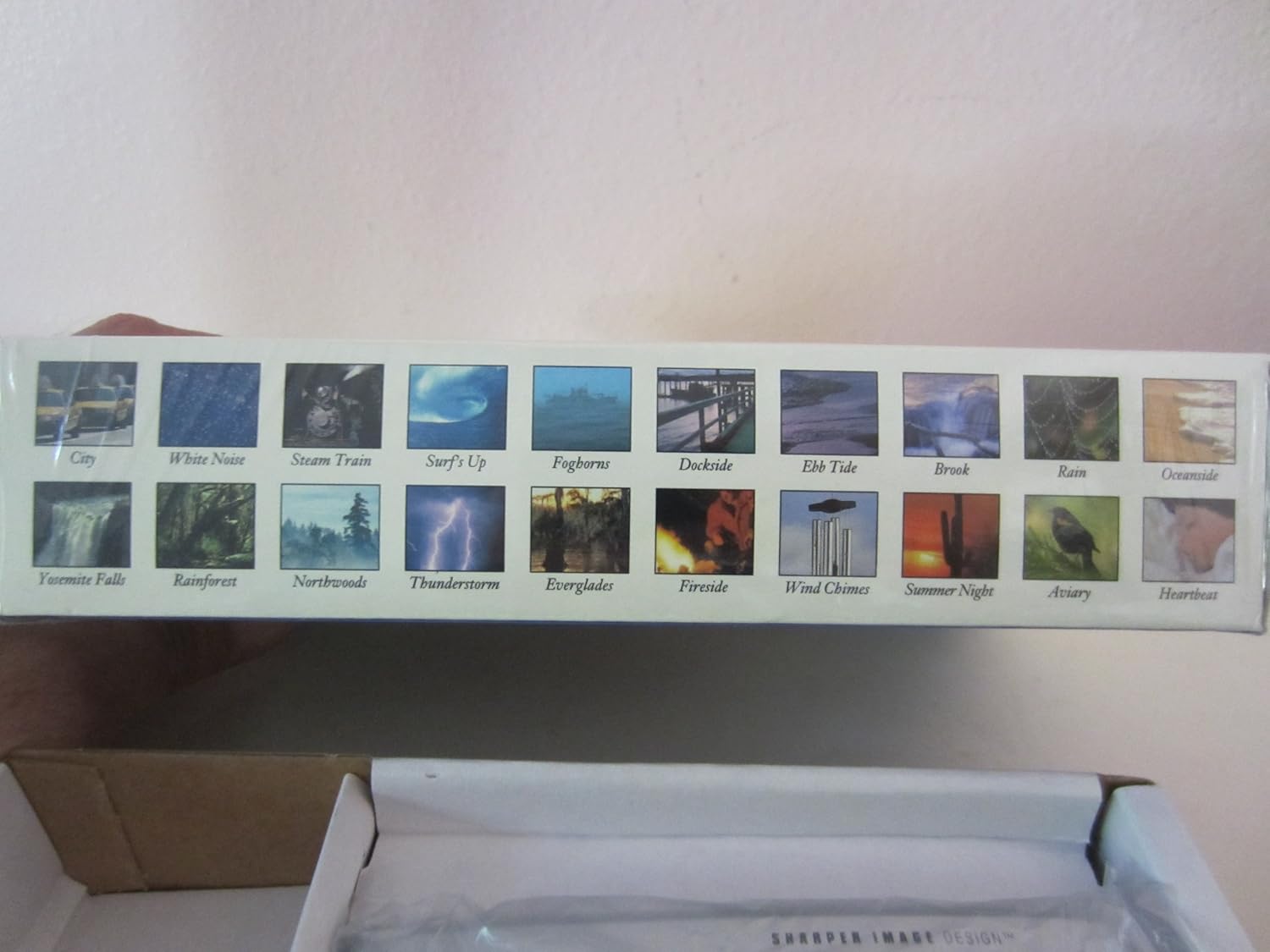
Visual representation of the 20 sound environments available on the device.
- ከተማ
- ነጭ ድምጽ
- የእንፋሎት ባቡር
- Surf's Up
- ፎግሮንስ
- የመርከብ ዳር
- Ebb ማዕበል
- ብሩክ
- ዝናብ
- በውቅያኖስ ዳርቻ
- Yosemite Falls
- የዝናብ ደን
- Northwoods
- ነጎድጓድ
- ዋልድላስስ
- የእሳት ዳር
- የንፋስ ቃጭል
- የበጋ ምሽት
- አቪዬሪ
- የልብ ምት
ሰዓት ቆጣሪን በመጠቀም፡-
The unit features an auto-shutoff timer with settings from 15 to 120 minutes.
- While a sound environment is playing, press the TIMER አዝራር በተደጋጋሚ.
- The display will show the selected timer duration (e.g., 15, 30, 60, 90, 120 minutes).
- ክፍሉ ከተመረጠው ጊዜ በኋላ በራስ-ሰር ይጠፋል።
የሙቀት መጠን ማሳያ
The LCD displays the ambient temperature.
- በፋራናይት (°F) እና በሴልሺየስ (°C) መካከል ለመቀያየር፣ ይጫኑ አሳይ አዝራር።
ጥገና
ማጽዳት፡
- መሳሪያውን ለስላሳና ደረቅ ጨርቅ ይጥረጉ።
- ገላጭ ማጽጃዎችን ወይም ፈሳሾችን አይጠቀሙ.
- Avoid exposing the unit to excessive moisture.
የባትሪ መተካት፡
When the display dims or the unit functions erratically, it is time to replace the batteries. Follow the battery installation steps outlined in the Setup section.
መላ መፈለግ
| ችግር | መፍትሄ |
|---|---|
| ዩኒት ኃይል የለውም። | የባትሪውን ፖሊነት ያረጋግጡ። በአዲስ የ AA ባትሪዎች ይተኩ። |
| ማሳያው ደብዛዛ ወይም ባዶ ነው። | Replace batteries. Ensure batteries are correctly inserted. |
| ድምፅ የተዛባ ወይም በጣም ዝቅተኛ/ከፍተኛ ነው። | በመጠቀም የድምፅ መጠን ያስተካክሉ ድምጽ- እና ቮል+ buttons. Ensure earbuds are properly connected if used. |
| ማንቂያ አይሰማም። | Ensure the alarm is activated (alarm icon visible on display). Check alarm time settings. |
ዝርዝሮች
- ሞዴል፡ SI601
- የኃይል ምንጭ፡- 3 x AA ባትሪዎች (አልተካተተም)
- መጠኖች፡- Approximately 4 7/8" (W) x 2 3/4" (H) x 1 1/3" (D)
- ክብደት፡ Approximately 6 oz (without batteries)
- ማሳያ፡- የኋላ ብርሃን LCD
- Sound Environments: 20 digitally-recorded sounds
- ሰዓት ቆጣሪ፡ 15, 30, 60, 90, 120 minutes auto-shutoff
- ባህሪያት፡ Dual-time alarm clock, thermometer (°F/°C), date, year display
ዋስትና እና ድጋፍ
የዋስትና መረጃ ወይም የቴክኒክ ድጋፍ ለማግኘት፣ እባክዎን ከምርትዎ ጋር የተካተተውን የዋስትና ካርድ ይመልከቱ ወይም በቀጥታ የሻርፐር ምስል የደንበኞች አገልግሎትን ያነጋግሩ። የግዢ ደረሰኝዎን እንደ ግዢ ማረጋገጫ ያስቀምጡት።
For further assistance, please visit the official Sharper Image webጣቢያ ወይም የደንበኛ ድጋፍ መስመራቸውን ያነጋግሩ።


