መግቢያ
This manual provides detailed instructions for the setup, operation, maintenance, and troubleshooting of your POLY Plantronics Savi Office W730 Convertible Headset. This wireless headset system is designed to unify communication across your PC, desk phone, and mobile phone, offering hands-free mobility and high-quality audio.
ምርት አልቋልview
The Savi Office W730 system includes a convertible headset and a multi-device charging base. It features a noise-canceling microphone, digital sound processing, and wideband PC audio for clear communication. The system allows for seamless switching between different call sources and offers a wireless range of up to 350 feet.

ምስል 1፡ The Plantronics Savi Office W730 headset docked in its base station. The base station serves as a charging dock and connectivity hub for PC, desk phone, and mobile devices.
ማዋቀር
1. ማሸግ እና አካላት
ሁሉም ክፍሎች መኖራቸውን ያረጋግጡ፡-
- Savi W730 Convertible Headset
- Multi-device Base Station
- የኤሲ ኃይል አስማሚ
- የዩኤስቢ ገመድ
- Telephone Interface Cable
2. የመሠረት ጣቢያውን በማገናኘት ላይ
- የግንኙነት ኃይል; Plug the AC power adapter into the base station and then into a power outlet.
- ከፒሲ ጋር ይገናኙ፡ Connect one end of the USB cable to the USB port on the base station and the other end to an available USB port on your computer.
- Connect to Desk Phone:
- Disconnect the handset coil cord from the base of your desk phone.
- Connect the telephone interface cable to the handset port on your desk phone.
- Connect the other end of the telephone interface cable to the designated port on the base station.
- Connect the desk phone handset to the telephone interface cable.
- Pair with Mobile Phone (Bluetooth):
- On the base station, press and hold the Bluetooth pairing button until the Bluetooth indicator light flashes blue and red.
- On your mobile phone, enable Bluetooth and search for new devices. Select "Savi W730" from the list.
- If prompted, enter "0000" as the passcode. The Bluetooth indicator on the base will turn solid blue when paired.
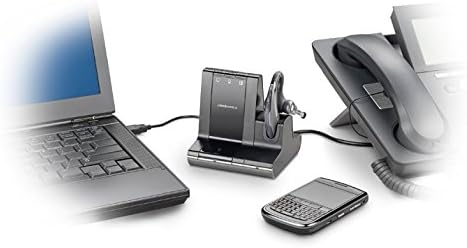
ምስል 2፡ The Savi Office W730 base station demonstrating its multi-connectivity, linking to a laptop via USB, a desk phone via telephone interface cable, and a mobile phone wirelessly via Bluetooth.
3. የጆሮ ማዳመጫውን መሙላት
Place the headset into the charging cradle on the base station. The charge indicator light on the base will illuminate to confirm charging. Allow approximately 3 hours for a full charge before initial use.
የአሠራር መመሪያዎች
1. ጥሪዎችን ማድረግ እና መመለስ
- መልስ/ጥሪ ጨርስ፡ Press the Call Control button on the headset or the corresponding phone button on the base station.
- ደውል: Select the desired phone source (PC, desk phone, or mobile) on the base station, then dial from your device.
- Switching Calls: During an active call, press the button for another connected device on the base station to switch to that line.
2. የጆሮ ማዳመጫ መቆጣጠሪያዎች
- የድምጽ ማስተካከያ; በጆሮ ማዳመጫው ላይ የድምጽ መጨመሪያ (+) እና ድምጽ ወደ ታች (-) አዝራሮችን ይጠቀሙ።
- ማይክሮፎን ድምጸ-ከል አድርግ፡ በጆሮ ማዳመጫው ላይ ያለውን የድምጸ-ከል አዝራር ይጫኑ። ድምጸ-ከልን ለማንሳት እንደገና ይጫኑ።
- Flash (for desk phone): Press the Call Control button on the headset briefly to put a call on hold or switch between calls on the desk phone.
3. ገመድ አልባ ክልል
The Savi W730 offers a wireless range of up to 350 feet from the base station. Environmental factors and obstacles may affect actual range.
4. Software Integration (Plantronics Hub)
For advanced features, customization, and firmware updates, install the Plantronics Hub software on your PC. This software enables features like call control for softphones and status updates.
ጥገና
1. የባትሪ እንክብካቤ
The headset features a hot-swappable battery, allowing for extended talk time with an optional spare battery (sold separately). To maximize battery life, fully charge the headset before first use and regularly dock it in the base station when not in use. Note that over time, all rechargeable batteries experience reduced capacity.
2. ማጽዳት
Wipe the headset and base station with a soft, dry, lint-free cloth. Avoid using liquid cleaners or abrasive materials.
መላ መፈለግ
| ጉዳይ | ሊሆን የሚችል መፍትሄ |
|---|---|
| No dial tone or audio |
|
| Poor audio quality or static |
|
| Headset not pairing with mobile phone |
|
| የተገደበ የባትሪ ዕድሜ |
|
ዝርዝሮች
- የሞዴል ቁጥር፡- 83543-01
- ግንኙነት፡ DECT 6.0 (Wireless), USB (PC), RJ-11 (Desk Phone), Bluetooth (Mobile Phone)
- የገመድ አልባ ክልል፡ እስከ 350 ጫማ (100 ሜትር)
- የጆሮ ማዳመጫ ክብደት: 0.8 አውንስ (በግምት)
- ባትሪ፡ 1 Lithium Polymer battery (hot-swappable)
- የምርት መጠኖች: 5.92 x 1.17 x 2.73 inches (Base Station)
- ልዩ ባህሪያት፡ Noise-canceling microphone, digital sound processing, wideband PC audio, one-touch call controls.
ዋስትና እና ድጋፍ
For warranty information, technical support, or to purchase accessories, please visit the official POLY webጣቢያ ወይም የደንበኛ አገልግሎታቸውን ያነጋግሩ። ለዋስትና ጥያቄዎች የግዢ ማረጋገጫዎን ያስቀምጡ።


