መግቢያ
This manual provides comprehensive instructions for the setup, operation, maintenance, and troubleshooting of your DISH DISH211 4-Device Universal Remote. Designed for ease of use, this remote supports DISH TV receivers and can control up to four different devices, including TVs and other entertainment systems. Its ability to learn commands from original remotes makes it a versatile replacement.
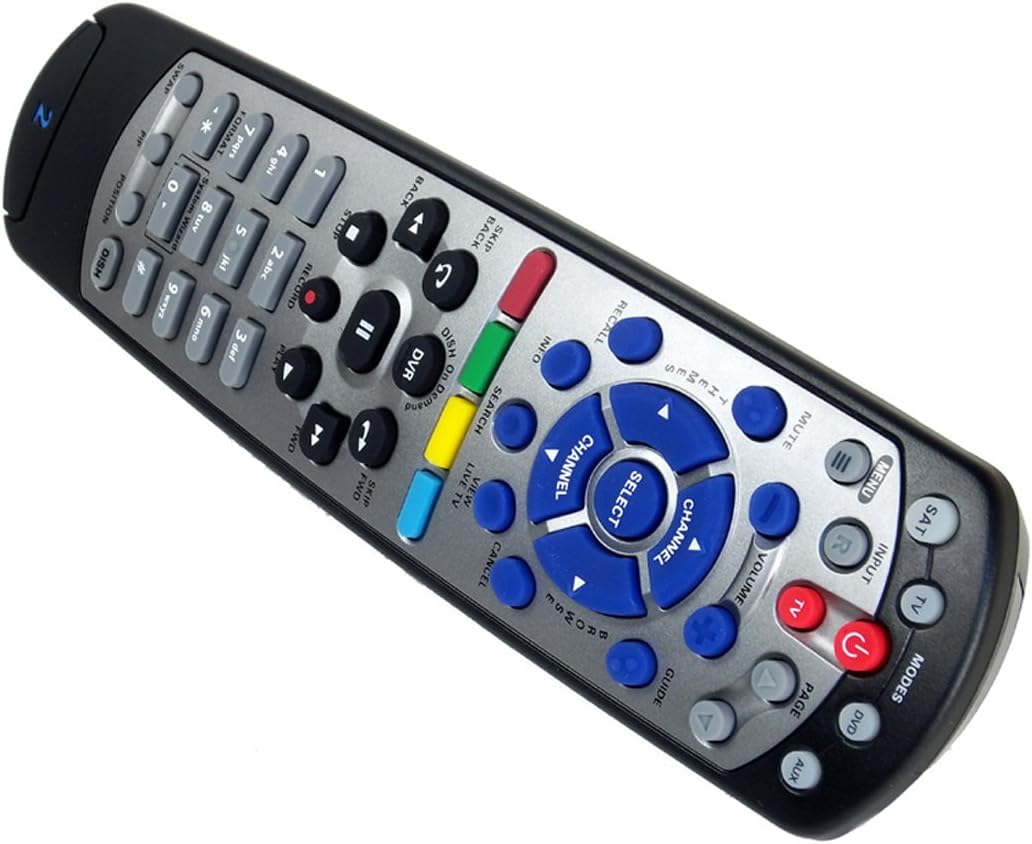
Figure 1: The DISH DISH211 4-Device Universal Remote, showcasing የእሱ ergonomic ንድፍ እና የአዝራር አቀማመጥ።
ማዋቀር
1. የባትሪ ጭነት
The DISH211 remote requires two (2) AA batteries for operation. To install:
- የባትሪውን ክፍል በርቀት መቆጣጠሪያው ጀርባ ላይ ያግኙት።
- የባትሪውን ሽፋን ወደ ታች ያንሸራትቱ እና ለመክፈት ያንሱ።
- Insert two AA batteries, ensuring the positive (+) and negative (-) terminals align with the indicators inside the compartment.
- የባትሪውን ሽፋን ወደ ቦታው እስኪገባ ድረስ ወደ ላይ በማንሸራተት ይተኩት።
2. Device Pairing and Programming
The DISH211 remote can be programmed to control your DISH receiver and other devices. It supports both Infrared (IR) and Ultra High Frequency (UHF) communication, depending on your receiver model.

Figure 2: Cover of the official DISH Remote User Guide, which provides detailed programming instructions.
For DISH Receiver Pairing (UHF/IR):
Some DISH receivers may require setting the remote's address and communication type (UHF or IR). A small switch near the battery compartment may allow selection between UHF and IR modes. Ensure this switch is set correctly for your receiver type.
To address the remote to your receiver:
- የሚለውን ይጫኑ የስርዓት መረጃ button on the front of your receiver to access the system information screen.
- ተጭነው ይያዙት። SAT button on the remote until all mode lights illuminate.
- Enter a number between 1-15 on the remote keypad. This number corresponds to the TV-2 UHF address displayed on your receiver's screen.
- የሚለውን ይጫኑ # (pound) button once.
- የሚለውን ይጫኑ መዝገብ አዝራር ሦስት ጊዜ.
- ይምረጡ ተከናውኗል on the system info screen and test the remote's functionality.
For Other Devices (TV, DVD, AUX):
The remote has a large code library and can learn commands from your original remotes. Refer to the official DISH remote user guide (often included with the product or available online) for specific programming codes and learning instructions for various brands and device types.

Figure 3: The back of the DISH remote packaging, indicating compatible DISH receiver models for both IR and IR/UHF configurations.
የአሠራር መመሪያዎች
The DISH211 remote is designed for intuitive control of your entertainment system. It features backlit active MODE keys for visibility in low light conditions and dedicated DVR controls.
1. ሁነታ ምርጫ
Press the desired mode button (e.g., SAT for DISH receiver, TV for television, ዲቪዲ for DVD player, AUX for auxiliary device) at the top of the remote to select the device you wish to control. The selected mode button will illuminate.
2. መሰረታዊ ቁጥጥሮች
- ኃይል፡- የሚለውን ይጫኑ ኃይል የተመረጠውን መሣሪያ ለማብራት ወይም ለማጥፋት አዝራር.
- መጠን፡- የሚለውን ተጠቀም ድምጽ ወደላይ/ወደታች buttons to adjust the audio level of your television.
- ቻናል፡ የሚለውን ተጠቀም ቻናል ወደ ላይ / ወደ ታች buttons to change channels on your DISH receiver or television.
- ድምጸ-ከል አድርግ፡ የሚለውን ይጫኑ ሙት ድምጹን ጸጥ ለማድረግ የሚያስችል አዝራር።
- ግቤት፡ የሚለውን ይጫኑ ግቤት button to cycle through video inputs on your television.
3. DVR Controls
The remote includes dedicated buttons for DVR functionality:
- መዝገብ፡ የአሁኑን ፕሮግራም ቀረጻ ይጀምራል።
- አጫውት/ ለአፍታ አቁም፡ Starts or pauses playback of recorded content or live TV.
- ተወ: መልሶ ማጫወት ያቆማል።
- ወደኋላ መመለስ/ፈጣን ወደፊት Controls playback speed and direction.
- Skip Forward (DISH Skip Forward): Allows quick skipping through commercials or segments.
- ወደኋላ ዝለል Skips backward in recorded content.

ምስል 4: መቀራረብ view of the DISH DISH211 remote, highlighting the central navigation and DVR control buttons.
ጥገና
1. የባትሪ መተካት
When the remote's performance degrades or buttons become unresponsive, it is likely time to replace the batteries. Follow the battery installation steps outlined in the Setup section.
2. ማጽዳት
የርቀት መቆጣጠሪያዎን ለማጽዳት፣ ወለሉን ለስላሳና ደረቅ ጨርቅ በቀስታ ይጥረጉ። ለጠንካራ ቆሻሻ፣ ትንሽ ይጥረጉ።ampen the cloth with water or a mild, non-abrasive cleaner. Avoid using excessive liquid or harsh chemicals, as these can damage the remote's electronics or finish.
መላ መፈለግ
የርቀት ምላሽ የማይሰጥ
- ባትሪዎችን ይፈትሹ፡ ባትሪዎች በትክክል መጫኑን እና በቂ ኃይል መሙላትዎን ያረጋግጡ። አስፈላጊ ከሆነ ይተኩ.
- የእይታ መስመር (IR): If using IR mode, ensure there is a clear line of sight between the remote and the device's IR receiver. Obstructions can block the signal.
- ሁነታ ምርጫ፡- Verify that the correct mode button (e.g., SAT, TV) is selected for the device you are trying to control.
- Remote Address/UHF-IR Switch: For DISH receivers, confirm the remote's address is correctly set and the UHF/IR switch (if present) matches your receiver's configuration. Incorrect settings can prevent communication.
የማይቋረጥ ተግባራዊነት
- ጣልቃ ገብነት፡- Other electronic devices or strong light sources (like plasma TV IR interference) can sometimes interfere with IR signals. Try operating the remote from a different angle or location.
- DVR Directory Update: If experiencing lag or unresponsiveness with DVR functions, ensure your DVR's directory is updated. Consult your DISH receiver's manual for instructions on updating its software or directory.
አዝራሮች አይሰሩም
- ንጹህ የርቀት መቆጣጠሪያ፡ Dirt or debris under buttons can cause them to stick or become unresponsive. Clean the remote as described in the Maintenance section.
- እንደገና ፕሮግራም ያድርጉ፦ If specific buttons for a device are not working, the remote may need to be reprogrammed for that device.
ዝርዝሮች
| ባህሪ | ዝርዝር |
|---|---|
| የሞዴል ቁጥር | DISH211 |
| የምርት ስም | ዲሽ |
| የምርት ልኬቶች | 1.75 x 4.81 x 11.38 ኢንች |
| የእቃው ክብደት | 9.6 አውንስ |
| ባትሪዎች ያስፈልጋሉ። | 2 AA ባትሪዎች |
| የሚደገፉ መሳሪያዎች ከፍተኛ ቁጥር | 4 |
| ተስማሚ መሣሪያዎች | Television, DISH TV receivers (TV1 and TV2 locations) |
| የግንኙነት ቴክኖሎጂ | Infrared (IR), Ultra High Frequency (UHF) |
| ልዩ ባህሪያት | Backlit keys, Universal compatibility, Learning capability |
ዋስትና እና ድጋፍ
የዋስትና መረጃ
The DISH DISH211 Universal Remote typically comes with a የተወሰነ የ90-ቀን ዋስትና. Please refer to the documentation enclosed with your product for specific terms, conditions, and details regarding warranty claims.
የደንበኛ ድጋፍ
For further assistance with programming, troubleshooting, or general inquiries, it is recommended to consult the official DISH Network support resources. This may include their website, online user guides, or customer service contact information. The manufacturer of this product is Audiovox Accessories Corporation.


