1. መግቢያ
This manual provides detailed instructions for the installation, operation, and maintenance of your Soundstream VL-11A Single DIN Digital Media Receiver. Please read this manual thoroughly before using the product to ensure proper operation and to prevent damage.
The Soundstream VL-11A is designed to provide high-quality audio playback from various digital sources, including USB drives, SD cards, and auxiliary input devices. It features a compact single DIN chassis for easy integration into most vehicle dashboards.
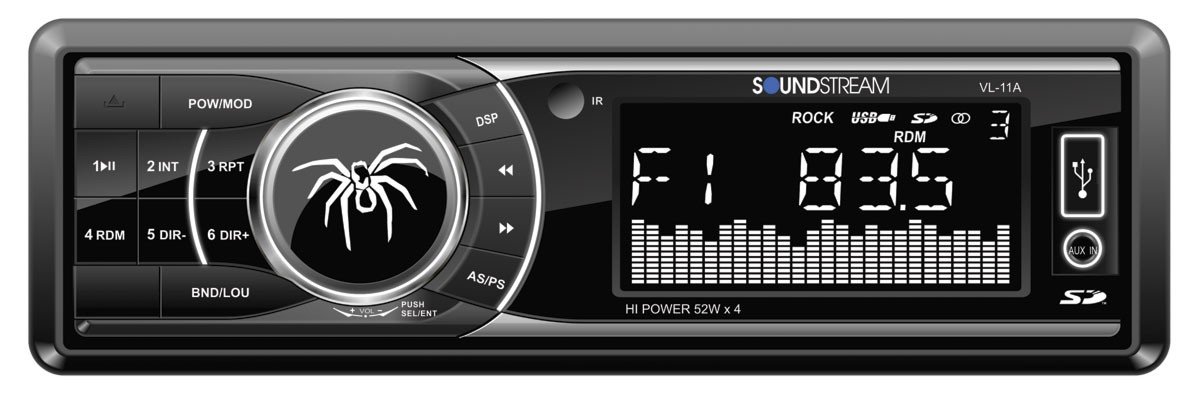
ምስል 1.1፡ ፊት ለፊት view of the Soundstream VL-11A Digital Media Receiver. This image displays the main unit with its control buttons and display panel.
2. የደህንነት መረጃ
በክፍሉ ላይ ጉዳት ወይም ጉዳት ለመከላከል የሚከተሉትን የደህንነት ጥንቃቄዎች ያክብሩ።
- ክፍሉን ከመንዳት በሚያዘናጋ መልኩ አያንቀሳቅሱት። ሁል ጊዜ ለመንገድ ደህንነት ቅድሚያ ይስጡ።
- Ensure proper wiring connections. Incorrect wiring can cause fire or damage to the vehicle's electrical system.
- ክፍሉን ለእርጥበት ወይም ለከፍተኛ ሙቀት ከማጋለጥ ይቆጠቡ።
- ክፍሉን ለመበተን ወይም ለማሻሻል አይሞክሩ. ሁሉንም አገልግሎቶች ብቁ ለሆኑ ባለሙያዎች ያመልክቱ።
- ድምጹን የውጭ የትራፊክ ድምፆችን ለመስማት በሚያስችል ደረጃ ያቆዩት።
3. የጥቅል ይዘቶች
ሁሉም እቃዎች በጥቅሉ ውስጥ መኖራቸውን ያረጋግጡ፡-
- Soundstream VL-11A Digital Media Receiver
- የሽቦ Harness
- የመጫኛ ሃርድዌር (ዊንጣዎች፣ የመጫኛ እጅጌ)
- የርቀት መቆጣጠሪያ
- የተጠቃሚ መመሪያ (ይህ ሰነድ)
4. ምርት አብቅቷልview
4.1 የፊት ፓነል መቆጣጠሪያዎች
The front panel provides access to primary functions and media inputs.
ምስል 4.1፡ Illustrative diagram of the VL-11A front panel. This image highlights the display, volume knob, mode button, track controls, USB port, SD card slot, and auxiliary input.
- የኃይል / ሁነታ ቁልፍ Press to turn on/off. Short press to cycle through audio sources (Radio, USB, SD, AUX).
- የድምፅ ቁልፍ; የድምጽ መጠንን ለማስተካከል ያሽከርክሩ። የድምጽ ቅንብሮችን ለመድረስ ይጫኑ (ባስ፣ ትሬብል፣ ባላንስ፣ ፋደር፣ ኢኪው)።
- ማሳያ፡- የአሁኑን ሁኔታ፣ የትራክ መረጃ እና ቅንብሮችን ያሳያል።
- የዩኤስቢ ወደብ፡ የሚዲያ መልሶ ማጫወት የዩኤስቢ ማከማቻ መሳሪያዎችን ያገናኙ።
- የኤስዲ ካርድ ማስገቢያ፡ የሚዲያ መልሶ ማጫወትን ለማረጋገጥ የኤስዲ ካርዶችን ያስገቡ።
- AUX ግቤት፡ ውጫዊ የድምጽ መሳሪያዎችን በ3.5ሚሜ መሰኪያ ያገናኙ።
- የትራክ/የቃኝ አዝራሮች፡ ትራኮችን ያስሱ ወይም የሬዲዮ ፍሪኩዌንሲዎችን ያስተካክሉ።
4.2 የኋላ ግንኙነቶች
The rear of the unit contains the main wiring harness and preamp ውጤቶች.
ምስል 4.2፡ Illustrative diagram of the VL-11A rear connections. This image shows the main wiring harness connector and the RCA preamp ውጤቶች.
- ዋና የሽቦ ማሰሪያ፡ Connects to vehicle power, ground, accessory, and speaker wires.
- RCA ቅድመamp ውጤቶች፡ Two sets of 2V outputs for connecting external ampአነፍናፊዎች።
5. ማዋቀር
5.1 መጫን
Professional installation is recommended. If installing yourself, ensure the vehicle's battery is disconnected before beginning.
- መጫን፡ Insert the metal mounting sleeve into the vehicle's dashboard opening. Bend the tabs to secure it.
- ሽቦ ማድረግ፡ Connect the supplied wiring harness to the vehicle's wiring. Match wire colors and functions carefully.
- የድምጽ ማጉያ ግንኙነቶች; Connect the speaker wires from the harness to your vehicle's speakers. Ensure correct polarity.
- የኃይል ግንኙነቶች Connect the yellow wire (constant 12V), red wire (switched 12V), and black wire (ground) to the appropriate vehicle circuits.
- አንቴና፡ የተሽከርካሪውን የአንቴና ገመድ ከመሳሪያው የአንቴና ግብዓት ጋር ያገናኙ።
- ደህንነቱ የተጠበቀ ክፍል Slide the VL-11A into the mounting sleeve until it clicks into place.
Warning: Incorrect wiring can cause severe damage to the unit or vehicle. Consult a professional if unsure.
5.2 የመጀመሪያ ኃይል-አፕ
After installation, reconnect the vehicle's battery. Press the power button on the unit or remote control to turn it on. The display should illuminate.
6. የአሠራር መመሪያዎች
6.1 መሰረታዊ ቁጥጥሮች
- ማብራት/ማጥፋት፡ የሚለውን ይጫኑ PWR/MODE አዝራር።
- የድምጽ ማስተካከያ; አሽከርክር ድምጽ እንቡጥ.
- የምንጭ ምርጫ፡- አጭር ተጫን PWR/MODE button to cycle through Radio, USB, SD, and AUX.
6.2 የድምጽ ቅንብሮች
የሚለውን ይጫኑ ድምጽ knob to enter the audio menu. Rotate the knob to navigate options and press to select.
- ባስ/ትሬብል፡ የባስ እና የትሬብል ደረጃዎችን ያስተካክሉ።
- ሚዛን፡ Adjust audio balance between left and right speakers.
- ፋዳ Adjust audio balance between front and rear speakers.
- EQ (አመጣጣኝ): Select from preset EQ curves (e.g., Pop, Rock, Classic) or a custom setting.
6.3 የዩኤስቢ/ኤስዲ መልሶ ማጫወት
Insert a USB drive into the USB port or an SD card into the SD card slot. The unit will automatically switch to the respective source and begin playback.
- አጫውት/ ለአፍታ አቁም፡ የሚለውን ይጫኑ አጫውት/አፍታ አቁም አዝራር።
- ቀጣይ / ቀዳሚ ትራክ የሚለውን ይጫኑ ቀጣይ / ቅድመ አዝራሮች.
- የአቃፊ ዳሰሳ፡ የሚለውን ተጠቀም አቃፊ ወደላይ/ታች buttons (if available on remote or unit).
6.4 ረዳት ግብዓት (AUX)
Connect an external audio device (e.g., smartphone, MP3 player) to the 3.5mm AUX input on the front panel using an audio cable. Select AUX as the source using the MODE አዝራር።
6.5 Radio Tuner
Select Radio as the source. The unit supports AM/FM bands.
- የባንዱ ምርጫ የሚለውን ይጫኑ ባንድ በFM1፣ FM2፣ FM3 እና AM መካከል ለመቀያየር አዝራር።
- በእጅ ማስተካከል አጭር ተጫን ወደላይ/ታች ያስተካክሉ buttons to adjust frequency step-by-step.
- ማስተካከያ ይፈልጉ ን በረጅሙ ተጫን ወደላይ/ታች ያስተካክሉ የሚቀጥለውን ጠንካራ ጣቢያ በራስ-ሰር ለመፈለግ አዝራሮች።
- አስቀድመው የተቀመጡ ጣቢያዎች፡ Press and hold a numbered preset button (1-6) to save the current station. Short press to recall a saved station.
6.6 የርቀት መቆጣጠሪያ
The included remote control provides convenient access to most functions. Point the remote control towards the unit's front panel sensor.
ምስል 6.1፡ Illustrative diagram of the VL-11A remote control. This image shows the various buttons for power, mode, volume, track control, and numeric presets.
7. ጥገና
7.1 ክፍሉን ማጽዳት
- የፊት ፓነልን ለማጽዳትና ለማሳየት ለስላሳና ደረቅ ጨርቅ ይጠቀሙ።
- ሻካራ ማጽጃዎችን፣ ሰምዎችን ወይም ፈሳሾችን አይጠቀሙ።
- Avoid spraying cleaning solutions directly onto the unit.
7.2 አጠቃላይ እንክብካቤ
- ከመጠን በላይ ሙቀትን ለመከላከል በክፍሉ ዙሪያ ትክክለኛውን የአየር ዝውውርን ያረጋግጡ.
- ከባድ ዕቃዎችን በክፍሉ ላይ ከማስቀመጥ ተቆጠብ።
- If the unit is exposed to extreme cold, allow it to warm up before operation to prevent condensation.
8. መላ መፈለግ
ችግር ካጋጠመዎት፣ ድጋፍ ሰጪን ከማነጋገርዎ በፊት የሚከተለውን ሰንጠረዥ ይመልከቱ፡
| ችግር | ሊሆን የሚችል ምክንያት | መፍትሄ |
|---|---|---|
| ኃይል የለም | Blown fuse; Incorrect wiring; Disconnected battery. | Check vehicle fuses and unit fuse. Verify wiring connections. Ensure battery is connected. |
| ድምጽ የለም። | የድምጽ መጠኑ በጣም ዝቅተኛ ነው፤ ድምጸ-ከል ተደርጓል፤ የድምጽ ማጉያው የተሳሳተ ሽቦ፤ ምንጭ አልተመረጠም። | Increase volume. Deactivate mute. Check speaker connections and polarity. Select correct audio source. |
| ዩኤስቢ/ኤስዲ አይጫወትም። | የማይደገፍ file format; Corrupt media; Incorrectly inserted device. | ሚዲያ የሚደገፍ ኦዲዮ መያዙን ያረጋግጡ files (e.g., WMA). Try a different USB/SD. Reinsert device. |
| የሬዲዮ አቀባበል ደካማ | አንቴና አልተገናኘም; ደካማ የምልክት ቦታ. | የአንቴናውን ግንኙነት ይፈትሹ. ወደ ጠንካራ ጣቢያ ለማስተካከል ይሞክሩ። |
| የርቀት መቆጣጠሪያ አይሰራም | Dead battery; Obstruction; Not pointing at sensor. | Replace remote battery. Remove obstructions. Ensure direct line of sight to unit's IR sensor. |
9. ዝርዝሮች
Technical specifications for the Soundstream VL-11A Digital Media Receiver:
- ሞዴል፡ VL-11A
- የምርት ስም፡ የድምጽ ፍሰት
- አምራች፡ የድምጽ ፍሰት
- የምርት መጠኖች: 22.35 x 20.32 x 9.65 ሴ.ሜ
- የእቃው ክብደት፡ 771.11 ግ (1.7 ፓውንድ)
- ኦዲዮ ዋትtage: 52 Watts (Max)
- የሰርጦች ብዛት፡- 4
- ቅድመamp ውጤቶች፡ 2 Sets of 2V
- የሚዲያ ቅርጸት፡- WMA (and other common digital audio formats)
- ልዩ ባህሪያት፡ SD Card Input, USB Input, Auxiliary Input
- የማገናኛ አይነት፡ Auxiliary, USB, 3.5mm Jack
- ተስማሚ መሣሪያዎች ተናጋሪ
- የመቆጣጠሪያ ዘዴ፡- የርቀት
10. ዋስትና እና ድጋፍ
የሳውንድ ዥረት ምርቶች የተነደፉ እና የሚመረቱት በከፍተኛ የጥራት ደረጃዎች ነው። ለተለየ የዋስትና መረጃ፣ እባክዎን ከምርትዎ ጋር የተካተተውን የዋስትና ካርድ ይመልከቱ ወይም ኦፊሴላዊውን Soundstream ይጎብኙ webጣቢያ.
For technical support or service inquiries, please contact Soundstream customer service through their official channels. Keep your purchase receipt and product model number (VL-11A) handy when contacting support.


