1. መግቢያ እና በላይview
The Alpine VIE-X007-WS-E is a dedicated in-dash car navigation system designed for specific vehicle models, featuring a high-definition 7-inch wide VGA LED LCD display. This unit provides clear and detailed maps, high-quality video playback, and integrates advanced features for an enhanced driving experience. It includes a 32GB SDHC memory for map and music data, a built-in terrestrial digital TV tuner, and Bluetooth connectivity for hands-free calling and audio streaming. The system is 'Tuned by Alpine' to ensure optimal acoustic settings and vehicle-specific functionalities.
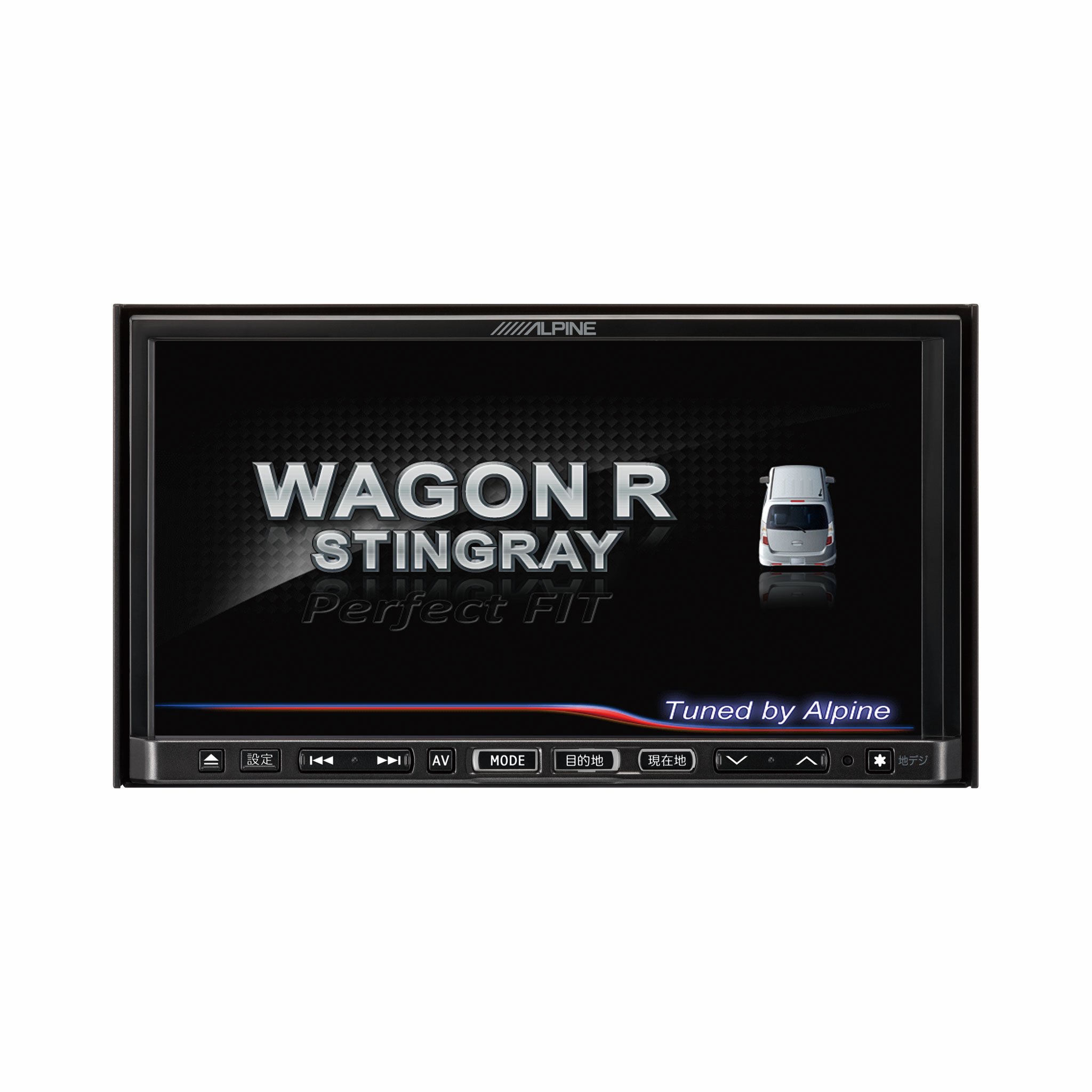
ምስል 1.1፡ ፊት view of the Alpine VIE-X007-WS-E In-Dash Car Navigation System, showcasing its 7-inch display and control interface.
2. ቁልፍ ባህሪያት
- ማሳያ፡- 7-inch LED / WVGA Touch Panel Monitor for clear visuals and intuitive control.
- ማከማቻ፡ 32GB SD memory (16GB for Map Data + 16GB for Music Data).
- መቃኛ፡ Built-in Terrestrial Digital TV Tuner (12 Segments/One Segment) for broadcast reception.
- ግንኙነት፡ Built-in Bluetooth for hands-free calling and Bluetooth audio support.
- የሚዲያ መልሶ ማጫወት Supports DVD/CD, FM/AM radio, SD Memory Card, iPod/iPhone, USB, and Walkman (connection cable not included).
- የተሽከርካሪ ውህደት፡- Alpine system link functions for rear vision camera and vehicle-specific settings.
3. የማዋቀር መመሪያዎች
Proper installation is crucial for optimal performance and safety. It is highly recommended that this unit be installed by a qualified professional car audio technician.
3.1. የቅድመ-መጫኛ ቼኮች
- መጫኑን ከመጀመርዎ በፊት የተሽከርካሪው ባትሪ መቆራረጡን ያረጋግጡ።
- Verify all necessary mounting hardware and wiring harnesses are present.
- Confirm compatibility with your specific vehicle model (Wagon R MH23 Stingray).
3.2. የወልና ግንኙነቶች
- የኃይል ግንኙነት; Connect the main power harness to the vehicle's power supply, ensuring proper grounding.
- የድምጽ ማጉያ ግንኙነቶች; Connect the speaker wires to the corresponding vehicle speakers, observing polarity.
- የአንቴና ግንኙነቶች; Connect the GPS antenna and the terrestrial digital TV antenna to their respective inputs on the unit. Position antennas in locations with clear line of sight.
- የውጭ መሳሪያዎች ግንኙነቶች; Connect any optional devices such as a rear-view camera, USB devices, or iPod/iPhone using the appropriate cables (sold separately).
3.3. ክፍሉን መትከል
- Carefully insert the unit into the vehicle's dashboard opening.
- የተሰጡትን የመጫኛ ቅንፎች እና ዊንጮች በመጠቀም መሳሪያውን ደህንነቱ በተጠበቀ ሁኔታ ያያይዙት።
- Re-connect the vehicle's battery.
3.4. የመጀመሪያ ኃይል-በ
- Turn on the vehicle's ignition. The unit should power on and display the Alpine logo.
- እንደ ቋንቋ ምርጫ እና የጊዜ ሰቅ ያሉ ለመጀመሪያ ጊዜ ማዋቀር በማያ ገጽ ላይ ያሉ ማናቸውንም ጥያቄዎች ይከተሉ።
4. የአሠራር መመሪያዎች
This section provides general guidance on operating your Alpine navigation system.
4.1. ማብራት / ማጥፋት
- The unit typically powers on automatically with the vehicle's ignition.
- To manually turn off or put the unit into standby, press and hold the power button (location may vary, refer to specific vehicle integration manual).
4.2. የንክኪ ማያ ገጽ አሠራር
- Navigate menus and select functions by lightly touching the screen icons.
- Use swipe gestures for scrolling through lists or maps.
4.3. Navigation Functions
- Accessing Navigation: Tap the 'Navigation' or 'Map' icon on the main menu.
- ወደ መድረሻ መግባት፡ Use the on-screen keyboard to input an address, point of interest (POI), or select from recent destinations.
- የመንገድ መመሪያ፡ Once a destination is set, the system will calculate a route and provide turn-by-turn voice guidance and visual cues.
- ካርታ View: Switch between 2D, 3D, and various zoom levels using the on-screen controls.
4.4. የሚዲያ መልሶ ማጫወት
- ሬዲዮ፡ Select 'FM' or 'AM' from the main menu. Use the tuner controls to scan for stations or select presets.
- ሲዲ/ዲቪዲ፡ Insert a disc into the slot. Playback should begin automatically or can be selected from the 'Disc' source.
- SD Card/USB: Insert an SD card or USB device. Select 'SD' or 'USB' as the source and browse for media files.
- የብሉቱዝ ድምጽ Pair your Bluetooth device (see section 4.5) and select 'Bluetooth Audio' as the source to stream music.
- Terrestrial Digital TV: Select 'TV' from the main menu. The system will scan for available channels.
4.5. የብሉቱዝ ማጣመር
- On the unit, go to the 'Bluetooth' menu.
- በተንቀሳቃሽ መሳሪያዎ ላይ ብሉቱዝን ያንቁ እና የሚገኙ መሳሪያዎችን ይፈልጉ።
- Select 'Alpine VIE-X007-WS-E' (or similar name) from your device's list.
- ከተጠየቁ በሁለቱም መሳሪያዎች ላይ የማጣመሪያውን ኮድ ያረጋግጡ.
- አንዴ ከተጣመሩ በኋላ ጥሪዎችን ማድረግ/መቀበል እና ኦዲዮ መልቀቅ ይችላሉ።
5. ጥገና
Regular maintenance ensures the longevity and optimal performance of your navigation system.
5.1. ክፍሉን ማጽዳት
- Use a soft, dry cloth to wipe the display and control panel.
- በማያ ገጹ ላይ ላሉ ግትር ቆሻሻዎች፣ በትንሹ ዲampen the cloth with a screen cleaner specifically designed for electronics. Do not spray cleaner directly onto the unit.
- ሻካራ ማጽጃዎችን፣ ፈሳሾችን ወይም ኃይለኛ ኬሚካሎችን ከመጠቀም ይቆጠቡ።
5.2. የሶፍትዌር እና የካርታ ዝመናዎች
- Periodically check the Alpine official website for available software and map updates.
- Follow the instructions provided with the update package carefully to ensure proper installation. Updates typically involve downloading files to an SD card or USB drive and inserting it into the unit.
5.3. የኤስዲ ካርድ አያያዝ
- Always eject the SD card safely through the unit's menu before physically removing it.
- Store the SD card in a protective case when not in use to prevent damage.
6. መላ መፈለግ
ይህ ክፍል ሊያጋጥሙዎት የሚችሉ የተለመዱ ችግሮችን እና ሊሆኑ የሚችሉ መፍትሄዎቻቸውን ያብራራል።
| ችግር | ሊሆን የሚችል ምክንያት | መፍትሄ |
|---|---|---|
| ዩኒት ኃይል የለውም። | ያልተቋረጠ የኃይል ግንኙነት፣ የተነፋ ፊውዝ፣ የተሽከርካሪ ባትሪ ጉዳይ። | Check power wiring and fuse. Ensure vehicle battery is charged. Consult a professional if issues persist. |
| No GPS signal or inaccurate positioning. | GPS antenna obstructed or improperly connected, unit in an area with poor satellite reception. | የጂፒኤስ አንቴና ግልጽ መሆኑን ያረጋግጡ view የሰማይ። የአንቴናውን ግንኙነት ይፈትሹ. ወደ ክፍት ቦታ ይሂዱ። |
| የብሉቱዝ መሣሪያ ማጣመር አልቻለም። | Bluetooth not enabled on device, incorrect pairing mode, interference. | Ensure Bluetooth is active on your device. Put the unit in pairing mode. Try re-pairing. Move closer to the unit. |
| የንክኪ ማያ ገጽ ምላሽ አይሰጥም። | Temporary software glitch, screen calibration issue. | Restart the unit (turn vehicle ignition off and on). If available, perform screen calibration via settings. |
| ከድምጽ ማጉያዎች ምንም ድምፅ የለም። | የድምጽ መጠኑ በጣም ዝቅተኛ፣ ድምጸ-ከል ሆኖ ነቅቷል፣ የድምጽ ማጉያው የማገናኘት ችግር። | የድምጽ መጠን ይጨምሩ። ድምጸ-ከል ገባሪ መሆኑን ያረጋግጡ። የድምጽ ማጉያ ግንኙነቶችን ያረጋግጡ። |
If you encounter problems not listed here or if the suggested solutions do not resolve the issue, please contact Alpine customer support or a certified service center.
7. ዝርዝሮች
| ባህሪ | ዝርዝር መግለጫ |
|---|---|
| የምርት ስም | አልፓይን |
| ሞዴል | VIE-X007-WS-E |
| የስክሪን መጠን | 7 ኢንች |
| የማሳያ ዓይነት | WVGA LED LCD Touch Panel Monitor |
| የማህደረ ትውስታ ማከማቻ አቅም | 16 GB (for Map Data, total 32GB SDHC) |
| ልዩ ባህሪያት | Hands Free (Bluetooth) |
| የግንኙነት ቴክኖሎጂ | ብሉቱዝ ፣ ዩኤስቢ |
| የሰው በይነገጽ ግቤት | የንክኪ ማያ ገጽ |
| የሚዲያ አይነት ይደገፋል | Memory, DVD, CD, FM/AM, SD Card, iPod/iPhone, USB, Walkman |
| አብሮ የተሰራ መቃኛ | Terrestrial Digital TV Tuner (12 Segments/One Segment) |
| ባትሪዎች ተካትተዋል። | አይ |
| የምርት ልኬቶች | 18.66 x 17.8 x 10 ሴ.ሜ |
| የእቃው ክብደት | 6.44 ኪ.ግ |
8. ዋስትና እና ድጋፍ
Warranty information for the Alpine VIE-X007-WS-E is typically provided with the product packaging or at the point of purchase. Please refer to these documents for details regarding warranty coverage, terms, and conditions.
For technical support, service inquiries, or to find authorized service centers, please visit the official Alpine website or contact Alpine customer service directly. Ensure you have your product model number (VIE-X007-WS-E) and proof of purchase available when seeking support.
የአልፕስ ኦፊሴላዊ Webጣቢያ፡ www.alpine.com