1. መግቢያ
The Mastech MS8232B is a compact, auto-ranging digital multimeter designed for measuring AC/DC voltage, AC/DC current, resistance, frequency, capacitance, and duty cycle. It features a 3 3/4 digit LCD display with 3999 counts, overload protection, a flashlight function, low voltage display, and automatic power-off for energy conservation. This manual provides essential information for safe and effective operation of the device.
2. የደህንነት መረጃ
To ensure safe operation and avoid damage to the meter, observe the following safety precautions:
- ማንኛውንም መለኪያ ከማድረግዎ በፊት ሁልጊዜ የሙከራ ሊዶቹ በጥሩ ሁኔታ ላይ መሆናቸውን እና በትክክል መገናኘታቸውን ያረጋግጡ።
- ጥራዝ አይጠቀሙtagለእያንዳንዱ ክልል ከተገለጹት ከፍተኛ ገደቦች የሚበልጥ e ወይም current።
- ከቮል ጋር ሲሰሩ ከፍተኛ ጥንቃቄ ያድርጉtagእነዚህ ከ60V DC ወይም ከ30V AC RMS በላይ ናቸው፣ ምክንያቱም እነዚህ የአደጋ ስጋት ይፈጥራሉ።
- ተግባራትን ከመቀየርዎ በፊት, በፈተና ውስጥ ካለው ወረዳ ውስጥ የሙከራ መሪዎችን ያላቅቁ.
- ቆጣሪው የተበላሸ መስሎ ከታየ ወይም መያዣው ክፍት ከሆነ አይጠቀሙ.
- የባትሪው ዝቅተኛ አመልካች ሲታይ ባትሪውን ወዲያውኑ ይተኩት፤ ይህም ትክክለኛ ንባብ እንዲኖርዎት ያደርጋል።
- የአካባቢ እና የሀገር ደህንነት ኮዶችን ያክብሩ።
3. ምርት አብቅቷልview
The Mastech MS8232B is a compact and versatile digital multimeter. Key features include a 4000-count display, non-contact voltage detection, and an integrated flashlight.

Figure 3.1: Mastech MS8232B Mini Digital Multimeter with test leads.
3.1 ክፍሎች
- LCD ማሳያ፡- የመለኪያ ንባቦችን፣ አሃዶችን እና የተግባር አመልካቾችን ያሳያል።
- ሮታሪ መቀየሪያ፡- የሚፈለገውን የመለኪያ ተግባር ለመምረጥ ጥቅም ላይ ይውላል።
- FUNC አዝራር፡- Toggles between different measurement modes within a single rotary switch position (e.g., AC/DC, Resistance/Continuity/Diode).
- የእጅ ባትሪ አዝራር፡- አብሮ የተሰራውን የእጅ ባትሪ ያነቃቃል።
- Hz% አዝራር፡- በድግግሞሽ እና በተግዴታ ዑደት መለኪያዎች መካከል ይቀያይራል።
- የግቤት ጃክሶች፡- የሙከራ ምቶችን ለማገናኘት።
- እውቂያ ያልሆነ ጥራዝtage (NCV) Sensor: የ AC voltagሠ ያለ ቀጥተኛ ግንኙነት.

Figure 3.2: Close-up of the rotary switch and function buttons, including FUNC, Flashlight, and Hz%.

Figure 3.3: The multimeter's LCD display showing a measurement.
4. ማዋቀር
4.1 የባትሪ ጭነት
The MS8232B is powered by batteries. To install or replace batteries:
- መልቲሜትሩ መጥፋቱን ያረጋግጡ።
- በመሳሪያው ጀርባ ላይ የባትሪውን ክፍል ሽፋን ያግኙ.
- ሽፋኑን የሚያስተሳስሩትን ዊንች(ዎች) ለማስወገድ ዊንችዌር ይጠቀሙ።
- Carefully remove the old batteries (if any) and insert new ones, observing the correct polarity (+ and -).
- የባትሪውን ክፍል ሽፋን ይቀይሩት እና በዊች (ዎች) ያስጠብቁት.
4.2 የማገናኘት የሙከራ እርሳሶች
Connect the red test lead to the 'VΩHz%CAP' input jack and the black test lead to the 'COM' input jack for most voltage, resistance, frequency, and capacitance measurements. For current measurements, refer to the specific current measurement section.
5. የአሠራር መመሪያዎች
Always ensure the correct function is selected and test leads are properly connected before making any measurement.
5.1 ዲሲ ጥራዝtagየኢ (ዲሲቪ) መለኪያ
- Set the rotary switch to the 'VΩHz%' position.
- Press the 'FUNC' button until 'DC' is indicated on the display.
- ቀዩን የሙከራ ሊድ ከወረዳው አወንታዊ ጎን እና ጥቁር የፈተና ሊድ ከአሉታዊ ጎን ጋር ያገናኙ።
- ጥራዝ ያንብቡtagበኤልሲዲ ማሳያ ላይ ኢ እሴት።
5.2 ኤሲ ጥራዝtagየኢ (ኤሲቪ) መለኪያ
- Set the rotary switch to the 'VΩHz%' position.
- Press the 'FUNC' button until 'AC' is indicated on the display.
- የፍተሻ መሪዎቹን በ AC voltagኢ ምንጭ.
- ጥራዝ ያንብቡtagበኤልሲዲ ማሳያ ላይ ኢ እሴት።
5.3 DC Current (DCA) Measurement
- Set the rotary switch to the 'μA' or 'mA' position, depending on the expected current range.
- Press the 'FUNC' button until 'DC' is indicated on the display.
- Disconnect power to the circuit. Break the circuit and connect the multimeter in series. The red lead connects to the higher potential side, and the black lead to the lower potential side.
- ኃይልን ወደ ወረዳው ይተግብሩ እና የአሁኑን እሴት ያንብቡ።
5.4 AC Current (ACA) Measurement
- Set the rotary switch to the 'μA' or 'mA' position, depending on the expected current range.
- Press the 'FUNC' button until 'AC' is indicated on the display.
- Disconnect power to the circuit. Break the circuit and connect the multimeter in series.
- ኃይልን ወደ ወረዳው ይተግብሩ እና የአሁኑን እሴት ያንብቡ።
5.5 የመቋቋም መለኪያ
- Set the rotary switch to the 'Ω' position.
- በሙከራ ላይ ያለው ዑደት ኃይል መሟጠጡን ያረጋግጡ።
- ተቃውሞውን ለመለካት የፍተሻ መሪዎቹን በክፍሉ ላይ ያገናኙ.
- በ LCD ማሳያ ላይ ያለውን የመቋቋም ዋጋ ያንብቡ.
5.6 የድግግሞሽ (Hz) እና የግዴታ ዑደት (%) መለኪያ
- Set the rotary switch to the 'VΩHz%' position.
- Press the 'Hz%' button to cycle between Frequency and Duty Cycle modes.
- በሲግናል ምንጭ ላይ የፍተሻ መሪዎቹን ያገናኙ.
- Read the frequency or duty cycle value on the LCD display.
5.7 የአቅም መለኪያ
- Set the rotary switch to the 'CAP' position.
- የሙከራ ገመዶችን ከማገናኘትዎ በፊት መያዣው ሙሉ በሙሉ መውጣቱን ያረጋግጡ።
- የሙከራ ሽቦዎችን በካፓሲተር ተርሚናሎች ላይ ያገናኙ።
- በ LCD ማሳያ ላይ ያለውን አቅም ዋጋ ያንብቡ.
5.8 የባትሪ ብርሃን ተግባር
The multimeter includes a built-in flashlight for illuminating dark work areas.
- Press the flashlight button (labeled with a light bulb icon) to turn the flashlight ON.
- የእጅ ባትሪውን ለማጥፋት አዝራሩን እንደገና ይጫኑ።

Figure 5.1: The integrated flashlight on the Mastech MS8232B.
5.9 የእውቂያ ያልሆነ ጥራዝtagሠ (NCV) ማወቂያ
የኤንሲቪ (NCV) ተግባር የኤሲ መጠንን ለመለየት ያስችላልtagከኮንዳክተሮች ጋር ቀጥተኛ ግንኙነት ሳይኖር።
- Set the rotary switch to the 'NCV' position (often integrated with other functions or a dedicated position).
- Bring the top front part of the multimeter (where the NCV sensor is located) close to the conductor.
- ቆጣሪው የ AC vol መኖሩን ያሳያልtagበሚሰማ ድምጽ እና/ወይም በእይታ አመልካች በኩል።
5.10 ራስ-ሰር ኃይል ጠፍቷል
The multimeter features an automatic power-off function to conserve battery life. If no operation is performed for approximately 15 minutes, the meter will automatically shut down. To reactivate, turn the rotary switch to OFF and then back to the desired function, or press any button.
6. ጥገና
6.1 ጽዳት
መያዣውን በማስታወቂያ ይጥረጉamp ጨርቅ እና መለስተኛ ሳሙና። ማጽጃዎችን ወይም ማሟሟቶችን አይጠቀሙ። የግቤት ተርሚናሎችን ከቆሻሻ እና እርጥበት ነፃ ያድርጉ።
6.2 የባትሪ መተካት
የባትሪ ምትክ መመሪያዎችን ለማግኘት ክፍል 4.1ን ይመልከቱ። ሁልጊዜ የተገለጸውን የባትሪ አይነት ይጠቀሙ።
6.3 ማከማቻ
If the meter is not to be used for an extended period, remove the batteries to prevent leakage and damage to the unit. Store the meter in a cool, dry place away from direct sunlight.
7. መላ መፈለግ
| ችግር | ሊሆን የሚችል ምክንያት | መፍትሄ |
|---|---|---|
| ሜትር አይበራም | የሞቱ ወይም በስህተት የተጫኑ ባትሪዎች | የባትሪውን ፖላሪቲ ይፈትሹ ወይም ባትሪዎችን ይተኩ. |
| "OL" (ከመጠን በላይ ጭነት) ይታያል | Input value exceeds selected range or meter's maximum capacity | Select a higher range (if available) or ensure the input is within the meter's specifications. |
| ትክክለኛ ያልሆኑ ንባቦች | Low battery, incorrect function selected, or poor test lead connection | Replace batteries, verify function selection, ensure leads are securely connected. |
| የኤንሲቪ ምርመራ የለም | ምንም AC voltage present, or sensor not close enough to source | የ AC ጥራዝ ያረጋግጡtage presence with direct contact method if safe, move sensor closer. |
8. ዝርዝሮች
The Mastech MS8232B offers the following technical specifications:
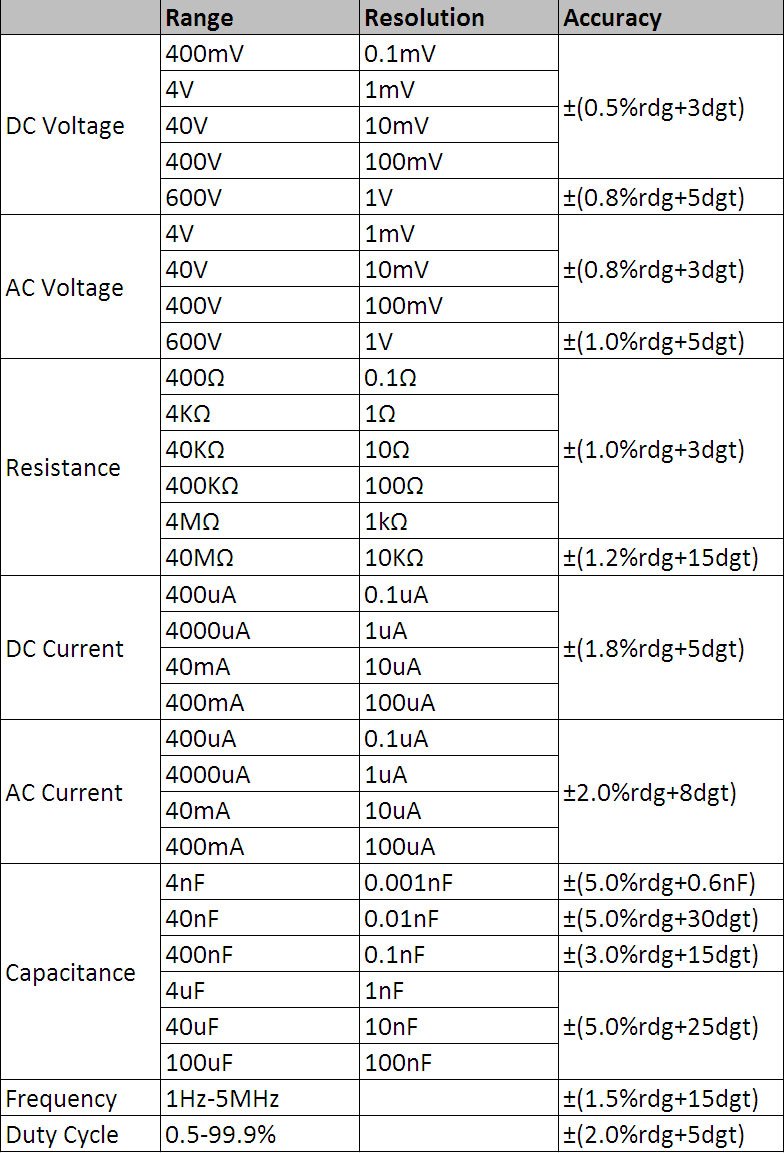
Figure 8.1: Detailed technical specifications table.
አጠቃላይ ዝርዝሮች፡
- ማሳያ፡- 3 3/4 digits LCD, 3999 Counts
- ከመጠን በላይ መጫን ጥበቃ; የሙሉ ክልል ጥበቃ
- ዝቅተኛ ጥራዝtagሠ ማሳያ፡ አዎ
- ራስ-ሰር ኃይል ጠፍቷል; አዎ
- የባትሪ ብርሃን ተግባር አዎ
- የኃይል ምንጭ፡- በባትሪ የተጎላበተ
- የደህንነት ደረጃዎች፡- UL 61010-1፣ IEC 61010-1
የመለኪያ ክልሎች እና ትክክለኛነት፡-
- ዲሲ ጥራዝtagኢ (ዲሲቪ): 400mV / 4V / 40V / 400V / 600V (±0.5% + 3 digits)
- ኤሲ ጥራዝtagኢ (ኤሲቪ): 4V / 40V / 400V / 600V (±0.8% + 3 digits)
- የዲሲ ጅረት (ዲሲኤ): 400μA / 4000μA / 40mA / 400mA (±1.8% + 5 digits)
- AC Current (ACA): 400μA / 4000μA / 40mA / 400mA (±2.0% + 8 digits)
- መቋቋም፡ 400Ω / 4KΩ / 40KΩ / 400KΩ / 4MΩ / 40MΩ (±1.0% + 3 digits)
- ድግግሞሽ፡ 1Hz - 5MHz (±1.5% + 15 digits)
- አቅም፡ 4nF / 40nF / 400nF / 4μF / 40μF / 100μF (±5.0% + 6 digits)
- የግዴታ ዑደት፡- 0.5% - 99.9% (±2.0% + 5 digits)
9. ዋስትና እና ድጋፍ
Specific warranty information for the Mastech MS8232B Mini Digital Multimeter is not provided in the product data. For warranty claims or technical support, please contact your retailer or the manufacturer directly. Retain your proof of purchase for any warranty-related inquiries.


