መግቢያ
The Sony HDR-MV1 Music Video Recorder is designed for capturing high-quality audio and video, particularly for musical performances. It features professional-grade sound recording capabilities and HD video, making it suitable for musicians and content creators. This manual provides detailed instructions for setting up, operating, and maintaining your device.

ፊት ለፊት view of the Sony HDR-MV1 Music Video Recorder, showcasing its compact design and prominent microphone array.
በሣጥኑ ውስጥ ያለው
ሁሉም እቃዎች በጥቅልዎ ውስጥ መኖራቸውን ያረጋግጡ፡-
- Sony HDR-MV1 Music Video Recorder (Black)
- ዳግም ሊሞላ የሚችል የባትሪ ጥቅል (NP-BX1)
- የማይክሮ ዩኤስቢ ገመድ
- የምስሪት ካፕ
- Cap String
- የአሠራር መመሪያ
ማዋቀር
1. Inserting the Battery Pack
- Open the battery cover located on the side of the recorder.
- Insert the supplied NP-BX1 battery pack with the correct orientation.
- የባትሪውን ሽፋን በጥንቃቄ ይዝጉ።
2. የማህደረ ትውስታ ካርድ ማስገባት
The HDR-MV1 supports Micro SD cards. A memory card is required for recording.
- የማህደረ ትውስታ ካርድ ማስገቢያ ሽፋን ይክፈቱ.
- Insert a compatible Micro SD card into the slot until it clicks into place.
- የማህደረ ትውስታ ካርድ ማስገቢያ ሽፋንን ዝጋ።
3. ባትሪውን በመሙላት ላይ
Use the supplied micro USB cable to charge the battery. Connect one end to the recorder's MULTI terminal and the other end to a USB power source (e.g., AC adapter, computer USB port).

ጎን view of the HDR-MV1, showing the MULTI (USB) port, HDMI OUT, and LINE IN/headphone jack.
4. ማብራት / ማጥፋት
ተጭነው ይያዙት። ኃይል button located on the top of the device to turn the recorder on or off.

ከፍተኛ view of the HDR-MV1, highlighting the POWER and START/STOP recording buttons.
5. Connecting to a Smartphone (Wi-Fi/NFC)
The HDR-MV1 can be controlled remotely and files can be transferred to a smartphone or tablet using Wi-Fi and NFC (Near Field Communication).
- የኤንኤፍሲ ግንኙነት፡ Touch your NFC-compatible smartphone to the N-Mark on the recorder to establish a connection.
- የWi-Fi ግንኙነት፡- Use the "PlayMemories Mobile" app (available for iOS and Android) to connect to the recorder's Wi-Fi network. This allows for remote control and easy sharing of recorded content.
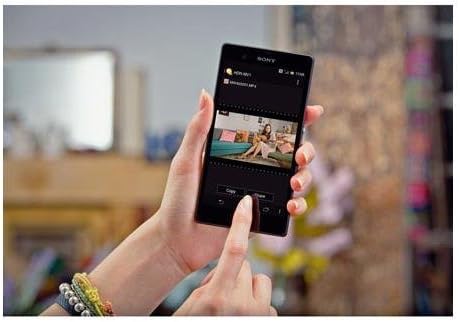
A smartphone screen showing the PlayMemories Mobile app, used for managing and sharing content from the HDR-MV1.
መቅጃውን በመስራት ላይ
1. ቪዲዮ እና ኦዲዮ መቅዳት
መቅዳት ለመጀመር፣ የሚለውን ይጫኑ ጀምር/አቁም button. Press it again to stop recording. The recorder captures Full HD 1080p video through its 120-degree wide-angle Carl Zeiss Tessar lens and high-quality audio via its 120-degree X/Y stereo microphones.

የተጠጋ ፊት view of the HDR-MV1, highlighting the Carl Zeiss Tessar lens and the X/Y stereo microphone array.
2. Audio Recording Settings
The HDR-MV1 offers versatile audio recording options:
- LPCM (Linear PCM): For uncompressed, studio-quality audio recording. Ideal for professional use where audio fidelity is paramount.
- AAC For compressed, internet-ready audio, suitable for sharing online.
- ዝቅተኛ-የተቆረጠ ማጣሪያ; Reduces unwanted low-frequency noise (e.g., wind, rumble) for clearer recordings.
- የማይክሮፎን ደረጃ፡ Adjust the input level of the built-in microphones to prevent distortion or capture quieter sounds.
- ውጫዊ የማይክሮፎን ግብዓት፡ Connect an external microphone via the 3.5mm jack for alternative audio capture.
3. የቪዲዮ ቀረጻ ባህሪያት
The recorder features a wide-angle lens, capturing a broad field of view, which is beneficial for recording entire bands or large scenes without missing details. It also performs well in low-light conditions thanks to its high-quality sensor.
4. Playback and Sharing
Review your recordings directly on the side display. Use the PlayMemories Mobile app to easily transfer videos and audio to your smartphone for quick sharing on social media or other platforms.

The HDR-MV1's side screen displaying a recorded video, showing the user interface for playback.
5. ይፋዊ የምርት ቪዲዮ
Official product video for the Sony HDR-MV1, demonstrating its key features and use cases for music recording.
ጥገና
- ማጽዳት፡ Use a soft, dry cloth to clean the camera body. For the lens, use a lens cleaning cloth and solution. Avoid harsh chemicals.
- የባትሪ እንክብካቤ Store the battery in a cool, dry place when not in use. Do not expose to extreme temperatures.
- ማከማቻ፡ Store the recorder in a protective case to prevent scratches and damage, especially to the lens and microphones.
መላ መፈለግ
| ችግር | መፍትሄ |
|---|---|
| መቅጃው አይበራም። | Ensure the battery is correctly inserted and fully charged. Try charging the device for at least 30 minutes. |
| Cannot record while charging. | The Sony HDR-MV1 is designed not to record while connected to a power source for charging. Disconnect the charger to initiate recording. |
| Smartphone app disconnects frequently or does not display properly. | Ensure the recorder's Wi-Fi is enabled and your smartphone is connected to the correct network. Try restarting both the recorder and the PlayMemories Mobile app. Ensure your app is updated to the latest version. |
| ደካማ የድምጽ ጥራት። | Check microphone levels to avoid clipping or being too low. Ensure the low-cut filter is appropriately set for your environment. Avoid recording in extremely windy conditions without additional wind protection. |
| Video appears grainy in low light. | While the HDR-MV1 has good low-light performance, extreme darkness may still result in some grain. Ensure adequate lighting for optimal video quality. |
ዝርዝሮች
| ባህሪ | ዝርዝር |
|---|---|
| የምርት ልኬቶች | 5.75 x 2.95 x 4.72 ኢንች |
| የእቃው ክብደት | 1.32 ፓውንድ |
| የንጥል ሞዴል ቁጥር | HDRMV1 |
| ባትሪዎች | 1 ሊቲየም አዮን ባትሪ ያስፈልጋል (ተካቷል) |
| የፎቶ ዳሳሽ ቴክኖሎጂ | CMOS |
| የቪዲዮ ቀረጻ ጥራት | 1080 ፒ |
| ከፍተኛ የትኩረት ርዝመት | 2.5 ሚሊሜትር |
| የፍላሽ ማህደረ ትውስታ አይነት | ማይክሮ ኤስዲ |
| የቪዲዮ ቀረጻ ቅርጸት | h.264;mpeg-2 |
| የሚደገፍ የድምጽ ቅርጸት | LPCM, AAC |
| የስክሪን መጠን | 2.7 ኢንች |
| የግንኙነት ቴክኖሎጂ | NFC, USB, Wi-Fi |
| ቀለም | ጥቁር |
| አምራች | ሶኒ |
| የመጀመሪያ ቀን ይገኛል። | ሴፕቴምበር 4፣ 2013 |
ዋስትና እና ድጋፍ
የዋስትና መረጃ፣ የቴክኒክ ድጋፍ ወይም የአገልግሎት ጥያቄዎች ካሉዎት እባክዎን ኦፊሴላዊውን የ Sony አድራሻ ይመልከቱ። webየ Sony ደንበኛ አገልግሎትን ድህረ ገጽ ወይም ያግኙ። የግዢ ማረጋገጫዎን ለዋስትና ጥያቄዎች ያስቀምጡ።
ኦፊሴላዊ የሶኒ ድጋፍ፡ https://www.sony.com/electronics/support


