1. መግቢያ
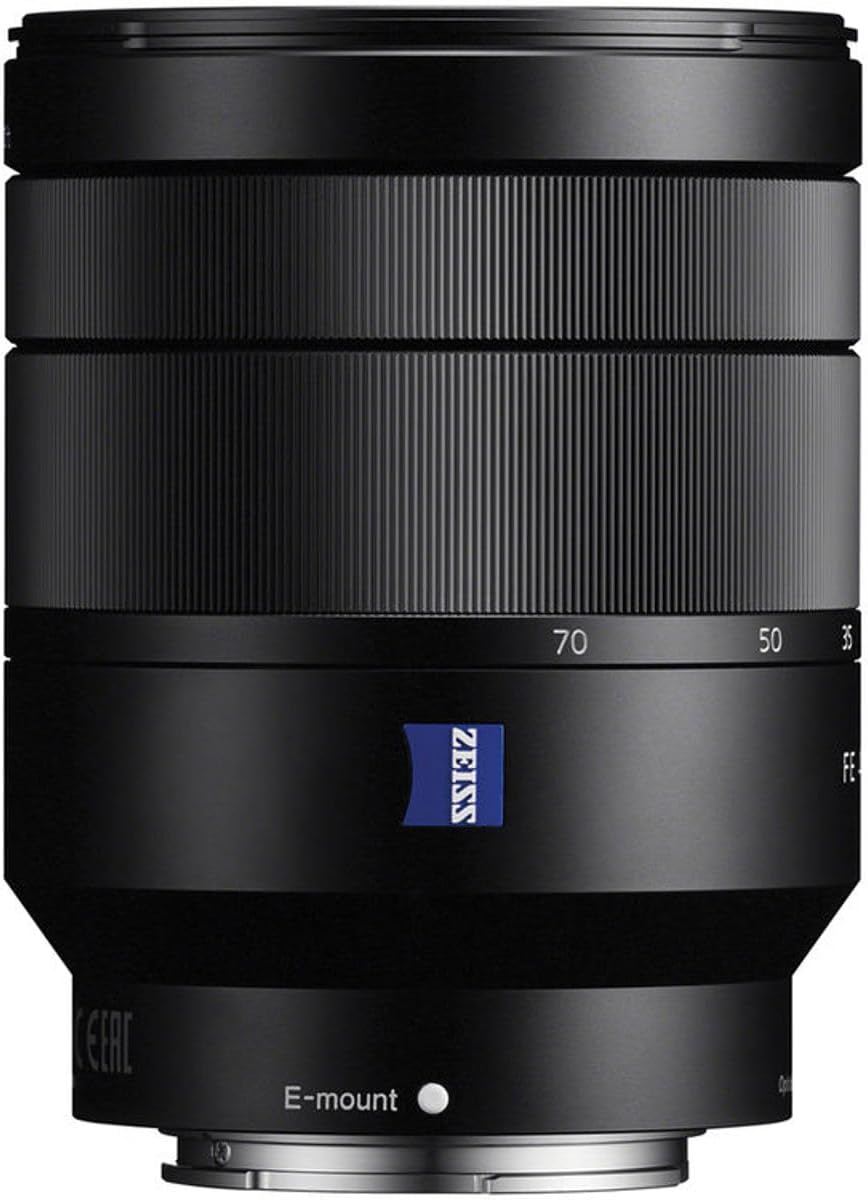
This manual provides essential information for the safe and effective use of your Sony FE 24-70mm f/4 Vario-Tessar T* OSS Zoom Lens. This compact full-frame Carl Zeiss mid-range zoom lens offers a versatile 24mm to 70mm focal length range with a constant maximum aperture of F4, ensuring consistent exposure. It is designed for use with full-frame and APS-C E-mount cameras and features dust and moisture resistance for reliable performance.
2. የደህንነት መረጃ
- Do not expose the lens to direct sunlight for extended periods, as this may damage the camera's image sensor.
- ሌንሱን ለጠንካራ ተጽእኖዎች ከመጣል ወይም ከመጣል ይቆጠቡ።
- Keep the lens away from water and moisture to prevent malfunction.
- ሌንሱን ለመበተን ወይም ለማሻሻል አይሞክሩ። ጥገናዎች መከናወን ያለባቸው በተፈቀደላቸው የአገልግሎት ሰራተኞች ብቻ ነው።
- Store the lens in a cool, dry place away from extreme temperatures.
3. የጥቅል ይዘቶች
- መነፅር
- Lens hood (ALC-SH130: petal shape, bayonet type)
- የሌንስ የፊት ቆብ
- የሌንስ የኋላ ካፕ
- ጉዳይ
4. ክፍሎችን መለየት
Familiarize yourself with the key components of your lens.

- የትኩረት ቀለበት በእጅ ለማተኮር ጥቅም ላይ ይውላል።
- የማጉላት ቀለበት፡ Adjusts the focal length between 24mm and 70mm.
- E-mount Index: Align with the camera's mount index for attachment.
- የሌንስ ኮፍያ አባሪ ምልክት፡ For attaching the lens hood.
- Optical SteadyShot Switch: Activates or deactivates image stabilization.
- የማጣሪያ ክር For attaching filters (67mm diameter).
5. ማዋቀር
ሌንሱን በማያያዝ ላይ
- የኋላ ሌንስ ካፕ እና የካሜራውን የሰውነት ካፕ ያስወግዱ።
- Align the white index mark on the lens with the white index mark on your camera body.
- ሌንሱን ወደ ቦታው እስኪገባ ድረስ በሰዓት አቅጣጫ በማዞር ሌንሱን ይጫኑ።
- Attach the lens hood by aligning its mark with the lens hood attachment mark on the lens, then turn it clockwise until it locks.
ሌንሱን በማስወገድ ላይ
- የካሜራው አካል ላይ ያለውን የሌንስ መልቀቂያ ቁልፍ ሲጫኑ፣ ሌንሱ እስኪቆም ድረስ በተቃራኒ ሰዓት አቅጣጫ ያዙሩት።
- ሌንሱን ያስወግዱ.
- Attach the lens caps to protect the lens and camera sensor.
6. ሌንስን ማንቀሳቀስ
ማጉላት
Rotate the zoom ring to adjust the focal length from 24mm (wide-angle) to 70mm (telephoto).
ማተኮር
- ራስ-ማተኮር (ኤኤፍ)፦ ካሜራዎን ወደ AF ሁነታ ያቀናብሩት። ሌንሱ በራስ-ሰር በጉዳዩ ላይ ያተኩራል።
- በእጅ ትኩረት (ኤምኤፍ)፦ Set your camera to MF mode. Rotate the focus ring to achieve desired focus.
Optical SteadyShot (Image Stabilization)
This lens features built-in Optical SteadyShot image stabilization. Activate it via the switch on the lens or through your camera's menu for sharper images, especially in low light or when shooting handheld.
የአየር ማስገቢያ መቆጣጠሪያ
The lens maintains a constant maximum aperture of f/4 across the entire zoom range. Adjust the aperture through your camera's settings to control depth of field and exposure.
Video Usage
The lens's quiet linear motors and image stabilization are beneficial for video recording, minimizing operational noise and camera shake.
7. ጥገና እና እንክብካቤ
- የሌንስ ንጣፍ ማጽዳት; Use a lens blower to remove dust, then gently wipe with a soft, clean lens cloth. Do not use organic solvents.
- የሌንስ አካልን ማጽዳት; ለስላሳ እና ደረቅ ጨርቅ ይጥረጉ.
- ማከማቻ፡ When not in use, attach both front and rear lens caps. Store in a dry, well-ventilated area, away from direct sunlight and chemicals.
- የአቧራ እና የእርጥበት መቋቋም; While resistant, avoid exposing the lens to heavy rain or dust storms.
8. መላ መፈለግ
Lens not attaching properly
- Ensure the index marks on the lens and camera body are aligned.
- Check for any obstructions on the lens mount or camera mount.
ራስ-ሰር ትኩረት ቀርፋፋ ወይም ትክክል ያልሆነ ነው
- Check camera's focus mode settings.
- Ensure there is sufficient light on the subject.
- የሌንስ እውቂያዎችን በሌንስ እና በካሜራው አካል ላይ ያጽዱ።
Image stabilization not working
- Verify the Optical SteadyShot switch on the lens is set to ON.
- Check camera menu settings for image stabilization.
9. ዝርዝሮች
| ባህሪ | መግለጫ |
|---|---|
| የትኩረት ርዝመት | 24-70 ሚሜ |
| ከፍተኛው Aperture | ረ/4 |
| አነስተኛ የአየር ማራዘሚያ | F22 |
| አንግል የ View (35 ሚሜ) | 84°-34° |
| አነስተኛ የትኩረት ርቀት | 1.32 ጫማ (0.4 ሜትር) |
| ከፍተኛ የማጉላት መጠን | 0.20x |
| Aperture Blades | 7 (ክብ) |
| Filter Thread Diameter | 67 ሚሜ |
| የሌንስ አይነት | መደበኛ ማጉላት |
| ተኳሃኝ ማሰሪያዎች | ሶኒ ኢ |
| መጠኖች | 3.74 x 2.87 x 2.87 ኢንች |
| የእቃው ክብደት | 15 አውንስ |
| ልዩ ባህሪያት | Carl Zeiss T* coating, ED glass, Aspherical elements, Optical SteadyShot |
10. ዋስትና እና ድጋፍ
የዋስትና መረጃ እና የደንበኛ ድጋፍ ለማግኘት፣ እባክዎን ኦፊሴላዊውን የ Sony አድራሻ ይመልከቱ። website or contact your local Sony service center. Keep your proof of purchase for warranty claims.
Online resources and FAQs may also be available on the Sony support portal.
This product is covered by Sony's standard warranty. Additional protection plans may be available for purchase.


