1. መግቢያ
The COUGAR Evolution Galaxy is a full tower computer case designed for enthusiasts, offering a spacious interior and advanced cooling capabilities. This manual provides detailed instructions for the assembly, operation, and maintenance of your computer case, ensuring optimal performance and longevity.
2. ቁልፍ ባህሪያት
- ሰፊ የውስጥ ክፍል; Accommodates up to 8 PCI cards, providing flexibility for multiple graphics solutions.
- የላቀ የማቀዝቀዣ ዘዴ፡ Supports up to 7 fans, including dual 12cm COUGAR TURBINE HYPER-SPIN Bearing Silent Fans, with a unique dual-fan-set management system for excellent ventilation.
- የማዘርቦርድ ተኳኋኝነት፡ Supports Extended ATX and ATX motherboards.
- ዘላቂ ግንባታ; Made from SECC Alloy Steel for robust protection.
- የፊት ፓነል ግንኙነት; Features 4 USB 3.0 ports for high-speed data transfer.
- Bottom Mount PSU: Power supply mounts at the bottom for improved thermal management.
3. ማዋቀር እና መጫን
3.1 ማሸግ እና መፈተሽ
Carefully remove the computer case from its packaging. Inspect for any signs of damage during transit. Retain all packaging materials for future transport or warranty claims.
3.2 የማዘርቦርድ ጭነት
- Remove the side panel by unscrewing the thumbscrews at the rear of the case.
- ከእናትዎቦርድ ጋር የቀረበውን የI/O ጋሻ በኬሱ የኋላ ክፍል ውስጥ ይጫኑ።
- Align the motherboard with the pre-installed standoffs. If necessary, install additional standoffs according to your motherboard's form factor.
- Gently place the motherboard onto the standoffs and secure it with screws.
ምስል 1: የውስጥ view of the COUGAR Evolution Galaxy case, highlighting the motherboard tray and tool-less drive bays.
3.3 የድራይቭ መጫኛ
The COUGAR Evolution Galaxy features tool-less drive bays for easy installation.
- 5.25" Devices (Optical Drives): Remove the front panel bay cover. Slide the 5.25" device into the bay until it clicks into place.
- 3.5 ኢንች ኤችዲዲዎች፡ Slide the hard drive into the designated 3.5" drive tray until it secures.
- 2.5" SSDs/HDDs: These can be mounted in the 3.5" trays using adapter screws or dedicated 2.5" mounts if available.

ምስል 2፡ ዝርዝር የውስጥ ክፍል view showing the orange tool-less drive bay mechanisms for easy installation of storage devices.
3.4 የኃይል አቅርቦት መጫኛ
The power supply unit (PSU) mounts at the bottom rear of the case.
- Position the PSU into the designated compartment at the bottom rear.
- ከኋላ በኩል ያሉትን ዊንጮችን በመጠቀም የ PSU ን ከጉዳዩ ጋር ያገናኙ።
ምስል 3: የኋላ view of the COUGAR Evolution Galaxy case, illustrating the bottom-mounted power supply area, multiple PCI expansion slots, and the rear exhaust fan.
3.5 የኬብል አስተዳደር
Utilize the cutouts and tie-down points behind the motherboard tray to route cables. This improves airflow and maintains a clean interior aesthetic.
3.6 Fan and Front Panel Connections
Connect all case fans to the motherboard or the integrated fan controller. Connect the front panel headers (USB 3.0, audio, power switch, reset switch, HDD LED, Power LED) to the corresponding pins on your motherboard. Refer to your motherboard manual for pin assignments.
4. የአሠራር መመሪያዎች
4.1 በማብራት ላይ
Once all components are installed and connected, ensure the power supply switch is in the 'ON' position. Press the power button on the front panel of the case to start your system.
4.2 የደጋፊ ተቆጣጣሪ
The COUGAR Evolution Galaxy includes an integrated fan controller. Use the controls on the top panel to adjust fan speeds for optimal balance between cooling performance and noise levels. Connect your case fans to this controller for centralized management.
4.3 የፊት ፓነል ወደቦች
The front panel provides convenient access to USB 3.0 ports and audio jacks for headphones and microphones. Ensure these are correctly connected to your motherboard's internal headers during setup.

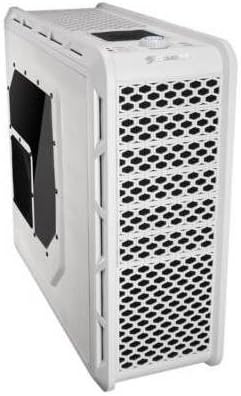
Figure 4: Angled front-side view of the COUGAR Evolution Galaxy case, showcasing the mesh front panel for airflow and the top-mounted controls and ports.
5. ጥገና
5.1 የአቧራ ማጣሪያ ማጽዳት
The case is equipped with dust filters to prevent dust accumulation inside. Regularly clean these filters (e.g., monthly) by removing them and washing with water or using a vacuum cleaner. Ensure filters are completely dry before reinstallation.
5.2 አጠቃላይ ጽዳት
ለስላሳ ይጠቀሙ, መamp cloth to clean the exterior surfaces of the case. Avoid abrasive cleaners or solvents that may damage the finish. For interior cleaning, use compressed air to remove dust from components and fans.
5.3 የአድናቂዎች ምርመራ
Periodically check all fans for proper operation. Ensure they are spinning freely and quietly. Replace any fans that are noisy or not functioning correctly to maintain optimal cooling.

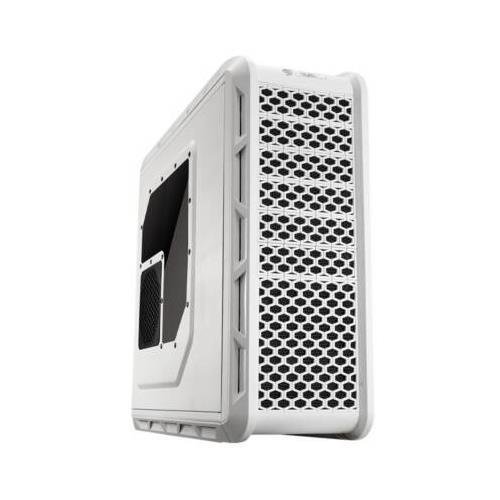
ምስል 5: ጎን view of the COUGAR Evolution Galaxy case, featuring a clear side panel window and a dedicated fan mount for additional cooling.
6. መላ መፈለግ
- ስርዓቱ አይበራም;
- ሁሉንም የኃይል ግንኙነቶች ይፈትሹ፣ ይህም ከግድግዳ ሶኬት ጋር ያለውን የ PSU፣ ከእናትቦርዱ ጋር ያለውን የ PSU እና የፊት ፓነልን የኃይል ማብሪያ / ማጥፊያ ራስጌን ጨምሮ።
- የ PSU ማብሪያ / ማጥፊያው በ 'በርቷል' ቦታ ላይ መሆኑን ያረጋግጡ።
- አድናቂዎች የማይሽከረከሩ;
- Verify fan cables are securely connected to the motherboard or fan controller.
- Check fan controller settings if applicable.
- Front Panel USB Ports Not Working:
- Ensure the USB 3.0 header cable from the case is correctly connected to the motherboard.
- Check motherboard BIOS settings for USB port enablement.
7. ዝርዝሮች
| ባህሪ | ዝርዝር መግለጫ |
|---|---|
| የጉዳይ ዓይነት | ሙሉ ግንብ |
| የማዘርቦርድ ተኳኋኝነት | Extended ATX, ATX |
| ቁሳቁስ | Alloy Steel (SECC) |
| ቀለም | ነጭ |
| የእቃው ክብደት | 29.8 ፓውንድ |
| የደጋፊዎች መጠን | 12 Centimeters (Dual COUGAR TURBINE HYPER-SPIN Bearing Silent Fans included) |
| የማቀዝቀዣ ዘዴ | አየር |
| የኃይል አቅርቦት መጫኛ ዓይነት | የታችኛው ተራራ |
| የዩኤስቢ 3.0 ወደቦች ብዛት | 4 |
8. ዋስትና እና ድጋፍ
የዋስትና መረጃ እና የቴክኒክ ድጋፍ ለማግኘት፣ እባክዎን ኦፊሴላዊውን COUGAR ይመልከቱ። webጣቢያ ወይም የአካባቢዎን ቸርቻሪ ያነጋግሩ። ለዋስትና ጥያቄዎች የግዢ ማረጋገጫዎን ያስቀምጡ።


