1. መግቢያ እና በላይview
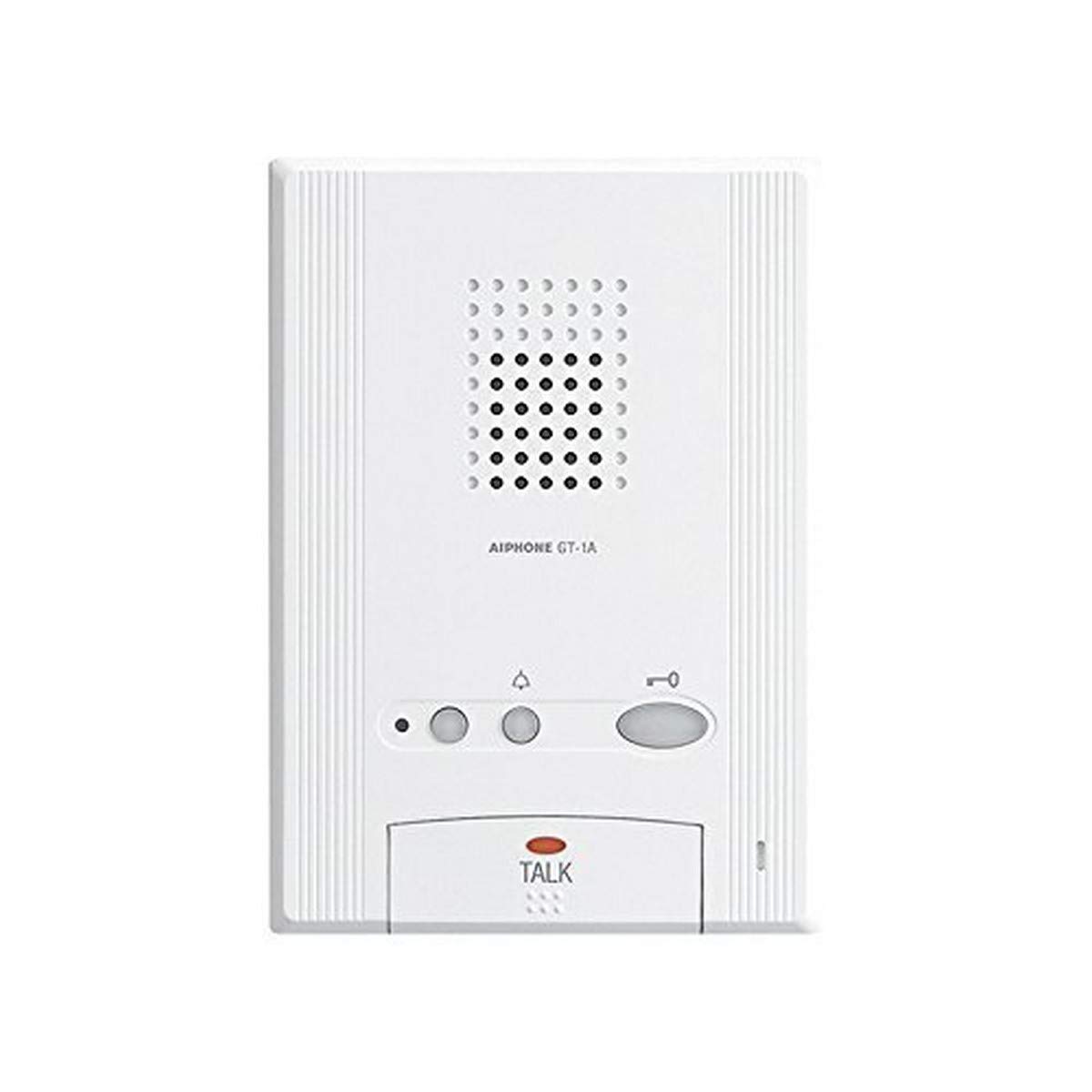
The Aiphone GT-1A is an audio-only tenant station designed for integration into the Aiphone GT Series Multi-Unit Entry System. This device facilitates hands-free audio communication between a tenant and a visitor at the building entrance. It is equipped with essential functions for managing visitor access and communication within a multi-tenant environment.
Key capabilities include two-way audio communication, door release activation, and an optional service button. The GT-1A also supports calling concierge or security guard stations, activating a light during communication with a visitor, and receiving emergency tones from pull cords or panic buttons. Its design is surface-mounted, offering a slim and streamlined profile. Up to four GT-1A units can be installed within a single tenant location.
2. ባህሪያት
The Aiphone GT-1A Audio Tenant Station offers the following features:
- Hands-free (VOX) or Push-to-Talk (Simplex) Communication: Provides flexible communication options with visitors.
- Door Release Function: Allows tenants to remotely unlock the entrance door for visitors.
- Security Guard/Concierge Call Button: Enables direct communication with building security or concierge services.
- Optional Service Buttons: Supports additional customizable functions.
- Call Tone and Communication Volume Control: Adjustable settings for personalized audio levels.
- Multiple Tenant Stations per Location: Supports up to four GT-1A units within a single resident location.
- Varying Ring Tones: Distinct ring tones for calls originating from the entrance panel, concierge, or doorbell.
3. ማዋቀር እና መጫን
The Aiphone GT-1A is designed for surface mounting. Due to the nature of intercom systems and electrical connections, professional installation by a qualified technician is strongly recommended to ensure proper functionality, system integration, and compliance with local electrical codes.
3.1 የቅድመ-መጫኛ ግምት
- Ensure the installation location is within the specified wiring distance from the GT series master station or distribution unit.
- Verify that the power supply meets the system requirements.
- Confirm compatibility with existing GT series components.
3.2 መጫን
The unit is typically mounted on a wall at a convenient height for user access. Mounting hardware and specific wiring diagrams are provided with the product for professional installers. Refer to the detailed installation manual for wiring connections to the GT series bus line and power supply.
4. የአሠራር መመሪያዎች
4.1 ጥሪን መመለስ
- When a visitor calls from the entrance panel, the GT-1A will ring with a distinct tone.
- የሚለውን ይጫኑ ተናገር button once to establish hands-free communication with the visitor.
4.2 የመገናኛ ዘዴዎች
- እጅ-ነጻ (VOX): After pressing the TALK button, communication is typically hands-free, allowing you to speak and listen without holding the button.
- Push-to-Talk (Simplex): In some configurations or if VOX is not active, you may need to press and hold the TALK button to speak and release it to listen. Observe the system behavior to determine the active mode.
4.3 የበር መልቀቂያ
To release the entrance door for a visitor during a call:
- Ensure communication is established with the visitor.
- የሚለውን ይጫኑ በር መልቀቅ button (typically marked with a key icon). The door will unlock for a preset duration.
4.4 Calling Concierge/Security
To initiate a call to the concierge or security guard station:
- Press the designated Concierge/Security Call አዝራር።
- Wait for the station to answer and begin communication.
4.5 የድምጽ መቆጣጠሪያ
The GT-1A features controls for adjusting the call tone and communication volume. Refer to the specific markings on your unit for the location of these controls, typically small dials or buttons on the side or bottom of the unit.
5. ጥገና
The Aiphone GT-1A requires minimal maintenance to ensure optimal performance and longevity.
- ማጽዳት፡ Gently wipe the exterior of the unit with a soft, dry cloth. For stubborn marks, a slightly damp cloth with mild soap can be used, followed by a dry wipe.
- ኬሚካሎችን ያስወግዱ; Do not use abrasive cleaners, solvents, or harsh chemicals, as these can damage the plastic housing and electronic components.
- ምርመራ፡- Periodically check for any visible damage or loose connections. If any issues are observed, contact a qualified technician.
6. መላ መፈለግ
If you experience issues with your Aiphone GT-1A, consider the following common troubleshooting steps:
- No Audio During Call:
- Check the volume control on the unit.
- Ensure the TALK button is pressed correctly.
- Verify that the system power is on.
- Door Release Not Functioning:
- Confirm that communication is active with the visitor.
- Ensure the Door Release button is pressed firmly.
- Check for any system error indicators on the entrance panel or master station.
- Unit Not Responding/No Power:
- Verify that the building's power supply to the intercom system is active.
- If multiple units are installed, check if other units are functioning.
For persistent issues or complex problems, it is recommended to contact a qualified Aiphone service technician or your system installer for professional diagnosis and repair.
7. ዝርዝሮች
| ዝርዝር መግለጫ | ዝርዝር |
|---|---|
| የሞዴል ቁጥር | GT-1A |
| አምራች | አይፎን ኮርፖሬሽን |
| የምርት ልኬቶች (H x W x D) | 7.4 x 5.8 x 1.9 ኢንች (ግምታዊ) |
| ክብደት | 1 ፓውንድ (በግምት) |
| የግንኙነት አይነት | Audio Only, Hands-Free (VOX) or Push-to-Talk |
| በመጫን ላይ | Surface ተራራ |
| የስርዓት ተኳኋኝነት | Aiphone GT Series Multi-Unit Entry System |
8. ድጋፍ እና ዋስትና
For technical support, service, or warranty information regarding your Aiphone GT-1A Audio Tenant Station, please contact your authorized Aiphone dealer or the Aiphone Corporation directly. Contact details can typically be found on the official Aiphone website or in the documentation provided with your system.
It is recommended to have your product model number (GT-1A) and any relevant system details available when contacting support to facilitate efficient assistance.


