መግቢያ
The Ozeri WeightMaster II Digital Body Weight Scale is designed to provide a comprehensive and simple solution for measuring and tracking your weight. This scale features BMI measurement, automatic user recognition, and advanced weight change detection technology to help you monitor your progress effectively. It supports a maximum weight capacity of 440 lbs (200 kg).
Please read this manual thoroughly before using your new scale to ensure proper operation and to maximize its features.
የደህንነት መረጃ
- Do not use this scale on wet or slippery surfaces. Ensure the scale is placed on a firm, flat, and dry surface before use.
- Avoid dropping the scale or subjecting it to strong impacts, as this may damage the device.
- Do not immerse the scale in water or use abrasive cleaning agents. Clean with a damp ጨርቅ.
- This scale is intended for household use only and not for medical or commercial purposes.
- ባትሪዎችን ልጆች በማይደርሱበት ቦታ ያስቀምጡ. ከተዋጠ አፋጣኝ የህክምና እርዳታ ያግኙ።
የጥቅል ይዘቶች
- Ozeri WeightMaster II 440 lbs Digital Bath Scale
- የተጠቃሚ መመሪያ
- 2 AA ባትሪዎች
ማዋቀር
1. የባትሪ ጭነት
- የባትሪውን ክፍል ክዳን በመለኪያው ግርጌ ይክፈቱ።
- Insert the two included AA batteries, ensuring correct polarity (+/-).
- የባትሪውን ክፍል ደህንነቱ በተጠበቀ ሁኔታ ይዝጉ።
2. የመጀመሪያ አቀማመጥ
መለኪያውን በጠንካራ፣ ጠፍጣፋ እና በተረጋጋ ቦታ ላይ ያስቀምጡት። ይህ ትክክለኛነትን ሊጎዳ ስለሚችል ምንጣፎችን ወይም ያልተስተካከለ ወለልን ያስወግዱ።
3. Unit Selection (lbs/kg)
On the underside of the scale, locate the unit switch. Toggle the switch to select your preferred unit of measurement: pounds (lb) or kilograms (kg).
4. የተጠቃሚ ፕሮfile Setup (for BMI and Auto-Recognition)
The scale can store data for up to 8 unique users. To set up a user profile and enable BMI calculation:
- Press the 'SET' button on the scale. The display will show a user number (P1-P8). Use the arrow buttons to select your desired user number.
- Press 'SET' again. The display will prompt for height. Use the arrow buttons to adjust your height.
- Press 'SET' to confirm. Your profile is now set.
- The scale will automatically recognize you based on your weight when you step on it, provided your weight is within a reasonable range of your last recorded weight for that profile.
የአሠራር መመሪያዎች
1. መለኪያ መውሰድ
- ሚዛኑ በጠንካራ ጠፍጣፋ መሬት ላይ መሆኑን ያረጋግጡ።
- በባዶ እግሮችዎ ወደ ሚዛኑ በቀስታ ይራመዱ። ሚዛኑ በራስ-ሰር ይበራል።
- Stand still until your weight is displayed and stabilizes.
- The scale will then display your Body Mass Index (BMI).
- Following the BMI, the scale will show your weight change detection data (L1, L3, L7, L30) with color alerts.
- Step off the scale. It will automatically power off after a few seconds.

Image: The Ozeri WeightMaster II scale display showing initial zero reading.
2. Weight Change Detection and Color Alert Technology
The WeightMaster II provides immediate feedback on your weight trends using its unique Weight Change Detection and Color Alert Technology:
- L1 Displays your net weight change from your last weigh-in.
- L3 Displays your net weight change from the average of your last 3 weigh-ins.
- L7 Displays your net weight change from the average of your last 7 weigh-ins.
- L30 Displays your net weight change from the average of your last 30 weigh-ins.
The display illuminates in different colors to indicate your trend:
- GREEN Illumination: Indicates weight loss.
- RED Illumination: Indicates weight gain.
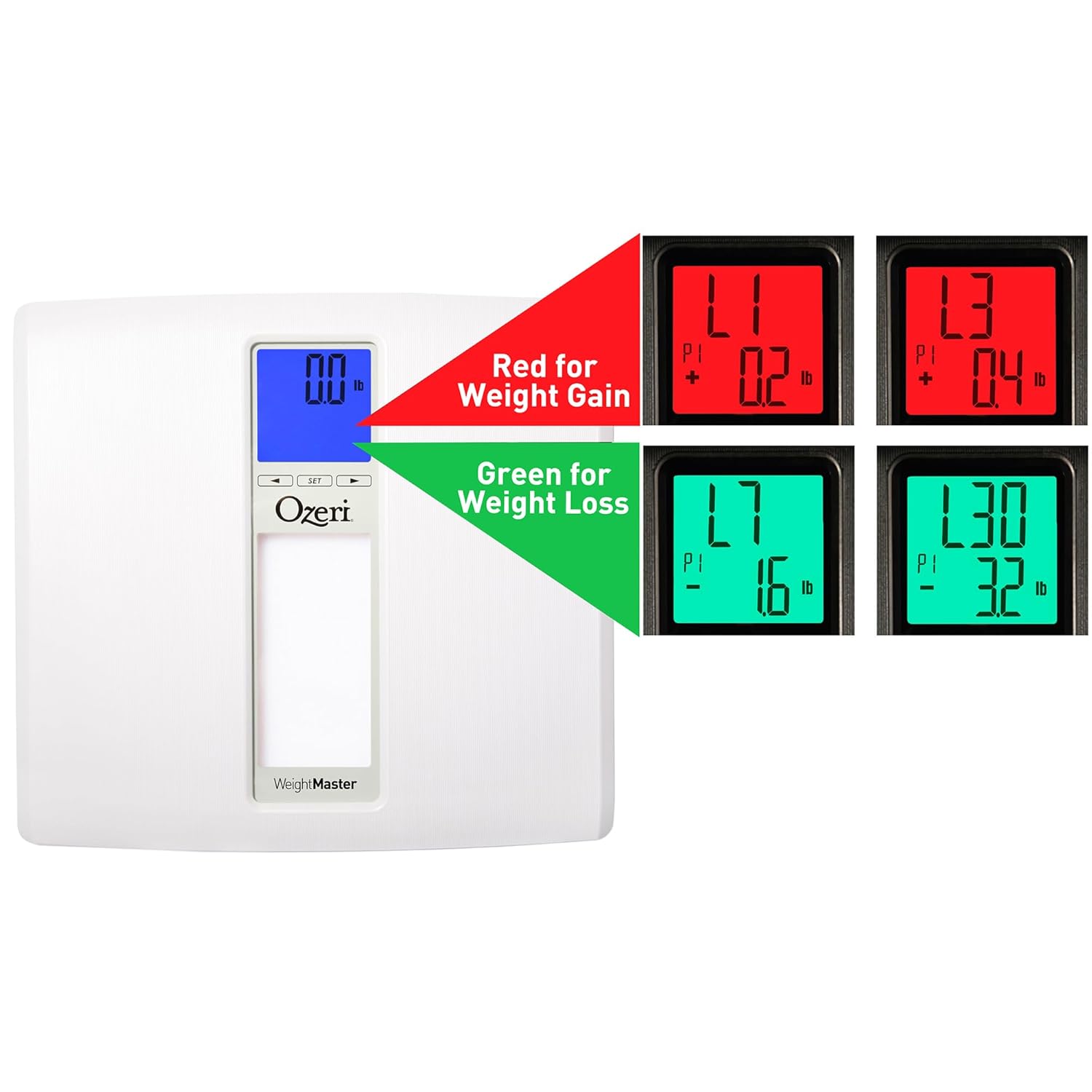
Image: The scale display illustrating red for weight gain and green for weight loss.

Image: Close-up of the display showing 'L1' in red, indicating a net weight gain from the previous recorded weight.
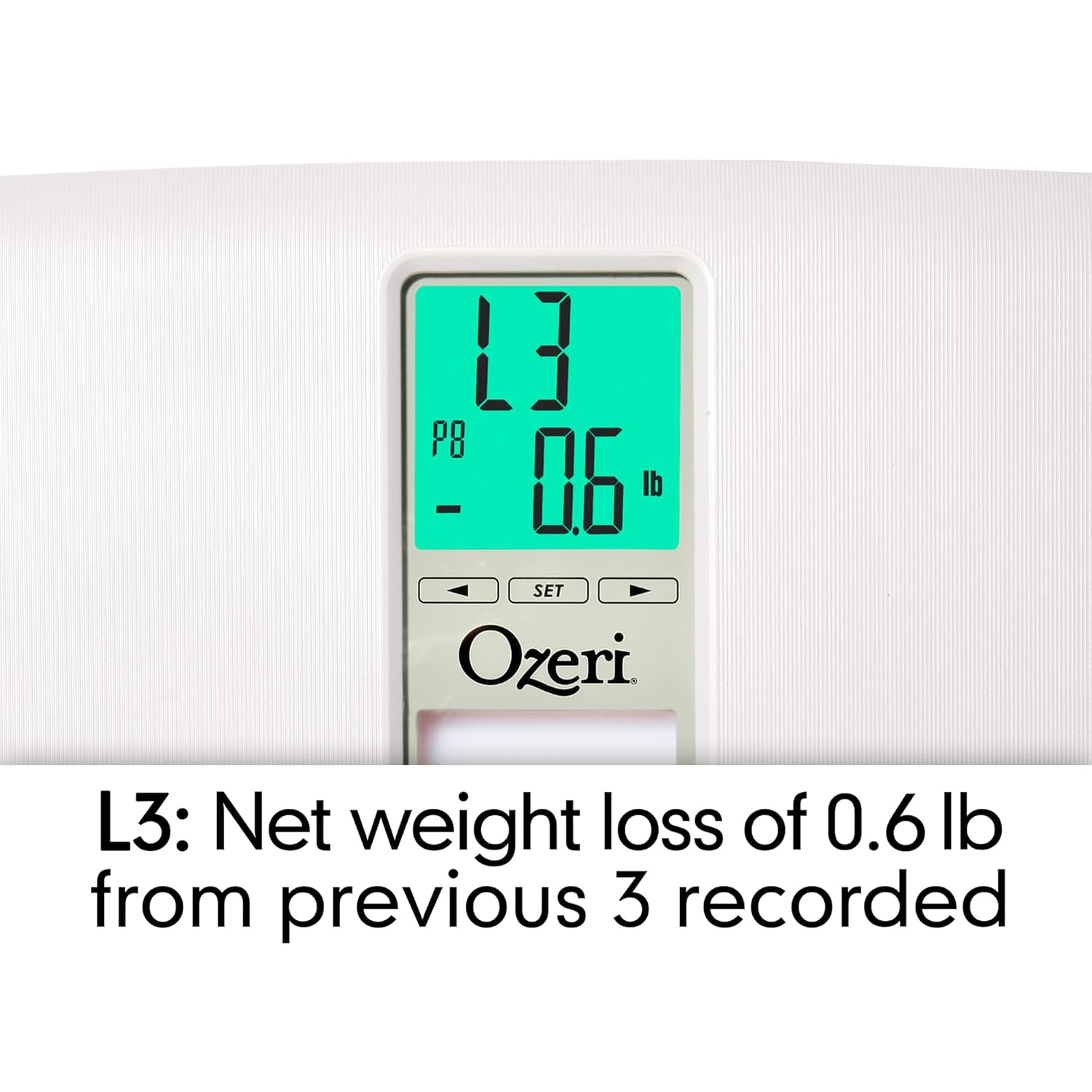
Image: Close-up of the display showing 'L3' in green, indicating a net weight loss from the average of the last 3 recorded weights.
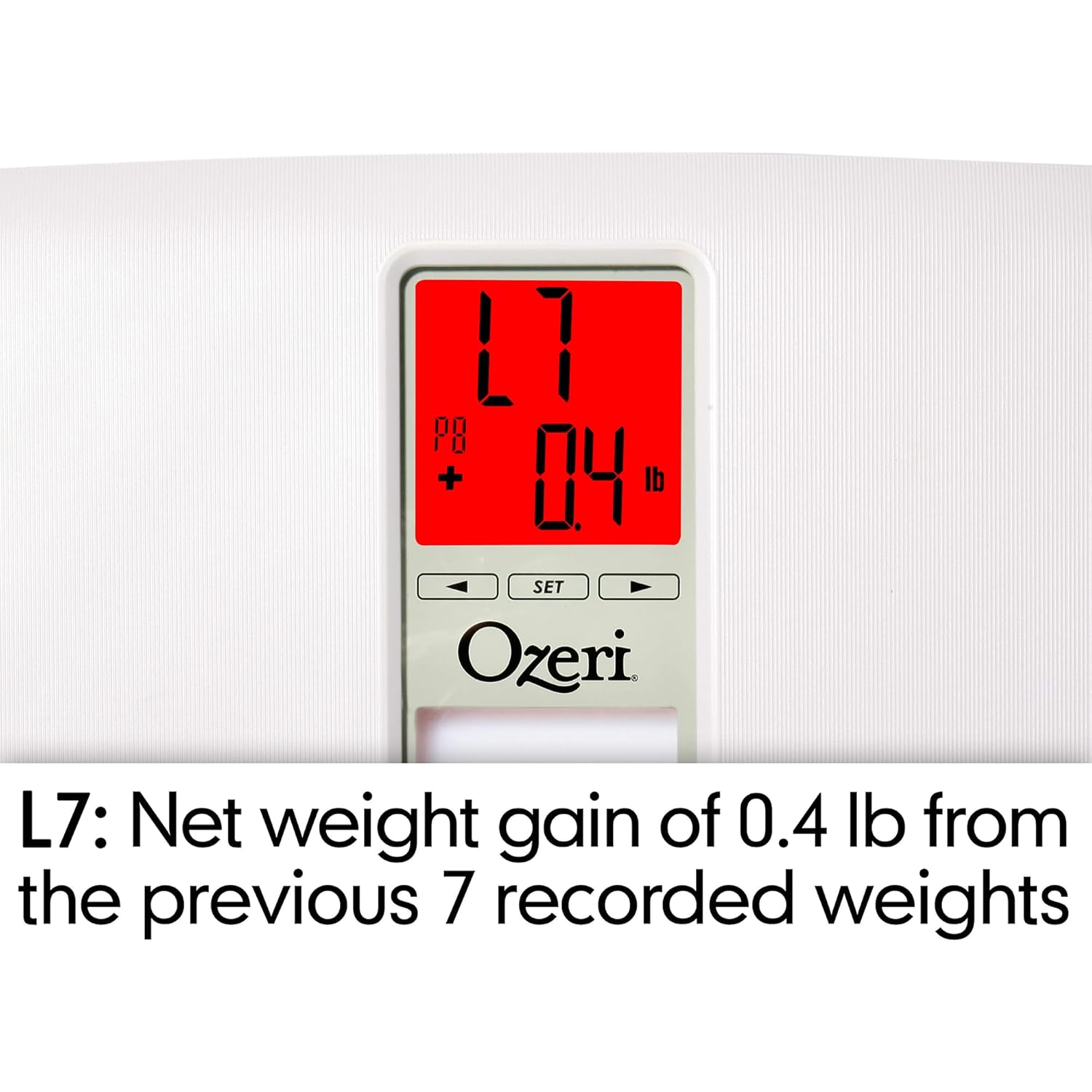
Image: Close-up of the display showing 'L7' in red, indicating a net weight gain from the average of the last 7 recorded weights.

Image: Close-up of the display showing 'L30' in green, indicating a net weight loss from the average of the last 30 recorded weights.
ጥገና
ማጽዳት
- የመለኪያውን ወለል ለስላሳ, መamp ጨርቅ.
- Do not use abrasive cleaners or chemical solvents, as these can damage the finish and electronic components.
- ከማከማቻ ወይም ከሚቀጥለው አጠቃቀምዎ በፊት ምግቡ ደረቅ መሆኑን ያረጋግጡ።
የባትሪ መተካት
If the display becomes dim or shows a 'Lo' indicator, it is time to replace the batteries. Follow the battery installation steps in the 'Setup' section.
ማከማቻ
ሚዛንን ከቀጥታ የፀሐይ ብርሃን እና ከፍተኛ የሙቀት መጠን ራቅ ባለ ቀዝቃዛና ደረቅ ቦታ ያስቀምጡ። ጥቅም ላይ በማይውሉበት ጊዜ ከባድ ነገሮችን በደረጃው ላይ አያስቀምጡ።
መላ መፈለግ
| ችግር | ሊሆን የሚችል ምክንያት | መፍትሄ |
|---|---|---|
| ልኬት አይበራም። | ባትሪዎች ሞተዋል ወይም በስህተት ተጭነዋል። | የባትሪውን ፖላራይት ይፈትሹ ወይም በአዲስ የ AA ባትሪዎች ይተኩ። |
| ትክክል ያልሆኑ ወይም ወጥነት የሌላቸው ንባቦች። | Scale is on an uneven surface; scale needs re-calibration; user is moving during measurement. | Place scale on a hard, flat surface. Step off and then back on to allow auto-calibration. Stand still during measurement. |
| ማሳያው "Err" ወይም "O-Ld" ያሳያል። | ክብደቱ ከከፍተኛው አቅም (440 ፓውንድ / 200 ኪ.ግ) ይበልጣል። | Reduce weight on the scale. |
| Scale shows 440 lbs (or max weight) for all users. | Internal error or severe calibration issue. | Remove batteries for 10 seconds, then reinsert. If problem persists, contact customer support. |
| ማሳያው "ሎ" ያሳያል. | ዝቅተኛ የባትሪ ኃይል. | ባትሪዎችን ይተኩ. |
| Scale does not recognize user. | ተጠቃሚ ፕሮfile not set or significant weight change from last recorded weight. | የተጠቃሚ ፕሮፌሽናልዎን ያረጋግጡfile is set. If your weight has changed significantly, the scale may not recognize you immediately; it will assign the reading to the closest profile or a new one. |
ዝርዝሮች
- ሞዴል፡ ZB20-ደብሊው
- የምርት ስም፡ ኦዜሪ
- የክብደት አቅም; 440 ፓውንድ (200 ኪ.ግ)
- የተነበበ ትክክለኛነት፡- 0.1 ፓውንድ (0.05 ኪግ)
- የማሳያ አይነት፡ LCD with Color Alert Technology
- ቁሳቁስ፡ ABS exterior with tempered glass interior
- መጠኖች፡- 11.75 x 12.5 x 1 ኢንች (29.8 x 31.75 x 2.54 ሴሜ)
- የእቃው ክብደት፡ 3.75 ፓውንድ (1.7 ኪ.ግ)
- የኃይል ምንጭ፡- 2 x AA ባትሪዎች (ተካትቷል)
- ልዩ ባህሪያት፡ Body Mass Index (BMI) measurement, Weight Change Detection (L1, L3, L7, L30), Auto-recognition for up to 8 users, Step-on technology, Auto-power off.
ዋስትና እና ድጋፍ
Ozeri products are manufactured to high-quality standards. For specific warranty information regarding your Ozeri WeightMaster II scale, please refer to the warranty card included with your purchase or visit the official Ozeri webጣቢያ.
If you encounter any issues or have questions not covered in this manual, please contact Ozeri customer support for assistance. Contact details can typically be found on the product packaging or the official Ozeri webጣቢያ.


