መግቢያ
The Logitech UE Boom is a 360-degree wireless Bluetooth speaker designed for portable audio. It features a durable, go-anywhere shape and is equipped with a water and stain resistant acoustic skin. This speaker allows for wireless music playback, phone calls, and can be paired with another UE Boom for stereo sound.

ምስል፡ ፊት ለፊት view of the Logitech UE Boom Wireless Bluetooth Speaker in Northern Light color.
ቁልፍ ባህሪያት
- 360-ዲግሪ ድምፅ; Delivers immersive audio in all directions.
- ተንቀሳቃሽ ንድፍ; Versatile, cylindrical shape for easy transport.
- ውሃ እና ብክለትን የሚቋቋም; Features a colorful acoustic skin with plasma coating for durability against water and stains.
- ገመድ አልባ ግንኙነት: Connects via Bluetooth from up to 50 feet away. Easy pairing via NFC for compatible devices.
- Double Up Feature: Wirelessly connect two UE BOOM speakers in stereo using the UE BOOM app for enhanced sound.
- ረጅም የባትሪ ህይወት; Rechargeable battery provides up to 15 hours of playback.
- የድምጽ ማጉያ ስልክ፡ Integrated crystal-clear speakerphone for calls.
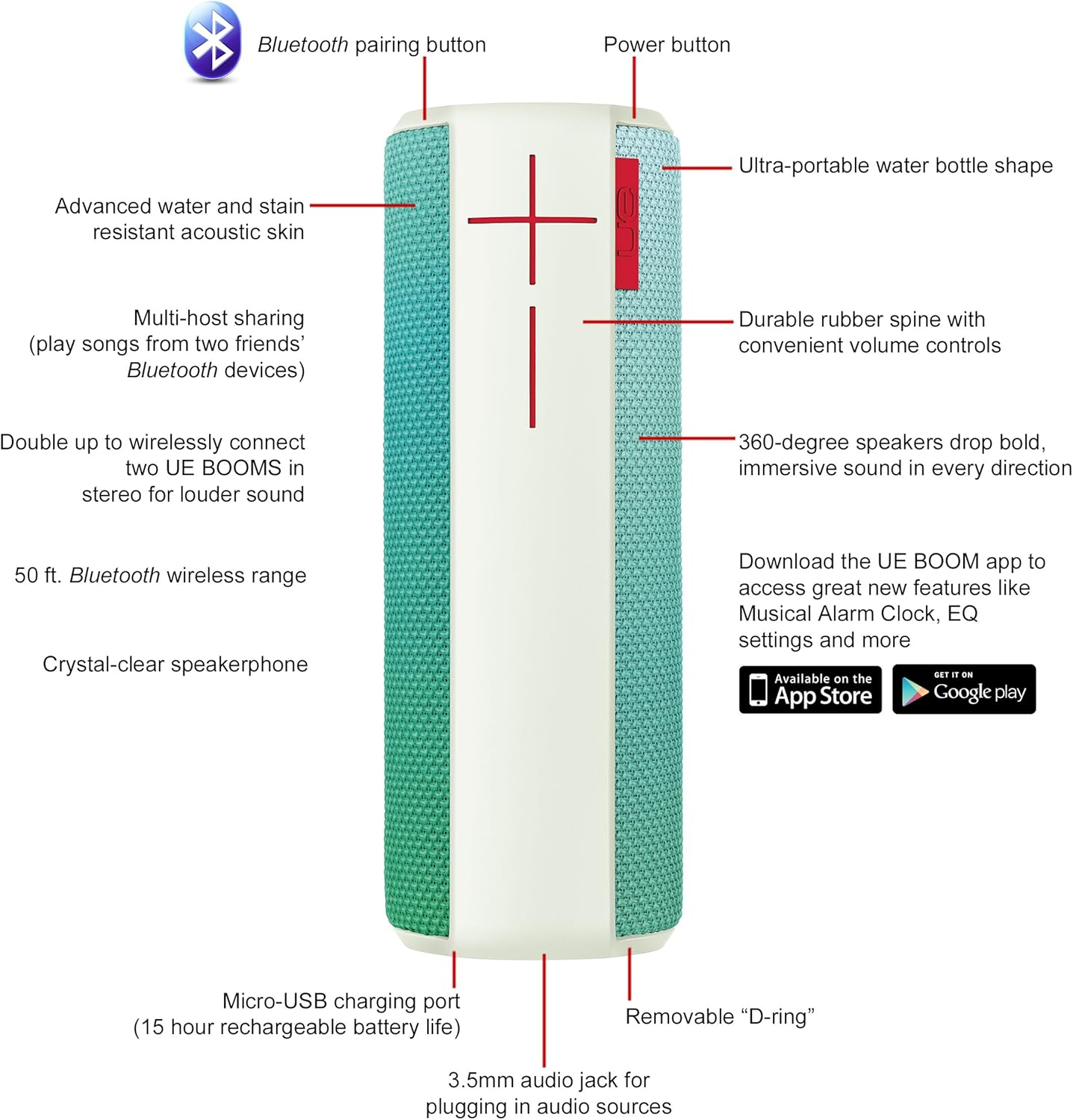
Image: Diagram highlighting key features and controls of the UE Boom speaker, including Bluetooth pairing button, power button, volume controls, micro-USB charging port, and 3.5mm audio jack.
ማዋቀር
ተናጋሪውን መሙላት
Before initial use, fully charge your UE Boom speaker. Connect the provided micro-USB cable to the charging port located at the bottom of the speaker and plug the other end into a USB power source. The speaker's battery provides approximately 15 hours of playback on a full charge.
የብሉቱዝ ማጣመር
- Power on your UE Boom speaker by pressing the power button.
- Press and hold the Bluetooth pairing button (usually indicated by a Bluetooth icon) until you hear an audible tone and the LED indicator flashes rapidly.
- On your mobile device (smartphone or tablet), navigate to the Bluetooth settings.
- Select "UE Boom" from the list of available devices to pair.
- Once paired, you will hear a confirmation tone from the speaker.
For NFC-enabled devices, simply tap your device to the NFC area on the speaker for quick pairing.
የአሠራር መመሪያዎች
መሰረታዊ ቁጥጥሮች
- የኃይል ቁልፍ፡- Located on the top of the speaker to turn it on or off.
- የድምጽ መቆጣጠሪያዎች; Large '+' and '-' buttons on the side of the speaker adjust the volume.
- የብሉቱዝ አዝራር፡- የብሉቱዝ ማጣመሪያ ሁነታን ይጀምራል።
Using the UE BOOM App
Download the official UE BOOM app from your device's app store (available on App Store and Google Play) to unlock additional features:
- Musical Alarm Clock: Wake up to your favorite music.
- የርቀት ማግበር; Turn your speaker on/off from your device.
- EQ ቅንብሮች፡- የድምጽ ፕሮ ያብጁfile ወደ ምርጫዎ.
- Double Up: Connect two UE BOOM speakers for a stereo sound experience.
Speakerphone Functionality
When connected to a smartphone, the UE Boom can be used as a speakerphone. Incoming calls will be routed through the speaker, allowing for hands-free communication.
ጥገና
The UE Boom speaker features a water and stain resistant acoustic skin. To clean, gently wipe the speaker with a damp cloth. Avoid using harsh chemicals or abrasive cleaners. Ensure all ports are dry before charging or connecting other devices.
መላ መፈለግ
- ኃይል የለም፡ Ensure the speaker is charged. Connect it to a power source using the micro-USB cable.
- በብሉቱዝ በኩል ማጣመር አይቻልም፦
- ድምጽ ማጉያው በማጣመር ሁነታ (ብልጭ ድርግም የሚሉ LED) መሆኑን ያረጋግጡ።
- በመሳሪያዎ ላይ ብሉቱዝ መንቃቱን ያረጋግጡ።
- መሳሪያዎን ወደ ድምጽ ማጉያው (በ50 ጫማ ርቀት ውስጥ) ያንቀሳቅሱት።
- መሣሪያውን ለማጣመር እና እንደገና ለማጣመር ይሞክሩ።
- ዝቅተኛ ድምጽ ወይም የተዛባ ድምጽ;
- በሁለቱም የድምጽ ማጉያው እና በተገናኘው መሳሪያዎ ላይ ያለውን ድምጽ ያስተካክሉ.
- ድምጽ ማጉያው ሙሉ በሙሉ መሙላቱን ያረጋግጡ።
- Check for any obstructions around the speaker.
- መተግበሪያ የማይገናኝ፡ Ensure the speaker is powered on and connected via Bluetooth to your device. Update the app to the latest version.
የምርት ዝርዝሮች
| የሞዴል ስም | Logitech UE Boom Wireless Bluetooth Speaker |
| የሞዴል ቁጥር | 980-001023 |
| የምርት ስም | ሎጊቴክ |
| ቀለም | Northern Light |
| የድምጽ ማጉያ አይነት | ከቤት ውጭ |
| የግንኙነት ቴክኖሎጂ | ብሉቱዝ ፣ ሽቦ አልባ |
| ገመድ አልባ ክልል | እስከ 50 ጫማ (15.24 ሜትር) |
| የኃይል ምንጭ | ባትሪ የተጎላበተ (1 ሊቲየም አዮን ባትሪ ተካትቷል) |
| አማካይ የባትሪ ህይወት | 15 ሰዓታት |
| የውሃ መቋቋም ደረጃ | የውሃ መከላከያ |
| የእቃው ክብደት | 2.2 ፓውንድ £ |
| የምርት ልኬቶች (LxWxH) | 2.6 x 2.6 x 7.1 ኢንች |
| ቁሳቁስ | ፕላስቲክ |
| ዩፒሲ | 097855112125 |
ይፋዊ የምርት ቪዲዮ
ቪዲዮ: አልቋልview of the Logitech UE Boom speaker's features, including 360-degree sound, water resistance, wireless connectivity, and the ability to pair two speakers for louder sound. This video demonstrates the speaker's durability and portability in various environments.
ዋስትና እና ድጋፍ
The Logitech UE Boom Wireless Bluetooth Speaker comes with a Limited Warranty. For specific warranty details, please refer to the documentation included with your product or visit the official Logitech webጣቢያ.
For technical support or customer service, you may contact Logitech at: 646-454-3200.


