መግቢያ
The Behringer NEKKST K8 is an ultra-linear 150-Watt reference-class studio monitor designed for accurate sound reproduction. It features an 8-inch woofer and a 1-inch silk dome tweeter, utilizing advanced waveguide technology for optimal acoustic dispersion and a wide 'sweet zone'. This monitor operates in a true bi-amping mode with two separate amplifiers for enhanced sound clarity.

ምስል፡ ፊት ለፊት view of the Behringer NEKKST K8 Studio Monitor, showcasing the 8-inch woofer and 1-inch tweeter.
አስፈላጊ የደህንነት መመሪያዎች
Please read and follow all safety instructions before operating the Behringer NEKKST K8 studio monitor. Retain these instructions for future reference.
- የኤሌክትሪክ ንዝረት አደጋ; Do not open the device. Refer all servicing to qualified service personnel.
- ይህንን መሳሪያ ለዝናብ እና ለእርጥበት አያጋልጡት።
- ይህንን መሳሪያ በውሃ አጠገብ አይጠቀሙ.
- በደረቅ ጨርቅ ብቻ አጽዳ.
- የአየር ማናፈሻ ክፍተቶችን አያግዱ። በአምራቹ መመሪያ መሰረት ይጫኑ.
- እንደ ራዲያተሮች፣ ሙቀት መመዝገቢያዎች፣ ምድጃዎች፣ ወይም ሌሎች መሳሪያዎችን (ያጠቃልለው) ካሉ የሙቀት ምንጮች አጠገብ አይጫኑ። ampማሞቂያዎች) ሙቀትን ያመነጫሉ.
- የኤሌክትሪክ ገመዱን ከመራመድ ወይም ከመቆንጠጥ ይከላከሉ, በተለይም በፕላጎች, ምቹ መያዣዎች እና ከመሳሪያው የሚወጡበት ቦታ.
- በአምራቹ የተገለጹ አባሪዎችን/መለዋወጫዎችን ብቻ ይጠቀሙ።
- ይህንን መሳሪያ በመብረቅ አውሎ ንፋስ ጊዜ ወይም ለረጅም ጊዜ ጥቅም ላይ በማይውልበት ጊዜ ይንቀሉት።

Image: Safety and regulatory labels found on the Behringer NEKKST K8, indicating electrical warnings and compliance information.
ማዋቀር
ማሸግ
Carefully unpack your NEKKST K8 monitor. Inspect the unit for any signs of damage that may have occurred during transit. Retain the original packaging for future transport or storage.
ግንኙነቶች
The NEKKST K8 offers both balanced XLR and unbalanced RCA input options. Connect your audio source (e.g., audio interface, mixer) to the appropriate input on the rear panel of the monitor.
- የኤክስኤልአር ግቤት፡ For balanced audio signals, providing optimal noise rejection.
- የ RCA ግቤት፡- For unbalanced audio signals, commonly used with consumer audio equipment.
Ensure the monitor is powered off before making any connections.
Placement and Room Compensation
Proper placement of your studio monitors is crucial for accurate sound reproduction. The NEKKST K8 features 'ROOM COMPENSATION' switches on the rear panel to help optimize its performance for your specific acoustic environment.
- Free Field: Use this setting when the monitor is placed away from walls and corners.
- ግድግዳ፡ Select this setting if the monitor is placed close to a wall.
- ጥግ፡ Choose this setting if the monitor is placed in a corner, which typically results in increased bass response.
Experiment with these settings to achieve the most balanced sound in your listening space.
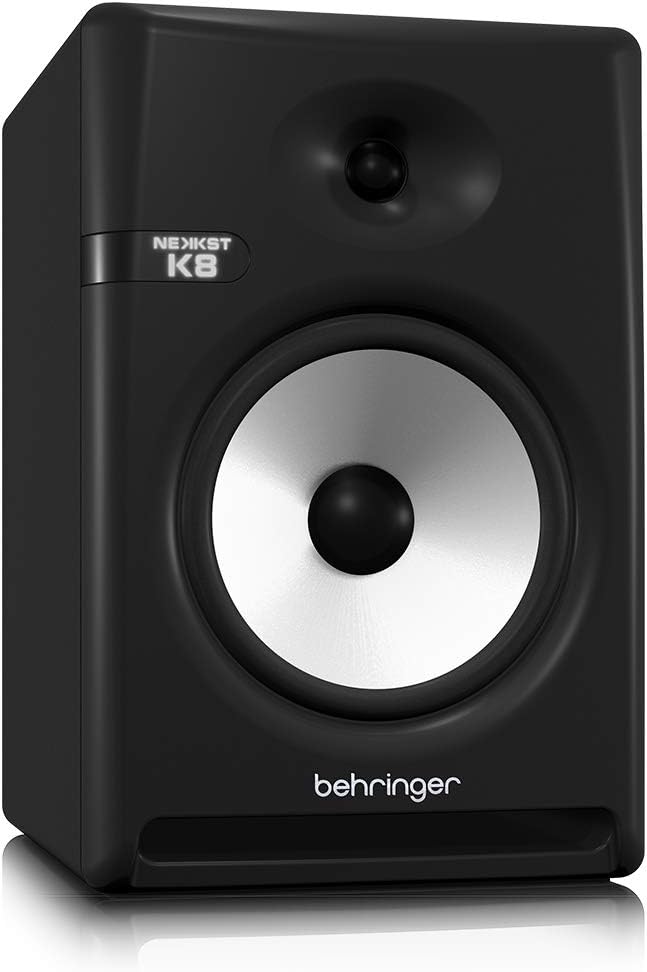
Image: Rear panel of the Behringer NEKKST K8, displaying XLR and RCA inputs, along with various control switches for room compensation and frequency adjustments.

ምስል፡ ዝርዝር view of the NEKKST K8's rear control panel, highlighting the input trim, frequency adjustments, and room compensation switches.
የኃይል ግንኙነት
Connect the provided power cord to the AC IN socket on the rear panel and then to a suitable power outlet. Ensure the power switch is in the OFF position before connecting to power.
ኦፕሬሽን
በማብራት / በማጥፋት ላይ
After all connections are made, switch the power button on the rear panel to the ON position. It is recommended to power on your monitors last and power them off first to prevent any pops or clicks through your speakers.
Input Trim Adjustment
The 'INPUT TRIM' knob on the rear panel allows you to adjust the input sensitivity of the monitor. Start with the knob at a lower setting and gradually increase it to achieve a comfortable listening level without distortion. This control helps match the output level of your audio source to the monitor's input.
Frequency Adjustments
The NEKKST K8 provides 'HIGH FREQUENCY' and 'LOW FREQUENCY' switches for fine-tuning the monitor's response to your listening environment and personal preference. These switches allow you to cut or boost specific frequency ranges.
- ከፍተኛ ድግግሞሽ፡ Adjusts the treble response. Options typically include flat, -2 dB, +2 dB.
- LOW FREQUENCY: Adjusts the bass response. Options typically include flat, -2 dB, -4 dB, -6 dB. This can be useful for compensating for room acoustics or when using a subwoofer.
Refer to the markings on the rear panel for specific dB adjustments.
ጥገና
ማጽዳት
To clean the exterior of your NEKKST K8 monitor, use a soft, dry cloth. Do not use liquid cleaners, abrasive cleaners, or solvents, as these can damage the finish or internal components. Ensure the monitor is unplugged before cleaning.
ማከማቻ
If storing the monitor for an extended period, it is recommended to use the original packaging to protect it from dust and physical damage. Store in a cool, dry place away from direct sunlight and extreme temperatures.
መላ መፈለግ
| ችግር | ሊሆን የሚችል ምክንያት | መፍትሄ |
|---|---|---|
| ድምጽ የለም። |
|
|
| የተዛባ ድምጽ |
|
|
| ጩኸት ወይም ድምጽ |
|
|
እነዚህን መፍትሄዎች ከሞከሩ በኋላ ችግሩ ከቀጠለ፣ እባክዎን የቤህሪንገር የደንበኛ ድጋፍን ያነጋግሩ።
ዝርዝሮች
| የሞዴል ስም | K8 |
| የድምጽ ማጉያ አይነት | ተቆጣጠር |
| Woofer ዲያሜትር | 8 ኢንች |
| Tweeter ዲያሜትር | 1 ኢንች |
| የድምጽ ማጉያ ከፍተኛ የውጤት ኃይል | 150 ዋት |
| ዋትtage | 150 ዋት |
| የድግግሞሽ ምላሽ | 20000 Hz (Upper limit; full range typically wider) |
| የግንኙነት ቴክኖሎጂ | RCA፣ XLR |
| የድምጽ ውፅዓት ሁኔታ | ስቴሪዮ |
| የኃይል ምንጭ | ባለገመድ ኤሌክትሪክ |
| የምርት ልኬቶች | 13.4" ዲ x 13.4" ዋ x 18.8" ኤች |
| የእቃው ክብደት | 19.18 ፓውንድ £ |
| ቁሳቁስ | ፕላስቲክ፣ ብረት፣ ጨርቅ |
| አምራች | የሙዚቃ ትሪብ ዩኤስ |
| ዩፒሲ | 748252139344 |
የዋስትና መረጃ
The Behringer NEKKST K8 Studio Monitor comes with a Limited Warranty. For detailed information regarding warranty terms, conditions, and registration, please refer to the official Behringer webከምርትዎ ጋር የተካተተው ጣቢያ ወይም የዋስትና ካርድ።
ድጋፍ
ለተጨማሪ እርዳታ፣ የቴክኒክ ድጋፍ ወይም የቅርብ ጊዜዎቹን ነጂዎች እና ሶፍትዌሮች ለማውረድ እባክዎ ኦፊሴላዊውን ቤህሪንገር ይጎብኙ webጣቢያ ወይም የደንበኞች አገልግሎት ክፍልን ያነጋግሩ።
እንዲሁም መጎብኘት ይችላሉ የቤህሪንገር መደብር በአማዞን ላይ ለምርት መረጃ እና መለዋወጫዎች.