1. መግቢያ
Thank you for choosing the TFA 35.1133.01 Sun Funk Weather Station. This device provides accurate indoor and outdoor temperature readings, along with a weather forecast based on atmospheric pressure changes. This manual will guide you through the setup, operation, and maintenance of your weather station to ensure optimal performance and longevity.
2. የደህንነት መረጃ
- Read this instruction manual carefully before using the device.
- ይህንን መመሪያ ለወደፊት ማጣቀሻ ያቆዩት።
- መሳሪያውን ለከፍተኛ ሙቀት፣ ንዝረት ወይም ድንጋጤ አያጋልጡት።
- ቀጥተኛ የፀሐይ ብርሃንን እና እርጥበትን ያስወግዱ.
- መሳሪያውን በውሃ ውስጥ አታስቀምጡ.
- Use only specified batteries. Ensure correct polarity.
- Remove depleted batteries promptly to prevent leakage.
- Do not attempt to repair the device yourself. Contact qualified personnel for service.
- መሣሪያውን እና ባትሪዎችን ህጻናት በማይደርሱበት ቦታ ያስቀምጡ.
3. የጥቅል ይዘቶች
እባክዎ ሁሉም ክፍሎች መኖራቸውን እና ያልተበላሹ መሆናቸውን ያረጋግጡ፡-
- TFA 35.1133.01 Main Weather Station Unit
- የገመድ አልባ ከቤት ውጭ ዳሳሽ
- መመሪያ መመሪያ
- Note: Batteries (4 x AAA) are typically required and may not be included.
4. ምርት አብቅቷልview
The TFA 35.1133.01 Sun Funk Weather Station consists of a main display unit and a wireless outdoor sensor. The main unit displays indoor temperature, outdoor temperature, and a weather forecast. The outdoor sensor transmits temperature data wirelessly to the main unit.
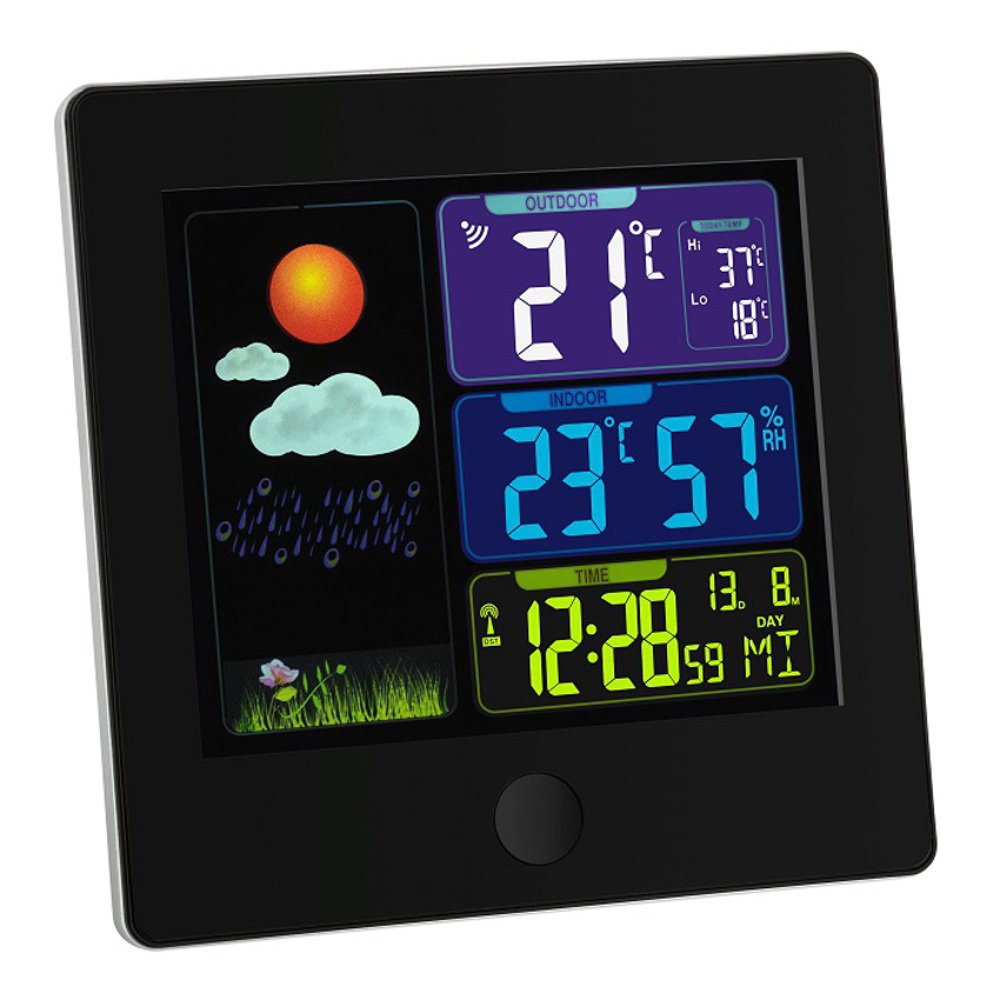
Image 1: TFA 35.1133.01 Sun Funk Weather Station. This image shows the main display unit and the compact wireless outdoor sensor. The main unit features a clear digital display, while the outdoor sensor is designed for external placement.
የዋና ክፍል ባህሪዎች
- Large LCD display for easy reading.
- Indoor temperature display.
- ከቤት ውጭ የሙቀት ማሳያ (ከገመድ አልባ ዳሳሽ)።
- Weather forecast icons (sunny, partly cloudy, cloudy, rainy).
- Radio-controlled clock (DCF77 signal for automatic time synchronization).
- የባትሪ ክፍል.
Outdoor Sensor Features:
- የሙቀት ዳሳሽ.
- የገመድ አልባ ስርጭት ወደ ዋናው ክፍል.
- የባትሪ ክፍል.
- Wall mounting option.
5. ማዋቀር
5.1 የባትሪ ጭነት
- የውጪ ዳሳሽ፡- Open the battery compartment cover on the back of the outdoor sensor. Insert 2 x AAA batteries, observing the correct polarity (+/-). Close the cover securely.
- ዋና ክፍል፡ Open the battery compartment cover on the back of the main unit. Insert 2 x AAA batteries, observing the correct polarity (+/-). Close the cover securely.
- Important: Always insert batteries into the outdoor sensor first, then into the main unit. This ensures proper synchronization.
5.2 ዳሳሽ አቀማመጥ
- Place the outdoor sensor in a shaded, dry location, protected from direct sunlight and rain, to ensure accurate temperature readings.
- Ensure the sensor is within the wireless range of the main unit (typically up to 30 meters in open air). Walls and other obstacles can reduce this range.
- Avoid placing the sensor near heat sources (e.g., vents, windows) or cold sources (e.g., refrigerators).
5.3 የመነሻ ማመሳሰል እና የጊዜ አቀማመጥ
- After inserting batteries, the main unit will automatically search for the outdoor sensor signal. This may take a few minutes. The outdoor temperature will appear on the display once connected.
- The main unit will also attempt to receive the DCF77 radio time signal. This signal automatically sets the correct time and date. Place the main unit near a window for better reception. This process can take several minutes or even hours, depending on your location and signal strength.
- If the DCF77 signal is not received, you may need to manually set the time and date. Refer to the specific button functions on your device (e.g., MODE, SET buttons) for manual adjustment.
6. የአሠራር መመሪያዎች
6.1 የማሳያ መረጃ
The main unit's display typically shows the following information:
- ሰዓት እና ቀን፡- Automatically set by the DCF77 radio signal.
- የቤት ውስጥ ሙቀት; አሁን ያለው የሙቀት መጠን የሚለካው በዋናው ክፍል ነው።
- የውጪ ሙቀት; Current temperature transmitted from the wireless sensor.
- የአየር ሁኔታ ትንበያ: Represented by icons (e.g., sun, clouds, rain) indicating predicted weather changes based on atmospheric pressure trends.
- የሲግናል ጥንካሬ አመልካች፡- For both the outdoor sensor and the DCF77 time signal.
6.2 Button Functions (Exampለ)
While specific button labels may vary, common functions include:
- ሁነታ/አዘጋጅ፡ Used to switch between display modes (e.g., time, alarm) or to enter setting mode.
- +/ADJ: Used to increase values during setting or to manually adjust time/date.
- -/MEM፡ Used to decrease values during setting or to view minimum/maximum temperature records.
- ቻናል If multiple outdoor sensors are supported, this button cycles through channels.
Refer to the specific button layout on your device for precise functions.
7. ጥገና
7.1 የባትሪ መተካት
- When the battery indicator appears on the display, replace the batteries in the respective unit (main unit or outdoor sensor).
- በአንድ ክፍል ውስጥ ያሉትን ሁሉንም ባትሪዎች በተመሳሳይ ጊዜ በተመሳሳይ አይነት አዲስ ባትሪዎች ይተኩ።
- በአካባቢው ደንቦች መሰረት የተሟጠጡ ባትሪዎችን ያስወግዱ.
7.2 ጽዳት
- መሳሪያውን ለስላሳ, መamp ጨርቅ. ገላጭ ማጽጃዎችን ወይም ፈሳሾችን አይጠቀሙ.
- Ensure no moisture enters the device's interior.
7.3 ማከማቻ
- If the device will not be used for an extended period, remove all batteries to prevent leakage.
- መሳሪያውን በቀዝቃዛና ደረቅ ቦታ ውስጥ ያከማቹ.
8. መላ መፈለግ
| ችግር | ሊሆን የሚችል ምክንያት | መፍትሄ |
|---|---|---|
| በዋናው ክፍል ላይ ምንም ማሳያ የለም። | Depleted or incorrectly inserted batteries. | ባትሪዎችን ይተኩ, ትክክለኛውን ፖሊነት ያረጋግጡ. |
| የውጪው የሙቀት መጠን አይታይም ወይም አይበራም። | Outdoor sensor out of range, depleted batteries, or interference. |
|
| Incorrect outdoor temperature reading. | ለፀሐይ ብርሃን ወይም ለሙቀት ምንጭ የተጋለጠ ዳሳሽ። | Relocate the outdoor sensor to a shaded, well-ventilated area. |
| Time not automatically set (DCF77 signal). | Poor signal reception due to location or interference. |
|
9. ዝርዝሮች
| ባህሪ | ዝርዝር |
|---|---|
| የሞዴል ቁጥር | 35.1133.01 |
| የምርት ስም | TFA-Dostmann |
| የምርት ልኬቶች | Main Unit: 2.5 x 12 x 12 cm; 168 g |
| ኃይል (ዋና ክፍል) | 2 x AAA ባትሪዎች (አልተካተተም) |
| Power (Outdoor Sensor) | 2 x AAA ባትሪዎች (አልተካተተም) |
| ቁሳቁስ | ፕላስቲክ |
| ልዩ ባህሪ | Lightweight, Radio-controlled time (DCF77) |
| የሚመከር አጠቃቀም | Indoor/Outdoor temperature monitoring |
| ገመድ አልባ ክልል | Up to 30 meters (open air, may vary with obstacles) |
10. ዋስትና እና ድጋፍ
10.1 የዋስትና መረጃ
ይህ ምርት በተለምዶ በሚከተሉት ተሸፍኗል የ 1 ዓመት የንግድ ዋስትና from the date of purchase. This warranty covers manufacturing defects and material faults. It does not cover damage caused by improper use, accidents, unauthorized repairs, or normal wear and tear. Please retain your proof of purchase for warranty claims.
10.2 የደንበኛ ድጋፍ
For technical assistance, warranty claims, or further information, please contact your retailer or the manufacturer's customer service department. Contact details can usually be found on the product packaging or the manufacturer's official webጣቢያ.
አምራች፡ TFA-Dostmann


