1. መግቢያ
This manual provides essential information for the safe and effective use of your Invacare T94HCP Wheelchair Elevating Legrests. These legrests are designed to enhance comfort and support for wheelchair users by allowing leg elevation and providing padded calf support. They feature a swing-away function for easy transfers and tool-free installation for convenience.
2. ጠቃሚ የደህንነት መረጃ
ከመጫንዎ እና ከመጠቀምዎ በፊት ሁሉንም መመሪያዎች በጥንቃቄ ያንብቡ። እነዚህን መመሪያዎች አለመከተል በምርቱ ላይ ጉዳት ወይም ጉዳት ሊያስከትል ይችላል።
- ተኳኋኝነት These legrests are specifically designed for Invacare wheelchairs. While they may fit other brands, compatibility is not guaranteed. Always verify fitment before use.
- ደህንነቱ የተጠበቀ አባሪ፡ Ensure legrests are securely attached and locked into place before use. Regularly check all connections for tightness.
- የክብደት አቅም; Do not exceed the weight capacity of your wheelchair or the legrests.
- ማስተላለፎች፡- Always engage wheelchair brakes and ensure legrests are swung away or removed before attempting transfers to prevent obstruction.
- ሃሳብ 65 ማስጠንቀቂያ፡- ይህ ምርት በካሊፎርኒያ ግዛት ካንሰርን እና የወሊድ ጉድለቶችን ወይም ሌላ የመራቢያ ጉዳትን የሚያስከትሉ ኬሚካሎችን ይዟል።
3. በሳጥኑ ውስጥ ያለው
ጥቅልዎ የሚከተሉትን ነገሮች መያዝ አለበት፡-
- Invacare T94HCP Elevating Legrest (1 pair)
4. ማዋቀር እና መጫን
The Invacare T94HCP legrests are designed for tool-free installation, making attachment and removal straightforward.
- Prepare Wheelchair: Ensure your wheelchair is on a flat, stable surface and the brakes are engaged.
- Align Brackets: Position the legrest's hinge brackets with the corresponding attachment points on your wheelchair's frame. These legrests feature a 1.5-inch spacing between swing-away hinge brackets, specifically for Invacare wheelchairs.
- Attach Legrest: Insert the legrest's pins into the attachment points. The front rigging design allows for easy attachment.
- ደህንነቱ የተጠበቀ መቆለፊያ፡ Push the legrest firmly until it clicks into place, indicating it is securely locked. Verify that the legrest is stable and does not wobble.
- Repeat for Second Legrest: Follow the same steps to attach the second legrest.
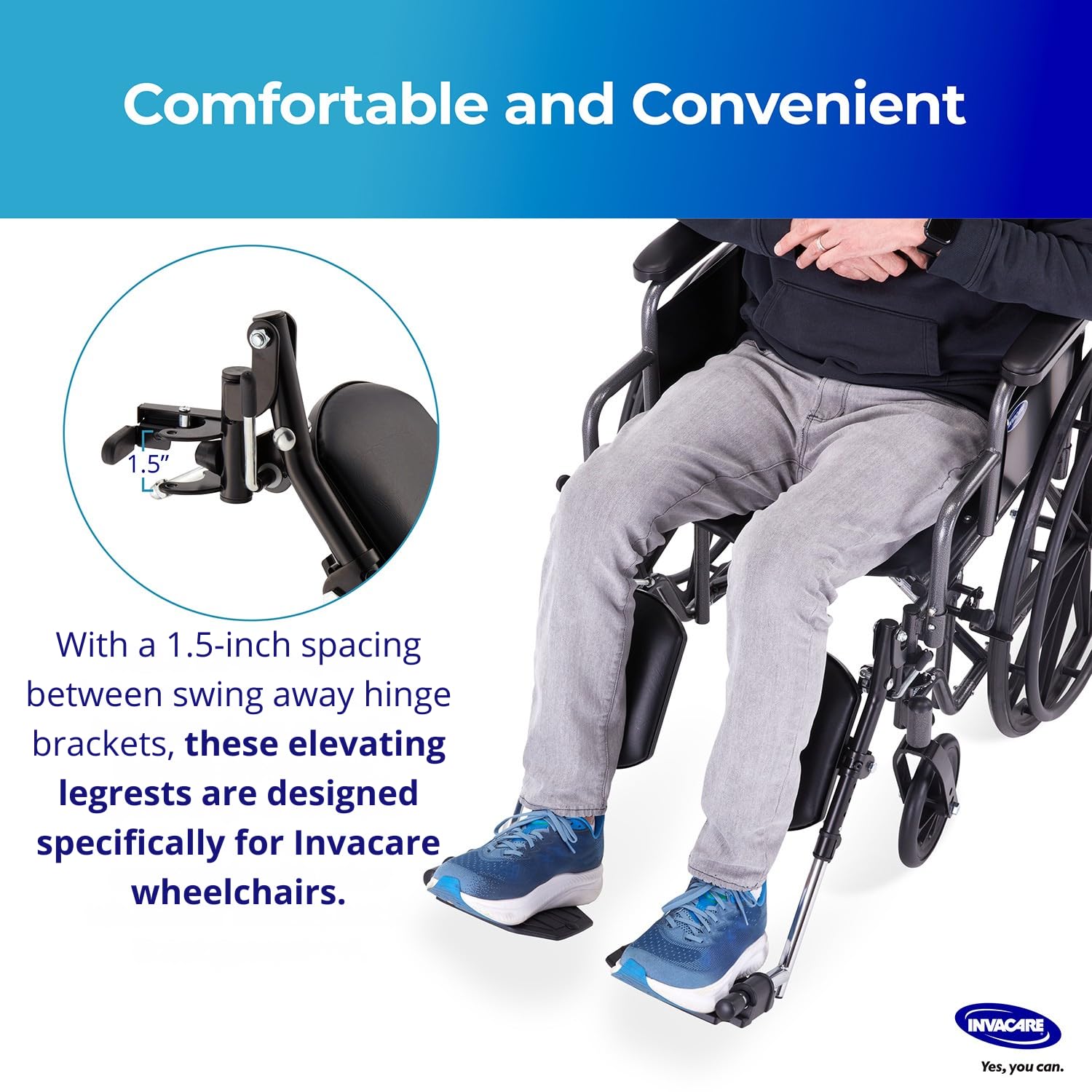
Image: Close-up of the legrest hinge bracket, highlighting the 1.5-inch spacing for compatibility with Invacare wheelchairs.

Image: Two images showing hands attaching and removing the legrest from a wheelchair, emphasizing the tool-free installation and user-friendly bracket for secure locking.
5. የአሠራር መመሪያዎች
The Invacare T94HCP legrests offer adjustable features for optimal user comfort and functionality.
5.1 Elevating the Legrests
To elevate or lower the legrests:
- Locate the adjustment lever on the side of the legrest.
- Press or pull the lever (depending on design) to release the locking mechanism.
- Gently raise or lower the legrest to the desired height. The legrests offer 4 adjustment levels.
- Release the lever to lock the legrest securely in the chosen position. Ensure it is fully engaged before resting your legs.

Image: An illustration of the elevating function, showing a person's leg raised on the legrest. Elevating legs can aid in blood circulation, and comfortable calf pads add support.

Image: A diagram showing the legrest at its minimum (16 inches) and extended (19.75 inches) heights, highlighting the 4 adjustment levels and 7.75-inch wide footplate.
5.2 Using the Swing-Away Function
The swing-away feature allows for easy transfers and maneuverability.
- To swing the legrest away, locate the release lever or button near the attachment point.
- Activate the release mechanism and pivot the legrest outwards, away from the front of the wheelchair.
- To return the legrest to its forward position, swing it back until it locks securely into place.

Image: An image demonstrating the swing-away feature of the legrests, showing them pivoted outwards to clear space for easier user transfers to and from the wheelchair.
5.3 Padded Calf Support and Footplate
- The padded calf supports provide comfort and reduce pressure during extended use.
- The composite footplates are designed to accommodate various foot sizes and offer a stable, non-slip surface.
- The footplates can be flipped up and down for enhanced maneuverability or to adjust positioning.
6. ጥገና እና እንክብካቤ
Regular maintenance ensures the longevity and safe operation of your legrests.
- ማጽዳት፡ Wipe down the legrests and padded calf supports with a damp ጨርቅ እና ለስላሳ ሳሙና. ገላጭ ማጽጃዎችን ወይም ፈሳሾችን ያስወግዱ።
- ምርመራ፡- Periodically inspect all components, including the attachment brackets, adjustment mechanisms, and padding, for any signs of wear, damage, or loose parts.
- ቅባት፡ If any moving parts become stiff, a small amount of silicone-based lubricant can be applied to the pivot points.
- ማከማቻ፡ Store the legrests in a clean, dry place when not in use.
7. መላ መፈለግ
If you encounter issues with your Invacare T94HCP legrests, refer to the following common solutions:
- Legrests do not attach securely: Ensure the legrests are fully aligned with the wheelchair's attachment points and pushed firmly until the locking mechanism engages. Verify your wheelchair is an Invacare model or compatible.
- Legrests are difficult to elevate/lower or swing away: Check for any obstructions. Apply a small amount of silicone lubricant to the moving parts if they feel stiff. Ensure the release lever is fully activated.
- Footplate does not stay in position: Ensure the footplate is fully flipped down and locked into its operational position.
If problems persist, contact Invacare customer support for assistance.
8. ዝርዝሮች
| ባህሪ | ዝርዝር |
|---|---|
| የሞዴል ቁጥር | T94HCP |
| የምርት ልኬቶች | 23.5 x 7.5 x 23.5 ኢንች |
| የእቃው ክብደት | 8.5 ፓውንድ £ |
| አምራች | ኢንቫኬር |
| Calf Pads | የታሸገ |
| Footplate Material | የተቀናጀ |
| መጫን | ከመሳሪያ ነጻ |
9. ዋስትና እና ድጋፍ
For specific warranty information regarding your Invacare T94HCP Wheelchair Elevating Legrests, please refer to the documentation included with your purchase or visit the official Invacare webጣቢያ.
If you require technical assistance, have questions about product functionality, or need to report a defect, please contact Invacare Customer Support:
- ኢንቫኬር Webጣቢያ፡ www.invacare.com
- የደንበኛ አገልግሎት፡ Refer to the contact section on the Invacare webየስልክ ቁጥሮች እና የኢሜይል ድጋፍ ጣቢያ።


