1. መግቢያ
This manual provides essential information for the safe and effective use of the VEMER VE755600 Digital Multifunction Tester. This device is designed for comprehensive electrical measurements, including continuity, insulation, loop impedance, short circuit analysis, differential current, earth resistance, AC voltage, and phase sequence detection. Please read this manual thoroughly before operating the instrument and retain it for future reference.
2. የደህንነት መረጃ
Always adhere to local and national safety regulations when using this instrument. Failure to follow safety precautions can result in electric shock, injury, or damage to the device.
- አትሥራ use the tester if it appears damaged or if the test leads are compromised.
- አትሥራ የድምፅ መጠንን ለመለካት መሞከርtagከተገለጹት ከፍተኛ ደረጃዎች በላይ የሆኑ es ወይም currents።
- Ensure proper insulation and grounding when performing measurements.
- Always disconnect power to the circuit before making connections for resistance or continuity tests.
- እንደ መከላከያ ጓንቶች እና የደህንነት መነጽሮች ያሉ ተገቢ የግል መከላከያ መሳሪያዎችን (PPE) ይልበሱ።
- መሳሪያውን እርጥብ ወይም ቀዝቃዛ በሆነ ቦታ ላይ ከመጠቀም ይቆጠቡamp ሁኔታዎች.
3. ምርት አብቅቷልview
The VEMER VE755600 is a robust digital multifunction tester equipped with an internal memory for storing measurement results and a USB interface for PC connectivity. It is designed for professional use in electrical installations.
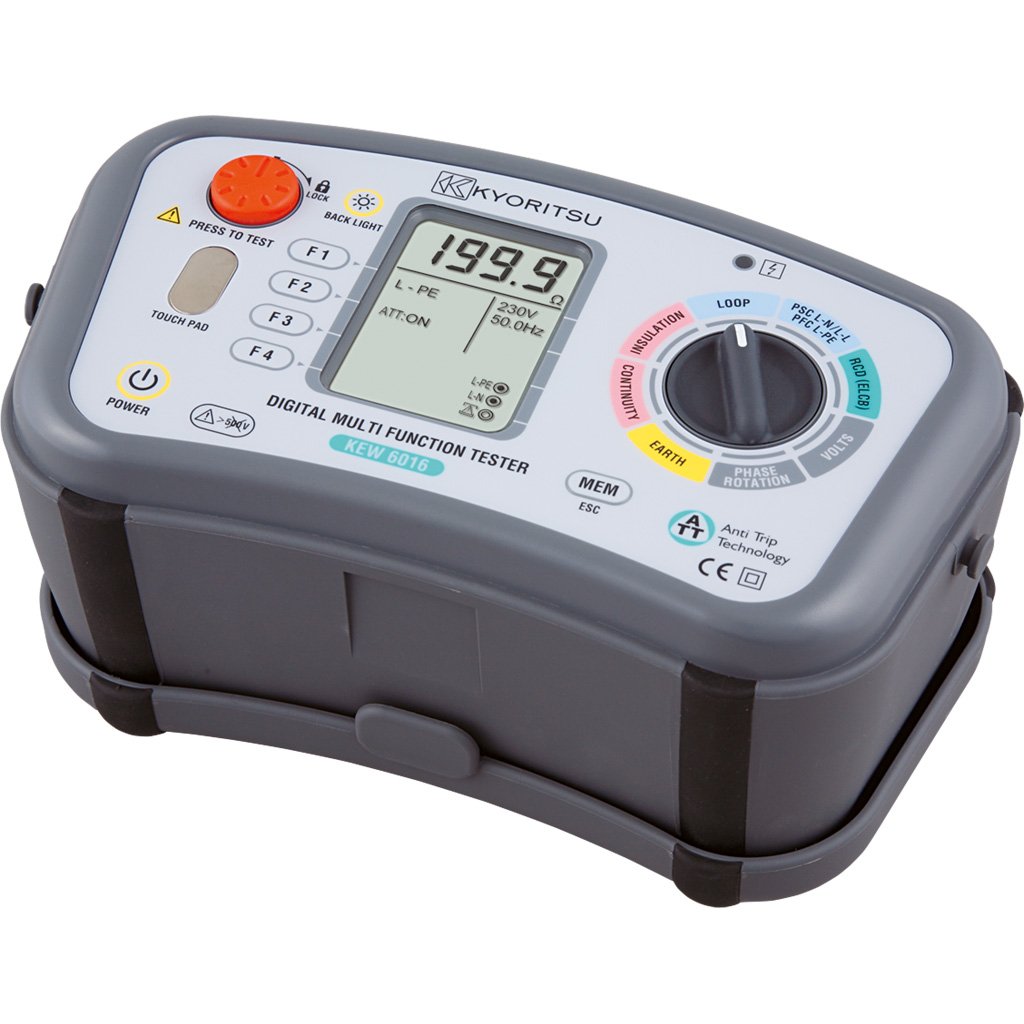
ምስል 3.1፡ VEMER VE755600 Digital Multifunction Tester. This image displays the front view of the dark gray multifunction tester, showing its display screen, rotary selector switch, and various function buttons. Test lead input jacks are visible at the bottom.
ቁልፍ ባህሪዎች
- Measures continuity, insulation resistance, loop impedance, short circuit current, differential current, earth resistance, AC voltage, and phase sequence.
- Internal memory for saving measurement data.
- USB interface for data transfer to a personal computer.
- Compact and durable design for field use.
4. ማዋቀር
Before using the VEMER VE755600, ensure it is properly prepared for operation.
4.1 የባትሪ ጭነት
- የባትሪውን ክፍል በመሳሪያው ጀርባ ላይ ያግኙት.
- Open the compartment cover using a suitable tool (e.g., screwdriver).
- Insert the required batteries, observing correct polarity (+/-).
- የባትሪውን ክፍል ደህንነቱ በተጠበቀ ሁኔታ ይዝጉ።
4.2 የማገናኘት የሙከራ እርሳሶች
- Identify the appropriate input jacks for your desired measurement (e.g., COM, VΩmA, etc.).
- Insert the test leads firmly into the corresponding jacks.
- Ensure the test probes are clean and free from damage.
5. የአሠራር መመሪያዎች
This section details the procedures for performing various measurements with the VEMER VE755600.
5.1 ማብራት / ማጥፋት
To power on the device, rotate the selector switch to any measurement function. To power off, rotate the selector switch to the 'OFF' position.
5.2 የተከታታይነት መለኪያ
- በሙከራ ላይ ያለው ዑደት ኃይል መሟጠጡን ያረጋግጡ።
- Rotate the selector switch to the ቀጣይነት position (often indicated by a speaker or ohm symbol).
- Connect the test leads across the component or conductor to be tested.
- Read the resistance value on the display. An audible tone typically indicates low resistance (continuity).
5.3 የኢንሱሌሽን መቋቋም መለኪያ
- በሙከራ ላይ ያለው ዑደት ኃይል ማቆሙን እና መገለሉን ያረጋግጡ።
- Rotate the selector switch to the የኢንሱሌሽን position (often indicated by MΩ).
- የተፈለገውን የሙከራ ጥራዝ ይምረጡtage (e.g., 250V, 500V, 1000V) if applicable.
- Connect the test leads between the conductor and earth, or between two conductors.
- Press the 'TEST' button and hold until the measurement stabilizes.
- በማሳያው ላይ ያለውን የኢንሱሌሽን ተቃውሞ እሴት ያንብቡ።
5.4 Loop and Short Circuit Measurement
- Ensure the circuit is energized for this test.
- Rotate the selector switch to the ሉፕ or አጭር ዙር አቀማመጥ.
- Connect the test leads to the live, neutral, and earth terminals of the circuit.
- Initiate the test as per the device's instructions (e.g., press 'TEST').
- The display will show the loop impedance or prospective short circuit current.
5.5 Earth Resistance (Terra) Measurement
- Ensure the circuit is de-energized and isolated from the main supply.
- Rotate the selector switch to the የመሬት መቋቋም position (often indicated by RE or a ground symbol).
- Connect the test leads and auxiliary electrodes according to the chosen measurement method (e.g., 3-pole or 4-pole method). Refer to specific diagrams in the full manual for correct connections.
- Initiate the test and read the earth resistance value.
5.6 ኤሲ ጥራዝtage and Phase Sense Measurement
- Rotate the selector switch to the ኤሲ ጥራዝtage (V~) or Phase Sense አቀማመጥ.
- ለኤሲ ቮልtage: Connect the test leads in parallel across the voltagኢ ምንጭ.
- For Phase Sense: Connect the test leads to the phases to determine their sequence.
- ጥራዝ ያንብቡtage or phase sequence indication on the display.
5.7 Data Storage and PC Connection
The VE755600 features internal memory for storing measurement results. Consult the full product manual for detailed instructions on saving, recalling, and deleting data. To transfer data to a PC, connect the device via the USB interface and use the provided software (if applicable).
6. ጥገና
Proper maintenance ensures the longevity and accuracy of your VEMER VE755600.
6.1 ጽዳት
የመሳሪያውን c ይጥረጉasing ለስላሳ, መamp ጨርቅ። የማጽጃ ማጽጃዎችን ወይም መሟሟቶችን አይጠቀሙ። ከማጽዳትዎ በፊት መሳሪያው መብራቱን እና ከማንኛውም ወረዳዎች መገናኘቱን ያረጋግጡ።
6.2 የባትሪ መተካት
Replace batteries when the low battery indicator appears on the display. Use only the specified battery type. Dispose of old batteries responsibly according to local regulations.
6.3 ማከማቻ
When not in use, store the tester in a dry, cool place, away from direct sunlight and extreme temperatures. If storing for extended periods, remove the batteries to prevent leakage.
7. መላ መፈለግ
If you encounter issues with your VEMER VE755600, refer to the following common problems and solutions.
- መሣሪያው አይበራም፦ የባትሪውን ጭነት እና የኃይል መሙያ ደረጃ ያረጋግጡ። አስፈላጊ ከሆነ ባትሪዎቹን ይተኩ።
- ትክክል ያልሆኑ ንባቦች፡- Ensure test leads are properly connected and not damaged. Verify the correct measurement function is selected. Calibrate the device if required (refer to service information).
- ማሳያው 'OL' (ከመጠን በላይ ጭነት) ያሳያል፡ The measured value exceeds the device's range. Disconnect immediately and re-evaluate the circuit.
- No data transfer to PC: Check USB cable connection and ensure the correct software drivers are installed on your computer.
For persistent issues, contact VEMER customer support or an authorized service center.
8. ዝርዝሮች
The following table outlines the technical specifications for the VEMER VE755600 Digital Multifunction Tester.
| ዝርዝር መግለጫ | ዋጋ |
|---|---|
| የምርት ስም | VEMER |
| የሞዴል ቁጥር | VE755600 |
| የምርት ልኬቶች (L x W x H) | 23.5 x 11.4 x 13.6 ሴ.ሜ |
| የእቃው ክብደት | 4.6 ኪ |
| የኃይል ምንጭ | በባትሪ የተጎላበተ |
| ቅጥ | ዲጂታል |
| ቀለም | darkgray |
| የአለም አቀፍ ንግድ መለያ ቁጥር (GTIN) | 08007951126324 |
9. ዋስትና እና ድጋፍ
For detailed warranty information, please refer to the warranty card included with your product or visit the official VEMER webጣቢያ. የዋስትና ውሎች እና ሁኔታዎች እንደ ክልል እና ቸርቻሪ ሊለያዩ ይችላሉ።
For technical support, service, or inquiries regarding your VEMER VE755600, please contact your authorized VEMER dealer or the manufacturer's customer service department. Keep your purchase receipt and product model number (VE755600) readily available when seeking support.


