1. መግቢያ
This manual provides detailed instructions for the setup, operation, and maintenance of your Peavey PV 14 AT 14 Channel Compact Mixer. The PV 14 AT is designed for professional audio applications, featuring 14 channels, integrated Bluetooth connectivity, and Antares Auto-Tune pitch correction technology. Please read this manual thoroughly to ensure proper use and to maximize the performance and longevity of your mixer.
2. ጠቃሚ የደህንነት መመሪያዎች
- የኃይል ምንጭ፡- Connect the unit only to the type of power supply specified in this manual or on the unit.
- እርጥበት እና ፈሳሽ; To reduce the risk of fire or electric shock, do not expose this apparatus to rain or moisture. Do not place objects filled with liquids, such as vases, on the apparatus.
- የአየር ማናፈሻ; የአየር ዝውውርን በአግባቡ ያረጋግጡ፡ የአየር ማናፈሻ ክፍተቶችን አይዝጉ። በአምራቹ መመሪያ መሰረት ይጫኑት።
- ሙቀት፡ እንደ ራዲያተሮች፣ ሙቀት መመዝገቢያዎች፣ ምድጃዎች፣ ወይም ሌሎች መሳሪያዎችን (ያጠቃልለው) ካሉ የሙቀት ምንጮች አጠገብ አይጫኑ። ampማሞቂያዎች) ሙቀትን ያመነጫሉ.
- መሬት ላይ የፖላራይዝድ ወይም የመሠረት አይነት መሰኪያ የደህንነት ዓላማን አያሸንፉ። የፖላራይዝድ መሰኪያ አንዱ ከሌላው የሚበልጥ ሁለት ቢላዎች አሉት። የመሠረት ዓይነት መሰኪያ ሁለት ቢላዎች እና ሦስተኛው የመሠረት ፕሮንግ አለው. ለደህንነትዎ ሲባል ሰፊው ምላጭ ወይም ሶስተኛው ዘንበል ተዘጋጅቷል. የቀረበው መሰኪያ ወደ መውጫዎ የማይገባ ከሆነ፣ ጊዜው ያለፈበትን መውጫ ለመተካት የኤሌትሪክ ባለሙያ ያማክሩ።
- የኃይል ገመድ ጥበቃ; የኤሌክትሪክ ገመዱን ከመራመድ ወይም ከመቆንጠጥ ይከላከሉ, በተለይም በፕላጎች, ምቹ መያዣዎች እና ከመሳሪያው የሚወጡበት ቦታ.
- አገልግሎት መስጠት፡ ሁሉንም አገልግሎቶች ብቁ ለሆኑ የአገልግሎት ሰራተኞች ያመልክቱ። አፓርትመንቱ በማናቸውም መንገድ ጉዳት ከደረሰ በኋላ ማገልገል ያስፈልጋል፣ ለምሳሌ የኃይል ማስተላለፊያ ገመድ ወይም መሰኪያ ሲበላሽ፣ ፈሳሽ ሲፈስ ወይም ዕቃው ውስጥ ሲወድቅ፣ መሳሪያው ለዝናብ ወይም ለእርጥበት ሲጋለጥ፣ መደበኛውን የማይሰራ ከሆነ። , ወይም ተጥሏል.
3. ምርት አብቅቷልview እና ባህሪያት
3.1 የፊት ፓነል መቆጣጠሪያዎች
The front panel of the PV 14 AT mixer provides access to all channel inputs, equalization controls, effects, and master output faders. Each channel features dedicated gain, EQ, and auxiliary send controls for precise audio shaping.

ምስል: አንግል view of the Peavey PV 14 AT mixer's front panel, showing various knobs, faders, and input jacks.
3.2 የኋላ ፓነል ግንኙነቶች
The rear panel houses essential power and digital audio connections, including the DC power input, power switch, and the Digital Audio Port for USB connectivity to a computer. Bluetooth pairing information is also located here.

ምስል: የኋላ view of the Peavey PV 14 AT mixer, displaying the DC power input, power switch, Digital Audio Port (USB), and Bluetooth pairing information.
3.3 ልኬቶች
The compact design of the PV 14 AT makes it suitable for various setups. Refer to the image below for approximate dimensions.
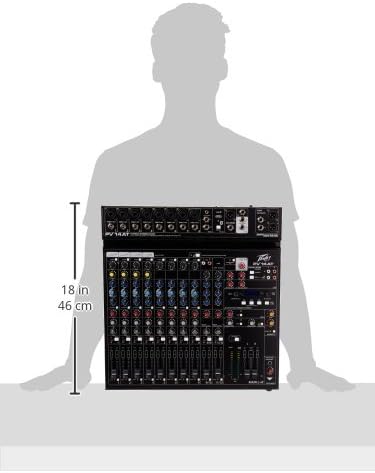
Image: Diagram showing the approximate dimensions of the Peavey PV 14 AT mixer, indicating a height of 18 inches (46 cm).
4. ማዋቀር
4.1 ማሸግ
Carefully remove the mixer from its packaging. Retain all packaging materials for future transport or storage. Inspect the unit for any signs of damage incurred during shipping. If damage is found, contact your dealer immediately.
4.2 የኃይል ግንኙነት
- የማደባለቂያው የኃይል ማብሪያ / ማጥፊያ ...
- Connect the provided power adapter to the DC IN port on the rear panel of the mixer.
- የኃይል አስማሚውን ወደ ተስማሚ የኤሲ የኃይል መውጫ ይሰኩ።
4.3 የድምጽ ግንኙነቶች
Connect your microphones, instruments, and other audio sources to the appropriate input channels. Use XLR cables for microphones and 1/4-inch TRS/TS cables for line-level instruments. Connect your main speakers or recording interface to the MAIN L+R outputs using XLR or 1/4-inch cables.
5. የአሠራር መመሪያዎች
5.1 የቻናል ኦፕሬሽን
Each input channel features a GAIN control to adjust input sensitivity, a 3-band EQ (High, Mid, Low) for tone shaping, and AUX SEND controls for monitor mixes or external effects. The channel fader controls the individual channel's level in the main mix. The SOLO button allows you to monitor a single channel without affecting the main output.
5.2 Antares Auto-Tune
The PV 14 AT includes Antares Auto-Tune on select channels. To activate Auto-Tune, locate the dedicated Auto-Tune button on the desired channel and press it. Adjust the Auto-Tune parameters (if available) via the mixer's digital display and controls to achieve the desired pitch correction effect.
5.3 የብሉቱዝ ግንኙነት
- Press the Bluetooth button on the mixer to activate Bluetooth pairing mode. The Bluetooth indicator light will flash.
- On your smart device (phone, tablet, computer), search for available Bluetooth devices and select "PV 14 AT" (or similar name).
- Once paired, the Bluetooth indicator light will become solid. You can now stream audio wirelessly to the mixer.
5.4 ዲጂታል ውጤቶች
The mixer features built-in digital effects. Use the EFFECTS section controls and LCD display to browse and select various effects such as reverb, delay, and chorus. Adjust the effect send levels on individual channels and the master effect return level to blend effects into your mix.
5.5 የዩኤስቢ ኦዲዮ በይነገጽ
The Digital Audio Port (USB) on the rear panel allows the PV 14 AT to function as an audio interface for your computer. Connect a USB cable from the mixer to your computer. The mixer will be recognized as an audio input/output device, enabling multi-track recording to a Digital Audio Workstation (DAW) or playback from your computer through the mixer.
6. ጥገና
6.1 ጽዳት
To clean the mixer, use a soft, dry cloth. Do not use abrasive cleaners, solvents, or waxes. Ensure the unit is powered off and disconnected from the power source before cleaning.
6.2 ማከማቻ
When not in use for extended periods, store the mixer in a cool, dry place, away from direct sunlight and extreme temperatures. It is recommended to use the original packaging for protection during storage or transport.
7. መላ መፈለግ
7.1 ምንም ኃይል የለም
- Check if the power adapter is securely connected to both the mixer and a working power outlet.
- የኋላ ፓነል የኃይል ማብሪያ / ማጥፊያው በ ON ቦታ ላይ መሆኑን ያረጋግጡ።
- ሌላ መሳሪያ በመጫን የኃይል ማከፋፈያው የሚሰራ መሆኑን ያረጋግጡ።
7.2 ምንም የድምፅ ውፅዓት የለም
- Confirm that all channel faders and the MAIN L+R faders are raised.
- Check all audio cables for secure connections and proper functionality.
- Ensure input sources (microphones, instruments) are active and producing sound.
- Verify that the connected speakers or headphones are powered on and functioning correctly.
7.3 ሁም ወይም ጫጫታ
- ሁሉም ኬብሎች በትክክል መከለላቸውን እና በጥሩ ሁኔታ ላይ መሆናቸውን ያረጋግጡ።
- Check for ground loops by ensuring all equipment is connected to the same power circuit or using a ground loop isolator.
- Reduce gain levels if input signals are too hot, causing clipping.
7.4 የብሉቱዝ ግንኙነት ጉዳዮች
- Ensure the mixer's Bluetooth is in pairing mode.
- Move your smart device closer to the mixer to ensure it is within range.
- Forget the device from your smart device's Bluetooth settings and attempt to re-pair.
8. ዝርዝሮች
| የእቃው ክብደት | 12 ፓውንድ |
| የምርት ልኬቶች | 12 x 12 x 12 ኢንች |
| የንጥል ሞዴል ቁጥር | PV14AT |
| የሃርድዌር በይነገጽ | ብሉቱዝ |
| የቁስ ዓይነት | አይዝጌ ብረት |
| ቀላቃይ ሰርጥ ብዛት | 14 |
| የኃይል ምንጭ | ባለገመድ ኤሌክትሪክ |
| የግንኙነት ቴክኖሎጂ | ብሉቱዝ |
9. ዋስትና እና ድጋፍ
For warranty information and technical support, please refer to the warranty card included with your product or visit the official Peavey website. You can also contact Peavey customer service directly for assistance with product registration, troubleshooting, and service inquiries.


