1. መግቢያ
ስለገዙ እናመሰግናለንasing the Marvo G904 6D Optical Wired Gaming Mouse. This manual provides essential information for the proper setup, operation, and maintenance of your new gaming mouse. Please read this manual thoroughly before use to ensure optimal performance and longevity of the product.
2. ምርት አብቅቷልview
The Marvo G904 is a high-performance 6D optical wired gaming mouse designed for precision and comfort. It features an AVago3050 sensor, adjustable DPI settings, and programmable buttons to enhance your gaming experience.

Figure 1: Marvo G904 Gaming Mouse with blue LED lighting, showcasinergonomic ዲዛይኑ እና ብርሃን የፈነጠቀ አክሰንት አለው።

Figure 2: Marvo G904 Gaming Mouse displaying green LED lighting, indicating different lighting modes or DPI settings.
3. ማዋቀር
Follow these steps to set up your Marvo G904 gaming mouse:
- ማውዙን ይንቀሉት፡- Carefully remove the mouse and any accessories from its packaging.
- ከኮምፒዩተር ጋር ይገናኙ; Plug the USB connector of the mouse into an available USB port on your computer. The mouse is plug-and-play for basic functionality.
- Install Driver (Optional for Advanced Features): For full functionality, including macro programming and advanced DPI settings, insert the provided CD driver into your computer's optical drive and follow the on-screen instructions to install the software. If your computer does not have an optical drive, please visit the official Marvo webለአሽከርካሪ ውርዶች ጣቢያ.

Figure 3: Marvo G904 Gaming Mouse packaging, which includes the driver CD.
4. የአሠራር መመሪያዎች
The Marvo G904 mouse features 6 buttons and adjustable DPI settings for versatile control.
4.1 የአዝራር ተግባራት
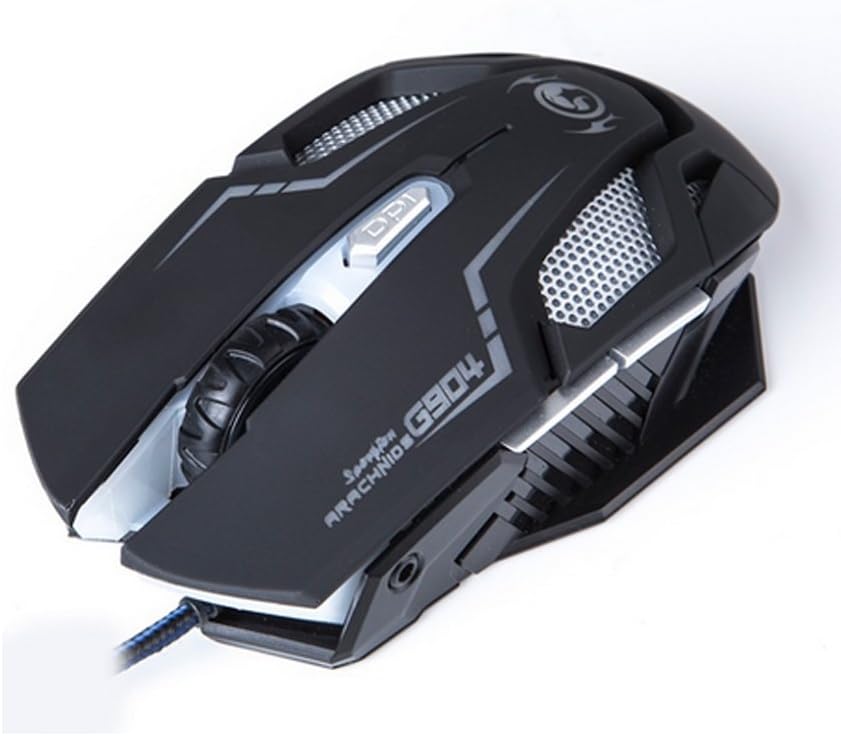
ምስል 4: ከፍተኛ view of the Marvo G904 Gaming Mouse, highlighting the placement of its 6 buttons.
- የግራ ጠቅታ አዝራር፡- መደበኛ የመጀመሪያ ደረጃ ጠቅታ ተግባር።
- በቀኝ ጠቅ ያድርጉ አዝራር; መደበኛ ሁለተኛ ደረጃ ጠቅታ ተግባር።
- የማሽከርከር ጎማ፡ Scrolls up/down. Can also be pressed for a middle click function.
- DPI Shift Button: Cycles through DPI settings (1000, 2000, 3000, 4000).
- የጎን ቁልፎች (2)፦ Typically function as 'Forward' and 'Back' in web አሳሾች እና file explorers. These can be programmed using the driver software.
4.2 የዲፒአይ ማስተካከያ
የሚለውን ይጫኑ DPI Shift Button (located behind the scroll wheel) to cycle through the available DPI settings: 1000, 2000, 3000, and 4000 DPI. Each DPI level may be indicated by a change in the mouse's LED lighting color or pattern, depending on the current light mode.
4.3 Macro Programming (with Light Mode)
Utilize the included CD driver software to customize button functions and create macros. The software also allows you to configure the mouse's LED lighting modes. Refer to the software's help section for detailed instructions on macro creation and light mode customization.
5. ጥገና
ትክክለኛው ጥገና የመዳፊትዎን ረጅም ዕድሜ እና ጥሩ አፈጻጸም ያረጋግጣል።
- ማጽዳት፡ የመዳፊቱን ገጽታ ለማጽዳት ለስላሳ እና ደረቅ ጨርቅ ይጠቀሙ. ለግትር ቆሻሻ፣ በትንሹ መampበጨርቁ ላይ በውሃ ወይም ለስላሳ የጽዳት መፍትሄ. ኃይለኛ ኬሚካሎችን ወይም ሻካራ ቁሳቁሶችን ከመጠቀም ይቆጠቡ.
- የዳሳሽ እንክብካቤ በመዳፊት ግርጌ ላይ ያለውን የኦፕቲካል ሴንሰር ንፁህ እና ከአቧራ ወይም ከቆሻሻ የጸዳ ያድርጉት። አስፈላጊ ከሆነ የጥጥ ሱፍ ወይም የተጨመቀ አየር ይጠቀሙ።
- የኬብል አስተዳደር ጉዳት እንዳይደርስ ለመከላከል ሹል መታጠፍ ወይም የዩ ኤስ ቢ ገመዱን ከመጠን በላይ መጎተትን ያስወግዱ።
- ማከማቻ፡ ጥቅም ላይ በማይውልበት ጊዜ አይጤውን ከከፍተኛ ሙቀት ርቆ ንጹህና ደረቅ አካባቢ ያከማቹ።
6. መላ መፈለግ
If you encounter issues with your Marvo G904 mouse, refer to the following common problems and solutions:
| ችግር | መፍትሄ |
|---|---|
| አይጥ ምላሽ እየሰጠ አይደለም። |
|
| የዲፒአይ ቅንብሮች አይቀየሩም። |
|
| Buttons not functioning correctly. |
|
| Mouse cursor movement is erratic or jumpy. |
|
7. ዝርዝሮች
Detailed technical specifications for the Marvo G904 Gaming Mouse:

ምስል 5: ታች view of the Marvo G904 Gaming Mouse, displaying model number, DPI range, and certification marks.
| ባህሪ | ዝርዝር |
|---|---|
| ሞዴል | ጂ904 |
| ዳሳሽ ዓይነት | Optical (AVago3050) |
| የዲፒአይ ቅንብሮች | 1000/2000/3000/4000 ዲፒአይ |
| አዝራሮች | 6D (6 Buttons) |
| የሪፖርት ደረጃ | 1000 Hz |
| ቁልፍ ዘላቂነት | 10 ሚሊዮን ጠቅታዎች |
| የኬብል ርዝመት | 1.5 ሜትር |
| ልኬቶች (L*W*H) | 143 * 76 * 42 ሚ.ሜ |
| ደረጃ የተሰጠው ጥራዝtage | 5V |
| ደረጃ የተሰጠው የአሁኑ | 10 ሚ.ኤ |
| ተኳኋኝነት | PC |
| ቀለም | ጥቁር |
8. ዋስትና እና ድጋፍ
For warranty information and technical support, please refer to the documentation provided with your purchase or contact your retailer. You may also visit the official MARVO website for further assistance and updated driver software.


